- AGENTIC
- SOLUTIONS
Building Agentic Workflows with Conductor: Implementation Guide
 Ram Durbha Orkes Engineering
 AI agents are autonomous, but unpredictable and difficult to thoroughly test and audit. How can we introduce governance into agentic systems? Simple: use agentic workflows. An agentic workflow is a structured yet dynamic sequence of tasks, where the key decision-making points are executed by AI agents, with minimal human intervention.
Agentic workflows combine the autonomy of AI agents with the traceability of workflows, bringing the best of both worlds. In highly regulated industries like finance, healthcare, and cybersecurity, agentic workflows provide a safer alternative to AI agents.
In this article, let’s build an agentic workflow using Orkes Conductor, a modern platform for workflow orchestration.
Example: an agentic cybersecurity monitoring system
In cybersecurity, alert fatigue can be catastrophic. The high-volume bombardment of alerts from multiple sources can lead to delays, missed responses, and ultimately, an increased risk of security breaches.
Let’s build an agentic workflow to combat alert fatigue. This workflow should be able to reconstruct attack narratives from disparate sources of IOCs (indicators of compromise). Before we begin building in Conductor, let’s map out the requirements. The agentic cybersecurity process has to:
- Collect alerts from multiple sources
- Collate related events for reconstructing the chain of events
- Prioritize choose follow-up actions
In sum, the agentic system should help paint a picture of the patterns in how an attack developed over time across devices, users, and services so that human reviewers can allocate their energy to understanding and combating threats rather than drowning in alerts. Let’s use an LLM to provide a human-readable timeline of events that constitute a complex attack.
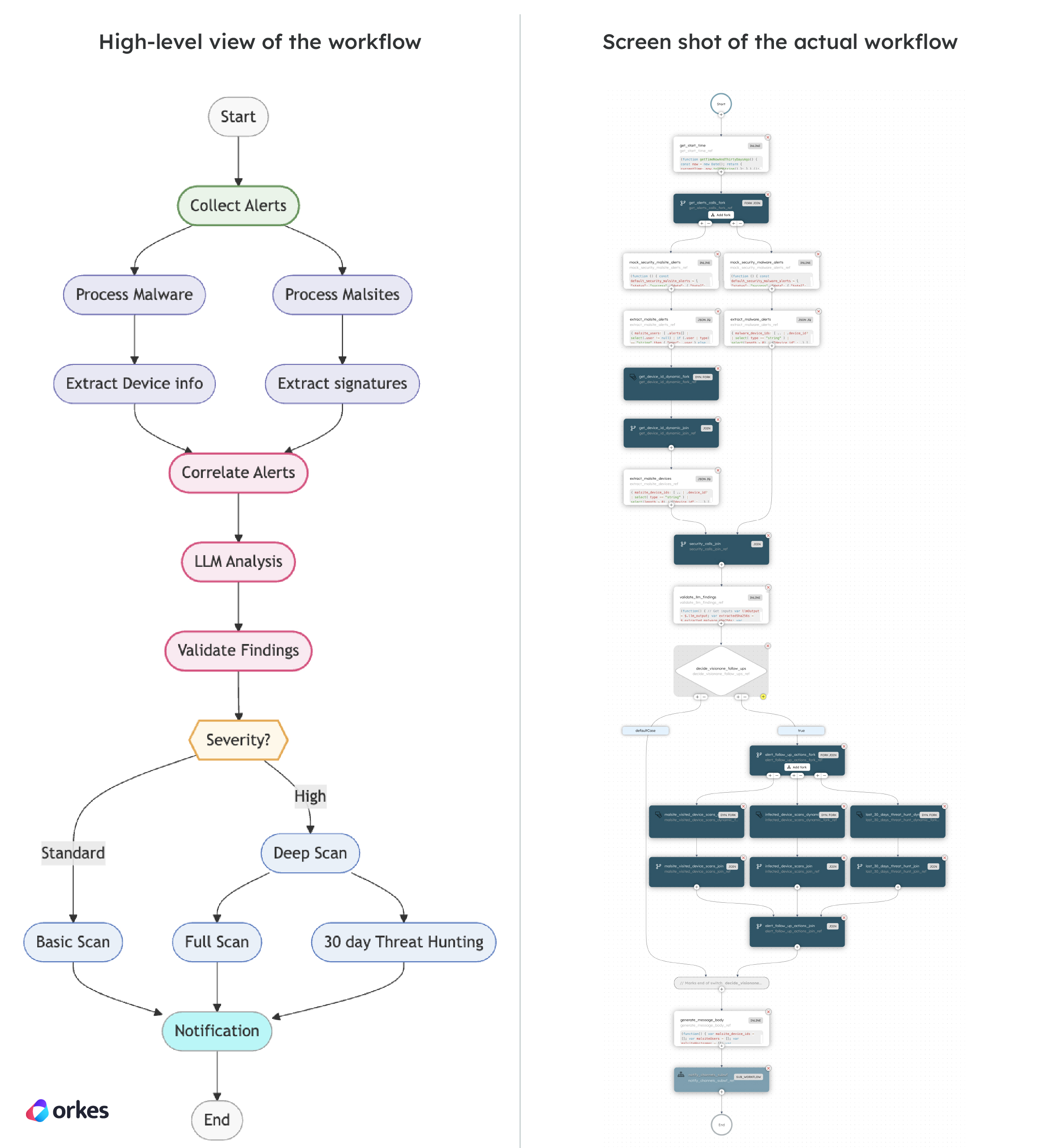
Here’s the high-level flow of the agentic system on the left, and the actual workflow built in Orkes Conductor on the right:
Now, here’s how you can create an agentic cybersecurity workflow on your own.
Getting started
Before you begin, make sure you have the following:
- An account on Orkes’ Developer Edition
- An OpenAI API key
The resources to build the agentic cybersecurity workflow are located in this GitHub repository. Note that all the task workers are mocked in this workflow example but use representative schemas from real-world cyber security tools like those provided by Netscope and TrendMicro.
Step 1: Import workflow definitions
The GitHub repository contains five workflows:
- Agentic_Security_Example
- Notify-Channels-x-mocked
- Security_get_device_id
- Vision_one_deep_visibility_hunt
- vision_one_device_scan
For each workflow, copy the JSON definition from the repository and add it to your Orkes Developer Edition account in Definitions > Workflow.
Step 2: Configure the OpenAI integration
We will be using OpenAI’s LLMs to power the AI and agentic components of the workflow. In the Developer Edition, go to Integrations and add the OpenAI integration and models. For this workflow, you should add:
- gpt-4o (required)
- gpt-4o-mini (recommended)
- Any other OpenAI models you wish to use
Repeat this procedure for other providers and models you want to use and compare.
Step 3: Add the AI prompt
The GitHub repository also contains the llm_alert_analysis prompt, which analyzes the detected alerts to form an attack narrative. Copy its JSON definition from the repository and add it to your Developer Edition account in AI Prompts. If you are using models other than gpt-4o, make sure to edit your AI prompt and workflow accordingly.
Step 4: Run the workflow
Finally, with the workflow and supporting resources ready, let’s run it to see how it works. By default, the workflow comes baked with sample mock alerts, so it can be directly run without having to configure its inputs.
In Definitions > Workflow, select the Agentic_Security_Example workflow and run it. As each task completes, you can review its output in real time.
Breaking down the workflow
As we track the steps of the Agentic_Security_Example workflow, let’s see how Orkes Conductor makes it easy to map the needs of our solution to actual tasks and design patterns:
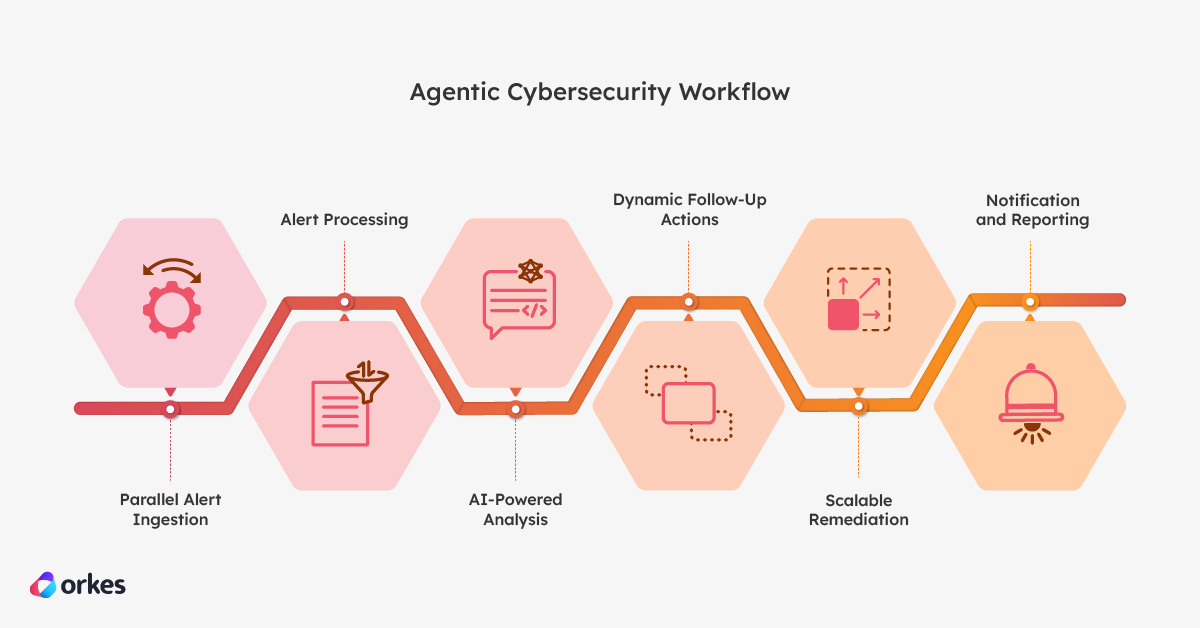
- Parallel Alert Ingestion: The workflow starts by concurrently fetching malware and malsite alerts using a Fork/Join task, which is Conductor’s built-in task for handling parallel data processing.
- Alert Processing: Once the raw alert data is ingested, the workflow extracts relevant details from both malware and malsite alerts using JSON JQ Transform tasks. These tasks parse and filter the data, ensuring that only meaningful alert information is passed on in a structured manner for efficient downstream analysis and decision-making.
- AI-Powered Analysis: The intelligence core lies in the llm_alert_analysis task, which utilizes Conductor’s LLM Text Complete task to send the raw alert data to an LLM (like gpt-4o-mini). The LLM, guided by a sophisticated prompt, analyzes the alerts for threat classification, correlation, context, and risk assessment.
- Dynamic Follow-Up Actions: Based on the LLM’s output, a Switch task directs the workflow to initiate follow-up actions only if a deep scan is deemed necessary. This demonstrates the agentic nature of the workflow, where the AI’s analysis directly influences the subsequent flow of control.
- Scalable Remediation: The workflow then uses Dynamic Fork tasks to initiate deep visibility threat hunts and device scans on all potentially affected devices identified by the LLM. This highlights Conductor’s ability to scale the response based on the AI’s findings.
- Notification and Reporting: Finally, the workflow generates a summary and sends notifications through a sub-workflow, ensuring that security teams are informed of the intelligent analysis and any initiated actions.
Going beyond
Now that you know how the workflow works, you can customize it for your own use case. Tweak it, replace the mocks with real data sources, or try creating your own agentic systems in Orkes Conductor.
Advantages of Orkes Conductor for agentic workflows
Orkes Conductor offers several key advantages that make it particularly well-suited for building agentic workflows. It provides all the necessary building blocks and orchestration capabilities to create sophisticated agentic workflows.
-
Native LLM integration with LLM Text Complete Task:
Conductor provides a dedicated LLM Text Complete task that simplifies the integration with various LLM providers like OpenAI. This built-in functionality eliminates the need for complex custom integrations and allows developers to seamlessly incorporate AI-powered text analysis and generation into their workflows.
The Text Complete task is just one of the many system LLM tasks provided in Conductor. The flexibility to choose from these system tasks, built and thoroughly tested for AI use cases, makes it easy to prototype and scale to production.
-
Dynamic task creation with Dynamic Forks:
For agentic workflows that need to take action based on AI insights, Conductor’s Dynamic Fork task is invaluable. It allows the workflow to dynamically create and manage parallel tasks based on the output of previous steps, like the LLM’s analysis output in the cybersecurity example. This is crucial for scenarios like initiating scans on multiple affected devices identified by the AI.
-
Robust workflow versioning:
Building intelligent agents often involves experimentation and iteration. Conductor’s robust workflow versioning and management capabilities allow teams to track changes, roll back to previous versions, and maintain complex agentic workflows effectively over time.
-
Scalability and reliability for critical operations:
Conductor is designed for high-throughput and mission-critical applications. Its architecture ensures the scalability and reliability needed to power agents that operate continuously and handle potentially large volumes of data and events. This is enhanced further by the suite of Security, Governance and Auditing capabilities like RBAC, Open Telemetry and Grafana support.
-
Flexibility and extensibility:
Conductor’s open architecture enables easy integration with a wide range of tools and systems through its various task types (HTTP, Sub Workflow, Event, and more) and ability to execute custom code. This flexibility is essential for building agentic workflows that interact with diverse security ecosystems. Simple workers allow for complex logic, while Inline tasks and JSON JQ Transform tasks allow for well-organized, clean glue code.
Orkes Conductor is a robust and developer-friendly platform made for building and managing the complexities of agentic workflows. Its architecture and features make it ideal for orchestrating complex processes involving AI-driven decision-making.
Wrapping up
Agentic workflows, driven by the reasoning and language processing abilities of LLMs, offer a significant leap forward compared to traditional, static workflows. By integrating LLMs into automated processes, systems can be built to:
-
Intelligently analyze and correlate diverse sources of information:
LLMs can process and understand natural language descriptions from various sources, enabling sophisticated correlation based on semantic understanding rather than just pattern matching.
-
Provide rich contextual analysis:
LLMs can leverage their vast knowledge base to provide context around the input content. More importantly, Conductor makes it easier to provide the LLM with additional context through built-in AI Prompts, which can be crafted with placeholder variables that are dynamically replaced during a workflow run.
In the above example, LLMs are used to provide context on detected threats, including information on malware families, attack vectors, and potential impact.
-
Dynamically adapt to current circumstances:
Agentic workflows enable dynamic decision-making, as shown above, providing automatic adaption to macro and micro changes.
With dozens of one-click-switch AI/LLM integrations, input/output schema enforcement, native human-in-the-loop features, and enterprise RBAC controls, you can seamlessly build agentic workflows in Orkes Conductor for any enterprise use case.
Stay tuned for more agentic examples and tutorials. In the meantime, check out Conductor’s Examples repository for other projects or get hands-on with our free Developer Edition. As always, join the Slack community to connect with fellow developers and the Conductor team.