ENGINEERING
How to Reuse Workflows Inside Other Workflows in Orkes Conductor

Maria Shimkovska
Content Engineer
Last updated: June 24, 2026
June 24, 2026
3 min read


Join thousands of developers building the future with Orkes.
This is for you if you would prefer not to read documentation and see more examples.
I want to show you everything that's possible with the built-in tasks in Orkes Conductor.
This is part of a series covering every built-in task in Orkes Conductor. This one is for the SUB WORKFLOW task.
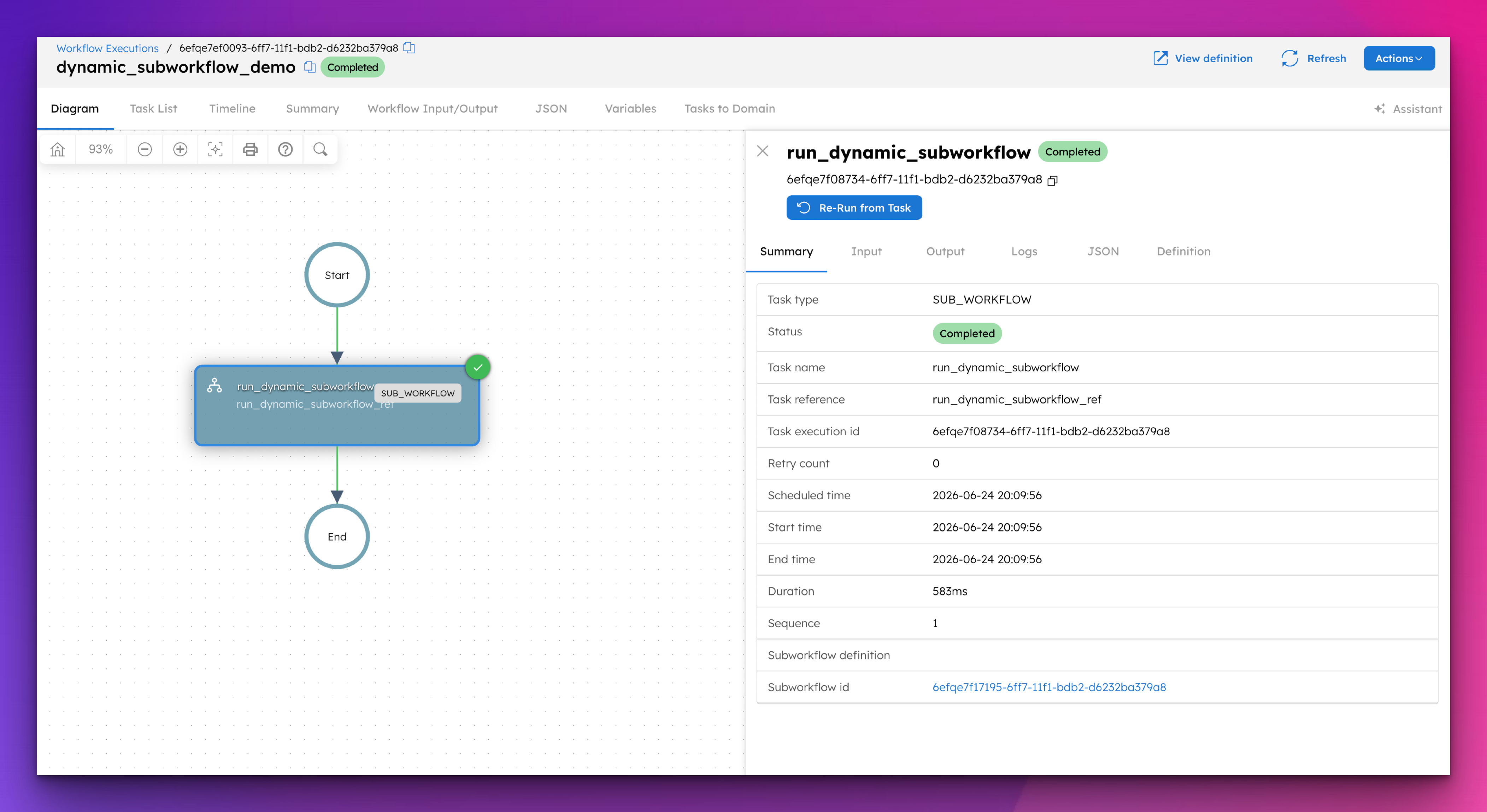
The Sub Workflow task runs an entire workflow as a single step inside another workflow.
The parent workflow waits for the sub-workflow to finish before moving on.
The key thing here is reuse. If you have a workflow that handles payment processing, user verification, or sending notifications, you don't need to copy that logic into every workflow that needs it. You call it as a sub-workflow and any updates you make to it are automatically reflected everywhere it is used.
Why does this matter? Because copy-pasting workflow logic is the same problem as copy-pasting your code essentially. It can work, but creates a horrible experience for debugging and managing your workflows.
If you're building a platform where payments happen in multiple contexts (a subscription renewal, a one-time purchase, an invoice settlement), and each of those is its own workflow, then you would need the payment logic to live in one place so that fixing a bug or updating a provider means updating one workflow, not five. This is exactly what the Sub Workflow task can be used for:
{
  "name": "subscription_renewal",
  "taskReferenceName": "subscription_renewal_ref",
  "type": "SUB_WORKFLOW",
  "subWorkflowParam": {
    "name": "payment_workflow",
    "version": 1
  },
  "inputParameters": {
    "userId": "${workflow.input.userId}",
    "amount": "${workflow.input.renewalAmount}",
    "currency": "${workflow.input.currency}"
  }
}
The subscription renewal workflow calls the payment workflow, waits for it to complete, and then continues with whatever comes next (sending a confirmation email, updating the subscription status, etc.).
The payment logic lives in one place and every workflow that needs it calls the same definition.
If you're building a document processing workflow, where each uploaded file needs to go through virus scanning, text extraction, and thumbnail generation before being marked as ready, then you would need each fork to run three tasks, not one.
The DYNAMIC_FORK task only supports one task per branch on its own. This is exactly where the Sub Workflow task solves it: wrap the three tasks into a sub-workflow and fork that instead:
{
  "name": "process_document",
  "taskReferenceName": "process_document_ref",
  "type": "SUB_WORKFLOW",
  "subWorkflowParam": {
    "name": "document_processing_pipeline",
    "version": 1
  },
  "inputParameters": {
    "fileUrl": "${workflow.input.fileUrl}",
    "fileId": "${workflow.input.fileId}"
  }
}
The document_processing_pipeline workflow contains the virus scan, text extraction, and thumbnail tasks in sequence. The DYNAMIC_FORK forks the sub-workflow once per file. All files get processed in parallel, each going through all three steps. Without the Sub Workflow task, this wouldn't be possible in a single fork.
If you're building a platform where tenants or integrations need to define their own processing logic, and you want to execute that logic inside your workflow without registering it in Conductor first, then you would need a way to run a workflow definition that comes in as an input rather than a saved definition.
This is exactly what the workflowDefinition parameter in the Sub Workflow task can be used for:
{
  "name": "run_tenant_workflow",
  "taskReferenceName": "run_tenant_workflow_ref",
  "type": "SUB_WORKFLOW",
  "subWorkflowParam": {
    "workflowDefinition": "${workflow.input.tenantWorkflowDefinition}"
  },
  "inputParameters": {}
}
The parent workflow receives the sub-workflow definition as an input, passes it to the Sub Workflow task, and Conductor executes it at runtime. The definition is never saved to your cluster. This is useful when you want to give external systems or tenants the ability to plug their own logic into your platform without giving them access to your workflow definitions page.
When the Sub Workflow task runs, it gives you access to everything the sub-workflow produced:
| Field | What It Contains |
|---|---|
subWorkflowId | The execution ID of the sub-workflow |
| Sub-workflow outputs | All output parameters from the sub-workflow are accessible directly |
Reference sub-workflow outputs in downstream tasks like:
${subscription_renewal_ref.output.paymentConfirmationId}
You can also use the subWorkflowId to look up the sub-workflow execution directly in the Conductor UI, which makes debugging straightforward. If a sub-workflow fails, you can rerun it from a specific task using the rerun API without restarting the entire parent workflow.
We built this task so your workflow logic stays in one place instead of being duplicated across every workflow that needs it. Any time you find yourself copying tasks from one workflow into another, that is a signal to extract them into a sub-workflow and call it instead. It also unlocks two things that aren't possible otherwise: multiple tasks per fork in a DYNAMIC_FORK, and nested loops in a Do While task.
The fastest way to see this in action is to spin up a free Developer Edition account of Orkes Conductor.
This example uses the workflowDefinition parameter to run a sub-workflow dynamically at runtime without registering it first. The parent workflow receives a workflow definition as input and executes it as a sub-workflow. Paste this into Conductor and hit Execute.
First, define the parent workflow:
{
  "name": "dynamic_subworkflow_demo",
  "description": "Runs a workflow definition passed as input without registering it first.",
  "version": 1,
  "tasks": [
    {
      "name": "run_dynamic_subworkflow",
      "taskReferenceName": "run_dynamic_subworkflow_ref",
      "type": "SUB_WORKFLOW",
      "inputParameters": {},
      "subWorkflowParam": {
        "workflowDefinition": "${workflow.input.dynamicWorkflow}"
      }
    }
  ],
  "inputParameters": [
    "dynamicWorkflow"
  ],
  "schemaVersion": 2,
  "restartable": true,
  "timeoutPolicy": "ALERT_ONLY",
  "timeoutSeconds": 0
}
Then run it by passing this as the input:
{
"dynamicWorkflow": {
"name": "weather_subworkflow",
"description": "Fetches current weather for Amsterdam.",
"version": 1,
"tasks": [
{
"name": "get_weather",
"taskReferenceName": "get_weather_ref",
"type": "HTTP",
"inputParameters": {
"uri": "https://api.open-meteo.com/v1/forecast?latitude=52.3676&longitude=4.9041¤t_weather=true",
"method": "GET",
"accept": "application/json"
}
}
],
"outputParameters": {
"temperature": "${get_weather_ref.output.response.body.current_weather.temperature}",
"windspeed": "${get_weather_ref.output.response.body.current_weather.windspeed}"
},
"schemaVersion": 2
}
}
The parent workflow receives the sub-workflow definition as an input, executes it at runtime, and returns the current temperature and windspeed for Amsterdam. The sub-workflow is never saved to your cluster. You can swap in any valid workflow definition as the input and the parent workflow will run it.
This is part of a series covering every built-in task in Orkes Conductor. Next up: the Wait task.