ENGINEERING
RAG Explained | Using Retrieval-Augmented Generation to Build Semantic Search

Yong Sheng Tan
Solutions Architect
Last updated: June 13, 2024
June 13, 2024
7 min read


Join thousands of developers building the future with Orkes.
Large language models (LLMs) have captured the public sphere of imagination in the past few years since OpenAI first launched ChatGPT to the world in late 2022. After the initial fascination amongst the public, businesses followed suit to find use cases where they could potentially deploy LLMs.
With more and more LLMs released as open source and deployable as on-premise private models, it became possible for organizations to train, fine-tune, or supplement models with private data. RAG (retrieval-augmented generation) is one such technique for customizing an LLM, serving as a viable approach for businesses to use LLMs without the high costs and specialized skills involved in building a custom model from scratch.
RAG (retrieval-augmented generation) is a technique that improves the accuracy of an LLM (large language model) output with pre-fetched data from external sources. With RAG, the model references a separate database from its training data in real-time before generating a response.
RAG extends the general capabilities of LLMs into a specific domain without the need to train a custom model from scratch. This approach enables general-purpose LLMs to provide more useful, relevant, and accurate answers in highly-specialized or private contexts, such as an organization’s internal knowledge base. For most use cases, RAG provides a similar result as training custom models but at a fraction of the required cost and resources.
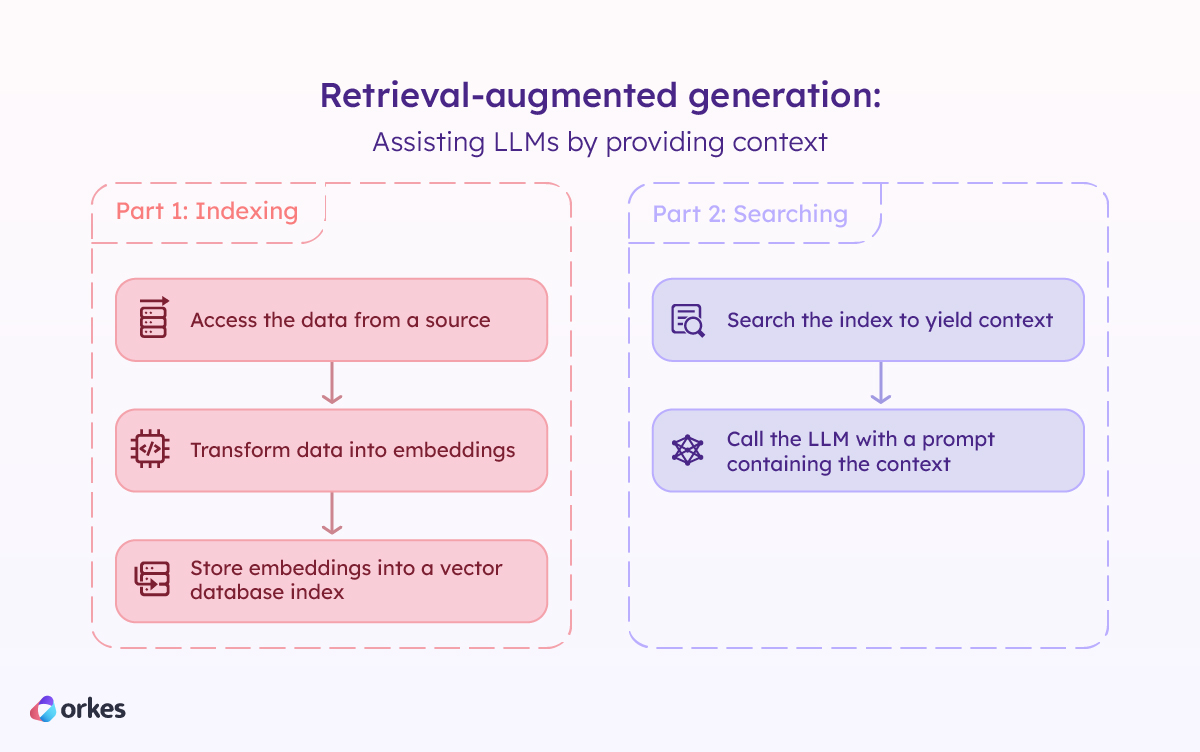
RAG involves using general-purpose LLMs as-is without special training or fine-tuning to serve answers based on domain-specific knowledge. This is achieved using a two-part process.
First, the data is chunked and transformed into embeddings, which are vector representations of the data. These embeddings are then indexed into a vector database with the help of an AI algorithm known as embedding models.
Once the data is populated in the index, natural language queries can be performed on the index using the same embedding model to yield relevant chunks of information. These chunks then get passed to the LLM as context, along with guardrails and prompts on how to respond given the context.
RAG offers several strategic advantages when implementing generative AI capabilities:
Minimize inaccuracies
Using a RAG-based LLM can help reduce hallucinations (plausible yet completely false information) or inaccuracies in the model’s answers. By providing access to additional information, RAG enables relevant context to be added to the LLM prompt, thus leveraging the power of in-context learning (ICL) to improve the reliability of the model’s answers.
Access to latest information
With access to a continuously updated external database, the LLM can provide the latest information in news, social media, research, and other sources. RAG ensures that the LLM responses are up-to-date, relevant, and credible, even if the model’s training data does not contain the latest information.
Cost-effective, scalable, and flexible
RAG requires much less time and specialized skills, tooling, or infrastructure to obtain a production-ready LLM. Furthermore, by changing the data source or updating the database, the LLM can be efficiently modified without any retraining, making RAG an ideal approach at scale.
Since RAG makes use of general-purpose LLMs, the model is decoupled from the domain, enabling developers to switch up the model at will. Compared to a custom pre-trained model, RAG provides instant, low-cost upgrades from one LLM to another.
Highly inspectable architecture
RAG offers a highly inspectable architecture, so developers can examine the user input, the retrieved context, and the LLM response to identify any discrepancies. With this ease of visibility, RAG-powered LLMs can also be instructed to provide sources in their responses, establishing more credibility and transparency with users.
RAG can be used for various knowledge-intensive tasks:
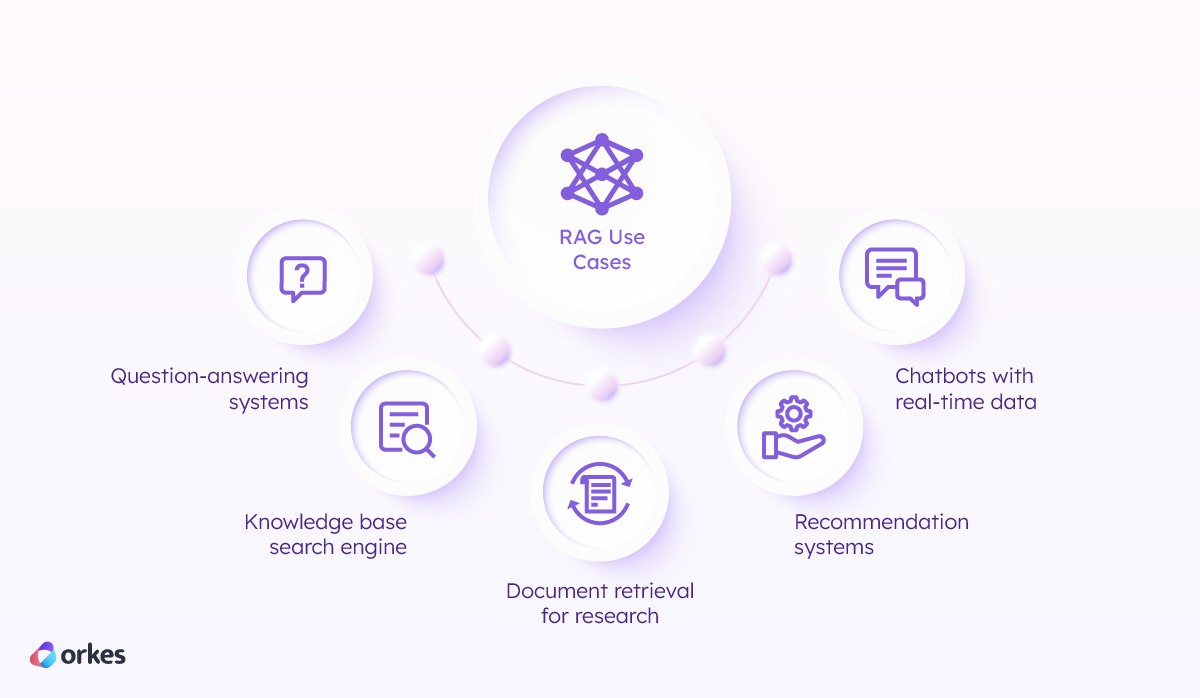
While the barriers to entry into RAG are much lower, it still requires an understanding of LLM concepts, as well as trained developers and engineers who can build data pipelines and integrate the query toolchain into the required services for consumption.
Using workflow orchestration as a means to build RAG-based applications levels the playing field to that of anyone who can string together API calls to form a business process. The two-part process described above can be built as two workflows to create a RAG-based application. Let's build a financial news analysis platform in this example.
Orkes Conductor streamlines the process of building LLM-powered applications by orchestrating the interaction between distributed components so that you don’t have to write the plumbing or infrastructure code for it. In this case, a RAG system requires orchestration between four key components:
Let's build out the workflows to orchestrate the interaction between these components.
The first part of creating a RAG system is to load, clean, and index the data. This process can be accomplished with a Conductor workflow. Let’s build a data-indexer workflow.
Step 1: Get the data
Choose a data source for your RAG system. The data can come from anywhere — a document repository, database, or API — and Conductor offers a variety of tasks that can pull data from any source.
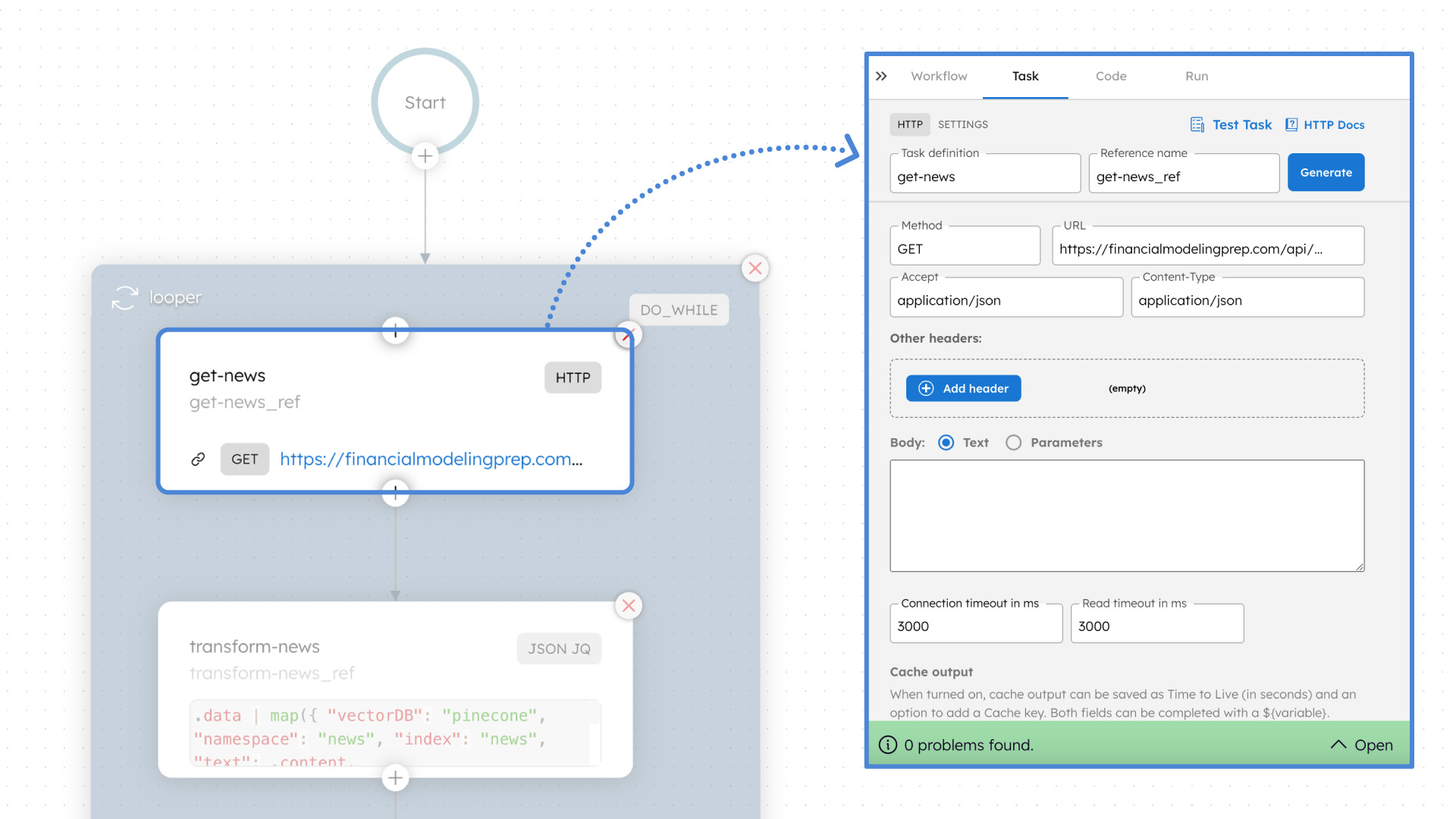
For our financial news analysis platform, the FMP Articles API will serve as the data source. To call the API, get the API access keys and create an HTTP task in your Conductor workflow. Configure the endpoint method, URL, and other settings, and the task will retrieve data through the API whenever the workflow is executed.
Step 2: Transform the data
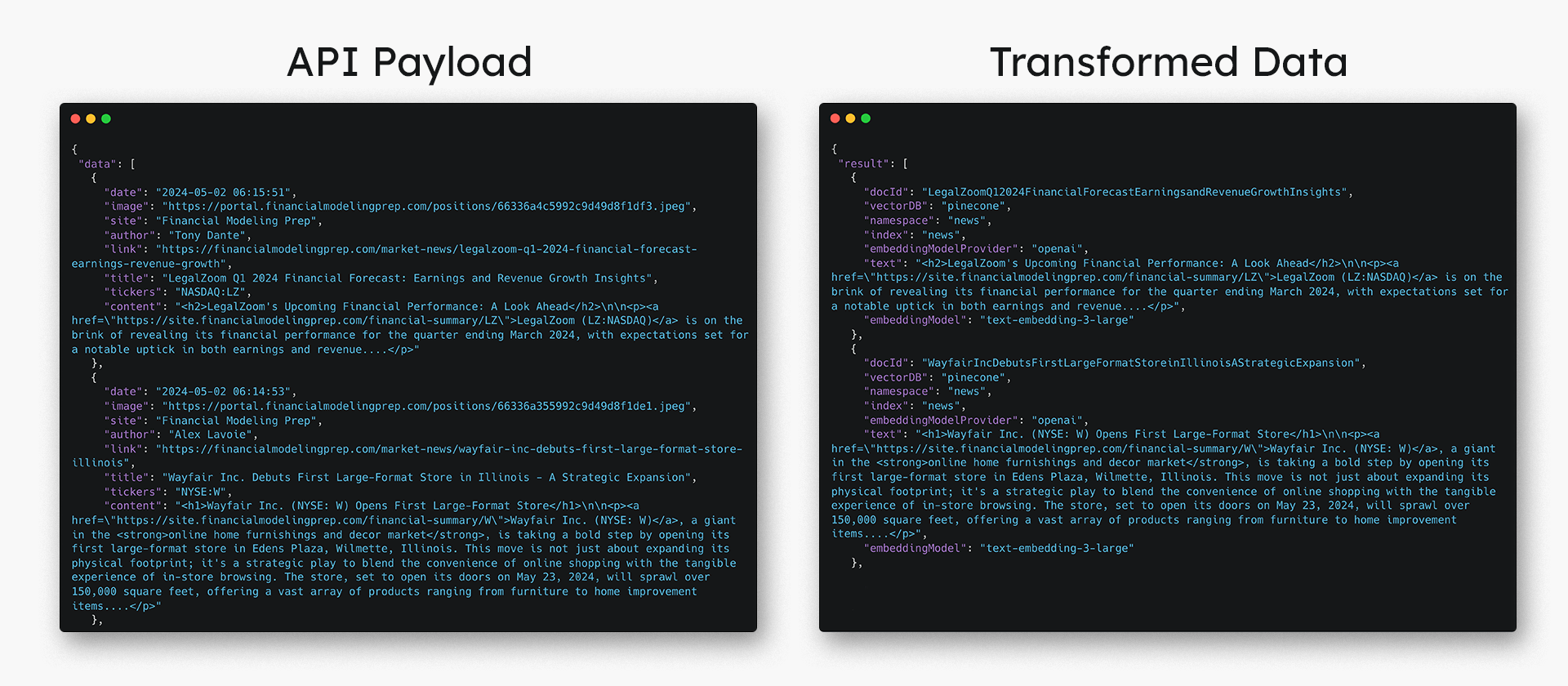
Before the data gets indexed to the vector database, the API payload should be transformed, cleaned, and chunked so that the embedding model can ingest it.
Developers can write Conductor workers to transform the data to create chunks. Conductor workers are powerful, language-agnostic functions that can be written in any language and use well-known libraries such as NumPy, pandas, and so on for advanced data transformation and cleaning.
In our example, we will use a JSON JQ Transform Task as a simple demonstration of how to transform the data. We only need the article title and content from the FMP Articles API for our financial news analysis platform. Each article must be stored in separate chunks in the required payload format for indexing.
Step 3: Index the data into a vector database
The cleaned data is now ready to be indexed into a vector database, such as Pinecone, Weaviate, MongoDB, and more. Use the LLM Index Text Task in your Conductor workflow to add one data chunk into the vector space. A dynamic fork can be used to execute multiple LLM Index Text Tasks in parallel so that multiple chunks can be added at once.
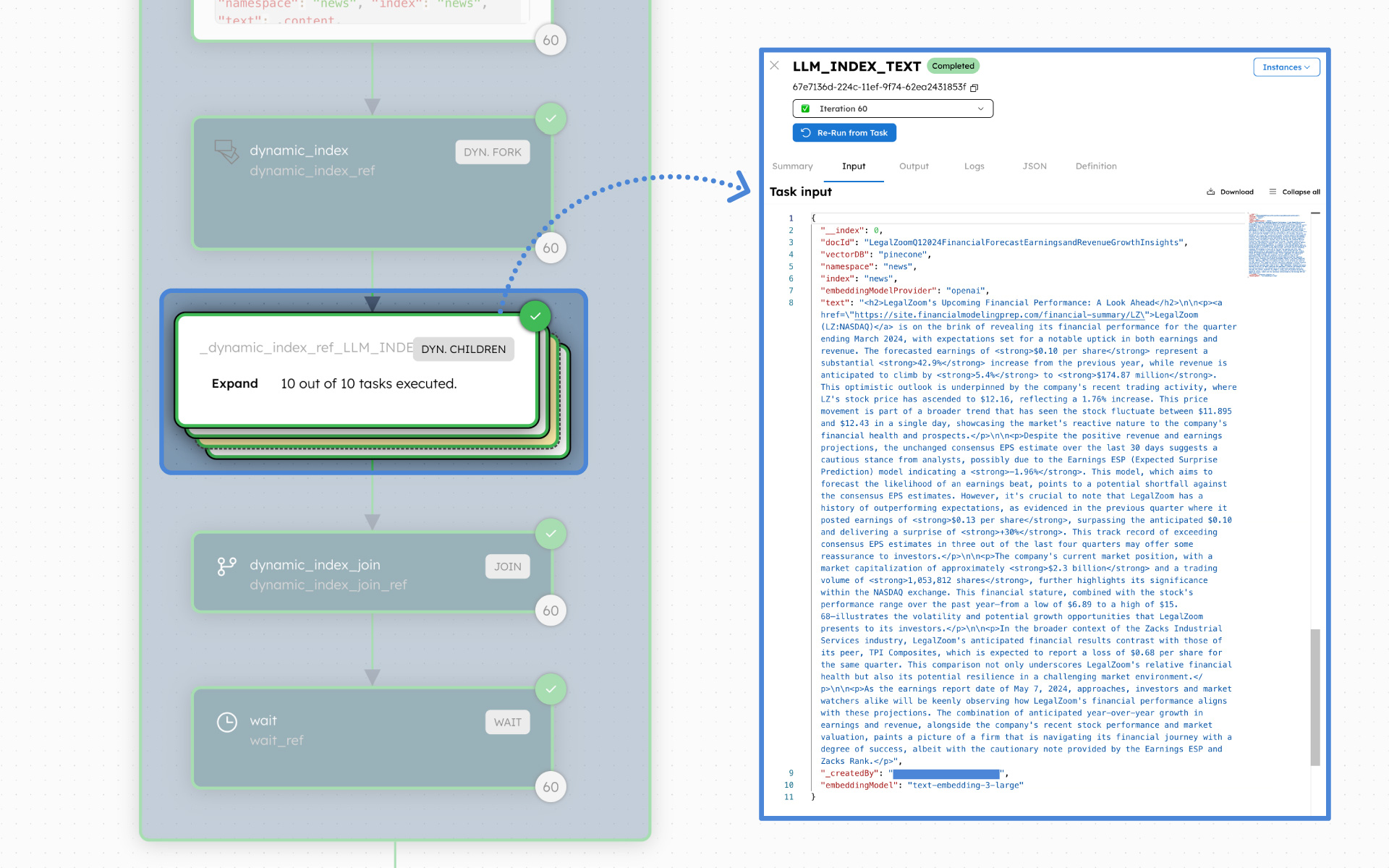
The LLM Index Test Task is one of the many LLM tasks provided in Orkes Conductor to simplify building LLM-powered applications.
Repeat
To build out the vector database, iterate through the three steps — extract, transform, load — until the desired dataset size is reached. The iterative loop can be built using a Do While operator task in Conductor.
Here is the full data-indexer workflow.
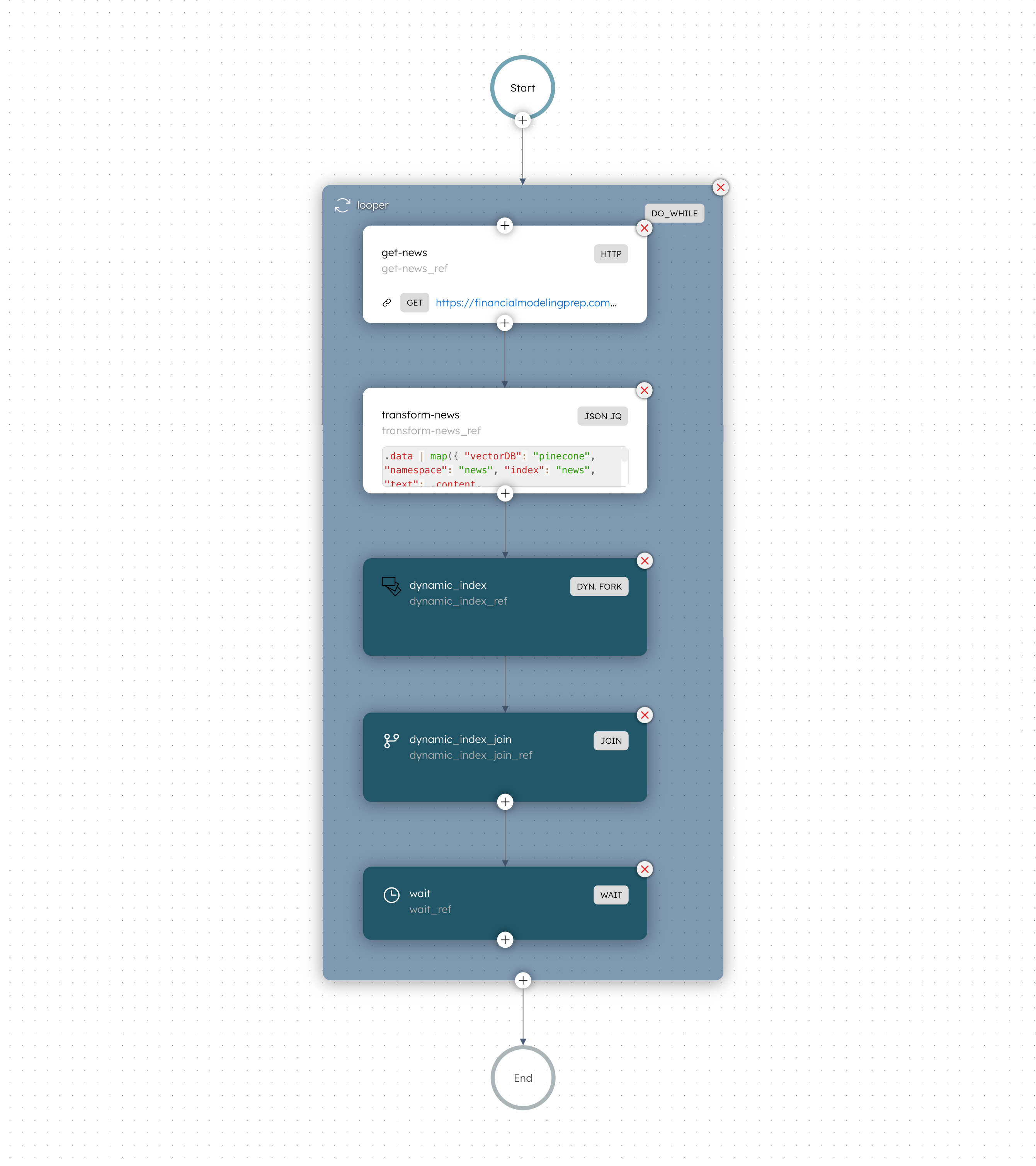
Once the vector database is ready, it can be deployed for production — in this case, for financial news analysis. This is where data is retrieved from the vector database to serve as context for the LLM, so that it can formulate a more accurate response. For this second part, let’s build a semantic-search workflow that can be used in an application.
Step 1: Retrieve relevant data from vector database
In a new workflow, add the LLM Search Index Task — one of the many LLM tasks provided in Orkes Conductor to simplify building LLM-powered applications. This task takes in a user query and returns the relevant context chunks that match the most closely.
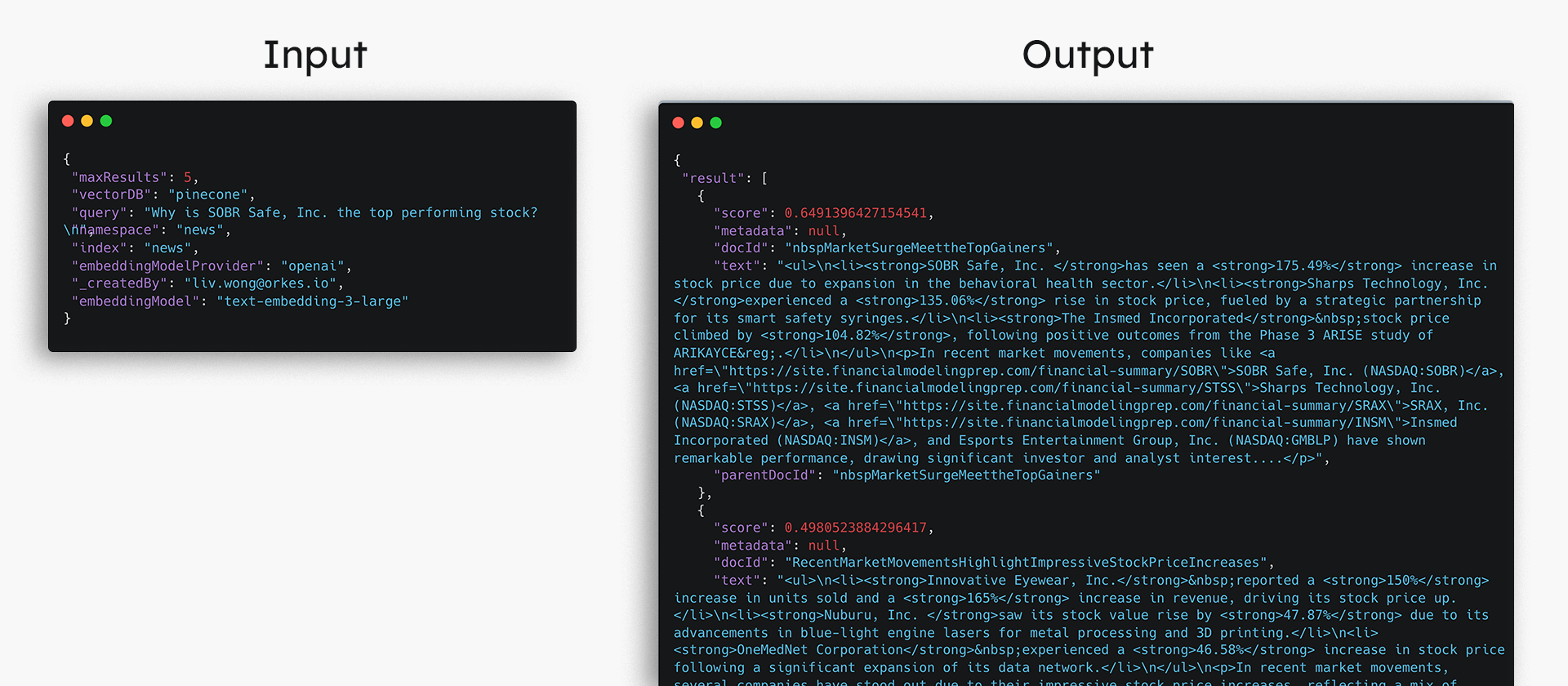
Step 2: Formulate an answer
With the retrieved context, call an LLM of your choice to generate the response to the user query. Use the LLM Text Complete Task in Orkes Conductor to accomplish this step. The LLM will ingest the user query along with the context.
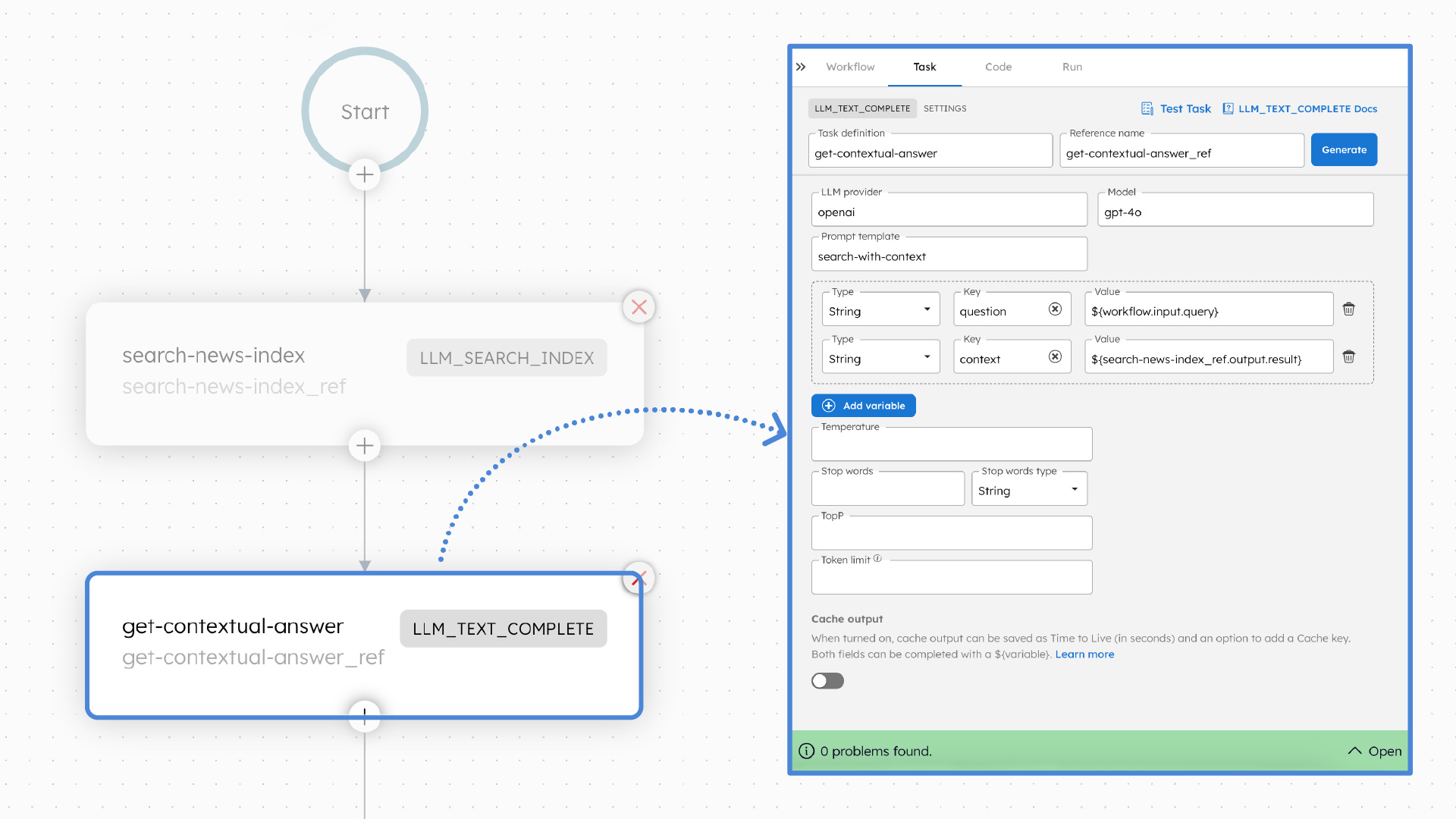
Guardrails can be set up in Orkes Conductor to optimize and constrain the LLM response, such as by adjusting the temperature, topP, or maxTokens.
Use Orkes Conductor’s AI Prompt studio to create a prompt template for the LLM to follow in the LLM Text Complete Task.
Example prompt template
Answer the question based on the context provided.

Context: "${context}"

Question: "${question}"

Provide just the answer without repeating the question or mentioning the context.
Here is the full semantic-search workflow.
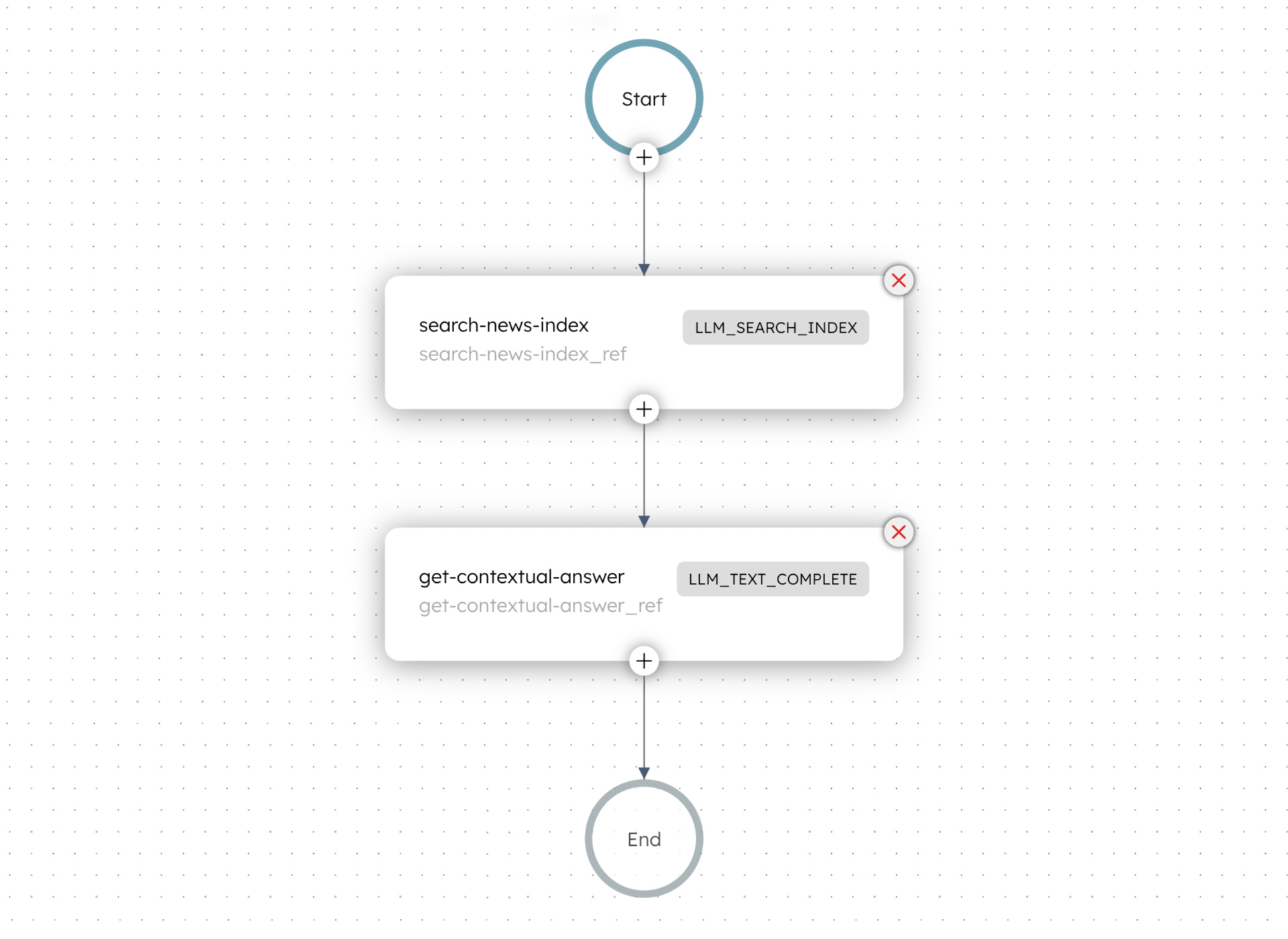
Use the workflow in your application
Once the semantic-search workflow is ready, you can use it in your application project to build a semantic search engine or chatbot. To build your application, leverage the Conductor SDKs, available in popular languages like Python, Java, and Golang, and call our APIs to trigger the workflow in your application.
The RAG-based financial news analysis platform looks like this:
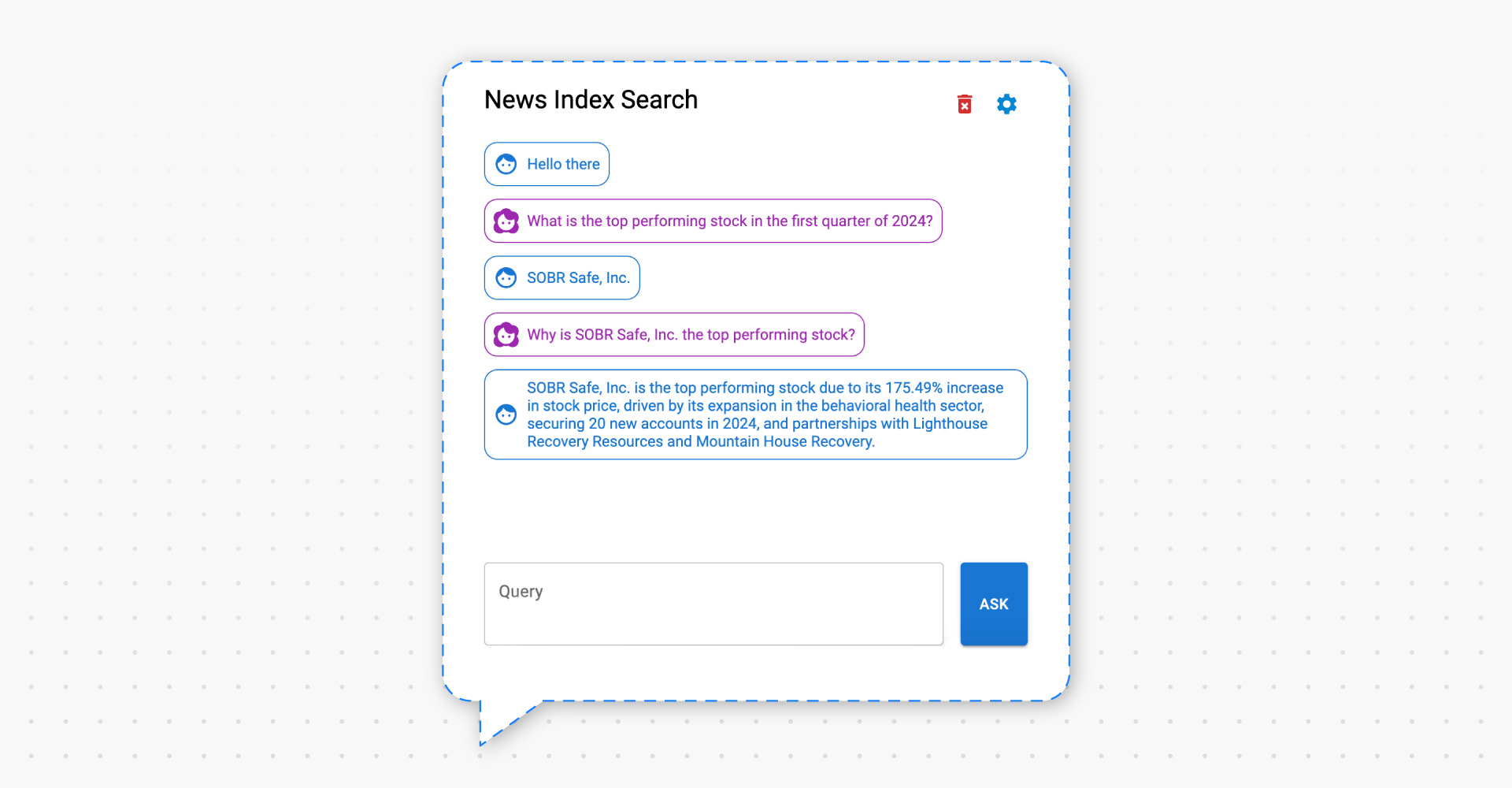
Whenever a user enters a query, a semantic-search workflow runs in the background to provide the answer.
If the vector database needs to be updated on the backend, the data-indexer workflow can be triggered, or even scheduled at regular intervals for automatic updates.
While the financial news analysis platform is a simple variant of a RAG system, developers can use Orkes Conductor to quickly develop and debug their own RAG systems of varying complexities.
Building semantic search using RAG can be much more achievable than most people think. By applying orchestration using a platform like Orkes Conductor, the development and operational effort need not involve complicated tooling, infrastructure, skill sets and other resources. This translates to a highly efficient go-to-market process that can be rapidly iterated over time to optimize the results and value derived from such AI capabilities in any modern business.
—
Conductor is an enterprise-grade orchestration platform for process automation, API and microservices orchestration, agentic workflows, and more. Check out the full set of features, try it yourself using our Developer Edition sandbox, or get a demo of Orkes Cloud, a fully managed and hosted Conductor service.