ENGINEERING
Orchestrating Long-Running APIs | A Step-by-Step Guide to Asynchronous Execution

Harshil
Software Engineer
Last updated: April 4, 2025
April 4, 2025
7 min read


Join thousands of developers building the future with Orkes.
Handling long-running APIs is a common challenge in modern applications. Whether you’re processing large datasets, generating reports, or interacting with third-party services, some API calls exceed the 30–60 second timeout window allowed by most systems. When an API takes too long to respond, workflows can break—resulting in failed tasks, degraded user experiences, or unnecessary retries.
To address this, we’ll implement a solution using asynchronous orchestration. Instead of waiting for the long-running task to complete, the workflow triggers it asynchronously, stores its progress in an external database, and uses polling to track its status until completion.
In this blog, we’ll walk through a scalable solution using Orkes Conductor—an orchestration platform—along with AWS Lambda, Amazon API Gateway, and Amazon DynamoDB.
APIs that take several minutes to complete are not uncommon, especially in systems that rely on compute-heavy workloads or external services. However, traditional synchronous API calls aren’t equipped to handle extended processing delays.
Let’s consider a simple HTTP task in Orkes Conductor or any workflow engine. These tasks typically expect a response within a certain timeout window (e.g., 60 seconds). If the external API takes longer than that, the task fails. This limitation affects:
Stretching timeout windows or blocking workflows isn’t a scalable solution. A better approach is a more resilient workflow architecture pattern—one that embraces asynchronous execution and decouples task initiation from task completion.
To reliably handle long-running APIs, we’ll implement an asynchronous invocation with a polling pattern using Orkes Conductor and AWS services. This avoids timeouts while maintaining full control and visibility over the process.
At a high level, the pattern involves:
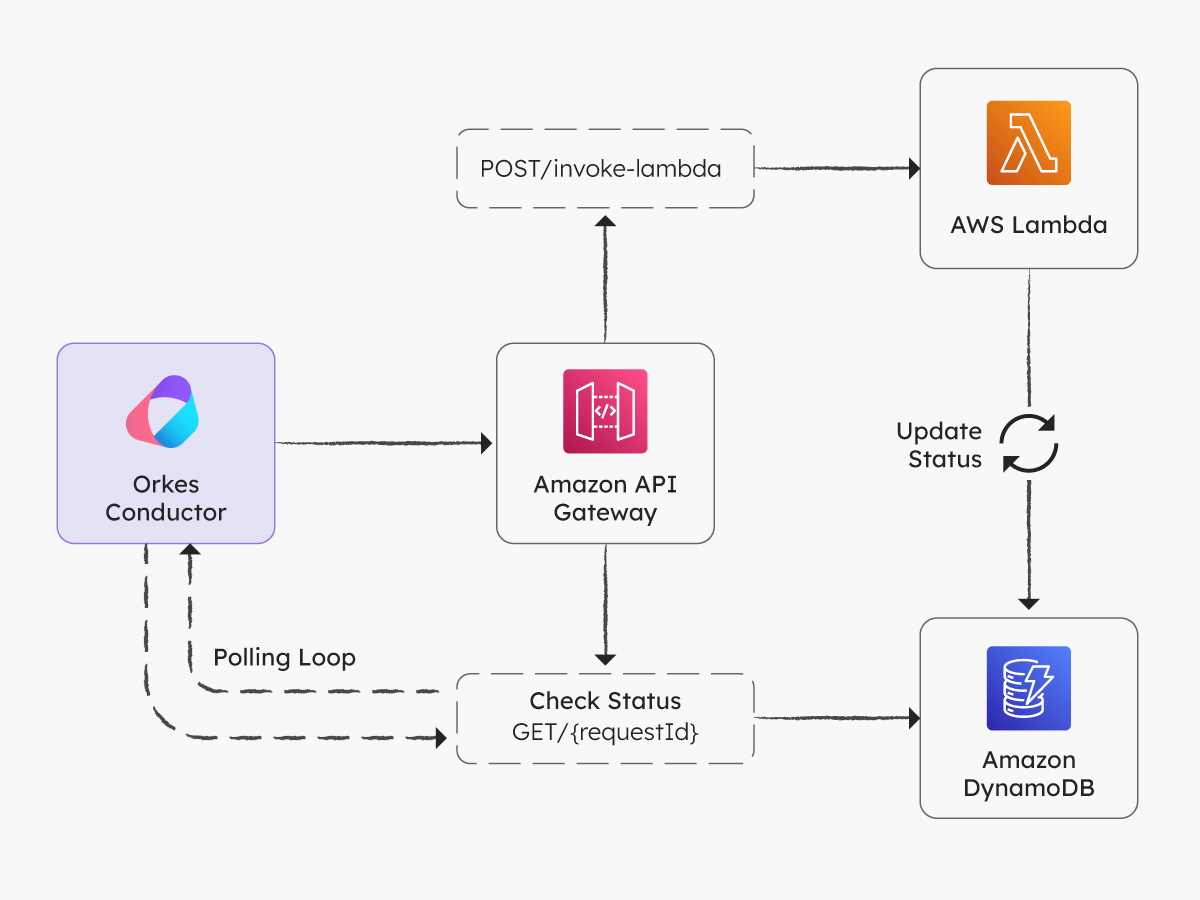
We’ll implement this orchestration pattern using:
The core idea behind this pattern is:
The workflow initiates the long-running process using an HTTP task configured to perform a non-blocking request (e.g., invoking a Lambda function asynchronously via API Gateway). The task immediately returns a requestId, which is used as a unique reference for tracking progress.
The Lambda function logs the execution state (e.g., PROCESSING or COMPLETED) in a NoSQL database like Amazon DynamoDB, which serves as a persistent data store for tracking task progress externally.
Conductor workflow periodically queries the status of the request using an HTTP Poll task. The polling continues until the task is marked as completed in the external system.
This model allows the workflow to remain active and aware of the task’s progress without exceeding timeout thresholds or blocking system resources.
Now that we understand the pattern conceptually, let’s walk through how to implement this using Orkes Conductor and AWS services.
In this section, we’ll implement the long-running API orchestration pattern using Orkes Conductor. To follow along, sign in to the free Developer Edition.
Start by creating a table in DynamoDB named lambda-invocation-status with requestId as the partition key.
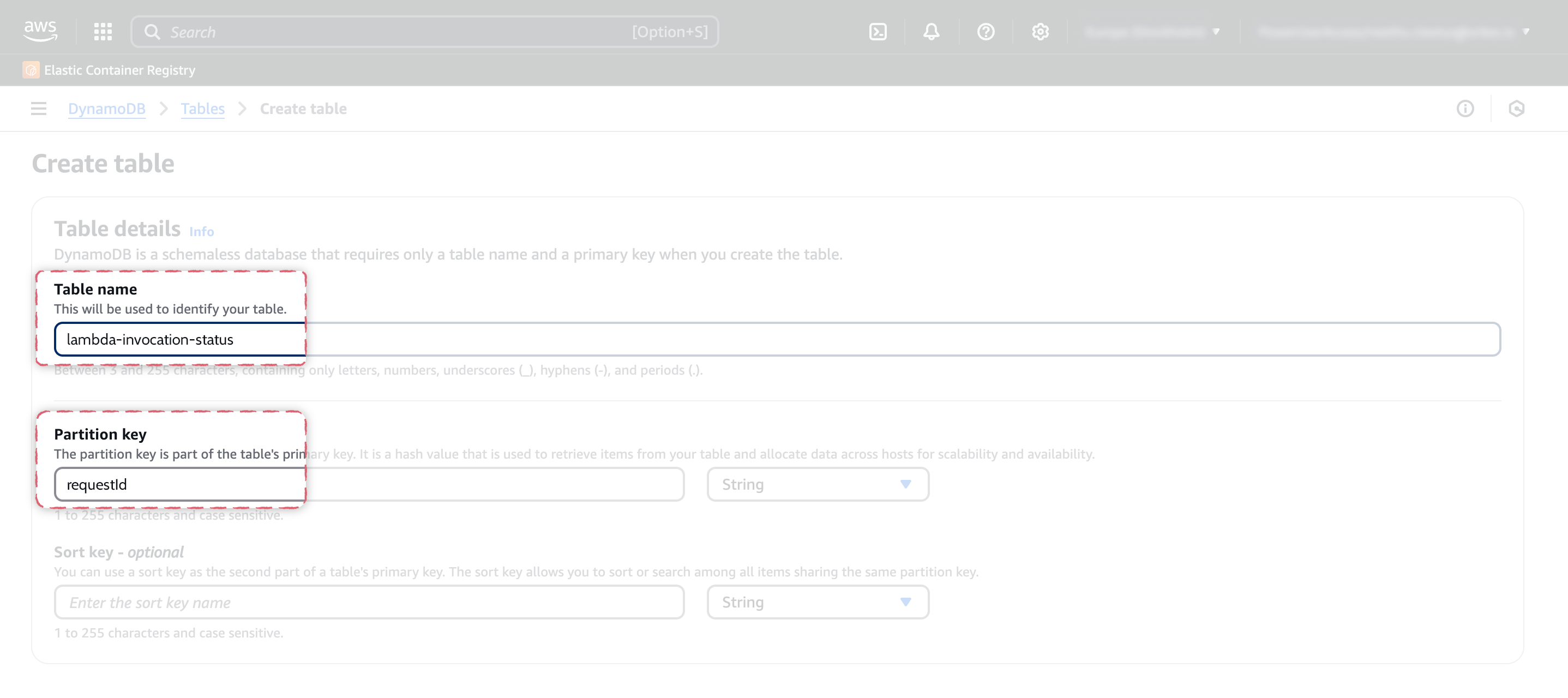
This table stores the execution status of each request.
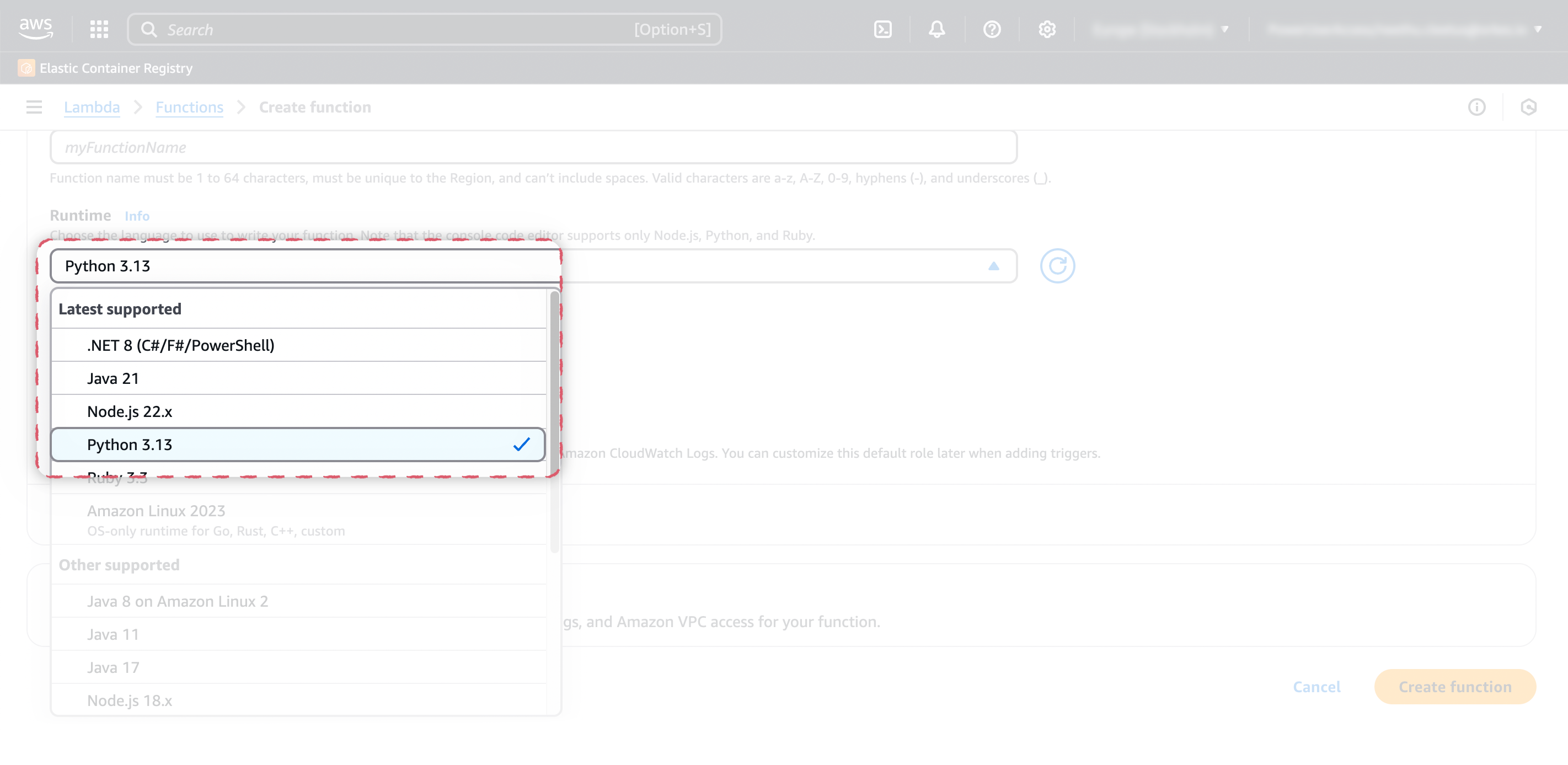
Next, we’ll create a Lambda function that:
requestId and an actionCreate an AWS Lambda function using the Python code:
import json
import time
import boto3

dynamodb = boto3.resource('dynamodb')
table = dynamodb.Table('lambda-invocation-status')

def lambda_handler(event, context):
    request_id = event['requestId']
    action = event.get("action")

    if action == "invoke":
        table.put_item(Item={'requestId': request_id, 'status': 'PROCESSING'})

        # Simulate long processing time
        time.sleep(2)
        process_long_running_task(request_id)

        return {
            "statusCode": 202,
            "body": json.dumps({"requestId": request_id, "status": "PROCESSING"})
        }

    elif action == "status":
        response = table.get_item(Key={'requestId': request_id})
        item = response.get('Item')
        if item:
            return {"statusCode": 200, "body": json.dumps(item)}
        else:
            return {"statusCode": 404, "body": json.dumps({"status": "NOT_FOUND"})}

def process_long_running_task(request_id):
    time.sleep(25)  # Simulate processing time
    table.update_item(
        Key={'requestId': request_id},
        UpdateExpression='SET #s = :val',
        ExpressionAttributeNames={'#s': 'status'},
        ExpressionAttributeValues={':val': 'COMPLETED'}
    )
Adjust the Lambda timeout to 1 minute and attach an IAM role with complete access to DynamoDB.
Create a REST API in Amazon API Gateway and expose the Lambda function with two endpoints:
POST /invoke-lambda–Triggers the task.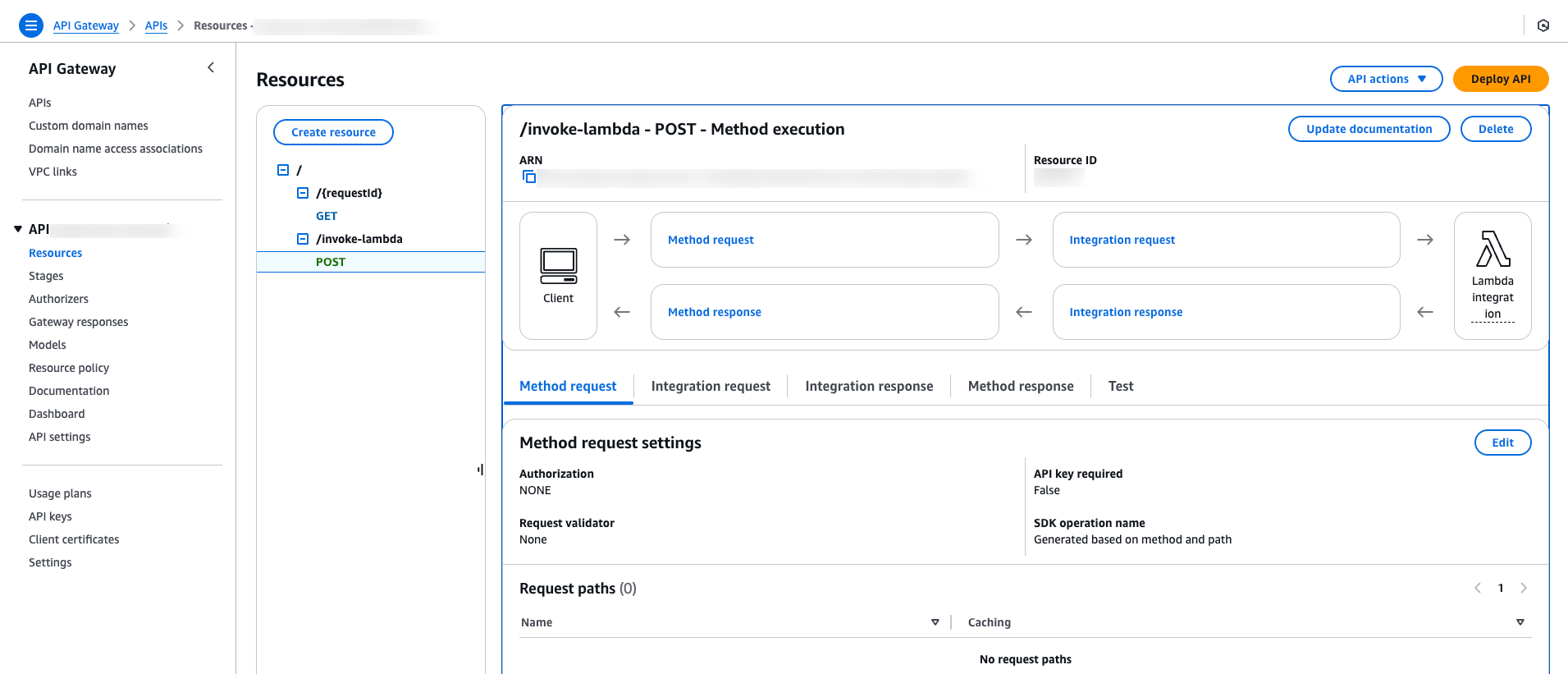
GET /{requestId}–Returns the current task status.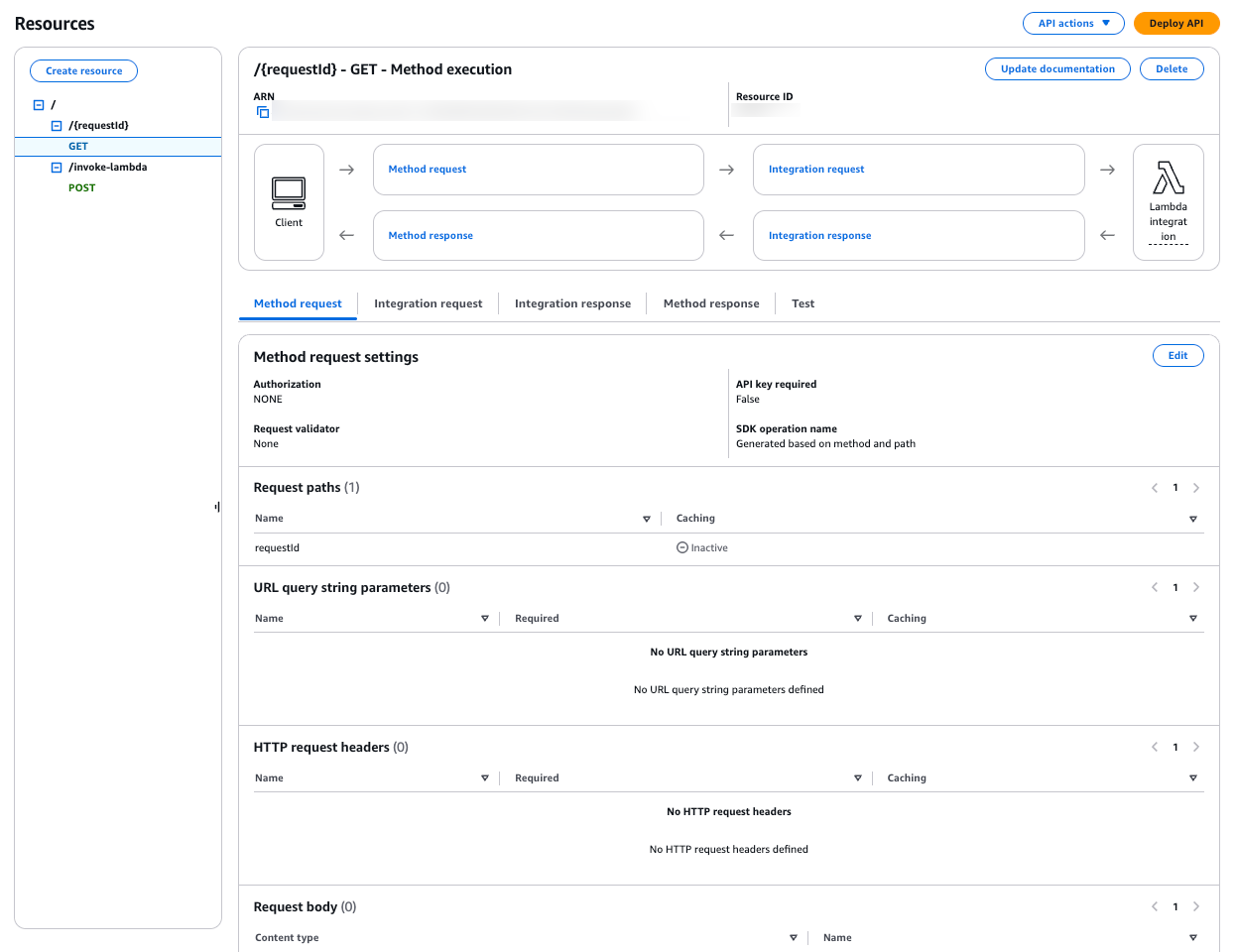
Deploy the API and note the endpoint URL—they’ll be used in the workflow definition.
With your AWS resources ready, it’s time to orchestrate the flow in Orkes Conductor. Let’s build a workflow that:
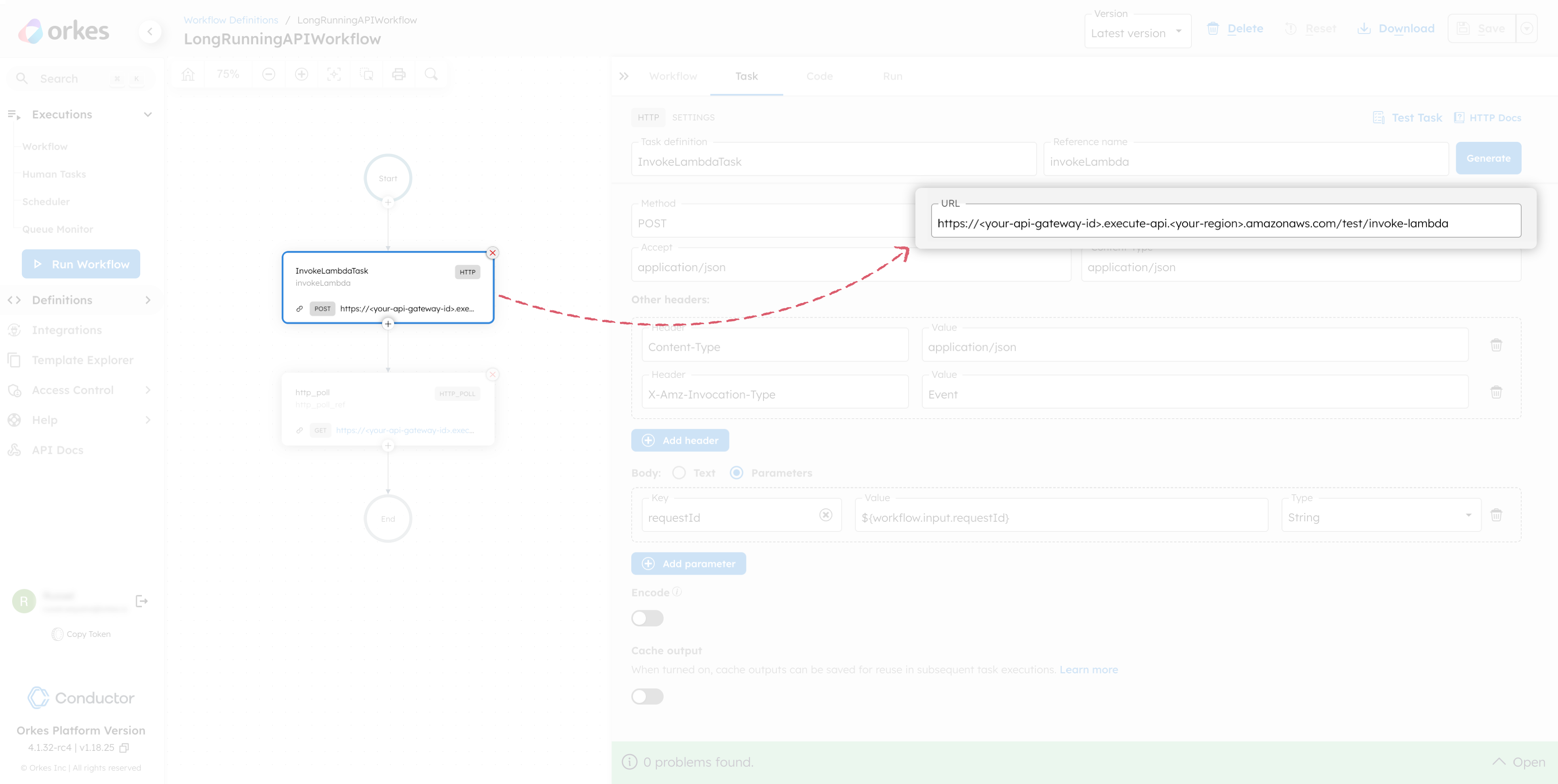
Use an HTTP task in Conductor to call the Lambda endpoint via API Gateway, passing a requestId in the body. The Lambda will start the task and return a 202 response.
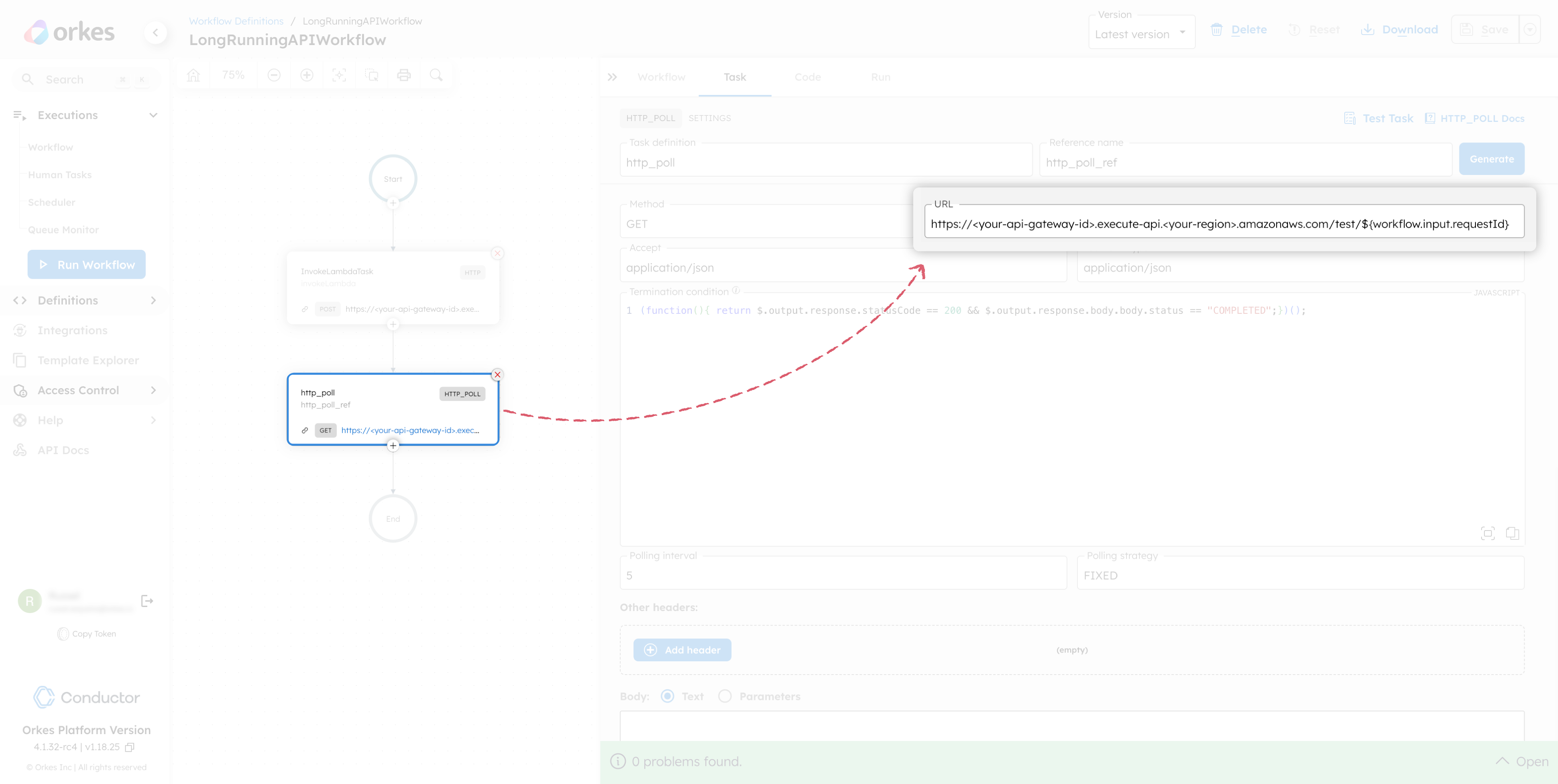
Use an HTTP Poll task to query the status endpoint at regular intervals. The polling continues until the external system returns a "COMPLETED" status.
This behavior is configured using the following termination condition in the HTTP Poll task:
(function(){
  return $.output.response.statusCode == 200 &&
         $.output.response.body.body.status == "COMPLETED";
})();
Create a workflow in Developer Edition by navigating to Definitions > Workflow. In the Code tab, paste the following code:
{
 "name": "LongRunningAPIWorkflow",
 "description": "Sample workflow",
 "version": 1,
 "tasks": [
   {
     "name": "InvokeLambdaTask",
     "taskReferenceName": "invokeLambda",
     "inputParameters": {
       "http_request": {
         "uri": "https://<your-api-gateway-id>.execute-api.<your-region>.amazonaws.com/test/invoke-lambda",
         "method": "POST",
         "headers": {
           "Content-Type": "application/json",
           "X-Amz-Invocation-Type": "Event"
         },
         "body": {
           "requestId": "${workflow.input.requestId}"
         },
         "accept": "application/json",
         "contentType": "application/json"
       }
     },
     "type": "HTTP"
   },
   {
     "name": "http_poll",
     "taskReferenceName": "http_poll_ref",
     "inputParameters": {
       "http_request": {
         "uri": "https://<your-api-gateway-id>.execute-api.<your-region>.amazonaws.com/test/${workflow.input.requestId}",
         "method": "GET",
         "accept": "application/json",
         "contentType": "application/json",
         "terminationCondition": "(function() { return $.output.response.statusCode == 200 && $.output.response.body.body.status == \\\"COMPLETED\\\"; })();",
         "pollingInterval": "10",
         "pollingStrategy": "FIXED",
         "encode": true
       }
     },
     "type": "HTTP_POLL"
   }
 ],
 "inputParameters": [
   "requestId"
 ],
 "schemaVersion": 2
}
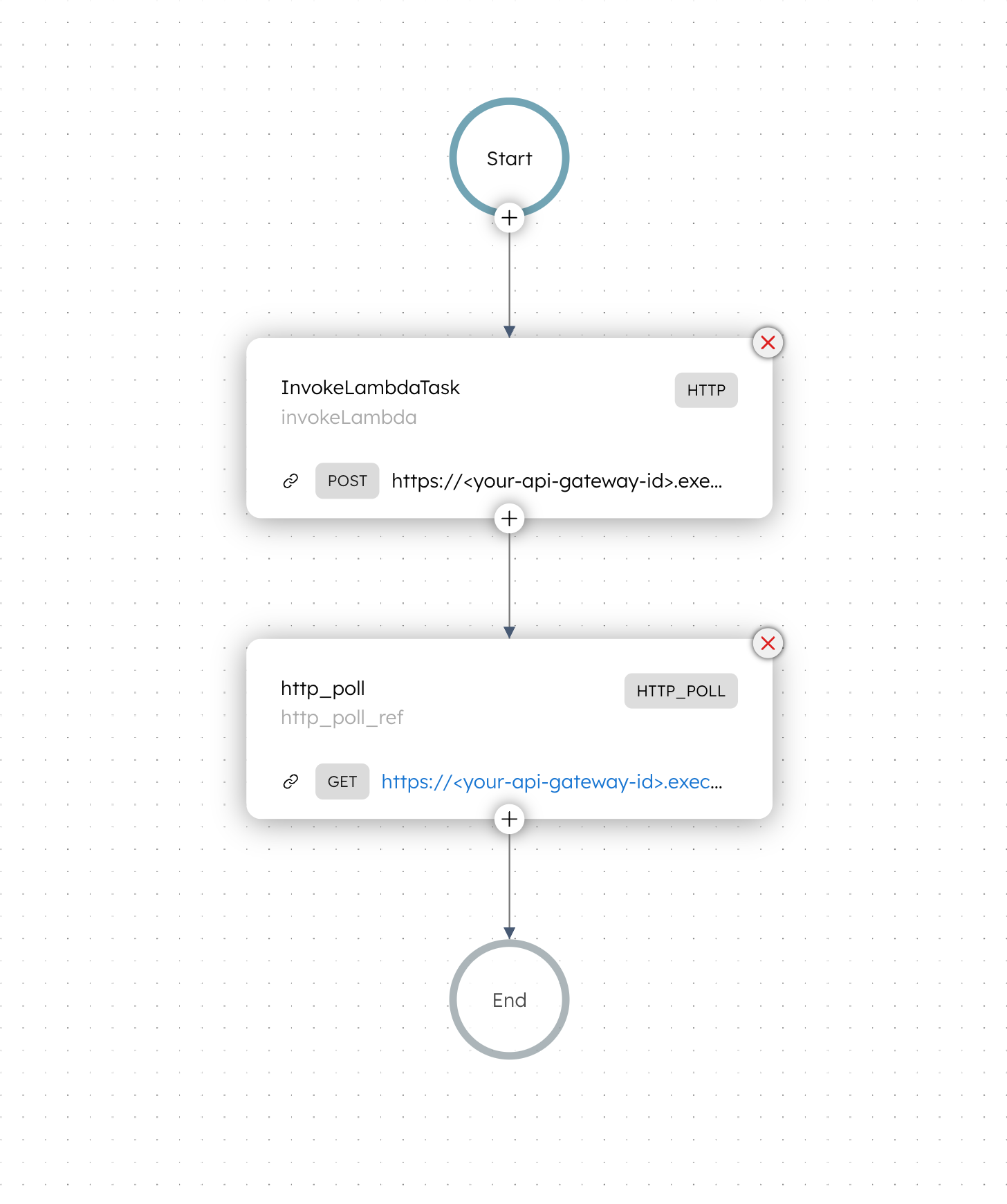
Your workflow will look like this:
Before running the workflow, update the URLs in your task definitions with your actual deployed API Gateway endpoints.
In InvokeLambdaTask (HTTP task), replace the URL with your deployed API endpoint for invoking the Lambda:
https://<your-api-gateway-id>.execute-api.<your-region>.amazonaws.com/<stage>/invoke-lambda
In the http_poll task, replace the polling URL with the endpoint for checking Lambda status:
https://<your-api-gateway-id>.execute-api.<your-region>.amazonaws.com/<stage>/${workflow.input.requestId}
Once configured, test the workflow with a sample input:
{
  "requestId": "12345"
}
The requestId serves as a unique identifier for each task instance. It is passed into the workflow, forwarded to the Lambda function, and used to poll the task’s status from DynamoDB.
When the workflow is run, the InvokeLambdaTask triggers the Lambda function. The http_poll task continuously checks the status until it is completed.
Congratulations—you’ve successfully orchestrated a long-running API using Orkes Conductor and AWS. For a complete implementation walkthrough, refer to the tutorial on orchestrating long-running APIs.
Long-running APIs can easily break synchronous workflows, but with exemplary architecture, you can handle them reliably and at scale.
By combining asynchronous invocation, external status tracking, and polling using Orkes Conductor, you can build resilient and timeout-proof workflows. This pattern can be adapted for a wide range of real-world scenarios, from third-party service orchestration to internal background processing.
Ready to build scalable workflows that can handle long-running operations without breaking? Try out using Orkes Conductor.
–
Orkes Conductor is an enterprise-grade orchestration platform for process automation, API and microservices orchestration, agentic workflows, and more. Check out the full set of features, or try it yourself using our free Developer Edition.