- AGENTIC
- ENGINEERING
How to Orchestrate a Real Workflow Using Slack and Supabase (With Conductor Doing the Heavy Lifting)
 Maria Shimkovska Content Engineer
 If you’ve ever struggled to connect tools like Slack and Supabase into one smooth workflow, this guide shows how to orchestrate the whole process, with Orkes Conductor easily managing the hard parts.
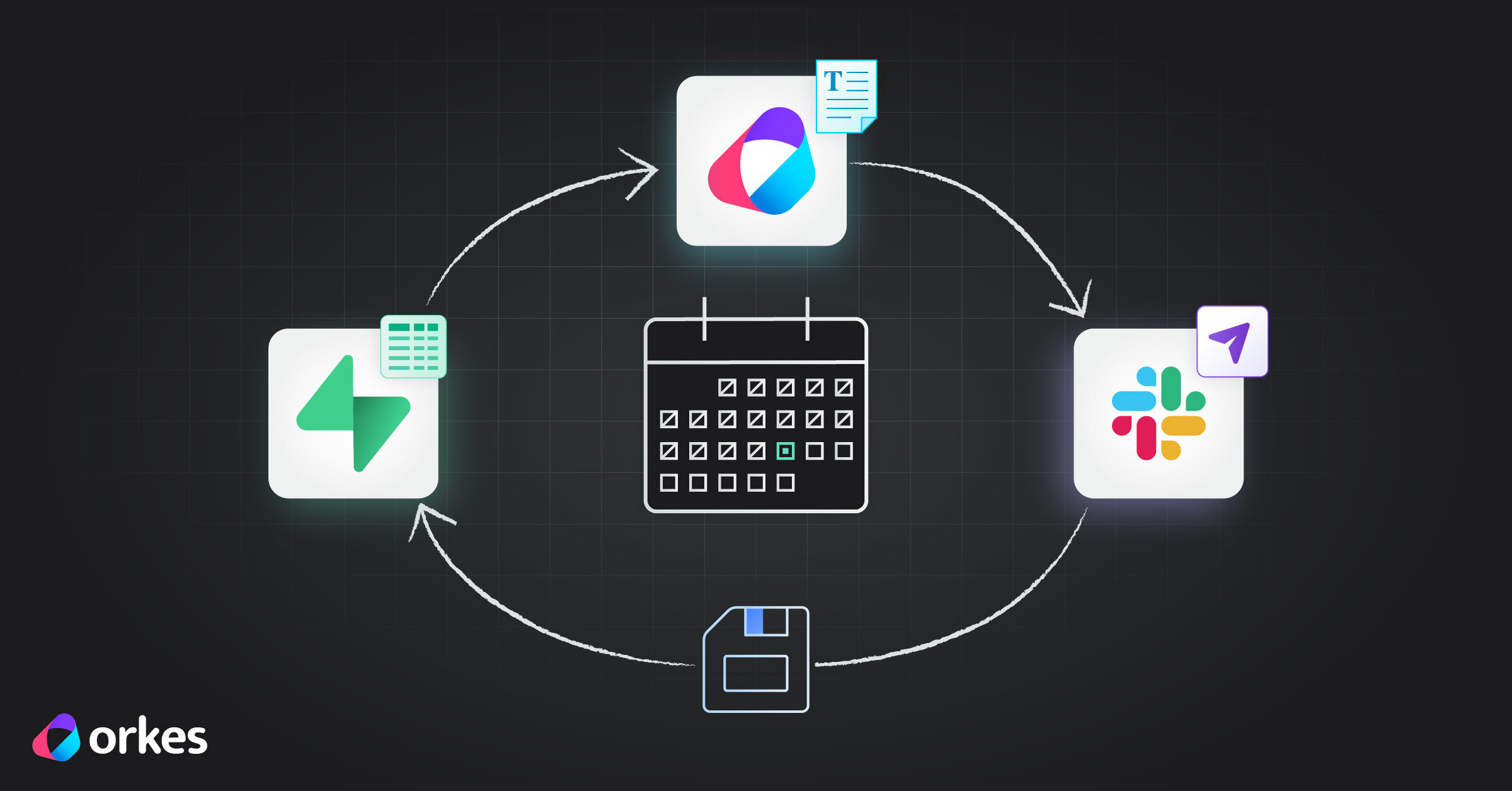
This is just one of many patterns you can build with Orkes Conductor, but it’s a great starter because it walks through the entire loop in a simple, real-world demo I rely on in my own workday. But what it essentially shows you is how you can connect a Slack app with Supabase (or other external databases), and how you can use an orchestrator (in our example Orkes Conductor) to make sure all the pieces play well together.
Here is what the demo workflow does:
- Captures data from Slack in an external database using Supabase
- Every morning at 9am, that data gets pulled from Orkes Conductor into a workflow
- The workflow processes that data with an LLM of my choice
- The workflow sends the processed data to a third-party app, in this case back to Slack
- Finally, the workflow saves the processed data back into Supabase to keep for later use
In this example, I’m building a personalized standup workflow, but the architecture is the same one you can use for any internal process you want to automate. Anything your team struggles with, you can build into a beautifully ran workflow.
Why This Is Useful
A lot of automation examples only show one tiny piece, like how to build a Slack app, how to write to Supabase, or how to run a workflow on its own. But real-life workflows aren’t that neat. They move across tools, pass data around, and actually need to do something useful.
This example shows how those pieces connect in the real world. Orkes Conductor sits in the middle, tying Slack and Supabase together in a simple loop that solves an actual problem.
Conductor handles the logic, keeps everything in sync, and basically helps your tools talk to each other when they normally wouldn’t.
Once you see this pattern, you can use it for all kinds of annoying, high-friction tasks—daily updates, deployment logs, audit checks, anything that takes raw data, runs it through some rules or an LLM, and turns it into something meaningful.
The Tech Stack Overview
This project highlights how Orkes, Supabase, and LLMs can work together in a clean, modern automation stack:
| Layer | Technology | Purpose |
|---|---|---|
| Workflow Orchestration | 🟣 Orkes Conductor | Defines, sequences, and manages each task in the automation |
| Data Layer | 🟢 Supabase | Stores notes, daily standup messages, and provides SQL-based access |
| Intelligence Layer | 🤖 LLM (OpenAI / MariaOpenAI) | Transforms notes into readable summaries or Slack messages |
| Output Channel | 💬 Slack | Posts the final standup messages and summaries |
Orkes acts as the central brain, calling out to Supabase to fetch and save data, invoking an LLM for natural language formatting, and using an HTTP task to post to Slack.
Agentic Workflows: Automating Thoughtful Routines
This project is a small example of an agentic workflow, which is a system that can take an end goal (“share my daily update”) and automatically execute all the steps needed to achieve it.
These kinds of workflows are perfect for the “gray area” tasks. These include tasks that are important but repetitive, require context but not deep decision-making, and spread across multiple tools like notes, databases, apps.
Why Orkes and Supabase Work So Well Together
Supabase provides a simple, SQL-based backend for storing structured data, like notes or message logs, without managing servers of schemas. Orkes Conductor acts as the orchestration layer, managing the logic, calling LLMs, integrating APIs, and running everything on a schedule.
Together they form a personal automation stack where Supabase holds and secures the data, while Orkes put everything in your workflow together.
From Slack to Supabase
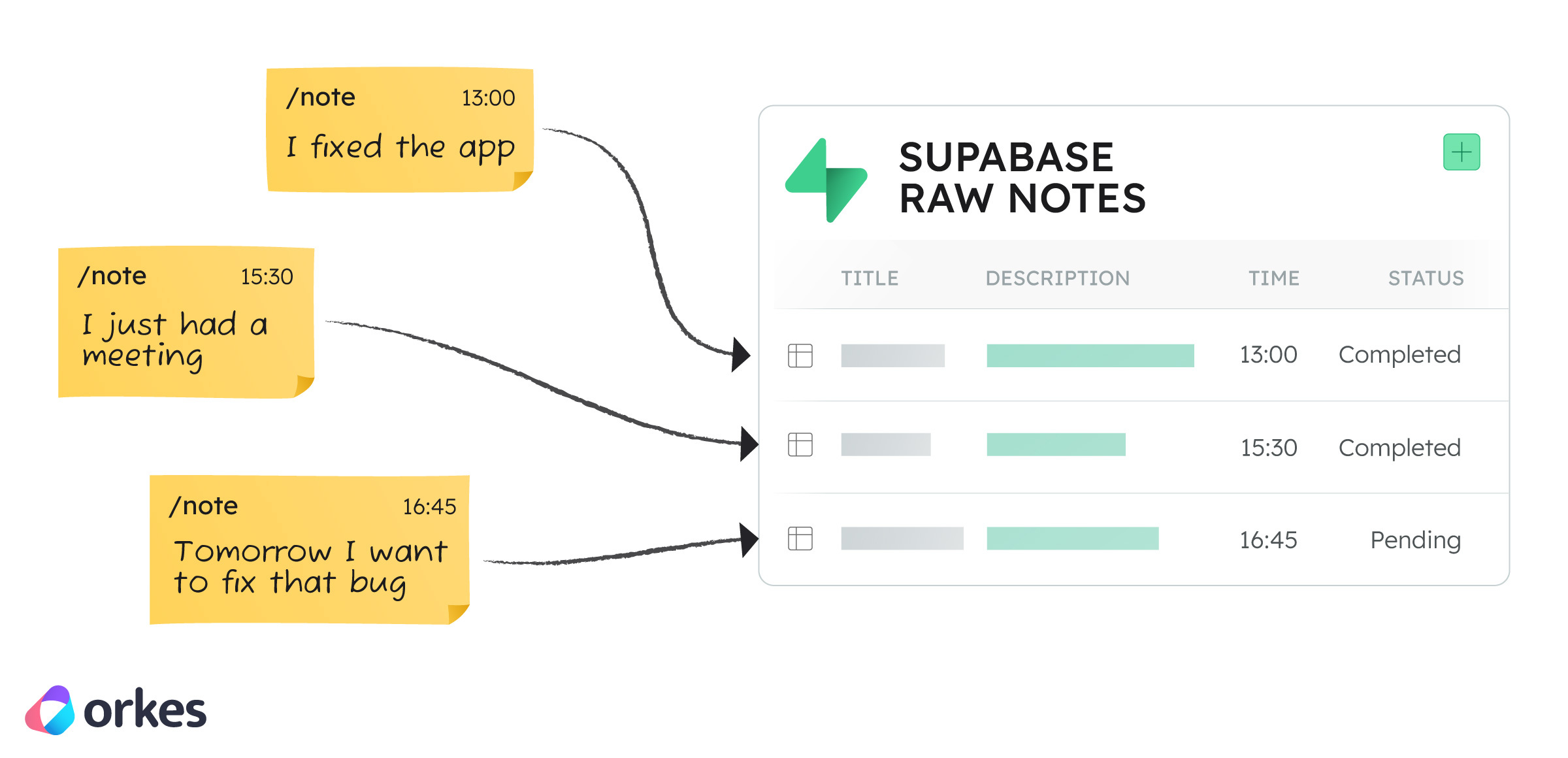
Even though my demo uses a simple Slack slash command (/note), the pattern behind it is the same one teams use in real Orkes deployments: capturing small, frequent events and storing them in a structured datastore.
In enterprise workflows, those events might be deployment updates, order or fullfilment changes, incident notes, or ticket activities. In this demo, Slack just happens to be my input source. All the notes (or events) get stpred in a Supabase tabele (raw_notes). This is similar to how teams store operational events before kicking off automations.
Scheduling the Workflow: From Supabase to Orkes
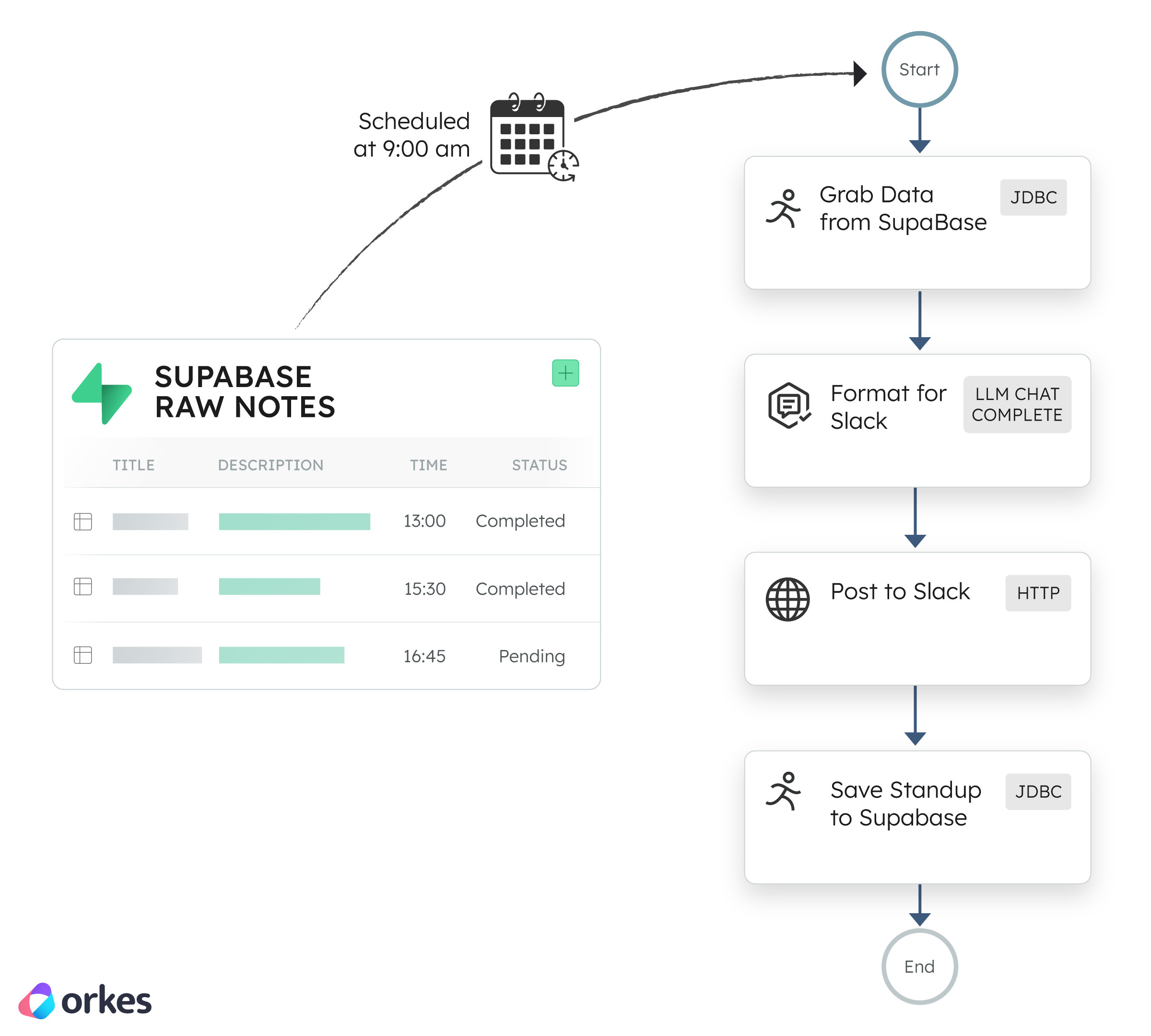
Every morning at 9 AM, Orkes starts the workflow using a built-in Cron Schedule. This is the same mechanism customers use to power:
- daily reconciliation
- nightly processing
- periodic audits
- agentic summaries
- compliance or SLA checks
The workflow pulls fresh data from Supabase and immediately begins processing. My use case is personal, but the structure is identical to how companies run recurring, business-critical automations with Orkes.
The Orkes Conductor Workflow Explained
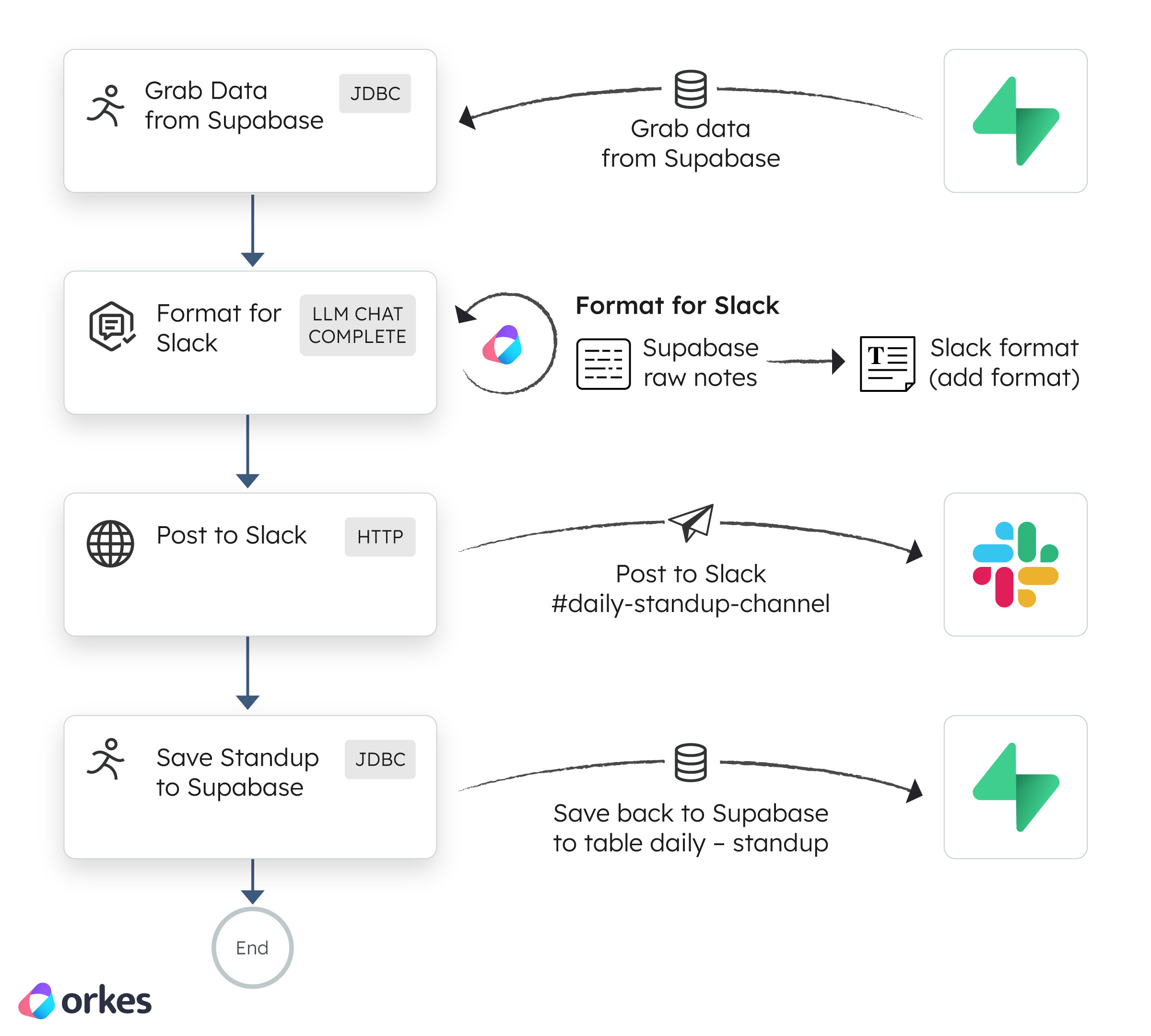
The workflow has four steps, and each step reflects a pattern used in real enterprise orchestrations:
1. Pull the latest events (JDBC → Supabase)
Queries recent activity—similar to how companies fetch new transactions, orders, incidents, or logs.
2. Transform the data with an LLM (Agentic Processing)
Uses an LLM to summarize and structure the information. Enterprise teams use the same pattern to turn raw operational data into:
- incident summaries
- order updates
- audit logs
- customer-facing explanations
3. Deliver the result (HTTP → Slack)
My result goes to Slack, but customers often send outputs to systems like Jira, PagerDuty, Salesforce, or internal APIs.
4. Store the generated summary (JDBC → Supabase)
Persists the output so a second workflow (like a weekly summary) can build on it. This mirrors how customers store reconciliations, outcome logs, or aggregated insights.
Final Thoughts
This standup bot example workflow shows you how you can take different technologies and weave them together so they collaborate. It shows you how easy it is to use Orkes Conductor to make that happen. Building these workflows can be confusing, so having an orchestrator that makes it simple is really important.
It’s exciting to see what teams are doing with Orkes Conductor.