- ENGINEERING
- PRODUCT
How Agents and Workflows Call Each Other in Conductor
 Maria Shimkovska Content Engineer
 Sometimes a process just has to be a workflow, multiple steps, retries, maybe a day-long wait for someone to approve it. And separately, you want people to just talk to an agent instead of filling out a form. Connecting the two is where it’s easy to get wrong: you don’t want the agent redoing all those steps itself, guessing at the order every time. You want it to call the workflow, the same way it’d call any other tool, and let the workflow take it from there.
Last time, I explained how an expense approval workflow can be built using code: check the expense, route it by amount, update accounting, and notify the employee once it’s approved, no AI involved. Here, I want to show you how you can call that workflow, or really any workflow, from an AI agent, as just another tool it has.
It works in both directions, so I’m covering both: how an agent calls a workflow like a tool, and how a workflow can call an agent back when it needs judgment instead of a fixed rule. I’ll use the same expense workflow for both:
- Part 1: calling a workflow from an agent. An employee messages a bot about an expense or an equipment request. The agent has to figure out which one it’s looking at, check whether it has enough information yet, and only then hand the job to the right workflow:
expense_approvalfrom before, or a short new one for equipment requests. - Part 2: calling an agent from a workflow. Sometimes a workflow hits a step that isn’t a simple rule, it needs a judgment call instead. Rather than writing messy if/else logic to guess at it, one task asks a small agent to make that call, and the workflow branches on the answer.
Same idea both times: the agent reasons, the workflow executes. In Part 1, the agent decides when to hand off to the workflow. In Part 2, the workflow decides when it needs judgment instead of a fixed rule.
Part 1: Calling a workflow from an agent
A tool can be a whole workflow
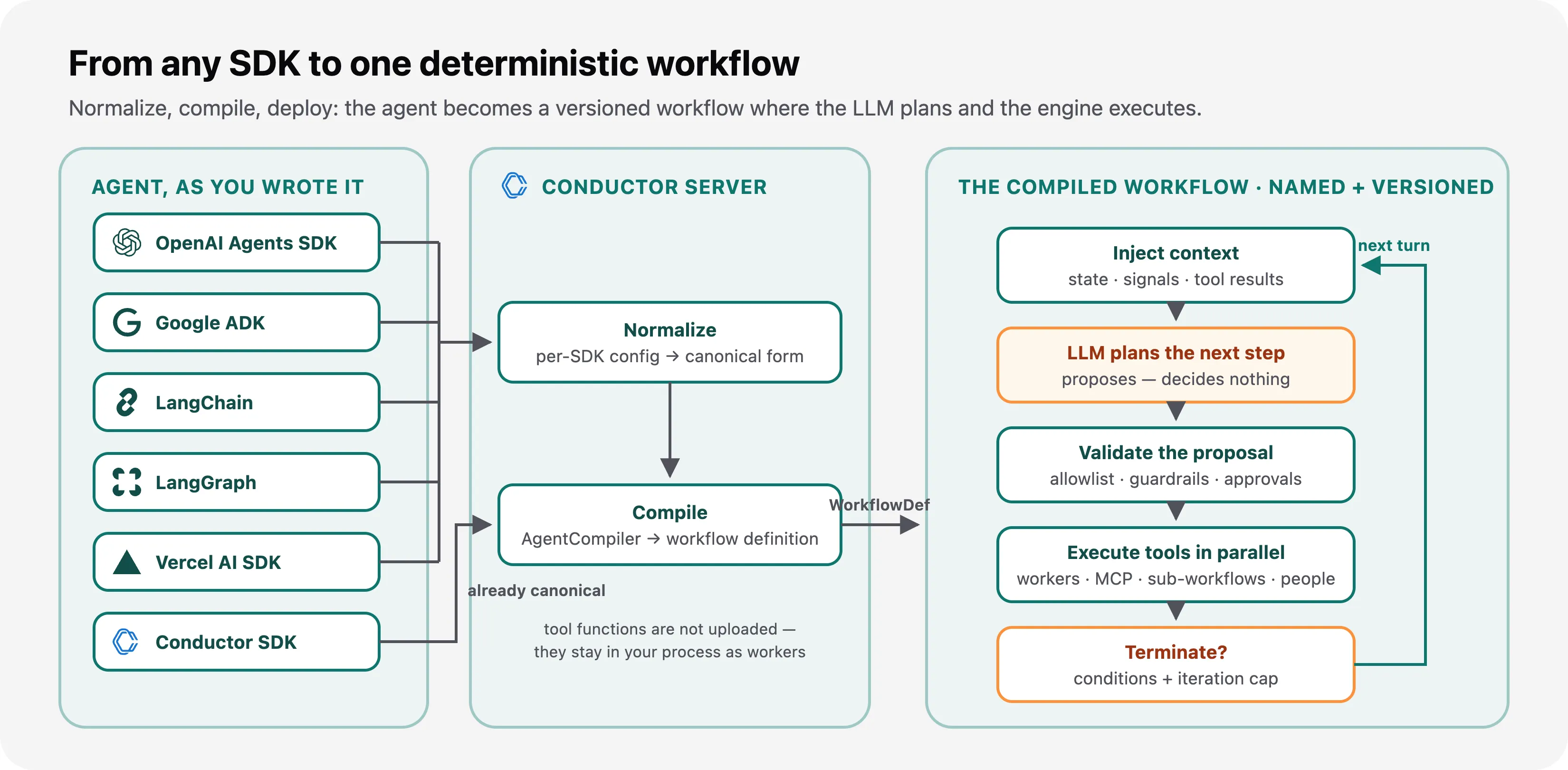
On Conductor, an agent is a workflow too. The model’s thinking is one task. Every tool it calls is another task. Conductor keeps track of the conversation, so your code doesn’t have to. That also means a tool can be anything Conductor already runs: a worker function, an HTTP call, an MCP tool, a person approving something, or an entire workflow.
That last one, calling a whole workflow, is what this post is about. When the tool is a workflow, the agent doesn’t improvise its way through validate, route, approve, notify, guessing at each step with the LLM. It hands the whole job to the same workflow you already built, waits for (or checks back on) one result, and moves on. That workflow still runs the same way every time, with the same retries and timeouts you already set for it. The model never touches those steps directly, so it can’t second-guess them. It just calls the tool and gets an answer back. This split, between what the model decides and what the engine runs, is what makes this safe to do.
The example: ExpenseBot
Employees message a bot instead of filling out a form. But the agent’s job isn’t just to read one sentence, pull out a few fields, and call a tool. If that were really all it did, you wouldn’t need an agent. A single AI step inside a workflow could already do that. The real job is a judgment call: figure out what kind of request this even is, decide if there’s enough information to act on yet, and if not, ask instead of guessing.
ExpenseBot handles two kinds of requests: a travel expense to reimburse (the expense_approval workflow from last time), and an equipment or supply request (a short new workflow called equipment_request_approval, just two tasks: log the request, then ping IT). Which one it is, and what’s missing, isn’t always clear from the first message:
employee: I took a cab to JFK for the Austin conference, employee ID emp-203expense_bot: Got it, that's a travel expense. What did the cab cost?employee: $85expense_bot: Submitted! Tracking ID 3f29e1b4-7c2a-4e9d-9b1a-2c6f8a1d9e77.There’s no dollar amount in that first message, so the agent asks for exactly the one thing it’s missing, instead of guessing at a number. The same kind of reasoning sends a different message somewhere else entirely:
employee: I need a new monitor for my desk, it's about $150expense_bot: Got it, that's an equipment request. What's your employee ID?employee: emp-203expense_bot: Submitted! Tracking ID 91b4e2a0-5f3d-4a1c-8e7b-6a2d9f0c3b58.Same bot, same two tools underneath, but a different decision up front: is this a reimbursement or a request, and what does it still need before it can run? The agent keeps asking, one missing piece at a time, until it has everything. Only then does it hand off, and from that point on, everything runs the same way every time:
employee message │ ▼expense_bot reasons: do I have enough yet, for whichever request this is? │ ├─ no → ask the user for exactly what's missing → (next message) ──┐ │ │ └─ yes ◄─────────────────────────────────────────────────────────────┘ │ ├─ it's a travel expense → submit_expense → expense_approval │ (unchanged from last post) │ └─ it's an equipment request → submit_equipment_request → equipment_request_approval (new, two tasks)Prerequisites: everything from last time (Python 3.9+, a free Orkes Developer Edition account, and expense_approval already registered), plus an API key for whichever LLM you’re using, and a second workflow called equipment_request_approval registered the same way. It’s just two tasks: log_equipment_request and notify_it_team.
Writing the tools
A tool here is just a regular Python function with a docstring and type hints. Add @tool above it, and Conductor turns it into a task and a worker behind the scenes. Each function’s job is to start a workflow and return something useful right away, not to sit and wait until a manager, or IT, gets around to approving it:
from conductor.ai.agents import Agent, AgentRuntime, toolfrom conductor.client.configuration.configuration import Configurationfrom conductor.client.configuration.settings.authentication_settings import AuthenticationSettingsfrom conductor.client.workflow.executor.workflow_executor import WorkflowExecutorfrom conductor.client.http.models.start_workflow_request import StartWorkflowRequest
# Same Developer Edition setup from last time. Running against# `conductor server start` instead? Drop the credentials:# conf = Configuration(base_url='http://localhost:8080')conf = Configuration(    base_url='https://developer.orkescloud.com',    authentication_settings=AuthenticationSettings(        key_id='_KEY_ID_',        key_secret='_KEY_SECRET_'    ))executor = WorkflowExecutor(conf)

@tooldef submit_expense(amount: float, employeeId: str, category: str) -> dict:    """Submit a travel expense for reimbursement. Only call this once you    have the amount, employee ID, and category, ask for whatever's missing    first. Returns a tracking ID right away; this does not wait for a    manager to sign off, since that can take a while."""    request = StartWorkflowRequest(        name='expense_approval',        version=1,        input={'amount': amount, 'employeeId': employeeId, 'category': category}    )    workflow_id = executor.start_workflow(request)    return {'workflowId': workflow_id, 'status': 'SUBMITTED'}

@tooldef submit_equipment_request(itemDescription: str, estimatedCost: float, employeeId: str) -> dict:    """Submit a request for equipment or supplies, like a laptop or a    monitor. Only call this once you have a description of the item, its    estimated cost, and the employee ID."""    request = StartWorkflowRequest(        name='equipment_request_approval',        version=1,        input={'itemDescription': itemDescription, 'estimatedCost': estimatedCost, 'employeeId': employeeId}    )    workflow_id = executor.start_workflow(request)    return {'workflowId': workflow_id, 'status': 'SUBMITTED'}

@tooldef check_request_status(workflowId: str) -> dict:    """Check whether a previously submitted expense or equipment request    has finished processing. Works for either kind, the workflow ID is    all it needs."""    status = executor.get_workflow_status(workflowId, include_output=True)    return {'status': status.status, 'output': status.output}
Three tools, but check_request_status only needed writing once. get_workflow_status() doesn’t care which workflow owns the ID, so one status-check tool covers both request types.
Also notice both submit tools call start_workflow(), not execute(). execute() waits for the workflow to finish before returning, which is fine for a fifteen-second run. But request_manager_approval can sit open for a day, and the agent can’t hold a conversation open that long either. start_workflow() kicks things off and returns the ID right away. check_request_status is how the agent, or the employee through the agent, checks back on it later.
Building the agent
The multi-turn part, the agent stopping to ask a question instead of guessing, comes from a tool type Conductor already provides, called human_tool. Add one to the agent’s tools, and when the LLM calls it, the whole conversation pauses on a real HUMAN task and waits, however long that takes, for someone to answer it. Once they do, the same conversation picks back up with that answer folded in. It isn’t a new message starting a new conversation, it’s the same one, paused and resumed:
from conductor.ai.agents import Agent, AgentRuntime, human_tool
ask_user = human_tool(    name='ask_user',    description=(        "Ask the employee a question when something required is missing, "        "and wait for their reply."    ),)
agent = Agent(    name='expense_bot',    model='openai/gpt-4o',    tools=[submit_expense, submit_equipment_request, check_request_status, ask_user],    instructions=(        "You handle two kinds of requests from employees: travel expense "        "reimbursements, and equipment or supply requests. Work out which "        "one you're looking at from what they tell you.\n\n"        "A travel expense needs an amount, an employee ID, and a category "        "before you call submit_expense. An equipment request needs a "        "description of the item, its estimated cost, and the employee ID "        "before you call submit_equipment_request. If anything required is "        "missing, call ask_user to ask for exactly that, don't guess at it "        "and don't call the submit tool early.\n\n"        "If someone asks about something they already submitted, call "        "check_request_status with the workflow ID you gave them."    ),)
Notice ask_user isn’t a function you wrote, there’s no @tool decorator and no body. It’s a tool type the engine itself understands, and the pausing and waiting is something Conductor does, not something sitting in your Python process the whole time it’s waiting. Whatever’s actually talking to the employee, a terminal, a chat UI, a Slack bot, just has to notice the conversation is paused, show the question, and hand the answer back. The agent picks up exactly where it left off, still holding onto the cab and emp-203 from the first message, which is why it only ever asks for the one thing it’s actually missing instead of starting the whole conversation over.
That’s the whole shape of it. The first message didn’t have everything submit_expense needs, so the agent called ask_user. Once it had an amount too, it called submit_expense, not submit_equipment_request, because it had already figured out this was a travel expense from the word “cab.” If the amount comes back under $100, expense_approval auto-approves it, books it to accounting, and notifies the employee, same as always. The agent never had to know any of those rules exist. It only had to know when it had enough information to hand the job off.
What actually happened, underneath
submit_expense, submit_equipment_request, and check_request_status are ordinary Conductor tasks now, the same kind you’ve been writing all along. They show up in the Conductor UI like any other task, with the same retry and timeout settings you’d give any worker. ask_user shows up too, as a HUMAN task, since that’s what it compiles to. The only thing special about any of them: the LLM decides when, and whether, to call them, instead of you wiring them into a fixed sequence yourself, and it can decide, on its own, that it needs to ask before it can.
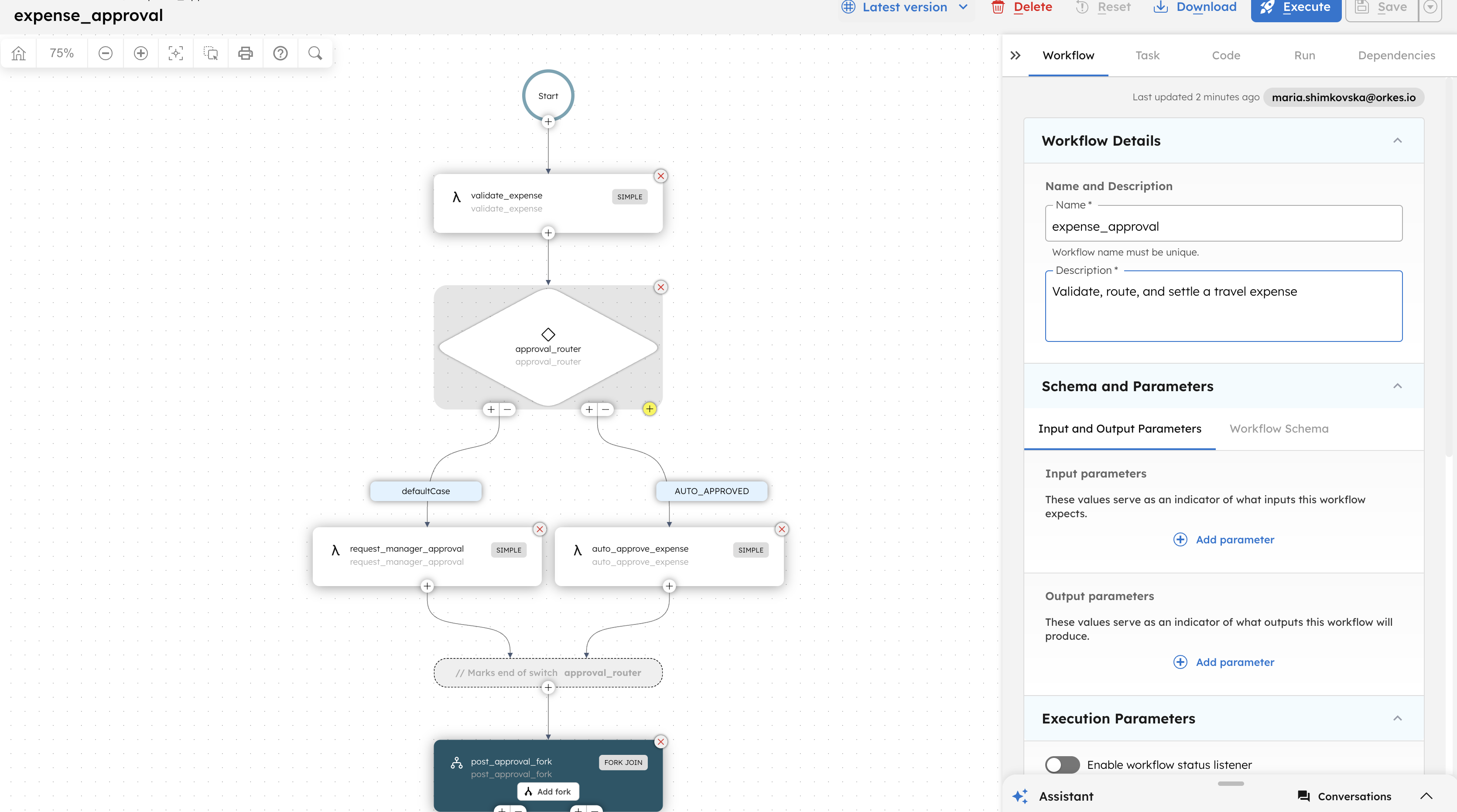
And the workflow each one kicks off is still just a workflow. Open expense_approval’s execution in the UI and it looks exactly like it did last post: validate_expense, approval_router, the fork into update_accounting and notify_employee. equipment_request_approval is just as plain: log_equipment_request, then notify_it_team. Neither one knows, or needs to know, that an agent spent two turns figuring out which of them to call this time.
The more native route, and where it stops fitting
What you just built calls the workflow from inside a worker function. That works for any workflow, and since it’s just Python, it’s the most portable way to do it. There’s also a more direct route. It’s worth knowing exactly what it does, and doesn’t, give you before you reach for it.
Every agent on Conductor can hand off to another agent as a tool. In Python that’s agent_tool(); in Java it’s AgentTool.from(). Normally this is for one LLM passing a task to another LLM, what’s called sub-agent delegation. But if the Agent you wrap has no model set, Conductor treats it as external. Instead of building a fresh LLM loop for it, Conductor builds a SUB_WORKFLOW task that points at an existing workflow on the server by name. That’s the real mechanism behind “pointing a tool at an entire workflow”: the call shows up as its own step in the agent’s execution graph in the UI, the same Sub Workflow task you’d use to call one workflow from another, instead of being hidden inside a worker function:
from conductor.ai.agents import Agent, agent_tool
expense_workflow = Agent(name='expense_approval')  # no model = external reference
agent = Agent(    name='expense_bot',    model='openai/gpt-4o',    tools=[agent_tool(expense_workflow)],    instructions="...",)
Here’s the part worth knowing before you build on this: that tool’s input is fixed, in both SDKs, to one field: {"request": "string"}. It was built for one agent handing a plain-English question to another agent, not for passing separate, structured pieces of data into any workflow. Wrapped this way, expense_approval would only ever get one string called request. It would never see amount, employeeId, or category as their own fields, unless you rewrote the workflow’s first task to accept that one string and pull the fields out of it itself.
So this route fits when the thing you’re calling already knows how to take a plain-English question and figure it out itself: another agent, or a workflow with its own extraction step built in. For a workflow like expense_approval, which expects three separate fields, the tool-function approach from earlier (pulling out the fields yourself and calling start_workflow()) is the one that actually works, no matter what the target workflow expects as input.
Part 2: Calling an agent from a workflow
Where a workflow runs out of rules
approval_router makes one clean decision: is the amount under 100 or not. But every finance team eventually adds a second rule that isn’t really a number. Something like “flag it anyway if it looks off,” where “looks off” could mean a vague category, a suspiciously round number, or three cab rides from the same person in one afternoon. You could try to write that as nested if/else logic, but it’ll be wrong the first time someone finds a new way to look slightly suspicious.
That’s a judgment call, not a rule, which makes it a job for an agent, not a SWITCH. And a workflow can ask an agent for a judgment call the same way it can hand a step to a sub-workflow: as a single task sitting in its own task list.
The AGENT task
Conductor has a built-in task type for exactly this, called AGENT. Neither SDK has a helper class for it yet, so for now you add it the same way you’d add any task without a helper: directly in the workflow’s Code tab in the UI, right alongside the tasks you defined in Python.
Here’s what it looks like dropped in right before approval_router:
{ "name": "assess_expense_risk", "taskReferenceName": "assess_expense_risk_ref", "type": "AGENT", "inputParameters": { "agentType": "conductor", "name": "expense_auditor", "prompt": "Expense: ${workflow.input.amount} dollars, category '${workflow.input.category}', submitted by ${workflow.input.employeeId}. Does this look worth flagging for manual review regardless of the dollar amount? Reply with exactly FLAG or OK, then one short reason." }}agentType: "conductor" means this calls an agent deployed on Conductor itself, expense_auditor, something you’d build the same way I built expense_bot in Part 1, just deployed once with runtime.deploy() instead of run interactively. (agentType: "a2a" is the other option, for calling a remote agent over the Agent2Agent protocol instead. Same task type, different wiring, not something I’m covering here.) Leave version out, and it runs the latest deployed version of expense_auditor.
What you get back
The task waits on its own (nothing in your workflow has to poll it) and comes back with a handful of fields worth knowing:
| Field | What it holds |
|---|---|
state | RUNNING, WAITING, COMPLETED, FAILED, or CANCELED |
text | The agent’s latest or final reply |
output | Structured output, if the agent produces any |
executionId | The agent’s own execution ID, if you need to resume it later with a follow-up prompt |
waiting | true if the agent is paused on something that needs a reply |
Downstream, anything in the workflow can read straight off it, the same way you’d read off any other task’s output:
${assess_expense_risk_ref.output.text}Match that against FLAG to route into request_manager_approval even when the amount is under $100, and let OK fall through to AUTO_APPROVED as before. The $100 rule and the judgment call sit side by side: one’s still a plain SWITCH, the other’s a task that happens to think before it answers.
One real wrinkle, worth knowing before you try this: your Python script registers expense_approval with overwrite=True, so any task you hand-add in the UI gets wiped out the next time that script runs. Until the SDKs add a helper class for AGENT, either register this version by hand and point your script somewhere else, or treat it as a one-off you re-add after every register(). Not ideal, but better to know now than to find out the hard way.
The knob worth knowing about
The task has its own durability setting, separate from any timeout expense_auditor has internally. maxDurationSeconds controls how long the workflow waits before giving up on the agent entirely. It defaults to a full day, the same reasoning behind giving request_manager_approval a day in Part 1. If expense_auditor is mid-conversation and needs something from a person to finish, the task comes back COMPLETED with waiting: true instead of hanging forever. A matching CANCEL_AGENT task type also exists, in case you need to kill a run in progress.
Both directions end up looking almost the same from the workflow’s side: one task, a name, some input, a result you branch on. Whether that task happens to be a worker function, an HTTP call, a sub-workflow, or, now, an agent making a judgment call doesn’t change how the rest of the workflow reads. Agents and workflows call each other because underneath, they’re built out of the same pieces.