ENGINEERING
How to Process a List of Items in Parallel in Orkes Conductor

Maria Shimkovska
Content Engineer
Last updated: June 20, 2026
June 20, 2026
3 min read


Join thousands of developers building the future with Orkes.
This is for you if you would prefer not to read documentation and see more examples.
I want to show you everything that's possible with the built-in tasks in Orkes Conductor.
This is part of a series covering every built-in task in Orkes Conductor. This one is for the DYNAMIC_FORK task.
The DYNAMIC_FORK task fans out execution across a list of inputs, one parallel branch per item, and then waits for all branches to finish before the workflow moves on.
You don't hardcode the number of branches. You pass in a list and Conductor figures out how many forks to create at runtime.
It always needs to be followed by a JOIN task. The JOIN is what collects the outputs from every branch and signals that the parallel work is done.
One important thing to know: each fork can only run one task. If you need to run multiple tasks per branch, you can put them inside a Sub Workflow and fork that instead.
There are two ways to use it depending on what you need:
dynamicForkTasksParam and dynamicForkTasksInputParamNameforkTaskName and forkTaskInputsWhy does this matter? Because otherwise you will need to run things one by one when you could run them all at once.
If you're building an order fulfilment workflow for an e-commerce platform, where each item in a customer's cart needs to be checked against inventory, reserved in the warehouse system, and confirmed before the order can proceed, then you would need to run those checks for every item at the same time rather than one by one.
So something like this:
{
  "name": "process_cart_items",
  "taskReferenceName": "process_cart_ref",
  "type": "FORK_JOIN_DYNAMIC",
  "inputParameters": {
    "dynamicTasks": "${prepare_tasks_ref.output.result.tasks}",
    "dynamicTasksInput": "${prepare_tasks_ref.output.result.inputs}"
  },
  "dynamicForkTasksParam": "dynamicTasks",
  "dynamicForkTasksInputParamName": "dynamicTasksInput"
}
Each item in the cart becomes its own branch. All branches run simultaneously. The JOIN waits for every item to be confirmed before the workflow moves to payment. A cart with 20 items takes the same time as a cart with 1.
If you're building a notification workflow for a SaaS platform, a single product event like a failed payment or a subscription renewal might need to trigger email, Slack, SMS, and an in-app alert all at once.
Waiting for each channel to finish before starting the next one is too slow and there's no reason for it. This is exactly what the DYNAMIC_FORK task can be used for, running every notification channel in parallel:
{
  "name": "fan_out_notifications",
  "taskReferenceName": "fan_out_notifications_ref",
  "type": "FORK_JOIN_DYNAMIC",
  "inputParameters": {
    "dynamicTasks": "${build_notification_tasks_ref.output.result.tasks}",
    "dynamicTasksInput": "${build_notification_tasks_ref.output.result.inputs}"
  },
  "dynamicForkTasksParam": "dynamicTasks",
  "dynamicForkTasksInputParamName": "dynamicTasksInput"
}
The previous task builds the list of notification tasks dynamically based on the user's preferences and the event type.
The DYNAMIC_FORK fans them all out at once. Whether the user has two channels enabled or five, the workflow handles it without you changing a thing.
If you're building a loan application workflow, every application needs to pass through multiple compliance checks before a decision can be made, like credit bureaus, sanctions lists, identity verification.
Running them one by one adds up fast, and there's no reason they can't all run at the same time:
{
  "name": "run_compliance_checks",
  "taskReferenceName": "compliance_checks_ref",
  "type": "FORK_JOIN_DYNAMIC",
  "inputParameters": {
    "dynamicTasks": "${prepare_compliance_tasks_ref.output.result.tasks}",
    "dynamicTasksInput": "${prepare_compliance_tasks_ref.output.result.inputs}"
  },
  "dynamicForkTasksParam": "dynamicTasks",
  "dynamicForkTasksInputParamName": "dynamicTasksInput"
}
With the example above, all three compliance checks fire at the same time.
The workflow waits for every one to return before the underwriting decision task runs.
As a result, the applicant gets a faster decision and your workflow doesn't slow down as you add more checks.
The DYNAMIC_FORK task waits for all branches to complete and makes every branch's output available to downstream tasks. You can reference individual branch outputs by their task reference name, or collect them all in the task that follows the JOIN.
| What You Get | How to Use It |
|---|---|
| Each branch's output | Reference by ${branch_task_ref.output.result} |
| Completion signal | The JOIN task fires only when all branches are done |
We built this task so you never have to accept sequential processing when parallel is possible. Any time your workflow needs to do the same thing across a list of items (process them, check them, notify them, validate them) and the list size isn't fixed at design time, the DYNAMIC_FORK handles it natively. If you're about to write a loop with async calls and a Promise.all, stop. This is what the DYNAMIC_FORK task is for.
The fastest way to see this in action is to spin up a free Developer Edition account of Orkes Conductor.
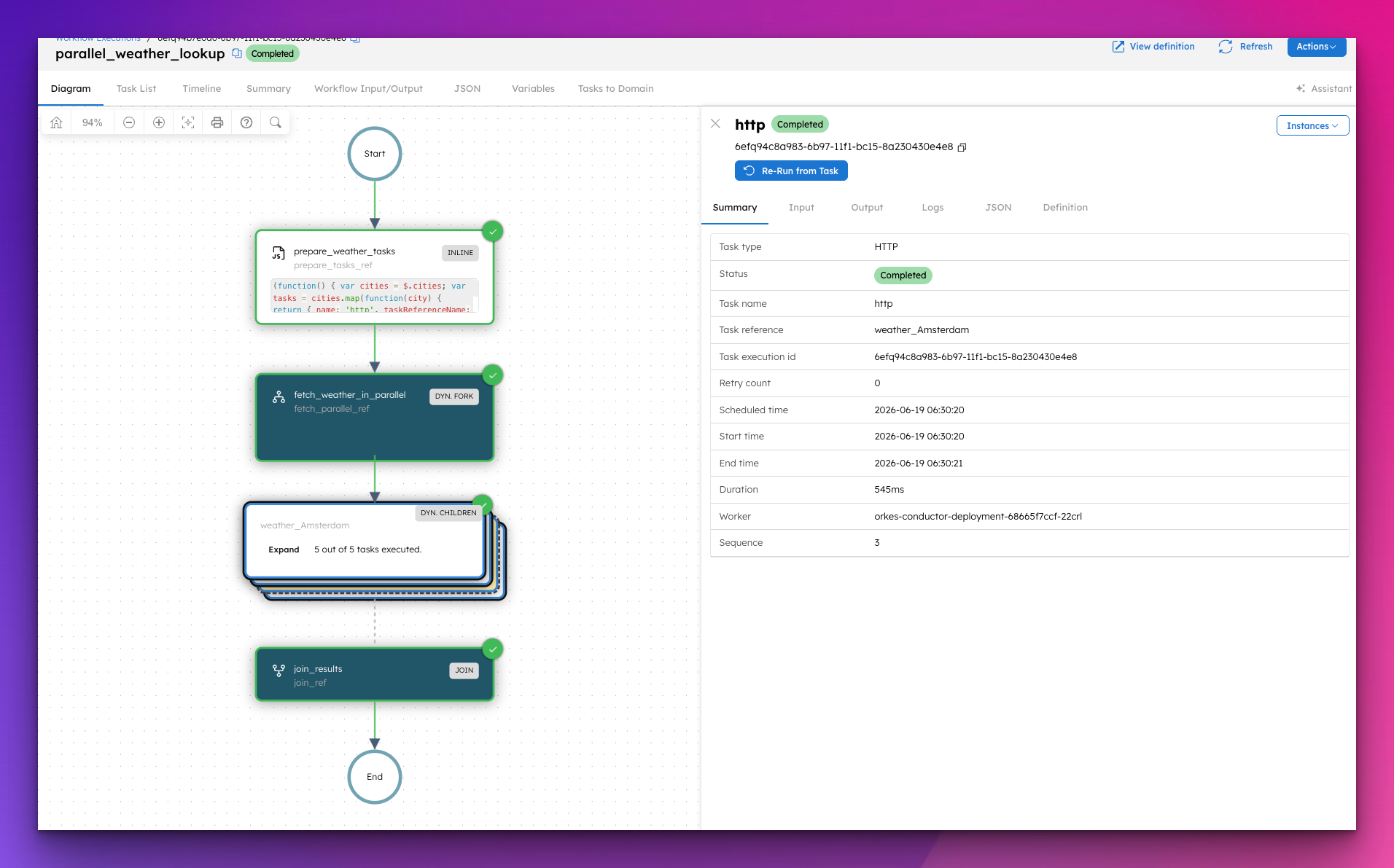
This workflow takes a list of cities by coordinates and fetches the current weather for each one in parallel using a DYNAMIC_FORK. All requests fire at the same time, results collected together. Just paste this into Conductor and click the Execute button.
{
"name": "parallel_weather_lookup",
"description": "Fetches current weather for multiple cities in parallel using DYNAMIC_FORK.",
"version": 1,
"tasks": [
{
"name": "prepare_weather_tasks",
"taskReferenceName": "prepare_tasks_ref",
"type": "INLINE",
"inputParameters": {
"evaluatorType": "graaljs",
"expression": "(function() { var cities = $.cities; var tasks = cities.map(function(city) { return { name: 'http', taskReferenceName: 'weather_' + city.name, type: 'HTTP' }; }); var inputs = {}; cities.forEach(function(city) { inputs['weather_' + city.name] = { uri: 'https://api.open-meteo.com/v1/forecast?latitude=' + city.lat + '&longitude=' + city.lon + '¤t_weather=true', method: 'GET', accept: 'application/json' }; }); return { tasks: tasks, inputs: inputs }; })();",
"cities": "${workflow.input.cities}"
}
},
{
"name": "fetch_weather_in_parallel",
"taskReferenceName": "fetch_parallel_ref",
"type": "FORK_JOIN_DYNAMIC",
"inputParameters": {
"dynamicTasks": "${prepare_tasks_ref.output.result.tasks}",
"dynamicTasksInput": "${prepare_tasks_ref.output.result.inputs}"
},
"dynamicForkTasksParam": "dynamicTasks",
"dynamicForkTasksInputParamName": "dynamicTasksInput"
},
{
"name": "join_results",
"taskReferenceName": "join_ref",
"type": "JOIN",
"inputParameters": {},
"joinOn": []
}
],
"inputParameters": [
"cities"
],
"outputParameters": {},
"schemaVersion": 2,
"restartable": true,
"workflowStatusListenerEnabled": false,
"timeoutPolicy": "ALERT_ONLY",
"timeoutSeconds": 0
}
To run it, pass a list of cities with their coordinates:
{
  "cities": [
    { "name": "Amsterdam", "lat": 52.3676, "lon": 4.9041 },
    { "name": "London", "lat": 51.5074, "lon": -0.1278 },
    { "name": "NewYork", "lat": 40.7128, "lon": -74.0060 },
    { "name": "Tokyo", "lat": 35.6762, "lon": 139.6503 },
    { "name": "Sydney", "lat": -33.8688, "lon": 151.2093 }
  ]
}
All five weather requests fire at the same time. The JOIN waits for every one to complete. You can see all five branches running simultaneously in the Conductor UI.
This is part of a series covering every built-in task in Orkes Conductor. Next up: the Sub Workflow task.