ENGINEERING
How to Run Custom Logic in Your Workflows Without Writing a Custom Worker

Maria Shimkovska
Content Engineer
Last updated: June 16, 2026
June 16, 2026
3 min read


Join thousands of developers building the future with Orkes.
This is for you if you would prefer not to read documentation and see more examples.
I want to show you everything that's possible with the built-in tasks in Orkes Conductor.
This is part of a series covering every built-in task in Orkes Conductor.
This one is for the JavaScript/Inline task.
The JavaScript task runs a JavaScript expression as a step in your workflow, evaluated by GraalJS at runtime.
GraalJS is just the engine that runs your JavaScript. Think of it as the runtime that executes your code inside Conductor, so you don't need Node.js or any external environment.
You pass it any input values you need, write your expression, and it executes and passes the result to the next task.
Here is a simple version of it adding two numbers together:
{
  "name": "inline",
  "taskReferenceName": "inline_ref",
  "type": "INLINE",
  "inputParameters": {
    "expression": "(function () { return $.value1 + $.value2; })();",
    "evaluatorType": "graaljs",
    "value1": 1,
    "value2": 2
  }
}
The task above returns 3.
From here you can make the expression as simple or as complex as your logic needs.
Also, any key you add to inputParameters other than expression and evaluatorType is automatically available inside your JavaScript expression as a property of the $ object. So if you pass in planPrice, you access it as $.planPrice inside the expression.
This task is not meant to replace big pieces of code that would typically be registered as workers in Conductor.
We built it so you can use it for the small pieces of logic that sit between your tasks like calculations, conditionals, and transformations that are too specific for a generic built-in task but too small to justify their own service.
Why does this matter? Because the alternative is spinning up a custom worker, deploying it, and maintaining it just to do something like calculate a price or format a date. The JavaScript task handles it in the workflow definition itself.
If you're building a billing workflow for a SaaS product, where customers can upgrade their subscription plan mid-cycle and you need to charge them only for the remaining days in the billing period, then you would need to calculate the prorated amount before passing it to your payment processor.
This is exactly what the JavaScript task can be used for, running the calculation inline without a dedicated service:
{
  "name": "calculate_proration",
  "taskReferenceName": "calculate_proration_ref",
  "type": "INLINE",
  "inputParameters": {
    "evaluatorType": "graaljs",
    "expression": "(function() { var dailyRate = $.planPrice / $.billingDays; var charge = dailyRate * $.daysRemaining; return Math.round(charge * 100) / 100; })();",
    "planPrice": "${workflow.input.planPrice}",
    "billingDays": "${workflow.input.billingDays}",
    "daysRemaining": "${workflow.input.daysRemaining}"
  }
}
The task takes the plan price, total billing days, and remaining days as inputs, runs the proration calculation, and returns the exact amount to charge.
Then the payment task that follows can reference ${calculate_proration_ref.output.result} directly.
If you're building a fraud detection workflow for a fintech platform, where incoming transactions are scored by an external risk engine and you need to decide whether to approve, flag, or block them based on that score, then you would need to apply your business rules to the raw score before routing the transaction.
This is exactly what the JavaScript task can be used for - encoding the decision logic directly inside the workflow:
{
  "name": "evaluate_risk",
  "taskReferenceName": "evaluate_risk_ref",
  "type": "INLINE",
  "inputParameters": {
    "evaluatorType": "graaljs",
    "expression": "(function() { var score = $.riskScore; if (score < 30) return 'approve'; if (score < 70) return 'review'; return 'block'; })();",
    "riskScore": "${risk_engine_ref.output.response.body.score}"
  }
}
The task reads the score from the upstream risk engine response, applies your thresholds, and returns a decision string - approve, review, or block.
A Switch task downstream can then route the transaction to the right path based on that output.
If you're building a patient notification workflow for a healthcare provider, where appointment reminders need to be personalised with the patient's name, appointment type, and time, then you would need to assemble the message string before passing it to your notification service.
You can use the JavaScript task for building the message inline from the workflow inputs like so:
{
  "name": "build_reminder_message",
  "taskReferenceName": "build_reminder_ref",
  "type": "INLINE",
  "inputParameters": {
    "evaluatorType": "graaljs",
    "expression": "(function() { return 'Hi ' + $.patientName + ', this is a reminder for your ' + $.appointmentType + ' appointment on ' + $.appointmentDate + ' at ' + $.appointmentTime + '. Please reply YES to confirm.'; })();",
    "patientName": "${workflow.input.patientName}",
    "appointmentType": "${workflow.input.appointmentType}",
    "appointmentDate": "${workflow.input.appointmentDate}",
    "appointmentTime": "${workflow.input.appointmentTime}"
  }
}
The task assembles the personalised message from the workflow inputs and returns it as a string. The notification task that follows picks it up and sends it.
When the JavaScript task runs, it gives you one output field to reference in downstream tasks:
| Field | What It Contains |
|---|---|
result | The value returned by your expression - a string, number, boolean, or object |
Reference it in later tasks like:
${calculate_proration_ref.output.result}
${evaluate_risk_ref.output.result}
We built this task so you can keep small pieces of logic inside your workflow definition instead of spinning up a service for them.
Any time you need to calculate a value, apply a business rule, format a string, or make a decision based on upstream outputs and the logic is too specific to fit a generic built-in task then the JavaScript task is the right tool.
If it fits in a function, it belongs here.
The fastest way to see this in action is to spin up a free Developer Edition account of Orkes Conductor.
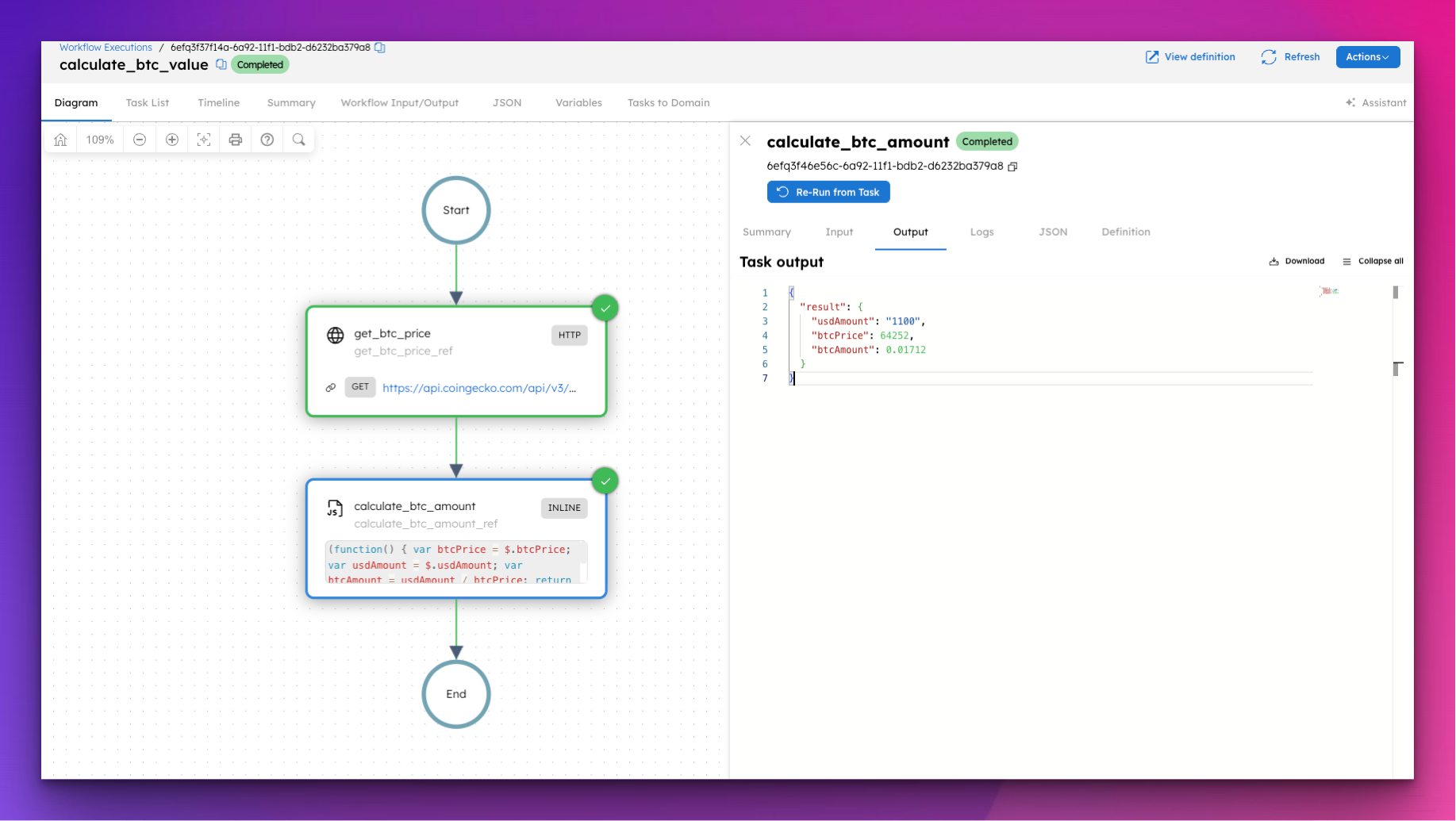
This workflow fetches the current Bitcoin price from a public API and uses a JavaScript task to calculate how much a given USD amount is worth in BTC at today's rate.
Just paste this into Conductor and click Execute.
{
  "name": "calculate_btc_value",
  "description": "Fetches the current Bitcoin price and calculates how much BTC a given USD amount can buy.",
  "version": 1,
  "tasks": [
    {
      "name": "get_btc_price",
      "taskReferenceName": "get_btc_price_ref",
      "type": "HTTP",
      "inputParameters": {
        "uri": "https://api.coindesk.com/v1/bpi/currentprice.json",
        "method": "GET",
        "accept": "application/json"
      }
    },
    {
      "name": "calculate_btc_amount",
      "taskReferenceName": "calculate_btc_amount_ref",
      "type": "INLINE",
      "inputParameters": {
        "evaluatorType": "graaljs",
        "expression": "(function() { var btcPrice = $.btcPrice; var usdAmount = $.usdAmount; var btcAmount = usdAmount / btcPrice; return { usdAmount: usdAmount, btcPrice: btcPrice, btcAmount: Math.round(btcAmount * 100000) / 100000 }; })();",
        "btcPrice": "${get_btc_price_ref.output.response.body.bpi.USD.rate_float}",
        "usdAmount": "${workflow.input.usdAmount}"
      }
    }
  ],
  "inputParameters": [
    "usdAmount"
  ],
  "outputParameters": {
    "result": "${calculate_btc_amount_ref.output.result}"
  },
  "schemaVersion": 2,
  "restartable": true,
  "workflowStatusListenerEnabled": false,
  "timeoutPolicy": "ALERT_ONLY",
  "timeoutSeconds": 0
}
To run it, pass a USD amount as input:
{
  "usdAmount": 1000
}
The workflow fetches the live Bitcoin price, runs the calculation inline, and returns exactly how much BTC that amount buys at today's rate.
The goal with Conductor is that the code you write is your business logic. Everything else is already handled. The JavaScript task is a good example of that.
This is part of a series covering every built-in task in Orkes Conductor.