- PRODUCT
Orkes Operators: Loops, Waits, and Human-in-the-Loop
 Karl Goeltner Software Engineer
 Not all workflows are linear. Some wait, some repeat, and some need a human to step in before moving forward.
In this post, we explore three essential operators that add patience, persistence, and people to your workflows:
- Do While for flexible, condition-based iteration
- Wait for clean, pause-and-resume control
- Human for structured human input and approvals
Whether you’re looping through review stages, waiting for external input, or routing manual approvals across teams, these operators help you build dynamic, resilient, and human-aware workflows without writing custom orchestration logic.
Do While
The Do While task is a loop operator that repeatedly executes a set of tasks as long as a specified condition remains true. Similar to a do-while loop in programming, it ensures the loop body runs at least once before evaluating the condition. This is useful for polling, retries, approval loops, or any scenario requiring repeated execution until a dynamic condition is met. The loop condition is evaluated after each iteration, and loop variables can be updated within the loop to control its execution.
Example implementation
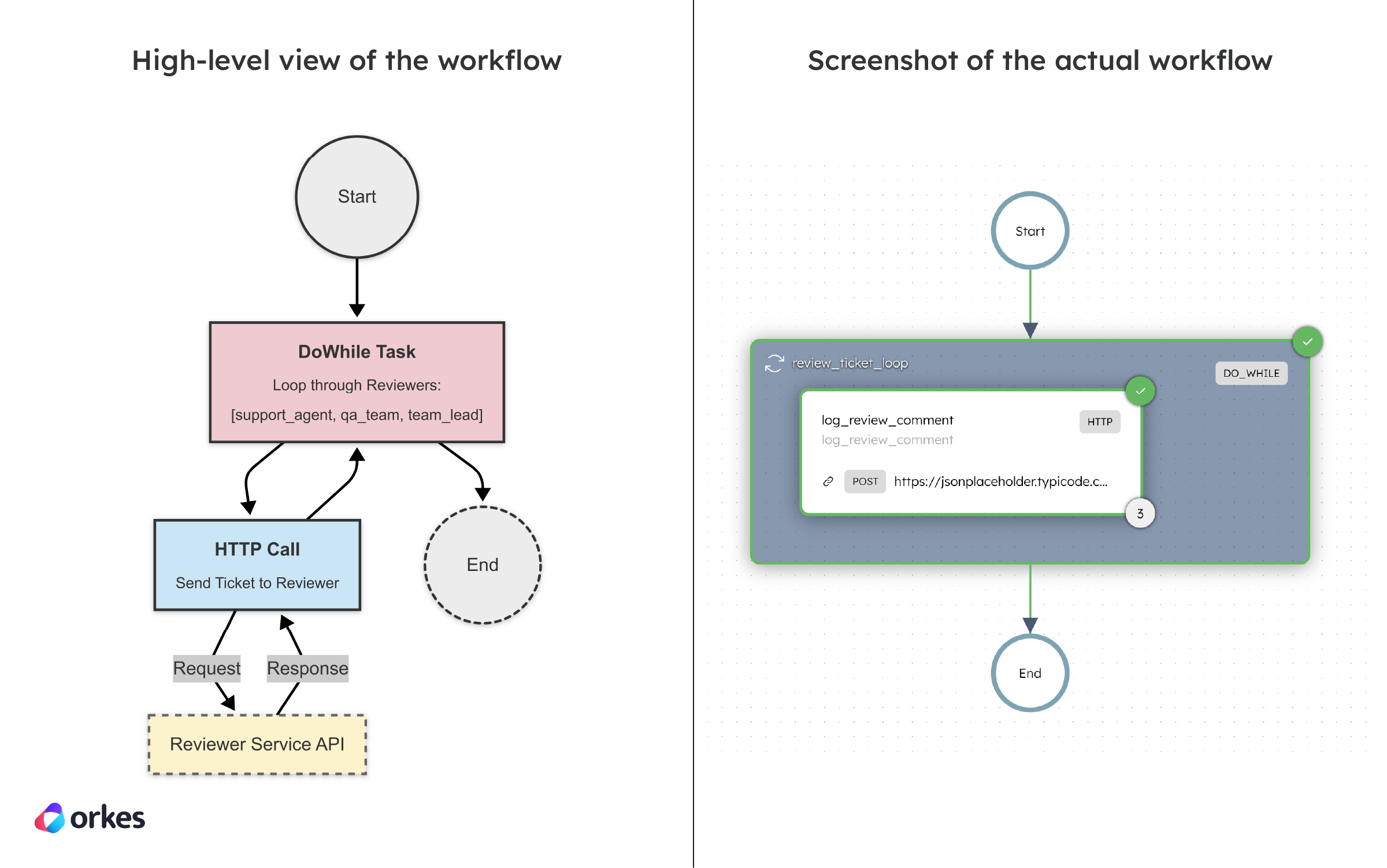
This workflow handles a ticket that must go through multiple internal review stages: support agent, QA team, and team lead. Using a Do While Task, the workflow loops through these stages automatically, sending the ticket to each reviewer in sequence. The loop runs once for each reviewer using the items list and exits cleanly once all reviews are complete.
Here’s the workflow visualized:
Here’s the code snippet for creating the workflow in code:
def register_workflow(workflow_executor: WorkflowExecutor) -> ConductorWorkflow:    # 1) Task to simulate review step with HTTP POST    review_task = HttpTask(        task_ref_name="log_review_comment",        http_input={            "uri": "https://jsonplaceholder.typicode.com/posts",            "method": "POST",            "headers": {                "Content-Type": "application/json"            },            "body": {                "reviewer": "${review_ticket_loop.output.item}",                "comment": "Reviewed and updated by ${review_ticket_loop.output.item}"            }        }    )
    # 2) DoWhileTask to iterate over reviewer stages    review_loop = DoWhileTask(        task_ref_name="review_ticket_loop",        termination_condition="$.review_ticket_loop.iteration < $.review_ticket_loop.input.items.length",        tasks=[review_task]    )    review_loop.input_parameters.update({        "items": ["support_agent", "qa_team", "team_lead"]    })
    workflow = ConductorWorkflow(        name="ticket_review_workflow",        executor=workflow_executor    )    workflow.version = 1    workflow.add(review_loop)    workflow.register(overwrite=True)
    return workflow
Check out the full sample code for the Do While Workflow.
Wait
The Wait task is a control flow operator used to pause workflow execution until an external signal is received. It’s ideal for scenarios that require human input, external approvals, or asynchronous events from another system. When the workflow reaches a Wait task, it halts and remains paused until it’s explicitly resumed using the Conductor API or UI. This makes it easy to build workflows that involve manual steps or depend on external triggers without resorting to constant polling or custom state management.
Example implementation
In an employee onboarding workflow, after provisioning accounts and sending welcome materials, the process may require the new hire to complete a digital form or provide verification documents. A Wait task can pause the workflow at this point until the user submits the required information. Once the input is received—via a webhook or manual trigger—the workflow resumes automatically, continuing with the next steps like assigning a manager or scheduling training.
Here’s the workflow visualized:
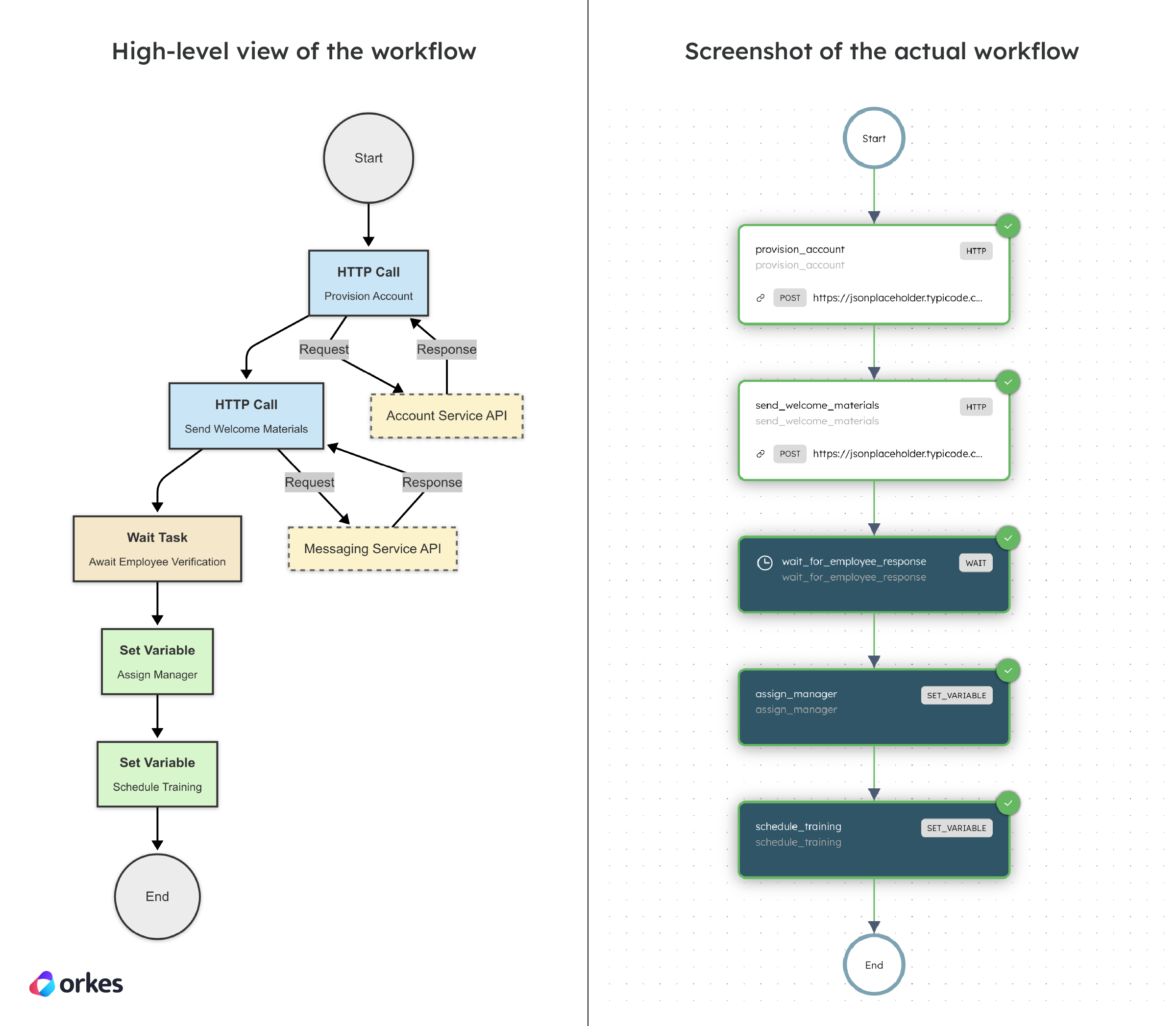
Here’s the code snippet for creating the workflow in code:
def register_workflow(workflow_executor: WorkflowExecutor) -> ConductorWorkflow:    # 1) Simulate account provisioning    provision_account = HttpTask(        task_ref_name="provision_account",        http_input={            "uri": "https://jsonplaceholder.typicode.com/users",            "method": "POST",            "headers": {                "Content-Type": "application/json"            },            "body": {                "employeeId": "${workflow.input.employeeId}",                "email": "${workflow.input.email}"            }        }    )
    # 2) Send welcome materials    send_welcome = HttpTask(        task_ref_name="send_welcome_materials",        http_input={            "uri": "https://jsonplaceholder.typicode.com/posts",            "method": "POST",            "headers": {                "Content-Type": "application/json"            },            "body": {                "employeeId": "${workflow.input.employeeId}",                "message": "Welcome to the company!"            }        }    )
    # 3) Wait for the new employee to submit verification (simulate with 10s wait)    wait_for_input = WaitTask(        task_ref_name="wait_for_employee_response",        wait_for_seconds=10    )
    # 4) Assign a manager    assign_manager = SetVariableTask(task_ref_name="assign_manager")    assign_manager.input_parameters.update({        "manager": "alice.smith@company.com"    })
    # 5) Schedule training    schedule_training = SetVariableTask(task_ref_name="schedule_training")    schedule_training.input_parameters.update({        "training_date": "2025-04-20"    })
    workflow = ConductorWorkflow(        name="employee_onboarding_workflow",        executor=workflow_executor    )    workflow.version = 1
    workflow.add(provision_account)    workflow.add(send_welcome)    workflow.add(wait_for_input)    workflow.add(assign_manager)    workflow.add(schedule_training)
    workflow.register(overwrite=True)    return workflow
Check out the full sample code for the Wait Workflow.
Human
The Human task in Orkes Conductor is used to pause a workflow and wait for manual input or approval from a human before continuing. It’s ideal for workflows that involve human-in-the-loop decisions, such as document reviews, access approvals, or data verification. When a Human task is reached, the workflow enters a WAITING state until a user provides the required input through the API or UI. This enables seamless integration of manual steps into automated workflows while maintaining visibility and control over the process.
Example implementation
In this example, an expense approval workflow uses two Human tasks to gather approvals from different departments. First, the HR department is prompted with a form showing the expense details in read-only fields. If HR approves, the workflow continues to the Finance department for a second round of approval using the same form template. Upon Finance’s approval, a notification workflow is triggered. If either department rejects the request, the workflow terminates early. This use case shows how Human tasks enable structured, multi-step approvals with manual input inside an otherwise automated process.
Here’s the workflow visualized:
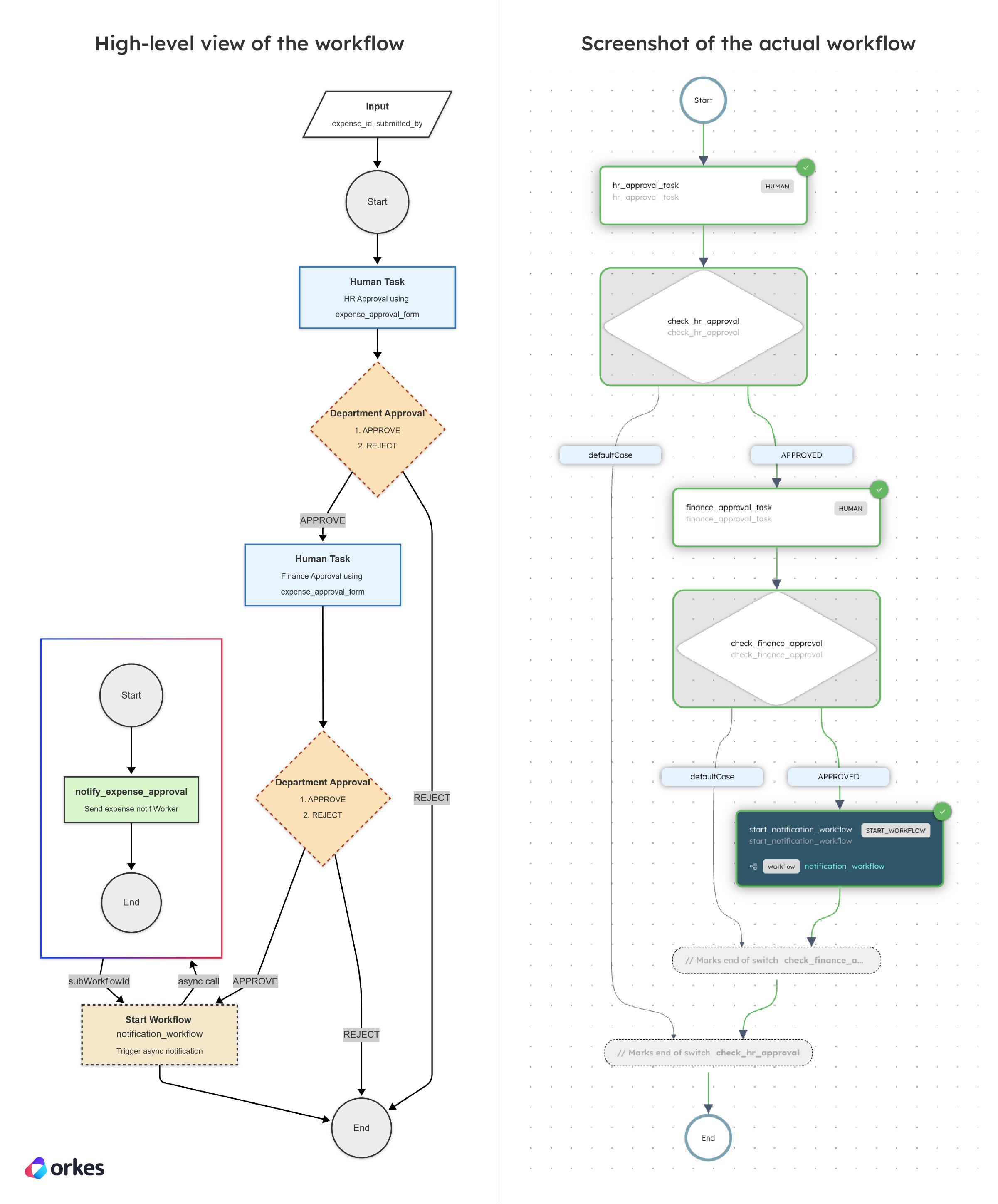
To create this workflow in Conductor, you must first define the expense_approval_form using the appropriate fields in the Orkes UI. Here’s the code snippet for creating the expense_approval_form in JSON:
{ "createTime": 1744849075315, "updateTime": 1744849570917, "createdBy": "USER:john.doe@acme.com", "updatedBy": "USER:john.doe@acme.com", "name": "expense_approval_form", "version": 1, "jsonSchema": { "$schema": "http://json-schema.org/draft-07/schema", "properties": { "approvalStatus": { "type": "string", "enum": [ "APPROVED", "REJECTED" ] } }, "required": [ "approvalStatus" ] }, "templateUI": { "type": "VerticalLayout", "elements": [ { "type": "Control", "scope": "#/properties/approvalStatus", "label": "Department Approval", "options": {} } ] }}Here’s the code snippet for creating the workflow in code:
# --- Notification Workflow ---
def register_notification_workflow(executor: WorkflowExecutor) -> ConductorWorkflow:    notify_task = SimpleTask(        task_def_name="notify_expense_approval",        task_reference_name="notify_expense_approval_ref"    )
    workflow = ConductorWorkflow(        name="notification_workflow",        executor=executor    )    workflow.version = 1    workflow.add(notify_task)    workflow.register(overwrite=True)    return workflow

# --- Expense Approval Workflow ---
def register_expense_approval_workflow(executor: WorkflowExecutor) -> ConductorWorkflow:    # 1) HR Approval Step    hr_approval = HumanTask(        task_ref_name="hr_approval_task",        display_name="HR Approval",        form_template="expense_approval_form",        form_version=1,        assignment_completion_strategy=AssignmentCompletionStrategy.TERMINATE    )
    check_hr = SwitchTask(        task_ref_name="check_hr_approval",        case_expression="${hr_approval_task.output.approvalStatus}"    ).switch_case("APPROVED", [])
    # 2) Finance Approval Step    finance_approval = HumanTask(        task_ref_name="finance_approval_task",        display_name="Finance Approval",        form_template="expense_approval_form",        form_version=1,        assignment_completion_strategy=AssignmentCompletionStrategy.TERMINATE    )
    check_finance = SwitchTask(        task_ref_name="check_finance_approval",        case_expression="${finance_approval_task.output.approvalStatus}"    ).switch_case("APPROVED", [])
    # 3) Start Notification Workflow    start_notification = StartWorkflowTask(        task_ref_name="start_notification_workflow",        workflow_name="notification_workflow",        start_workflow_request=StartWorkflowRequest(            name="notification_workflow",            version=1,            input={                "expense_id": "${workflow.input.expense_id}",                "submitted_by": "${workflow.input.submitted_by}"            }        ),        version=1    )
    # Add the notification task inside the finance approval success branch    check_finance.switch_case("APPROVED", [start_notification])
    # Add finance approval after HR approves    check_hr.switch_case("APPROVED", [finance_approval, check_finance])
    workflow = ConductorWorkflow(        name="expense_approval_workflow",        executor=executor    )    workflow.version = 1    workflow.add(hr_approval)    workflow.add(check_hr)    workflow.register(overwrite=True)    return workflow

# --- Worker for notification task ---
@worker_task(task_definition_name="notify_expense_approval")def notify_expense_approval() -> dict:    print("🔔 Expense approval notification sent.")    return {"notified": True}
Check out the full sample code for the Human Workflow.
Wrap up
Loops, waits, and human steps bring real-world rhythm to your workflows, allowing them to persist, pause, or involve people when needed. With tasks like Do While, Wait, and Human, Conductor makes asynchronous logic declarative, structured, and resilient. No brittle timers, no custom coordination—just clean, event-driven flow.
Next up:
—
Orkes Conductor is an enterprise-grade orchestration platform for process automation, API and microservices orchestration, agentic workflows, and more. Check out the full set of features, or try it yourself using our free Developer Edition.