PRODUCT
Workflow-Level Resilience in Orkes Conductor: Timeouts and Failure Workflows

Karl Goeltner
Software Engineer
Last updated: May 12, 2025
May 12, 2025
5 min read


Join thousands of developers building the future with Orkes.
Building resilient, production-grade workflows means preparing for the unexpected—from task stalls to external service outages. While task-level timeouts catch issues in isolated steps, workflow-level resilience settings act as a safety net for your entire orchestration. They ensure your system behaves predictably under stress and provides a graceful fallback when things go wrong.
In this post, we’ll explore two key features in Orkes Conductor that help you build robust workflows:
A workflow timeout defines how long a workflow is allowed to run before it's forcibly marked as timed out. This is crucial when your business logic needs to meet service-level agreements (SLAs) or avoid workflows stalling indefinitely.
Workflow timeout parameters
| Parameter | Description |
|---|---|
timeoutSeconds | Maximum duration (in seconds) for which the workflow is allowed to run. If the workflow hasn’t reached a terminal state within this time, it is marked as TIMED_OUT. Set to 0 to disable. |
timeoutPolicy | Action to take when a timeout occurs. Supports:
|
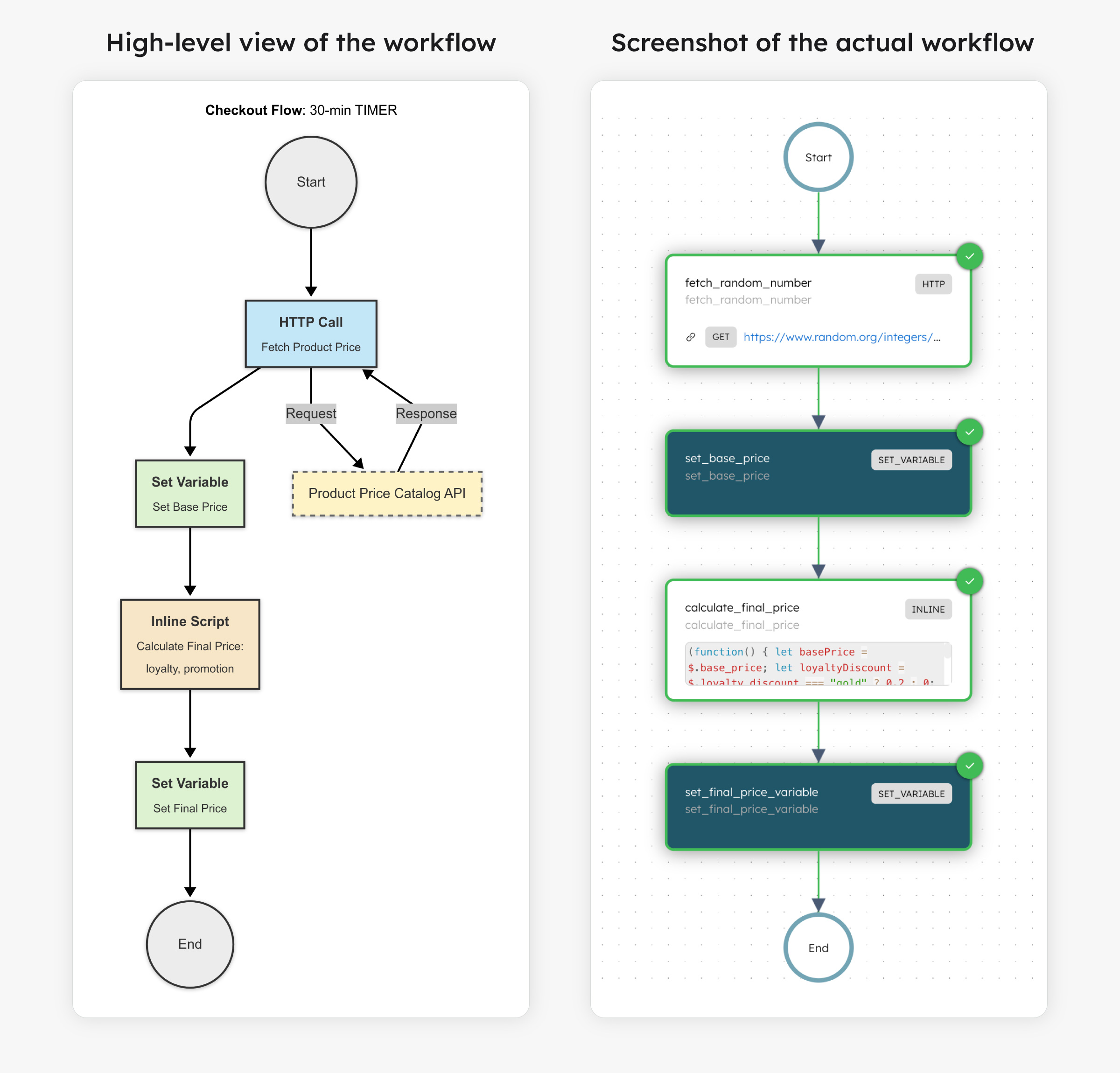
Imagine a checkout flow involving payment, inventory locking, and order confirmation. You don’t want stale carts holding inventory hostage for hours. A 30-minute timeout ensures the workflow either completes or fails cleanly.
Here’s a simplified implementation in Python using the Conductor SDK:
def register_workflow(workflow_executor: WorkflowExecutor) -> ConductorWorkflow:
    # 1) HTTP task to fetch product price (simulated with dummy URL)
    fetch_random_number_task = HttpTask(
        task_ref_name="fetch_random_number",
        http_input={
            "uri": "https://www.random.org/integers/?num=1&min=1&max=100&col=1&base=10&format=plain&rnd=new",
            "method": "GET",
            "headers": {
                "Content-Type": "application/json"
            }
        }
    )

    # 2) Set variable for base price
    set_base_price = SetVariableTask(task_ref_name='set_base_price')
    set_base_price.input_parameters.update({
        'base_price': '${fetch_random_number.output.response.body}'
    })

    # 3) Inline task to calculate final price
    calculate_price_task = InlineTask(
        task_ref_name='calculate_final_price',
        script='''
            (function() {
                let basePrice = $.base_price;
                let loyaltyDiscount = $.loyalty_discount === "gold" ? 0.2 : 0;
                let promotionDiscount = $.promotion_discount ? 0.1 : 0;
                return basePrice * (1 - loyaltyDiscount - promotionDiscount);
            })();
        ''',
        bindings={
            'base_price': '${workflow.variables.base_price}',
            'loyalty_discount': '${workflow.input.loyalty_status}',
            'promotion_discount': '${workflow.input.is_promotion_active}',
        }
    )

    # 4) Set final calculated price
    set_price_variable = SetVariableTask(task_ref_name='set_final_price_variable')
    set_price_variable.input_parameters.update({
        'final_price': '${calculate_final_price.output.result}'
    })

    # Define the workflow with a 30-minute timeout
    workflow = ConductorWorkflow(
        name='checkout_workflow',
        executor=workflow_executor
    )
    workflow.version = 1
    workflow.description = "E-commerce checkout workflow with 30-min timeout"
    workflow.timeout_seconds(1800)  # 30 minutes
    workflow.timeout_policy(TimeoutPolicy.TIME_OUT_WORKFLOW)

    workflow.add(fetch_random_number_task)
    workflow.add(set_base_price)
    workflow.add(calculate_price_task)
    workflow.add(set_price_variable)

    # Register the workflow definition
    workflow.register(overwrite=True)
    return workflow
Check out the full sample code for the E-commerce workflow.
If the workflow exceeds 30 minutes, it is marked as TIMED_OUT automatically, allowing you to alert a team, start a cleanup flow, or retry.
What happens when a workflow fails unexpectedly, due to a timeout, an API error, or an unhandled edge case? That’s where failure workflows come in.
These are separate workflows that are triggered when the main workflow fails. They allow you to compensate, clean up, and notify downstream systems or users.
Failure workflow parameters
| Parameter | Description |
|---|---|
failureWorkflow | The name of the fallback workflow to be triggered if this one fails. The default is empty. |
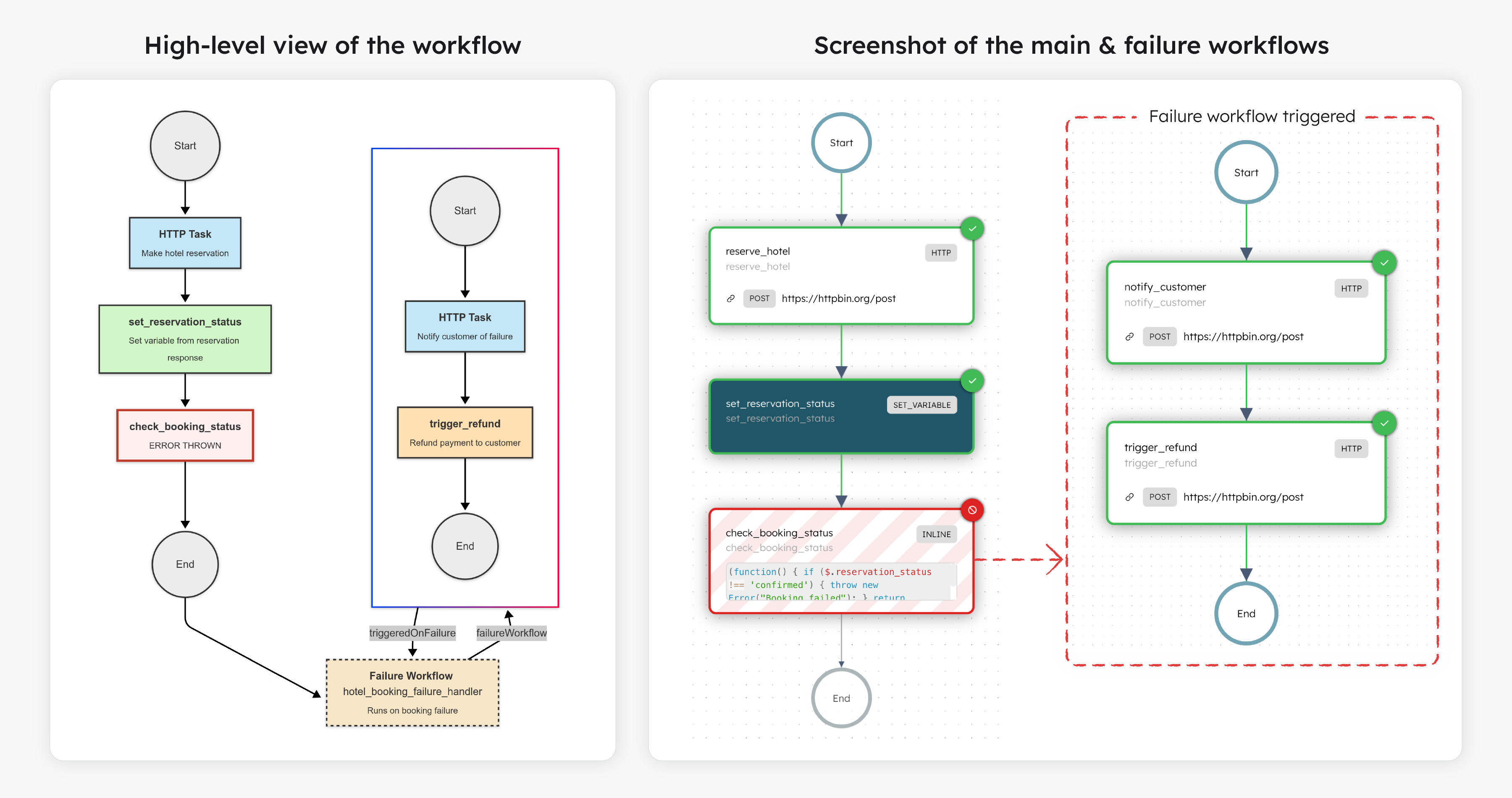
Let’s say your travel booking app orchestrates a hotel reservation workflow. If the booking fails (maybe the payment went through, but the room wasn’t confirmed), you’d want to:
Main workflow code
def register_hotel_booking_workflow(workflow_executor: WorkflowExecutor) -> ConductorWorkflow:
    # 1) HTTP task to reserve a hotel (simulated with dummy URL)
    reserve_hotel_task = HttpTask(
        task_ref_name="reserve_hotel",
        http_input={
            "uri": "https://httpbin.org/post",
            "method": "POST",
            "headers": {"Content-Type": "application/json"},
            "body": {
                "hotel_id": "${workflow.input.hotel_id}",
                "checkin": "${workflow.input.checkin_date}",
                "checkout": "${workflow.input.checkout_date}",
                "customer_id": "${workflow.input.customer_id}"
            }
        }
    )

    # 2) Set variable to confirm reservation status (simulate from body)
    set_status = SetVariableTask(task_ref_name='set_reservation_status')
    set_status.input_parameters.update({
        'reservation_status': '${reserve_hotel.output.response.body.json.status}'
    })

    # 3) Inline task to check booking status
    evaluate_reservation = InlineTask(
        task_ref_name='check_booking_status',
        script='''
            (function() {
                if ($.reservation_status !== 'confirmed') {
                    throw new Error("Booking failed");
                }
                return "confirmed";
            })();
        ''',
        bindings={
            'reservation_status': '${workflow.variables.reservation_status}'
        }
    )

    workflow = ConductorWorkflow(
        name='hotel_booking_workflow',
        executor=workflow_executor
    )
    workflow.version = 1
    workflow.description = "Hotel reservation flow with SLA and failure handling"
    workflow.timeout_seconds(900)  # 15 minutes
    workflow.timeout_policy(TimeoutPolicy.TIME_OUT_WORKFLOW)
    workflow.failure_workflow("hotel_booking_failure_handler")

    workflow.add(reserve_hotel_task)
    workflow.add(set_status)
    workflow.add(evaluate_reservation)

    workflow.register(overwrite=True)
    return workflow
Failure workflow code
def register_failure_workflow(workflow_executor: WorkflowExecutor) -> ConductorWorkflow:
    # 1) Notify customer (simulated with dummy URL)
    notify_customer_task = HttpTask(
        task_ref_name="notify_customer",
        http_input={
            "uri": "https://httpbin.org/post",
            "method": "POST",
            "headers": {"Content-Type": "application/json"},
            "body": {
                "customer_id": "${workflow.input.customer_id}",
                "message": "Your hotel booking could not be completed. We apologize for the inconvenience."
            }
        }
    )

    # 2) Trigger refund (simulated with dummy URL)
    refund_payment_task = HttpTask(
        task_ref_name="trigger_refund",
        http_input={
            "uri": "https://httpbin.org/post",
            "method": "POST",
            "headers": {"Content-Type": "application/json"},
            "body": {
                "payment_id": "${workflow.input.payment_id}",
                "reason": "Hotel booking failed"
            }
        }
    )

    failure_workflow = ConductorWorkflow(
        name="hotel_booking_failure_handler",
        executor=workflow_executor
    )
    failure_workflow.version = 1
    failure_workflow.description = "Handles failed hotel bookings with customer notification and refund"

    failure_workflow.add(notify_customer_task)
    failure_workflow.add(refund_payment_task)

    failure_workflow.register(overwrite=True)
    return failure_workflow
Check out the full sample code for the hotel booking workflow.
timeoutSeconds at both workflow and critical task levels to prevent resource overuse.failureWorkflow for any workflow that produces side effects or artifacts that need cleanup in the event of failure.Building production-ready workflows in Orkes Conductor means planning for both success and failure. Timeout policies and failure workflows aren’t just safeguards—they’re essential tools for maintaining system health, meeting SLAs, and ensuring a reliable user experience. When combined thoughtfully, they allow your workflows to self-regulate, recover from disruptions, and maintain a clean system state, even when things don’t go as planned.
—
Orkes Conductor is an enterprise-grade orchestration platform for process automation, API and microservices orchestration, agentic workflows, and more. Check out the full set of features, or try it yourself using our free Developer Edition.