PRODUCT
Orkes Operators: Parallelism and Reusability

Karl Goeltner
Software Engineer
Last updated: April 28, 2025
April 28, 2025
6 min read


Join thousands of developers building the future with Orkes.
Workflows don’t just move forward—they branch, scale, and reuse logic. Whether you’re processing tasks in parallel, delegating work to subflows, or triggering asynchronous side-jobs, these patterns let you build smarter, more modular orchestration.
In this post, we’ll explore operators that boost concurrency and composability in Orkes Conductor:
From concurrent notifications to reusable payment flows, these operators help you scale orchestration cleanly—without duplicating logic or overcomplicating control flow. Let’s dive in.
The Fork/Join task in Orkes Conductor enables parallel execution of multiple task branches within a workflow. When a Fork task is reached, it splits the workflow into separate paths that run concurrently, allowing different sequences of tasks to execute in parallel. Once all branches are complete, a Join task is used to synchronize them before continuing with the rest of the workflow. This pattern is ideal for optimizing performance and handling tasks that can be executed independently, such as running multiple validation checks or data fetch operations simultaneously.
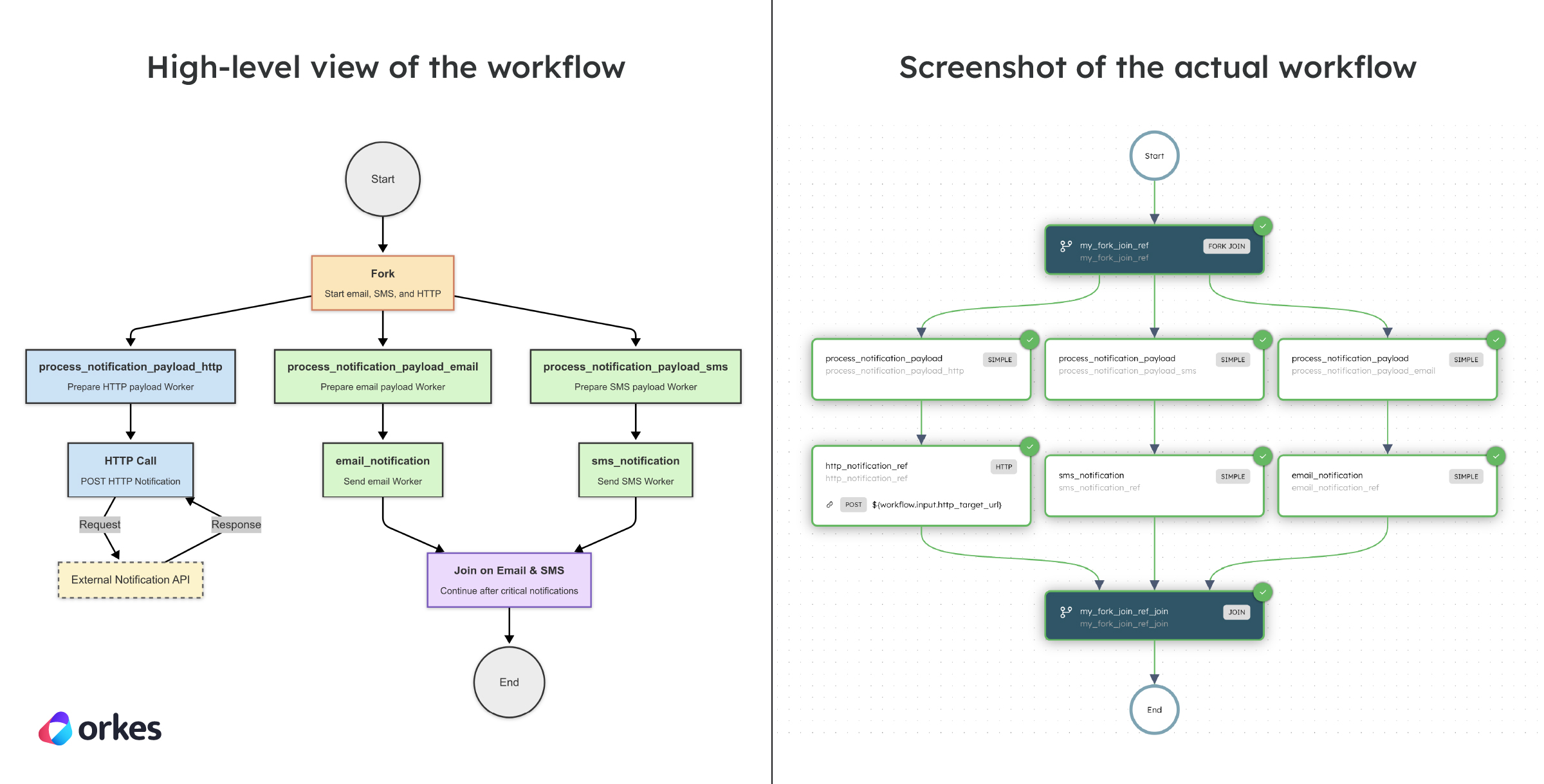
A common use case for the Fork/Join task is in a multi-channel notification workflow. Suppose a Fork task dispatches three parallel notifications—email, SMS, and HTTP. Each branch sends its respective message independently to maximize concurrency. Since HTTP responses can be retried and don’t need to block the overall flow, the Join task is configured with joinOn and is set to only the email_notification and sms_notification tasks. This allows the workflow to proceed as soon as the critical email and SMS tasks are complete, while the HTTP notification continues in the background. This setup enables partial synchronization—balancing reliability with improved efficiency.
Here’s the workflow visualized:
Here’s the code snippet for creating the workflow in code:
def register_notification_workflow(workflow_executor: WorkflowExecutor) -> ConductorWorkflow:
    # 1) Define each notification path
    email_branch = [
        SimpleTask(
            task_def_name="process_notification_payload",
            task_reference_name="process_notification_payload_email"
        ),
        SimpleTask(
            task_def_name="email_notification",
            task_reference_name="email_notification_ref"
        )
    ]

    sms_branch = [
        SimpleTask(
            task_def_name="process_notification_payload",
            task_reference_name="process_notification_payload_sms"
        ),
        SimpleTask(
            task_def_name="sms_notification",
            task_reference_name="sms_notification_ref"
        )
    ]

    http_branch = [
        SimpleTask(
            task_def_name="process_notification_payload",
            task_reference_name="process_notification_payload_http"
        ),
        HttpTask(
            task_ref_name="http_notification_ref",
            http_input={
                "uri": "${workflow.input.http_target_url}",
                "method": "POST",
                "headers": {
                    "Content-Type": "application/json"
                },
                "body": {
                    "message": "Notification triggered"
                }
            }
        )
    ]

    # 2) Fork-Join setup (only join on email + sms)
    fork_join = ForkTask(
        task_ref_name="my_fork_join_ref",
        forked_tasks=[email_branch, sms_branch, http_branch],
        join_on=["email_notification_ref", "sms_notification_ref"]
    )

    workflow = ConductorWorkflow(
        name="notification_workflow_with_fork_join",
        executor=workflow_executor
    )
    workflow.version = 1
    workflow.add(fork_join)
    workflow.register(overwrite=True)

    return workflow


@worker_task(task_definition_name="process_notification_payload")
def process_notification_payload() -> dict:
    print("🛠️ Processing notification payload...")
    return {"payload_processed": True}


@worker_task(task_definition_name="email_notification")
def email_notification() -> dict:
    print("📧 Email sent to test@example.com")
    return {
        "email_sent_at": "2021-11-06T07:37:17+0000",
        "email_sent_to": "test@example.com"
    }


@worker_task(task_definition_name="sms_notification")
def sms_notification() -> dict:
    print("📱 SMS sent to +1-xxx-xxx-xxxx")
    return {
        "sms_sent_at": "2021-11-06T07:37:17+0129",
        "sms_sent_to": "+1-xxx-xxx-xxxx"
    }
Check out the full sample code for the Fork/Join Workflow.
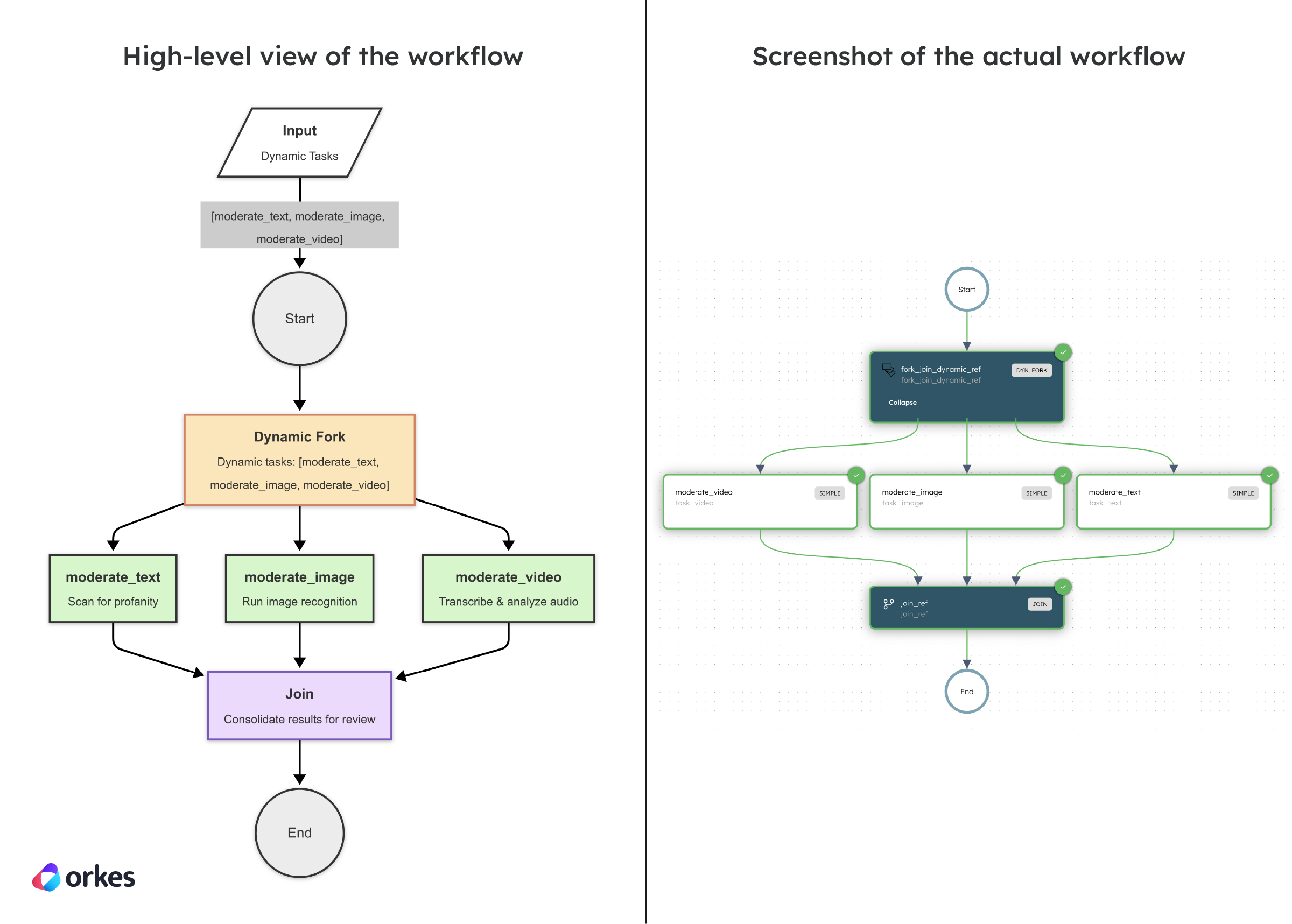
The Dynamic Fork task allows you to create and execute multiple parallel task branches based on dynamic input at runtime. Unlike a standard fork, which defines branches statically, Dynamic Forks generates parallel tasks on the fly using input parameters. This is particularly useful when the number of tasks isn’t known ahead of time—such as sending notifications to a dynamic list of users or processing a batch of files. Each dynamically generated task runs independently, and a corresponding Join task is used to synchronize them once all have been completed.
Imagine a content moderation workflow that needs to process different types of user-generated content—text, images, and videos. Each content type requires a different moderation approach, like scanning text for profanity, running image recognition for flagged visuals, or transcribing and analyzing video audio. Since the type and number of content items vary per request, a Dynamic Fork is ideal. At runtime, it dynamically generates tasks like moderate_text, moderate_image, and moderate_video, each configured with input specific to the content item. Once all moderation tasks are complete, a Join task consolidates the results for final review. This setup ensures flexibility and scalability for diverse, real-time moderation needs.
Here’s the workflow visualized:
Here’s the code snippet for creating the workflow in code:
def register_moderation_workflow(workflow_executor: WorkflowExecutor) -> ConductorWorkflow:
    # 1) Define Join task
    join_task = JoinTask(
        task_ref_name="join_ref",
        join_on=[]
    )

    # 2) Define Dynamic Fork Task with inputParameters dict
    dynamic_fork = DynamicForkTask(
        task_ref_name="fork_join_dynamic_ref",
        join_task=join_task
    )
    dynamic_fork.input_parameters.update({
        "dynamicTasks": "${workflow.input.dynamicTasks}",
        "dynamicTasksInputs": "${workflow.input.dynamicTasksInputs}"
    })

    workflow = ConductorWorkflow(
        name="DynamicForkExample",
        executor=workflow_executor
    )
    workflow.version = 1
    workflow.add(dynamic_fork)
    workflow.register(overwrite=True)

    return workflow


@worker_task(task_definition_name="moderate_text")
def moderate_text() -> dict:
    print("📝 Moderating text...")
    return {"status": "Text moderation complete"}


@worker_task(task_definition_name="moderate_image")
def moderate_image() -> dict:
    print("🖼️ Moderating image...")
    return {"status": "Image moderation complete"}


@worker_task(task_definition_name="moderate_video")
def moderate_video() -> dict:
    print("🎥 Moderating video...")
    return {"status": "Video moderation complete"}
Check out the full sample code for the Dynamic Fork Workflow.
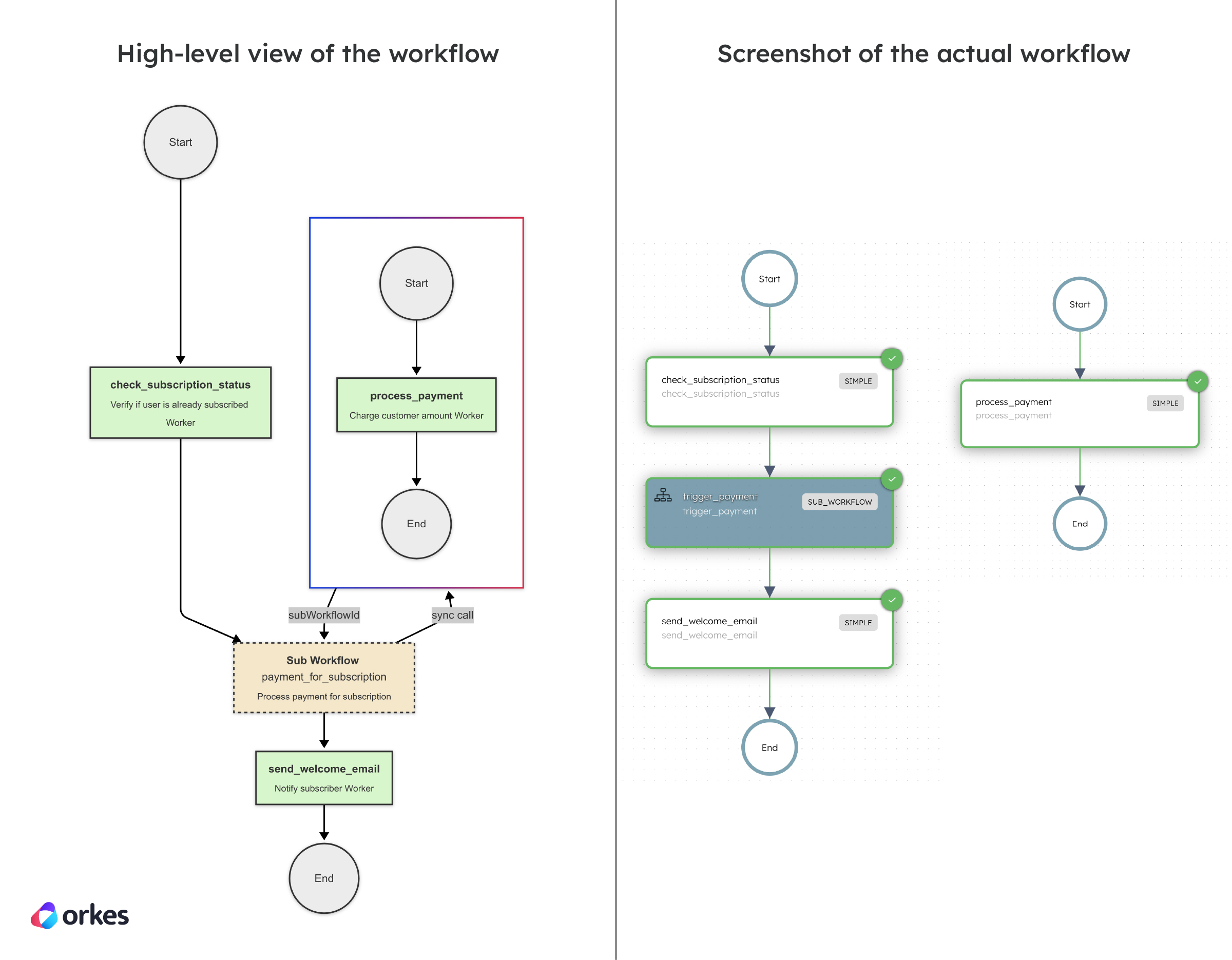
The Sub Workflow task in Orkes Conductor allows you to encapsulate and execute another workflow synchronously within the context of a parent workflow. This task enables modularity and reusability, letting you delegate specific parts of a workflow to be handled by a separate workflow definition. The sub-workflow can run independently and return results to the parent workflow, helping to simplify complex workflows and manage different logic in isolation. It also provides better scalability and maintainability by breaking down large workflows into smaller, reusable components.
In a subscription management workflow, the Sub Workflow task is used to modularize payment processing. Instead of duplicating the entire payment logic within the subscription workflow, the payment_for_subscription workflow is called as a sub-workflow whenever payment needs to be processed. This ensures that any updates made to the payment workflow are automatically reflected across all parent workflows, improving maintainability and consistency. The parent workflow can invoke the sub-workflow multiple times, allowing for seamless integration of payment logic into the larger subscription process.
Here’s the workflow visualized:
Here’s the code snippet for creating the workflow in code:
# --- Payment Workflow (Sub-Workflow for Subscription) ---

def register_payment_workflow(workflow_executor: WorkflowExecutor) -> ConductorWorkflow:
    # 1) Process payment (for subscription)
    process_payment = SimpleTask(
        task_def_name="process_payment",
        task_reference_name="process_payment"
    )
    process_payment.input_parameters.update({
        "amount": "${workflow.input.amount}"
    })

    workflow = ConductorWorkflow(
        name="payment_for_subscription",
        executor=workflow_executor
    )
    workflow.version = 1
    workflow.add(process_payment)
    workflow.register(overwrite=True)

    return workflow


# --- Subscription Workflow Definition (using Sub-Workflow) ---

def register_subscription_workflow(workflow_executor: WorkflowExecutor) -> ConductorWorkflow:
    # 1) Check if the user is subscribed
    check_status = SimpleTask(
        task_def_name="check_subscription_status",
        task_reference_name="check_subscription_status"
    )

    # 2) Trigger payment using sub-workflow
    trigger_payment = SubWorkflowTask(
        task_ref_name="trigger_payment",
        workflow_name="payment_for_subscription",  # The sub-workflow to invoke
        version=1
    )
    trigger_payment.input_parameters.update({
        "amount": "${workflow.input.amount}",  # Mapping input to sub-workflow
        "subscription_id": "${workflow.input.subscription_id}",
        "user_id": "${workflow.input.user_id}"
    })

    # 3) Send welcome email
    send_email = SimpleTask(
        task_def_name="send_welcome_email",
        task_reference_name="send_welcome_email"
    )

    workflow = ConductorWorkflow(
        name="subscription_management",
        executor=workflow_executor
    )
    workflow.version = 1
    workflow.add(check_status)
    workflow.add(trigger_payment)
    workflow.add(send_email)
    workflow.register(overwrite=True)

    return workflow


@worker_task(task_definition_name="check_subscription_status")
def check_subscription_status() -> dict:
    print("📡 Checking subscription status...")
    return {"status": "active"}


@worker_task(task_definition_name="send_welcome_email")
def send_welcome_email() -> dict:
    print("📨 Sending welcome email to subscriber...")
    return {"status": "email_sent"}


@worker_task(task_definition_name="process_payment")
def process_payment(amount) -> dict:
    print(f"💰 Charging customer: ${amount.input_data['amount']}")
    return {"status": "Payment successful"}
Check out the full sample code for the Sub Workflow Workflow.
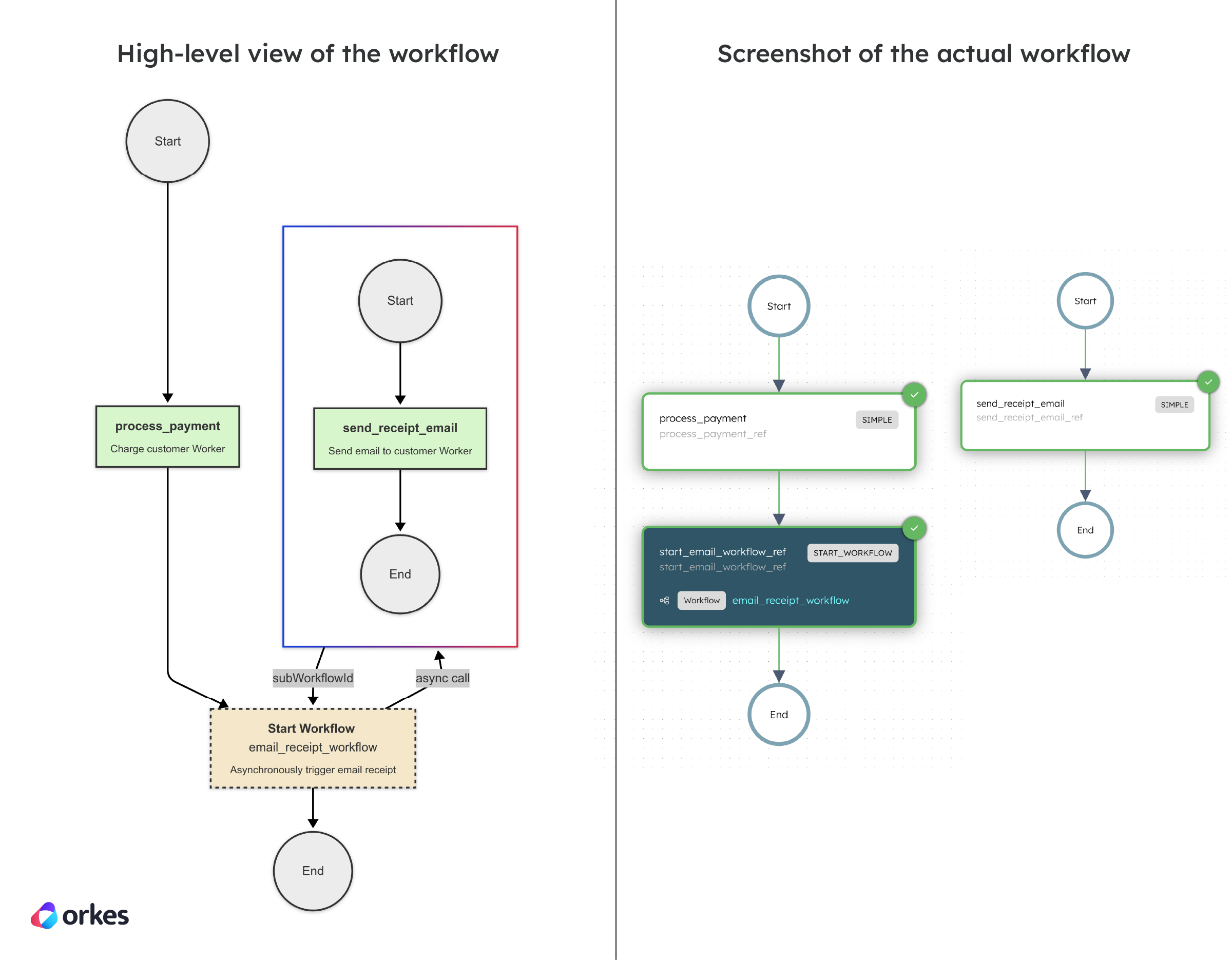
The Start Workflow task is an operator in Orkes Conductor that launches another workflow asynchronously from within the current one. Unlike the Sub Workflow task, which pauses the parent workflow until the child workflow completes, the Start Workflow task triggers the target workflow and immediately continues execution without waiting for its result. This is ideal for use cases like fire-and-forget processing, background jobs, or decoupled side operations where real-time feedback isn't needed, allowing for greater concurrency and throughput in orchestration.
A common use case for the Start Workflow task is submitting background jobs that don’t need to block the main workflow. For example, in an e-commerce checkout workflow, once the payment is processed, a Start Workflow task can be used to asynchronously trigger an email_receipt_workflow that sends a receipt to the customer. This ensures the checkout flow completes quickly without waiting for email processing, which can be handled independently.
Here’s the workflow visualized:
Here’s the code snippet for creating the workflow in code:
# --- Email Receipt Workflow (Sub-Workflow for emails) ---

def register_email_receipt_workflow(executor: WorkflowExecutor) -> ConductorWorkflow:
    email_task = SimpleTask(
        task_def_name="send_receipt_email",
        task_reference_name="send_receipt_email_ref"
    )

    workflow = ConductorWorkflow(
        name="email_receipt_workflow",
        executor=executor
    )
    workflow.version = 1
    workflow.add(email_task)
    workflow.register(overwrite=True)
    return workflow


# --- Main Checkout Workflow Definition (using Sub-Workflow) ---

def register_checkout_workflow(executor: WorkflowExecutor) -> ConductorWorkflow:
    # 1) Task to process payment
    payment_task = SimpleTask(
        task_def_name="process_payment",
        task_reference_name="process_payment_ref"
    )

    # 2) Task to asynchronously start email_receipt_workflow
    start_email_workflow_input = StartWorkflowRequest(
        name="email_receipt_workflow",
        version=1,
        input={
            "customer_email": "${workflow.input.customer_email}",
            "order_id": "${workflow.input.order_id}"
        }
    )

    start_email_workflow_task = StartWorkflowTask(
        task_ref_name="start_email_workflow_ref",
        workflow_name="email_receipt_workflow",
        start_workflow_request=start_email_workflow_input,
        version=1
    )

    workflow = ConductorWorkflow(
        name="checkout_workflow",
        executor=executor
    )
    workflow.version = 1
    workflow.add(payment_task)
    workflow.add(start_email_workflow_task)
    workflow.register(overwrite=True)
    return workflow

@worker_task(task_definition_name="process_payment")
def process_payment() -> dict:
    print("💳 Payment processed successfully.")
    return {"payment_status": "success"}


@worker_task(task_definition_name="send_receipt_email")
def send_receipt_email() -> dict:
    print("📧 Receipt email sent to customer.")
    return {"email_status": "sent"}
Check out the full sample code for the Start Workflow Workflow.
Parallelism and reusability aren’t just performance optimizations—they’re architectural superpowers. With operators like Fork/Join, Dynamic Fork, Sub Workflow, and Start Workflow, Orkes Conductor makes it easy to run tasks concurrently, compose modular logic, and trigger workflows asynchronously.
No threads to manage, no glue code to write—just clean, declarative orchestration that scales.
—
Orkes Conductor is an enterprise-grade orchestration platform for process automation, API and microservices orchestration, agentic workflows, and more. Check out the full set of features, or try it yourself using our free Developer Edition.