ENGINEERING
Stop Building This Yourself: JSON_JQ_TRANSFORM

Maria Shimkovska
Content Engineer
Last updated: June 11, 2026
June 11, 2026
3 min read


Join thousands of developers building the future with Orkes.
I want to show you everything that's possible with the built-in tasks in Orkes Conductor.
This is part of a series covering every built-in task in Orkes Conductor. This one is for JSON_JQ_TRANSFORM.
The goal here isn't a documentatoin walkthrough though. It's to show you something real, spark an idea, and have you thinking "I could use this for that thing I've been putting off" or "I was doing this through my code, but this is a much easier way to go about it".
JSON_JQ_TRANSFORM is a built-in Conductor task that lets you reshape, filter, and merge JSON data directly inside your workflow. So you don't need to do this in your own code. This means less time setting up infrastructure and more time building the workflows that actually matter for your business.
You give the task some JSON data (inline or passed from a previous task's output) and a queryExpression written in jq syntax.
Why does this matter for you? Because every time you'd normally write custome code just to transform data, you don't have to anymore. It's faster to build, faster to debug, and one less service to maintain.
jq is a lightweight query language for JSON. You write an expression and it transforms your data.
In real workflows, the JSON you get from any API is rarely the shape you actually need. It's bloated with fields you don't care about, nested in ways that don't match your next step, or spread across multiple responses that need combining. jq lets you fix all of that in one expression.
Here are the four things you'll use 90% of the time.
To try any of these live, go to jqplay.org, paste the Input into the JSON box on the left, and the Filter into the query box at the top. The output appears instantly on the right.
Get a field
Input:  { "name": "Ada", "role": "engineer" }
Filter: .name
Output: "Ada"
Grab a nested field
Input:  { "user": { "email": "ada@example.com" } }
Filter: .user.email
Output: "ada@example.com"
Reshape an array
Input:  [{ "id": 1, "name": "Ada", "password": "secret" }, { "id": 2, "name": "Grace", "password": "secret" }]
Filter: map({ id, name })
Output: [{ "id": 1, "name": "Ada" }, { "id": 2, "name": "Grace" }]
Filter an array by condition
Input:  [{ "name": "Ada", "active": true }, { "name": "Alan", "active": false }]
Filter: [.[] | select(.active == true)]
Output: [{ "name": "Ada", "active": true }]
That's really all you need to follow the examples below.
You're building a workflow that fetches user records from a third-party CRM. The API returns something like this:
{
  "data": {
    "users": [
      { "id": 1, "full_name": "Ada Lovelace", "contact": { "email": "ada@example.com" }, "internal_ref": "x991", "legacy_id": "abc" },
      { "id": 2, "full_name": "Grace Hopper", "contact": { "email": "grace@example.com" }, "internal_ref": "x992", "legacy_id": "def" }
    ]
  }
}
You only need id, full_name, and email for the next step. With JSON_JQ_TRANSFORM:
{
  "name": "clean_crm_response",
  "taskReferenceName": "clean_crm_ref",
  "type": "JSON_JQ_TRANSFORM",
  "inputParameters": {
    "payload": "${crm_fetch_ref.output.response.body}",
    "queryExpression": "[.payload.data.users[] | { id, name: .full_name, email: .contact.email }]"
  }
}
And the output is:
[
  { "id": 1, "name": "Ada Lovelace", "email": "ada@example.com" },
  { "id": 2, "name": "Grace Hopper", "email": "grace@example.com" }
]
The task took the raw CRM response, iterated over every user, and returned only the three fields you actually needed. All without deploying a single line of custom code or spinning up an additional service.
You have a workflow that processes orders. An upstream task returns all orders, but the next task should only handle orders with a status of "pending" and a value above $500.
{
  "name": "filter_orders",
  "taskReferenceName": "filter_orders_ref",
  "type": "JSON_JQ_TRANSFORM",
  "inputParameters": {
    "orders": "${fetch_orders_ref.output.result}",
    "queryExpression": "[.orders[] | select(.status == \"pending\" and .value > 500)]"
  }
}
This is the kind of thing that would normally require a worker with a loop, a couple of conditionals, and unit tests. Here it's one line.
Let's say your workflow runs two parallel HTTP tasks, one fetches a user profile, and another fetches their subscription plan. You need to combine them into a single object before sending a welcome email.
{
  "name": "merge_user_data",
  "taskReferenceName": "merge_user_ref",
  "type": "JSON_JQ_TRANSFORM",
  "inputParameters": {
    "profile": "${get_profile_ref.output.response.body}",
    "subscription": "${get_subscription_ref.output.response.body}",
    "queryExpression": "{ user: .profile.name, email: .profile.email, plan: .subscription.tier, expires: .subscription.expiry }"
  }
}
The JSON_JQ_TRANSFORM task took the outputs from both parallel HTTP tasks — the profile and the subscription — and combined them into a single, clean object in one step.
Instead of writing a separate service to merge these two responses, the jq expression handled it inline, right inside the workflow.
The next task gets exactly the shape it needs, with no extra code you need to maintain.
When the task runs, it gives you two output fields you can reference in downstream tasks:
| Field | What It Contains |
|---|---|
result | The first (or only) result from the jq expression |
resultList | All results as an array — useful when the expression produces multiple outputs |
error | Populated only if the jq expression fails |
Reference them in downstream tasks like:
${merge_user_ref.output.result.email}
We built this task so you can skip writing custom code every time you need to pick fields out of a response, rename or restructure keys, filter an array by a condition, merge two objects together, or concatenate arrays. If the logic fits in a jq expression, this task handles it natively and you don't need to write extra code.
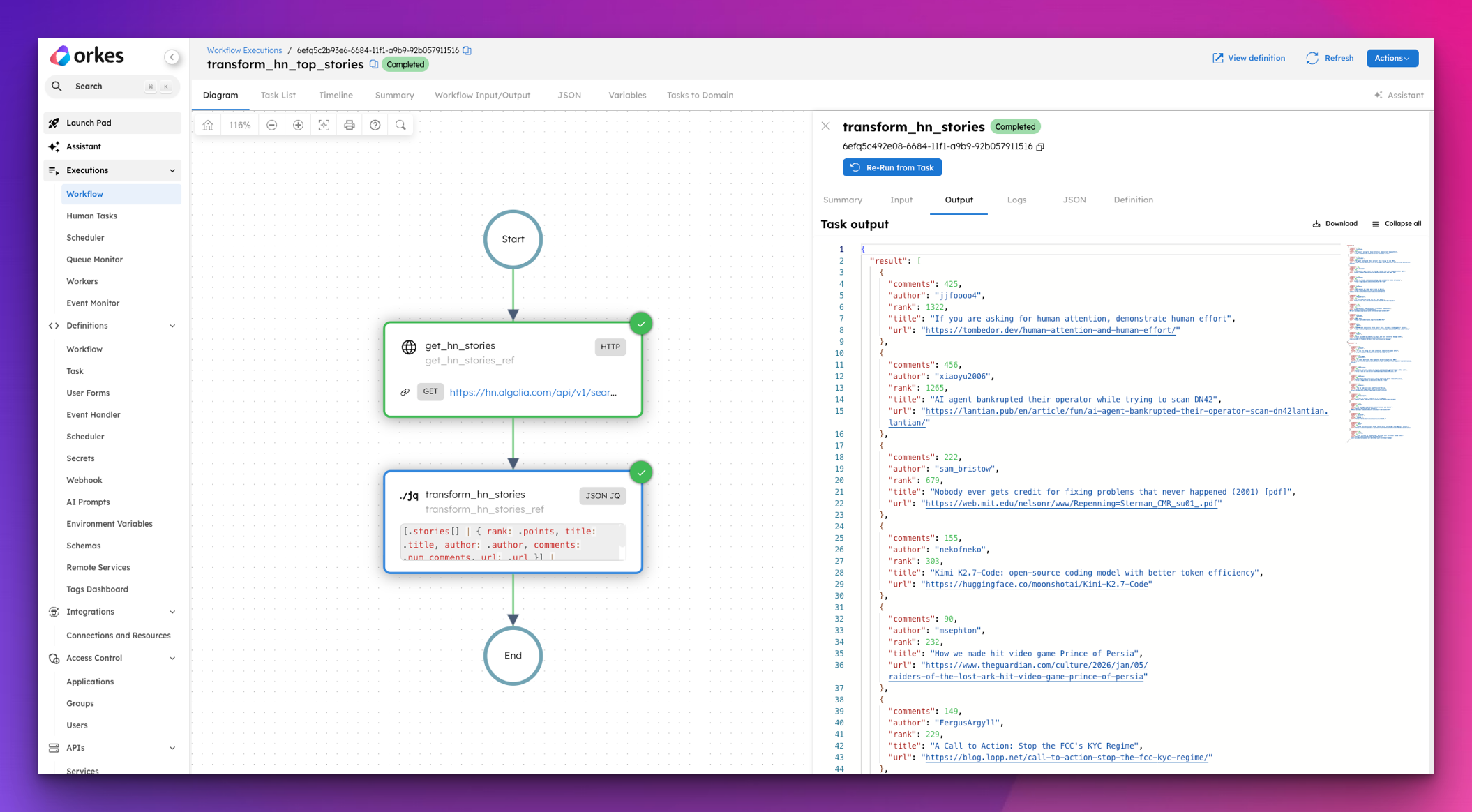
The fastest way to see this in action is to spin up a free Developer Edition account of Orkes Conductor.
{
  "name": "transform_hn_top_stories",
  "description": "Fetches the latest Hacker News front page stories and transforms the verbose response into a clean, readable summary.",
  "version": 1,
  "tasks": [
    {
      "name": "get_hn_stories",
      "taskReferenceName": "get_hn_stories_ref",
      "type": "HTTP",
      "inputParameters": {
        "uri": "https://hn.algolia.com/api/v1/search?tags=front_page&hitsPerPage=10",
        "method": "GET",
        "accept": "application/json"
      }
    },
    {
      "name": "transform_hn_stories",
      "taskReferenceName": "transform_hn_stories_ref",
      "type": "JSON_JQ_TRANSFORM",
      "inputParameters": {
        "stories": "${get_hn_stories_ref.output.response.body.hits}",
        "queryExpression": "[.stories[] | { rank: .points, title: .title, author: .author, comments: .num_comments, url: .url }] | sort_by(-.rank)"
      }
    }
  ],
  "inputParameters": [],
  "outputParameters": {
    "top_stories": "${transform_hn_stories_ref.output.result}"
  },
  "schemaVersion": 2,
  "restartable": true,
  "workflowStatusListenerEnabled": false,
  "timeoutPolicy": "ALERT_ONLY",
  "timeoutSeconds": 0
}
The raw Hacker News response comes back with over 20 fields per story. The JSON_JQ_TRANSFORM task strips it down to exactly what matters and sorts it by score, so the output is ready to use the moment the workflow finishes.
You'll have a working workflow transformation in under a minute. Especially if you post the workflow I have above and just tweak it depending on what you need.
And like I mentioned in the beginning, this is part of a series covering every built-in task in Orkes Conductor. Next up: the HTTP task.