- AGENTIC
- ENGINEERING
How to Test Your AI Prompts with Orkes Prompt Studio: Catch Prompt Issues Before They Hit Production
 Maria Shimkovska Content Engineer
 When you’re building AI agents or workflows with LLMs in them, you need to test your AI prompts.
Why? I’m so glad you asked.
Well, because when it comes to durable AI agents or agentic workflows, the durability comes from a lot of different parts of the system working together. Even with a tool like Conductor, our open-source workflow and agent runtime, giving you that durability out of the box, there are still pieces you own. The LLM prompt is one of them.
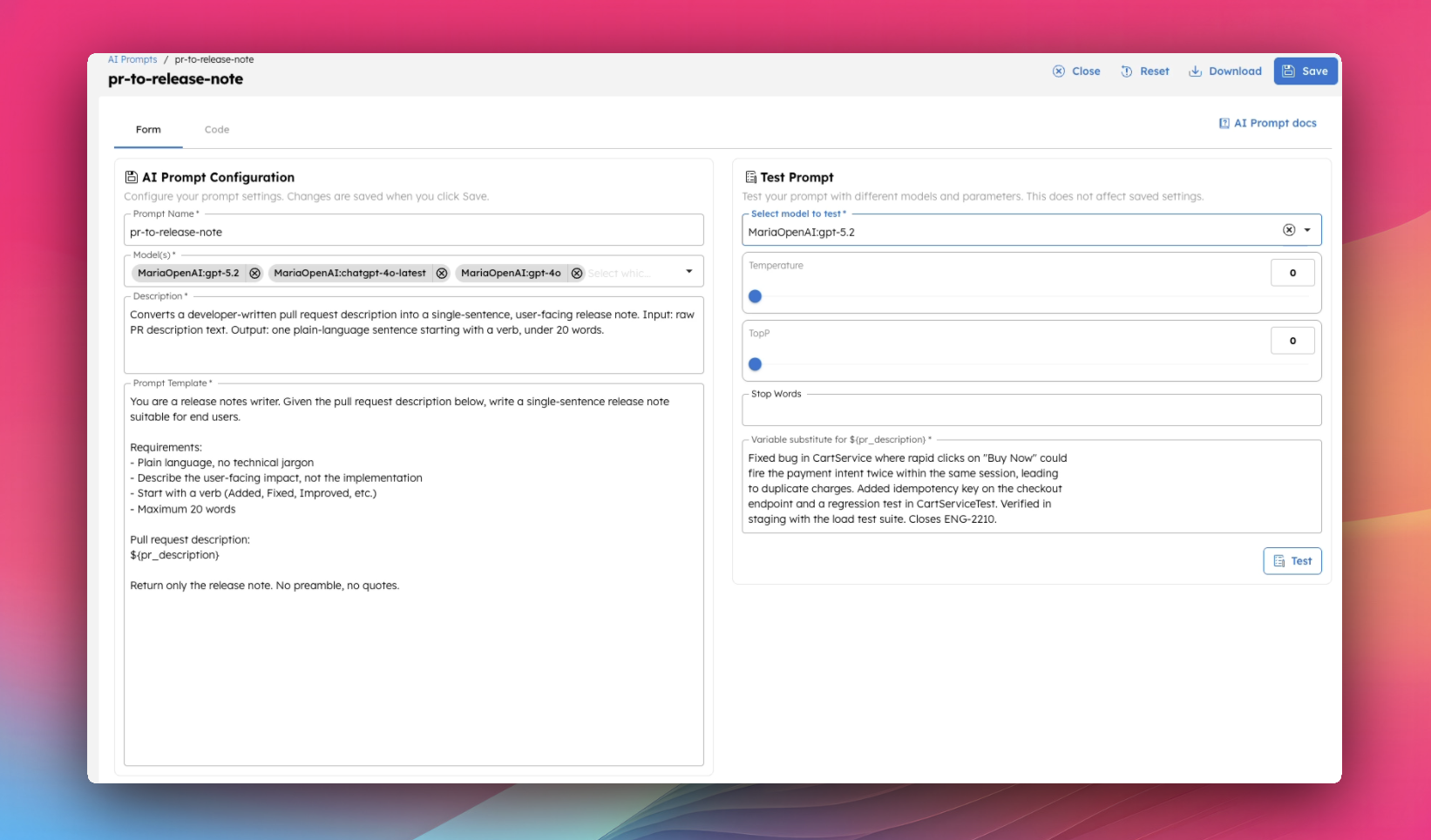
When you add an LLM call to an agent or a workflow, the prompt is just one piece of the chain. If the agent gives you a bad result, you want to know fast whether the prompt is the problem without running the whole thing again.
The faster way to do that is to test the prompt in isolation. Same kind of input it would see in production, but no surrounding system. You find out in seconds whether the prompt is doing what you want, without paying for the whole chain every time you tweak a word and without waiting for the entire workflow to complete.
Like this you find out right away if the prompt is doing what you want and you can tweak it from there.
What Prompt Studio actually is
Prompt Studio is a dedicated environment inside Conductor for engineering and testing AI prompts. Here are three things it gives you:
- Isolation. You can run a prompt without spinning up the workflow around it. Very important for fast iteration and testing.
- Parameterization. Prompts use
${variable}templating, so you can swap inputs as easily as changing a query parameter. You can see in the GIF above how I use that. - Comparison. Run the same prompt against multiple models. See how outputs differ before you commit to one. With new models coming up it’s best to see firsthand what your output looks like. Maybe a cheaper one is better for you and you don’t need to spend money on the latest and greatest.

Orkes Conductor Developer Edition
Your first agentic workflow is 5 minutes away. Everything you need is already there.

Take the prompt out of your application code, put it somewhere you can actually experiment with it, and only ship it once it’s doing what you want.
Bring your own model
One thing worth knowing before you start: Prompt Studio doesn’t ship locked to a single LLM provider. You bring your own. And this is what I really like about it.
It means you’re not paying for someone else’s model markup. You’re not stuck on whichever model the platform decided was the default. And when a new model ships (a faster Gemini, a cheaper Claude, the next GPT) you can plug it into the same prompts you’ve already tested, run the comparison, and switch if the new one is actually better. Your prompts stay portable.
Setting one up is quick. Head to the Integrations page in Conductor, click Add Integration, pick a provider (OpenAI is the fastest to set up if you don’t have a preference), paste your API key, and save.
One small but important step after that: add the specific model name you want to use inside the integration. The name has to match the provider’s model identifier exactly — gpt-4o, claude-sonnet-4-5, gemini-2.5-pro, and so on.
Once that’s done, the integration shows up in Prompt Studio’s model dropdown immediately. Add a second provider the same way if you want side-by-side comparison.
OK, now let’s look at some examples.
Example 1: PR description to release note
I’ll walk through the full setup with this one, then show three more you can try once you’re comfortable.
Every team ships changes, and every team has to translate developer-written PR descriptions into something users will read. Normally a writer or PM does this manually by turning “Fixed null pointer in legacy auth handler” into “Sign-in is now more reliable on older accounts.” It’s tedious work that piles up before every release, especially if you have a lot more fixes and smaller teams.
A solid prompt does it in seconds. But only if you can trust it not to leak jargon, mislabel a bug as a feature, or invent fixes that aren’t in the PR. Which is exactly the reason to test it before it ships into your release pipeline.
The prompt:
You are a release notes writer. Given the pull request description below, write a single-sentence release note suitable for end users.
Requirements:- Plain language, no technical jargon- Describe the user-facing impact, not the implementation- Start with a verb (Added, Fixed, Improved, etc.)- Maximum 20 words
Pull request description:${pr_description}
Return only the release note. No preamble, no quotes.
A PR description to test with (this goes in the variable substitute input field on the right):
Fixed bug in CartService where rapid clicks on "Buy Now" could fire the payment intent twice within the same session, leading to duplicate charges.
Added idempotency key on the checkout endpoint and a regression test in CartServiceTest. Verified in staging with the load test suite. Closes ENG-2210.
What a good model will return:
Fixed an issue where clicking "Buy Now" quickly could occasionally cause duplicate payments.The transformation is the point. About 50 words of internal-only jargon become around 15 words of plain user language. Internal class names, test references, ticket numbers, staging verification notes — all stripped. The remaining sentence is something you could paste directly into a changelog.
To do this in Prompt Studio: create a new prompt, paste the template, set pr_description as a variable, paste the PR text into the test panel, and hit Test.
Example 2: Invoice field extractor — same prompt, different inputs
The first thing worth testing on any prompt is how it behaves on inputs it wasn’t explicitly designed for. A prompt that works on your three happy-path examples might fall apart the moment something weird comes in.
For this one, here’s an example of an invoice field extractor. This is a common AP automation use case where finance teams pull structured data out of supplier invoices instead of typing it in by hand:
You are an invoice processing assistant. Extract the following fields from the invoice text and return them as JSON.
Required fields:- vendor_name (string)- invoice_number (string)- invoice_date (YYYY-MM-DD)- total_amount (number)- currency (3-letter code)- line_items (array of {description, quantity, unit_price, total})
If a field is missing or unclear, return null. Do not invent values.
Invoice text:${invoice_text}
Return only the JSON object, no commentary.
Run it against five different inputs in Prompt Studio:
- A clean invoice with all fields present
- An invoice missing a date. Does it return null or hallucinate one?
- A messy invoice with line items in inconsistent formats
- A non-English invoice. Does it translate field labels or extract correctly?
- An adversarial input. Paste a poem and call it an “invoice”
The first two would go fine. The third tells you how brittle the model’s parsing actually is. The fourth tells you whether multilingual handling is automatic or needs to be specified. The fifth tells you whether the “do not invent values” instruction holds up under pressure, or whether the model fabricates an entire fake invoice to be helpful.
You don’t know which way a prompt will behave on any of these until you run it. Testing in isolation makes it a 10-second feedback loop instead of running the entire workflow from the beginning.
Example 3: SQL generator — same prompt, different models
The model is part of the prompt. A prompt that works on GPT-4o might give noticeably different output on Claude or Gemini.
They have different verbosity, different format adherence, different handling of edge cases. If you ever plan to switch models (for cost, latency, or because a new release came out), you need a way to verify the swap doesn’t break anything.
SQL generation from natural language is a great example for this one because SQL is executable. So you can copy the model’s output, paste it into a real database, and see whether it actually works:
You are a SQL assistant. Given a database schema and a natural languagequestion, generate a valid PostgreSQL query that answers the question.
Schema:${schema}
Question:${question}
Return only the SQL query, no explanation. If the question cannot beanswered from the schema, return: -- Cannot answer from given schema.
Use a small schema like:
users (id INT, email VARCHAR, signup_date DATE, plan VARCHAR)orders (id INT, user_id INT, total NUMERIC, created_at TIMESTAMP, status VARCHAR)products (id INT, name VARCHAR, category VARCHAR, price NUMERIC)order_items (order_id INT, product_id INT, quantity INT)Then run a few questions against multiple models:
- “How many users signed up last month?”
- “Top 5 products by revenue this quarter”
- “Users who haven’t placed an order” — the trickiest. Does the model use LEFT JOIN … IS NULL, or does it fail?
- “Show me the marketing budget” — unanswerable from the schema. Does the model admit it, or does it hallucinate a table?
Prompt Studio lets you switch the model with a dropdown and re-run. You’ll see real differences fast. Some models over-explain even when told not to, some add unnecessary commentary, some refuse to follow the fallback instruction for unanswerable questions. The output that “works” on one model might fail validation on another. Better to find that out here than in a customer-facing tool.
Example 4: Meeting transcript to action items — same inputs, different prompt wording
AI prompts are sensitive. One word can double or halve your output. This is the hardest of the three lessons to internalize without seeing it happen.
Try the transcript-to-action-items prompt:
You are an assistant that extracts action items from meeting transcripts.
Given the transcript below, produce a list of action items. Each mustinclude:- owner: the person responsible (use the name from the transcript)- task: a single-sentence description of what they committed to- due: the deadline if mentioned, otherwise "not specified"
Only include items where someone explicitly committed to doing something.Do not include general discussion, suggestions, or maybes.
Transcript:${transcript}
Return the action items as a JSON array.
Run it against a real transcript (or a long synthetic one with a mix of clear commitments and vague maybes). Also, note the output length.
Then make one change: delete the word “explicitly” from the line “Only include items where someone explicitly committed”. Test it again. The output list will balloon and suddenly every “I’ll look into it” and “we should probably” gets picked up as an action item.
Now add one more change. At the top of the prompt, include a brief example of what counts as an action item (e.g. “Sarah will send the contract by Friday”). Run it again. Watch the output format tighten.
Three runs and you can already see how sensitive prompts are. Removing one word made things looser. Adding an example pulled them back in. If you’d skipped this and just shipped the prompt without “explicitly” in it, your action-item list would have ballooned in production and you’d be back in the logs trying to figure out what broke.
From Prompt Studio to your workflow
A tested prompt graduates by getting referenced from a Conductor workflow via an LLM Text Complete or LLM Chat Complete task.
The workflow points at the prompt by name, so the prompt and the workflow can be updated independently. You don’t have to redeploy the workflow every time you tweak the prompt.
Once your prompt is doing what you want in Prompt Studio, you can drop it into any workflow that needs it. Just reference it by name from the LLM task. The prompt you tested is the same prompt your workflow runs.
Your prompt testing checklist
Before any prompt goes near a workflow, run through this:
- Test against at least 10 realistic inputs — including edge cases and at least one adversarial one.
- Run against at least two models. Don’t assume a prompt is portable.
- Change one word at a time when iterating, so you can attribute output changes to a specific edit.
That’s the practice. The tooling is secondary, but if you want a place to actually do it without setting anything up, the Developer Edition is free and there’s no trial period. Spin up an account, add your LLM provider on the Integrations page, and paste one of the prompts above into Prompt Studio.
Orkes Conductor Developer Edition
Your first agentic workflow is 5 minutes away. Everything you need is already there.