- ENGINEERING
What Is Loop Engineering?
 Maria Shimkovska Content Engineer
 What it actually is, why “but every agent already loops” misses the point, and where you should still keep yourself in the picture.
Loop enginering feels like a natural next step in overall agentic engineering.
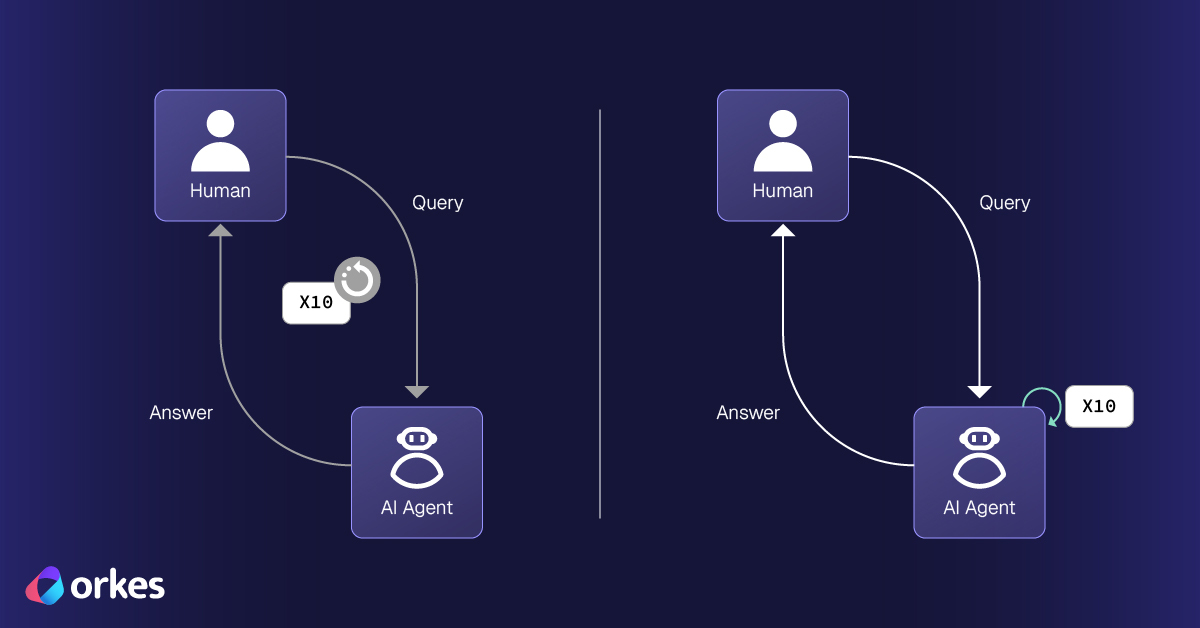
Loop engineering is building a loop around your agent so the agent can reprompt itself without you needing to do it.
For example when you ask Claude to build you something with code, and it comes back with a pretty good result, but not exactly the thing you want then you would naturally prompt it again (so re-prompt) with a slightly different input.
You read what it produced, find out that it was trash, figure out the next step, and prompt it again. It does that step and then stops again, waiting for you. This back-and-forth keeps going for as long as the work takes.
This conversation is how almost every agent we use behaves. Especially with coding agents. The agents are pretty cool, but they only move one step at a time (which makes sense), and the thing moving them from one step to the next is you, because you re-prompt when the input is bad.
So in a real sense, right now, you are the loop messenger. You’re the part of the setup that carries the work from one step to the next. Like “Hey, this is actually not what I wanted. Some of it worked, but here are all the things that are broken…”.
Now take that concept but make it so you don’t have to do that with Claude, but a loop will until you get the result you want, so you can go ahead and do something else with your time.
Loop engineering is about building that part where you used to be, so you no longer have to be it. The agent will handle all the mistakes and improve over time as well if you design it that way, which is why I’m actually more excited about loop engineering more than a lot of folks online.
Before we get into how any of that actually works, though, it’s worth knowing where this idea came from, and I’ll admit I have a small bone to pick with what it’s called.
A quick word on the name
You’ll see two names come up a lot when this gets discussed. Peter Steinberger’s version is that you shouldn’t be prompting coding agents anymore, you should be “designing loops that prompt your agents.” And Boris Cherny, who runs Claude Code at Anthropic, put it even more plainly. He says he doesn’t really prompt Claude anymore, but has loops that do the prompting for him, and said “my job is to write loops.”
Honestly though… I don’t love the term itself. It came up pretty casually in an interview, and because nobody who coined it ever really pinned it down when they mentioned it, the rest of us online have been filling in the gaps with our own definitions. If it were up to me, I’m not sure I’d call this “loop engineering,” in the same way I wouldn’t call writing a function “function engineering.” Or I would expand its meaning beyond re-prompting an agent.
Also beyond just agents having loops inside them, there are loops in context engineering, harness engineering, and prompt engineer. There will also be loops in whatever else comes after loop engineering no doubt, based on how it’s going. So the name can be a bit confusing.
But I don’t want to get stuck on the name, because the name matters far less than what you get out of it, which is a better agent that can run more on its own. So let’s focus on that, starting with the first thing that confused me a lot, especially given the name.
But doesn’t every agent already have a loop?
This is the exact question I got stuck on the first time I read about this. My first thought was, “wait, every agent I’ve built already loops, so this is just what I was already doing. Haven’t I been doing loop engineering already? What’s even the point?” And that’s fair.
An agent already runs in a loop. It takes your request, reaches for a tool if it needs one, takes the result, and goes around again, reading, writing, and checking until the task is finished. That really is a loop. So what is loop engineering actually adding?
Right now, it’s all about the re-prompting, and a lot can go into that. The agent’s built-in loop only runs until the task is done, then it stops and hands control back to you (unless you’ve set a max number of iterations). It runs on its own inside a single task, but between tasks it’s completely dependent on you. You are the bridge across every gap.
That bridge is exactly what loop engineering removes. The agent already has its own loop; loop engineering is about building a loop around the entire agent. So yes, every agent has a loop already, but this is a different kind of loop, which is where people also get confused. Like I said, the name could be more descriptive.
How do you do loop engineering?
Here’s what surprised me. The two lines that kicked all of this off, Steinberger’s and Boris’s, told everyone to start building loops, but neither of them actually spelled out how to build a loop around your agent. There’s no agreed-on way.
That makes right now an exciting time to poke at it and see what holds up and what falls apart, because plenty of it will fall apart. The clearest trap is cost. A loop that runs your agent over and over can burn through a huge number of tokens, and depending on whether you’re token-rich (Boris and Steinberger) or token-poor (most of us), that alone can turn a loop that sounds awesome into a bad idea in practice. Part of what makes this fun is that you get to find those edges yourself. It’s what I’m doing right now.
The two loops you can build pretty fast
Once you’re past the point where a normal agent would stop, there are two simple loops you can build to make it continue and solve your problem.
-
The first one is that it checks, meaning it grades its own output and redoes the weak parts instead of passing them to you.
-
The second is that it improves, meaning it looks at how past runs went and rewrites its own instructions so the next run is better.
Let’s start with the checker.
The checker
Say you have an agent that builds a UI component. You ask it for a notification bell with a dropdown, an unread count, and a “mark all as read” button. Normally it builds the thing, hands it to you, and then you’re the one who notices the problems: the buttons have no hover state, there’s no loading spinner while the notifications load, and it breaks on mobile. Every one of those notes is you looking at the work and sending it back.
The checker is a second agent (or LLM call) whose only job is to be you in that moment. You give it your standards ahead of time, like “every clickable thing needs a hover and focus state, anything that loads data needs a loading state and an error state, and it has to work on mobile.”
Then the first agent builds, the checker reviews it the way you would, writes down specific feedback, and sends it back. The two of them go back and forth on their own until the checker is happy, and a final check refuses to ship anything with loose ends. You described the component once and never had to review a single draft.
Notice the change here: the agents do the reviewing now, not you. You stop being the one who grades the work.
But catching a bad result once is only half the story. The bigger jump comes when the loop notices it keeps making the same mistake, and fixes that for good.
Hill climbing
This one is what I’m most excited about and it’s the one Boris was really pointing at. The checker catches a bad result once. Hill climbing works across many runs: when the same mistake keeps showing up, it rewrites the agent’s own instructions so it stops happening.
That rewriting is what people mean by “the agent prompts itself.” The loop takes the instructions you first typed and tacks on a new rule of its own, based on what kept going wrong. They started as something you wrote, and now they carry something the loop wrote for its own next run.
One warning, because I got this wrong at first: this loop should fire rarely. If it rewrites its instructions after every odd one-off failure, it overreacts and makes a mess. Wait until the same failure shows up several times before you change anything. And “improve” can mean more than accuracy. Point the loop at cost instead, for example, and it will trim the tokens it spends each run while keeping the answer good enough.
So that’s what the three loops do. The next question is what you actually build them out of, and the good news is you’ve probably used most of the parts already.
What you actually build loops out of
A loop is put together from pieces you’ve probably already used:
| Piece | What it does |
|---|---|
| Automations (the heartbeat) | Triggers that kick the loop off on a schedule or when something happens, so the agent finds its own work — new emails, new tickets, failing tests — instead of waiting for you. |
| Connectors | Tools that let the agent act in the real world, like GitHub, Linear, Slack, or Supabase. MCP servers are a common way to hook these up. |
| Sub-agents | Splitting the work across specialists. One agent writes the code, and a separate one with a fresh view reviews it and catches mistakes the first one made up. |
| Skills | Your rules and conventions written down, so the agent follows how your project actually works instead of guessing. |
| Worktrees | Separate workspaces so several agents can work at the same time without overwriting each other. |
| Persistent memory | A store that lives outside the current conversation, so the agent remembers past runs and stops repeating old mistakes. |
Underneath all of it, building a single loop comes down to four things: a goal (the objective you own), an agent (the doer), context (the tools, skills, and memory feeding it), and evaluation (the check). Keep that word goal in mind. It comes back a little later.
That’s the theory. To make sure it was more than theory, I took all of this and pointed it at a real bug that had been driving me up the wall.
Putting it to work on a real bug
I didn’t want to write about loop engineering without actually trying it, so I pointed it at a problem that had been annoying me for a while.
I’d been building an app with Claude Code and kept hitting a bug I couldn’t get past. The routine went like this: Claude Code would suggest a fix, I’d apply it and run the app, I’d read the output, and then I’d come back and tell it what happened, something like “here’s the change you gave me, here’s what I ran, and here’s the error I got back.” It would think it over, suggest another fix, and we’d go through the whole thing again.
I was the messenger carrying results back and forth, and it was slow, because every round had to wait on me to read the output and type it all up.
At some point it hit me that this back-and-forth was the exact thing I’d been writing about. I was the loop. So I built one to take my place.
The loop does what I had been doing by hand. It comes up with a fix, runs the code for real, and looks at the actual output instead of guessing what might happen. A separate step then decides whether the fix worked, and if it didn’t, another step writes up why it failed and what to try next. That feedback goes into the following attempt, and the cycle repeats until the bug is gone or it reaches a limit I set so it can’t run forever.
I built it on Conductor Agents, which runs each step as its own tracked piece of work. That gave me two things I wanted. I could watch every attempt as it happened and see exactly where a fix went wrong, and if the whole thing crashed partway through, it picked up where it left off instead of starting the hunt over from the beginning.
The piece that made the biggest difference was giving the loop a memory of everything it had already tried. Without that, it would happily suggest the same broken fix twice. With it, each new attempt knew what had already failed and got pushed toward something actually new. That memory is the difference between a loop that spins in place and one that makes real progress.
The result was pretty much what I hoped for. It ran faster, and I wasn’t stuck in the middle anymore. I set the goal, and the loop handled the tedious part of trying, checking, and trying again. I’m going to break down exactly how I built it in a follow-up post, because the details deserve their own write-up.
What stuck with me is how well this fits coding in particular, since you get an honest pass-or-fail signal every time you run your code, and that signal is what lets the loop check itself without me in the way. I don’t think coding is the only place it fits, either. I’ve started looking into other use cases, and I have a feeling there are a lot more of them than I first assumed.
There’s one part of all this that gets far more hype than the rest, though, and it’s worth being honest about how much weight it should really carry.
Save the self-improving part for last
Here’s an opinion I’ll stand behind. The self-improving angle is the headline, and headlines are exciting, but a headline isn’t the whole article. Loop engineering is stacking loops around an agent so it does the work reliably, runs on its own, and gets better over time. The first loops handle the work itself. The top loop handles improving that work. That top layer is genuinely cool, but it’s useless sitting on top of nothing. If your agent can’t do the task well and check itself yet, an improvement loop has nothing to improve.
So don’t reach for the hill-climbing loop first. Build up to it. And building up to it doesn’t mean building yourself out of the picture, which is exactly where a lot of people take this idea too far.
Humans still belong in the loop
It would be easy to read all of this as a push to get people out of AI completely, and that reading would be wrong. This is the part people tend to skip, so I want to be clear about it.
There’s a real difference between the two kinds of work you do between an agent’s steps. Most of it is mechanical: clicking “next,” copying one step’s output into the next, re-running something that failed. That kind of work doesn’t need a person. It needs a loop, and pulling yourself out of it is pure gain.
But some of what you do isn’t mechanical at all. Deciding what the goal should be. Judging whether the framing is right for the audience. Approving something that’s expensive or hard to undo, like merging code, publishing, or issuing a refund. Catching the thing that’s technically correct but still somehow wrong. That kind of work needs a person, and a loop can’t replace it, so you keep those checkpoints on purpose.
Remember the four pieces? The goal is the one you never hand off. The evaluation can move to the agent, the context can be automated, and the agent is the doer, but the goal sits at the top and stays yours. So the future here is about precision: keeping people exactly where they actually matter and freeing them from the rest. You strip out the busywork, you add automated checks where a check is enough, and you keep real human approval where the judgment and the stakes are real.
There’s a twist worth sitting with, too. A better loop can quietly make some things worse instead of better. The faster it ships code you didn’t write, the less you tend to understand your own system, because that understanding used to come for free from doing the work by hand. And the smoother the loop runs, the more tempting it is to stop reading what it produced and just take whatever it hands back.
So the better your loop gets, the more deliberately you have to keep reading its output and keep having an opinion about it. The moment a loop earns your trust is exactly the moment to be careful about how much you give it.
Part of that care is knowing when a loop is the wrong tool altogether, which is worth spelling out plainly.
Should you build loops from now on?
Remember those two lines from the top, Steinberger saying stop prompting and start designing loops, and Boris saying his whole job is writing loops? They’re striking, and they’re true for the people who said them. But you’re probably not either of them, and you don’t have to be. Both of them build agent systems all day, at a huge scale, so of course loops are the work for them. Copying where they landed without having their situation is a mistake.
So here’s my actual advice. Build a good agent system first and solve the problems you really have. Get the agent doing the task well, make it reliable, and ship something that works. Only then should you look at loop engineering, and you should look at it for the right reason: you’ve caught yourself doing the same repetitive thing over and over, you know exactly what that thing is, and you’re confident you can build a loop to do it without making the system worse.
Repetition is the tell. If you’re doing the same move again and again, that’s a loop you haven’t built yet.
And don’t trade away quality or safety to get there. A system that’s loop-engineered but worse is still worse. If a loop makes the work sloppier, or means a risky action stops getting a person’s eyes on it, you’ve taken a step backward with nicer branding. This technology is here to help you. Treat loops as a tool, use them where they solve a real problem, and skip them where they don’t.
If there’s one simple test to carry away from all of this and run on your own agents, it’s this.
The line between an agent and a loop
That’s really all of loop engineering. None of these systems is special because of how clever the single task is. They’re special because of what happens after the task: they keep going, they check themselves, or they get better, all without you sitting in the middle.
So take any agent you already have and ask the one question. When it finishes, does anything happen on its own? If the answer is no, then it’s just an agent, waiting for you to be the loop. And now you know exactly what it would take to build the part that used to be you.
Could this be the future?
I can see it. But we will need to figure out how not to burn a ton of tokens making these loops work and be helpful. In follow up articles, I will go more into example of how to build different loops for different use cases, including a loop I built to help me find a solution to an issue I had.
You no longer need to have the perfect prompt, that’s true. You can start with something simple and just get things going. That said, I don’t think loop engineering is dead as people claim for hype. It still has its place because not everything will need to be turned into loops.