- ENGINEERING
- PRODUCT
Orkes Shift ‘26: How LinkedIn, Bumble and Twilio Run Workflows and AI Agents in Production
 Maria Shimkovska Content Engineer
 Engineers from LinkedIn, Bumble, Twilio and Orkes on running AI agents reliably inside real business processes.
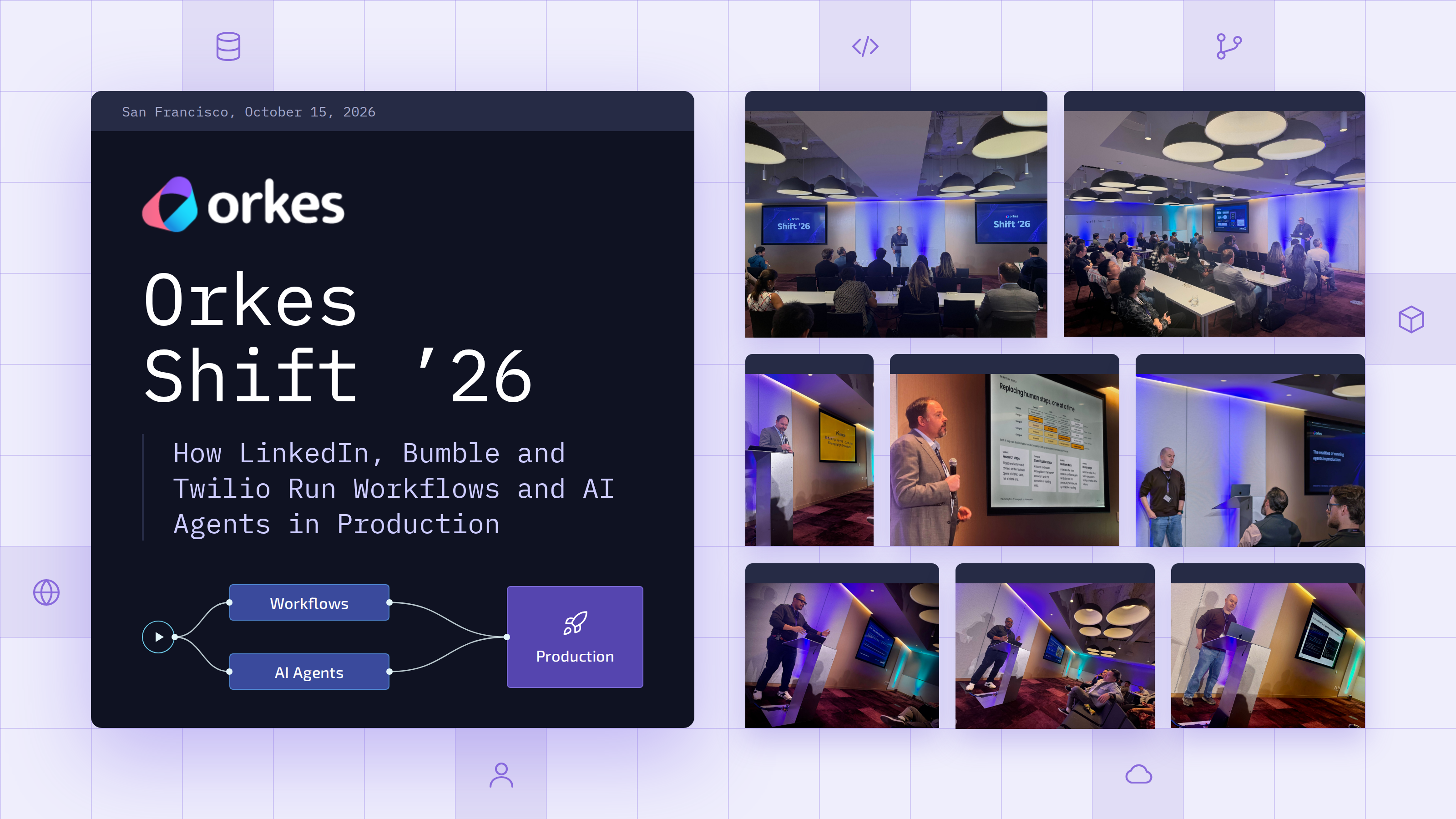
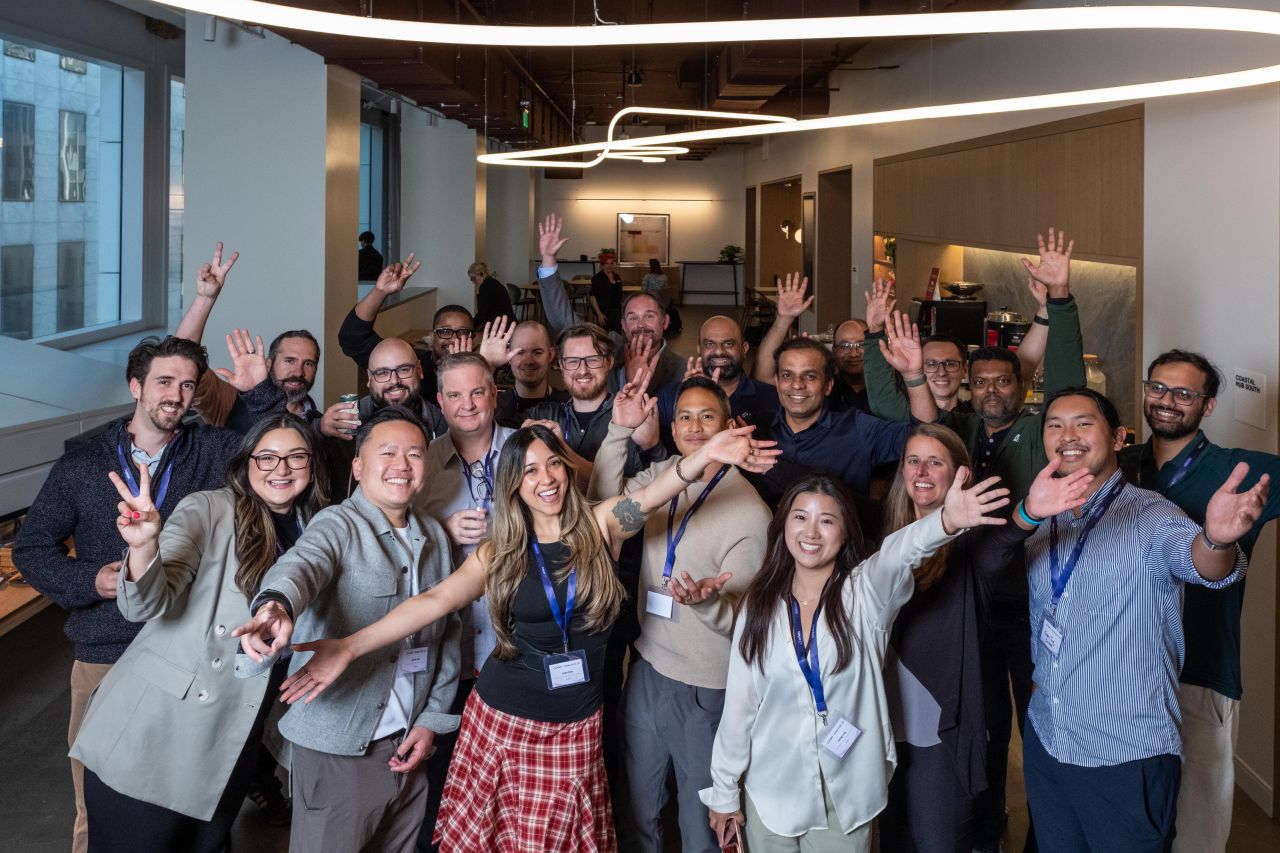
Orkes Shift ‘26, our first-ever conference, filled Convene in Union Square from morning breakfast through happy hour. Engineers, architects and platform leads joined us. Many had run Conductor in production for years, and some were meeting the people behind it for the first time.
It felt like the right moment. Conductor started at Netflix in 2016 to orchestrate microservices at a scale few companies ever see. Ten years later, it runs over a billion workflow executions a day. Now we’re on the cusp of a new need: orchestrating AI agents and running them reliably in production, right alongside the workflows teams already trust.
If you couldn’t make it to San Francisco, here’s what you missed. And if you were in the room, here’s your chance to revisit the ideas worth taking back to your team.
We rallied around one big idea: agents need production-grade orchestration
The hardest part about working with agents right now is getting AI agents and the business processes around them to behave as one reliable system. Agents are non-deterministic by design, but the processes they plug into can’t be.
Every talk at Shift landed on the same idea: run agents and the processes around them on one durable execution layer. That layer records every step as it runs, so work survives crashes, retries and long waits for a person. Agents then inherit the retries, state, observability and human approvals that workflows already have. Here’s how each session made the case.
- Bumble: one written-down process. Rebuilding trust and safety as a single workflow turned seven handoffs into one definition and gave every report one execution record. That record is what let Bumble hand steps to AI one at a time, with a person still on the record.
- Twilio Segment: a workflow engine they no longer have to maintain.. Conductor tracks when an agent’s work starts, pauses and finishes, so one mechanism covers crash recovery, human approvals and handoffs between agents.
- LinkedIn: a team of coding agents with a person in charge. Conductor passes work between product, architect, developer, QA and code review agents, with a limit on review rounds and a person approving the plan and the final changes.
- Orkes: retries and saved progress, built in. If each step works 99% of the time, a 100-step agent task finishes only about a third of the time. Saving each step as it finishes means a crash resumes the task instead of paying a customer twice.
We announced upcoming product releases
Shift was also where we shared what’s next for Orkes. We announced three things, each aimed at making it easier to run agents and workflows in production:
- Worker and tool hosting. Orkes will soon host the workers and tools your agents and workflows call, so there’s less infrastructure for your team to run.
- Multi-region and multi-cloud deployments. Run Conductor across regions and cloud providers, for teams that need resilience, lower latency, or data kept in a specific region.
- Particle DB. The world’s first agentic database
Want to try them before anyone else? Request early access.
We heard how real teams run workflows and agents in production
Speakers from Bumble, Twilio, LinkedIn and Orkes shared what’s working for them, what broke along the way, and what they’d do differently.
🐝 Bumble: why choreography gave way to orchestration
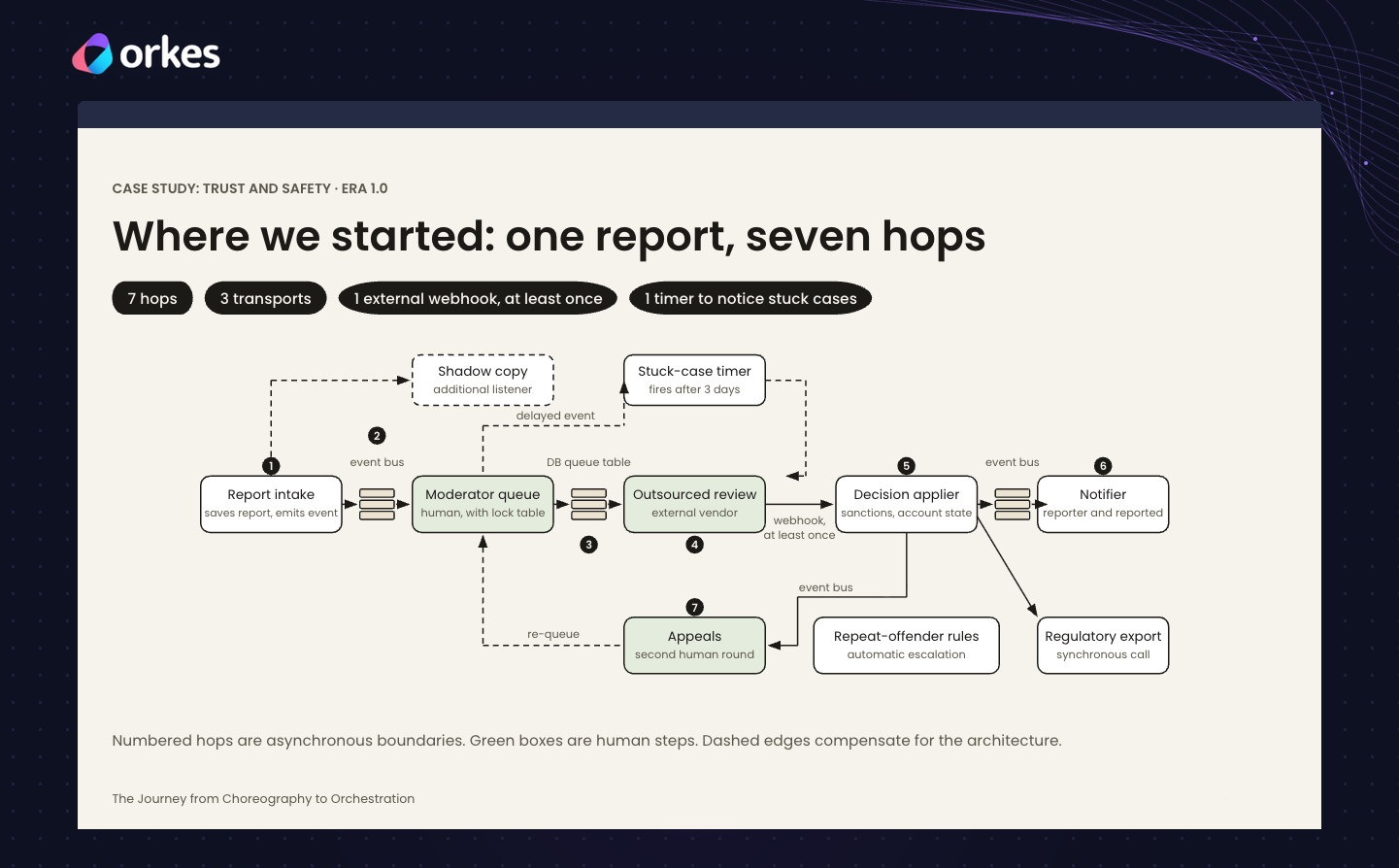
Paul Vander Griend, an Executive Technology Leader at Bumble, followed a single user report through Bumble’s trust and safety system, the part of the app that handles reports of bad behavior.
In the old setup, each part of the system reacted to the one before it, but nobody owned the process as a whole. One report passed through seven handoffs, including human moderators and an outside review vendor. Its status lived in three different places, and they didn’t always agree. If a report got stuck, nobody noticed until a timer went off three days later. Even small changes were expensive: adding one new status meant touching 13 places in the code across three teams.
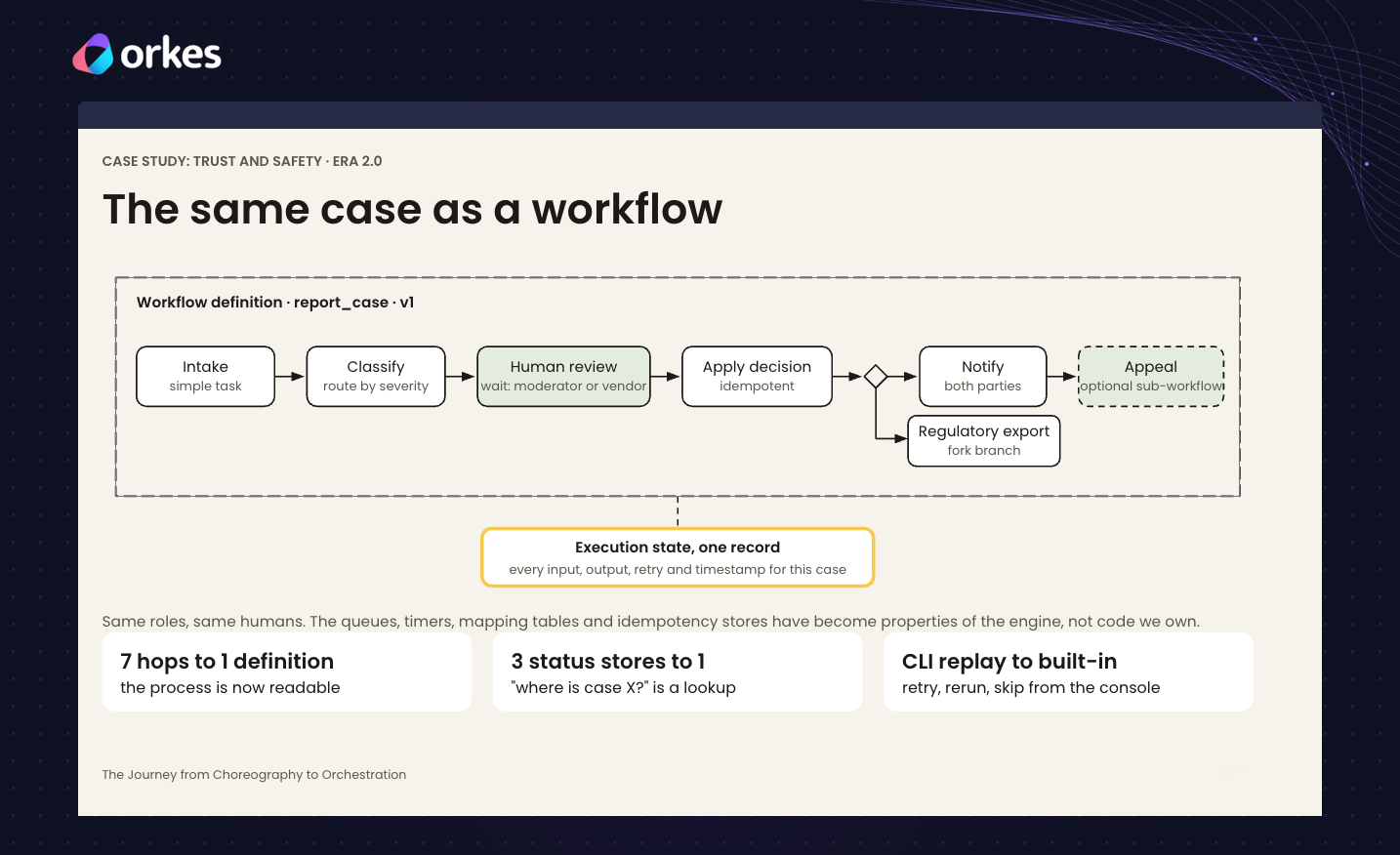
So Bumble rebuilt the same process as a single workflow. Same steps, same people, but now written down in one place. Seven handoffs became one definition, and three status records became one, so “where is this report?” became a simple lookup. When a step fails, it retries on its own. If it still fails, the workflow pauses with its data intact until the bug is fixed. Every decision is recorded, giving regulators and appeals a clear trail.
That groundwork is what made AI possible. Paul shared three principles for automating any business process:
- Understand the process, not just the code. Ask the people who run it what it’s for.
- Reimagine it. Don’t rebuild something just because that’s how the old system worked.
- Measure first, then add AI. Run the process with people making the decisions, so you have a baseline to compare against.
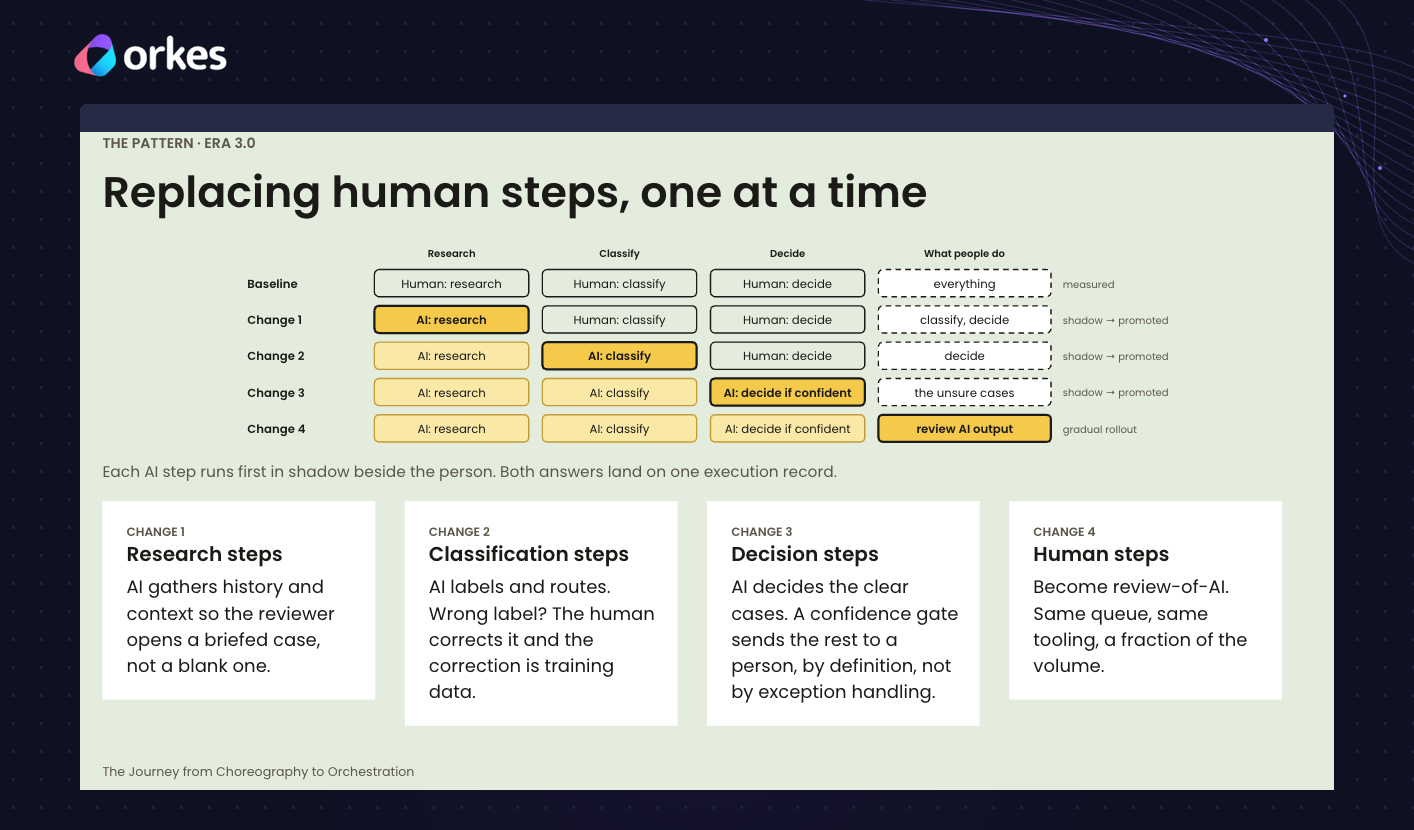
From there, Bumble hands steps to AI one at a time: first gathering background on a case, then labeling reports, then making the decisions it’s confident about. Each AI step runs quietly alongside a person first, and only takes over if its quality holds up. Adding a new step, like a second review, now takes days instead of quarters. And Bumble is seeing the same pattern in payments, GDPR requests and internal automation.
Paul closed with three things to take home.
- First, when every part of a system just reacts to the last, the process is hidden; writing it down as a workflow is what lets you change it on purpose.
- Second, durability makes change safe: a failed run waits for the fix instead of disappearing, and that’s what lets a team move fast.
- Third, AI fits into a written-down process as just another step. You add it, let it act only when it’s confident, and keep a person on the record.
💬 Twilio Segment: from maintaining a workflow engine to building on one
Joe Yan, a Staff Software Engineer and Tech Lead at Twilio Segment, shared how his team moved off a workflow engine they had built themselves, and what that freed them to do.
Twilio Segment helps businesses collect customer data, combine it into one profile per customer, and use it to reach the right people, like a pizza chain winning back customers who stopped ordering. Behind the scenes, Orkes coordinates the work of moving billions of rows between Segment’s live data pipeline and its data lake of roughly 10 petabytes.
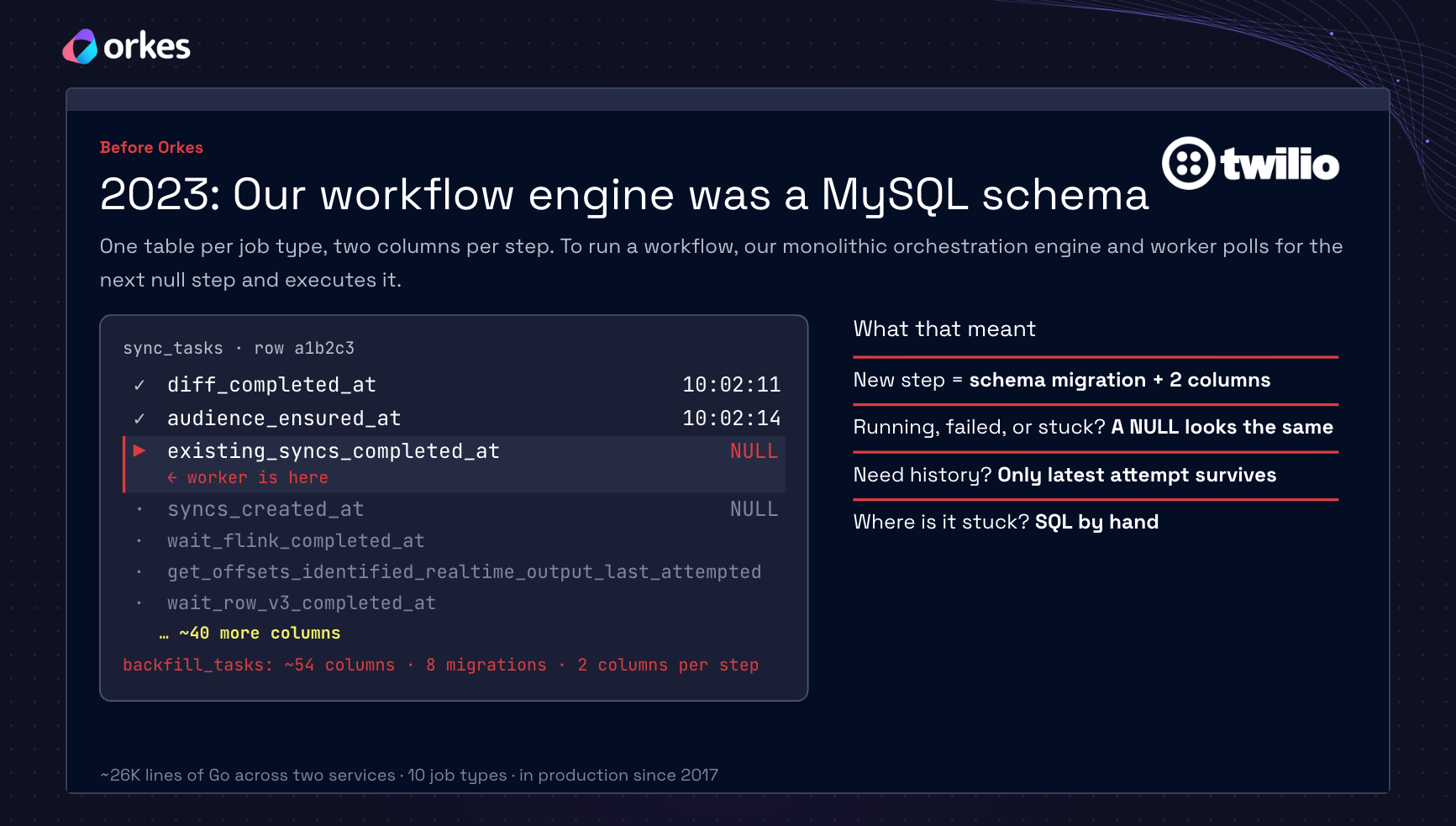
It wasn’t always that way. Segment’s original workflow engine was built on a MySQL database, with one table per job type and two columns for every step. Adding a step meant changing the database. A step that was running, failed or stuck all looked the same, and finding a stuck job meant writing SQL by hand. Debugging a single failure could take hours. And there was no path to the team’s goal of running 30,000 workflows at once.
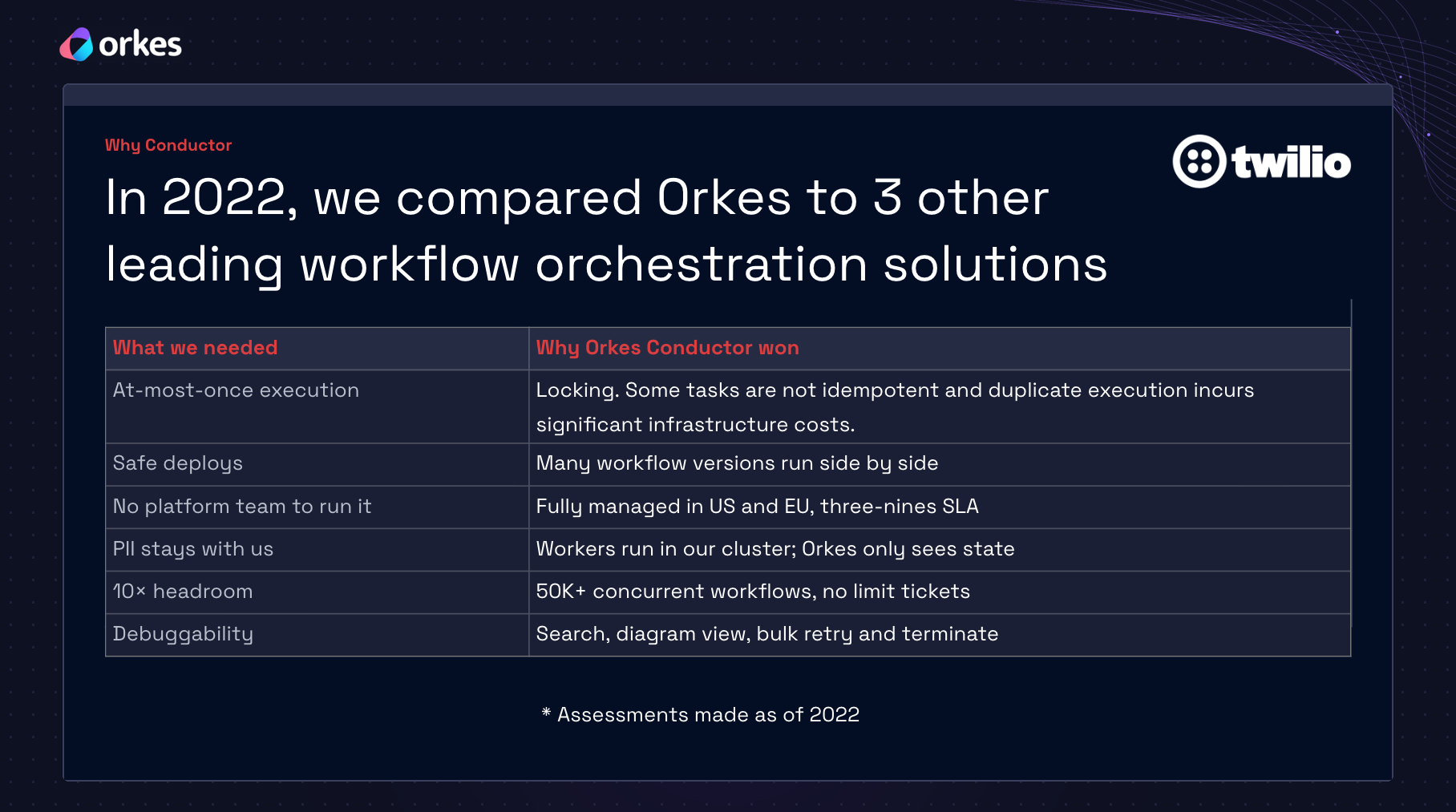
After comparing Orkes with three other workflow tools, the team chose Orkes Conductor. A few reasons stood out: steps that must not run twice don’t, new versions of a workflow can run side by side with old ones, it’s fully managed so no team has to run it, and customer data stays inside Segment’s own systems.
The payoff showed in 2025, when Segment moved customer computations from batch, where everything is recalculated on a schedule, to real time, where results update as new data arrives. Real time is far cheaper for the same result. Because the team could reuse existing workflows and roll back at any point, the project took about eight weeks from design to production. They migrated more than 10,000 computations and now save seven figures a year.
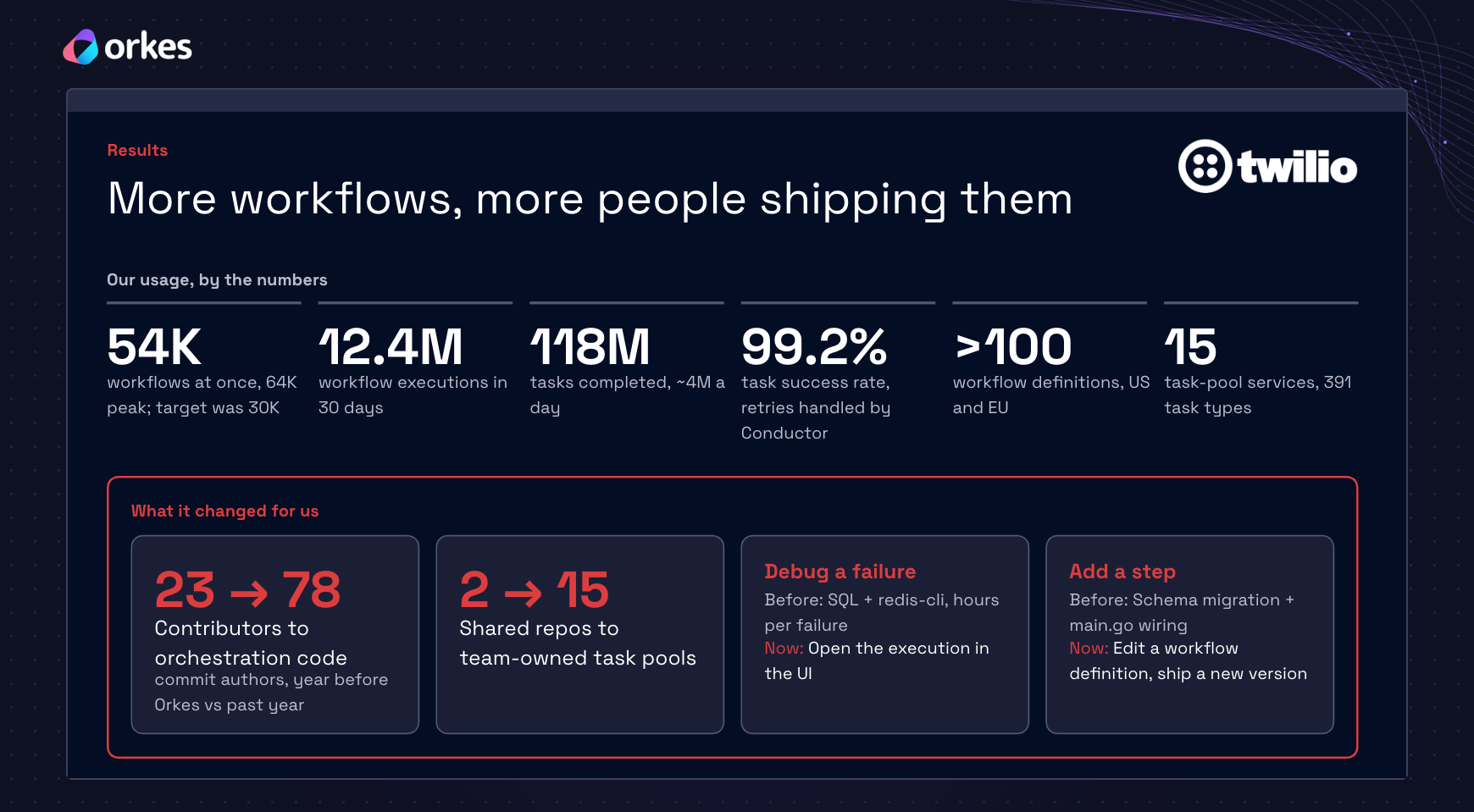
Today Segment runs about 54,000 workflows at once, peaking at 64,000, well past the original 30,000 goal. The number of engineers contributing to orchestration code grew from 23 to 78, and debugging a failure went from hours of SQL to minutes in the UI.
The takeaway, in Joe’s words: “We stopped maintaining a workflow engine and started building on one.”
🤝 LinkedIn: Scaling automation with an agent platform
Obi Azogu of LinkedIn showed how his team grew LinkedIn’s workflow automation into a platform for AI agents, without building a new system from scratch.
It started with a familiar problem. LinkedIn’s internal business teams, like sales and operations, work with rules that keep changing across regions, roles and policies, and on tight fiscal-year deadlines. The team’s answer was to break the work into small, single-purpose actions, like assigning a user to a seat or updating account ownership, then combine those actions into workflows. Obi compared it to Legoland, where huge model cities, stadiums and railways are all built from the same basic bricks. In one example, a temporary coverage process for when someone goes on leave reused the exact same actions as employee onboarding, just in a different order.
Then LLMs made it possible for non-technical people to build automations for their own day-to-day work, and LinkedIn wanted to let them add AI to the workflows that already existed. So the team treated automation as a spectrum: fixed workflows on one end, fully reasoning agents on the other, and hybrids in between, where a workflow includes an AI step.
The key design choice is that Conductor doesn’t track every thought an agent has. It only tracks when a piece of the agent’s work starts, stays alive, and finishes or pauses. Each pause saves the agent’s progress, so if a server crashes, the agent picks up where it left off on another one.
That same pause turned out to solve two more problems. When an agent needs a person’s approval, like before sending an email outside the company, it pauses, frees up its server, and waits at no cost until the person responds. Then it carries on with everything it knew. And when one agent hands a task to a specialist agent, it pauses the same way and resumes when the result comes back. No new machinery was needed for either. LinkedIn is still working through the policies around approvals, like which actions should need one, but the mechanism comes for free.
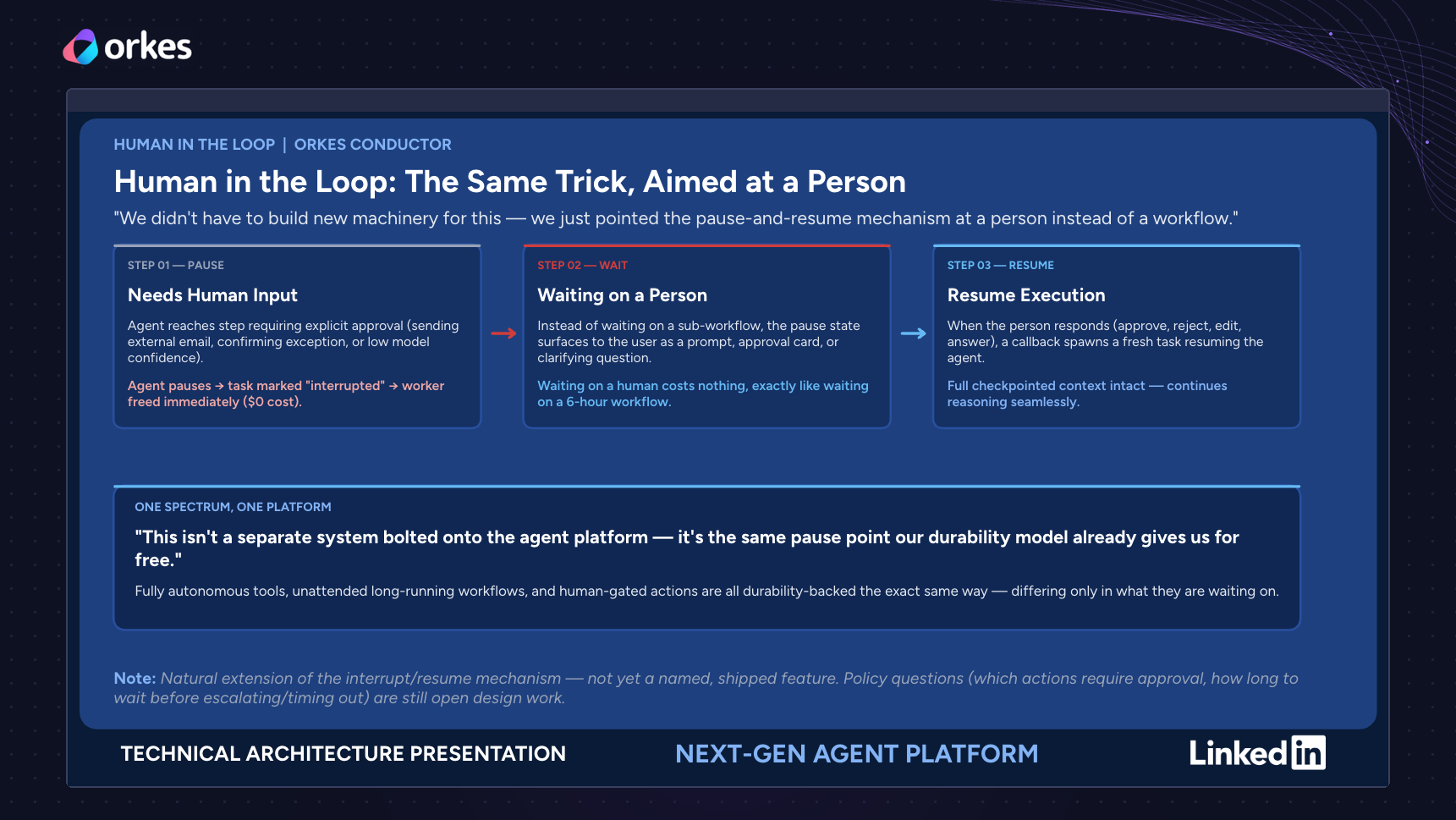
The takeaway: complex agent behavior doesn’t need a complex new system. Like the Lego cities, it can be built by combining simple, durable pieces.
🤝 LinkedIn: Stop babysitting your AI coding agents
Yangchen Situ and Calvin Lei of LinkedIn opened with a scene every engineer who codes with AI will recognize. You ask an agent for a simple change, and it adds three new layers. You remind it, again, to follow the repo’s conventions. It fixes one thing and breaks another. Yangchen called this babysitting: repeating decisions you’ve already made, instead of making new ones. Asking the AI to “remember this for next time” only goes so far, because those notes aren’t always loaded, or followed.
For the past six months, Yangchen’s team has worked differently. Every project moves through four stages, each with its own command: explore the idea, propose a plan, apply it, and archive what was learned. The plan comes as two files, one written for people to review and one with the detailed rules an AI needs to build it. A third file tracks progress as the work happens. Because the context lives in files rather than in one long chat, a new session can pick up exactly where the last one stopped. And because the team reviews the plan before any code is written, big design problems get caught early instead of buried in dozens of pull requests later.
Conductor ties it all together. Instead of a person chasing each agent, Conductor hands the work from one agent to the next. A product agent drafts the plan, and an architect agent reviews it against a checklist: Is it clear? Does it cover the requirements without inventing new ones? Is it over-engineered? They go back and forth up to three times before a person approves. Then a manager agent splits the plan into tasks for developer agents, a QA agent checks their work for up to ten rounds, and a code review agent adds its notes before everything reaches a person. As Yangchen put it, the human is now the CTO of the agent team.
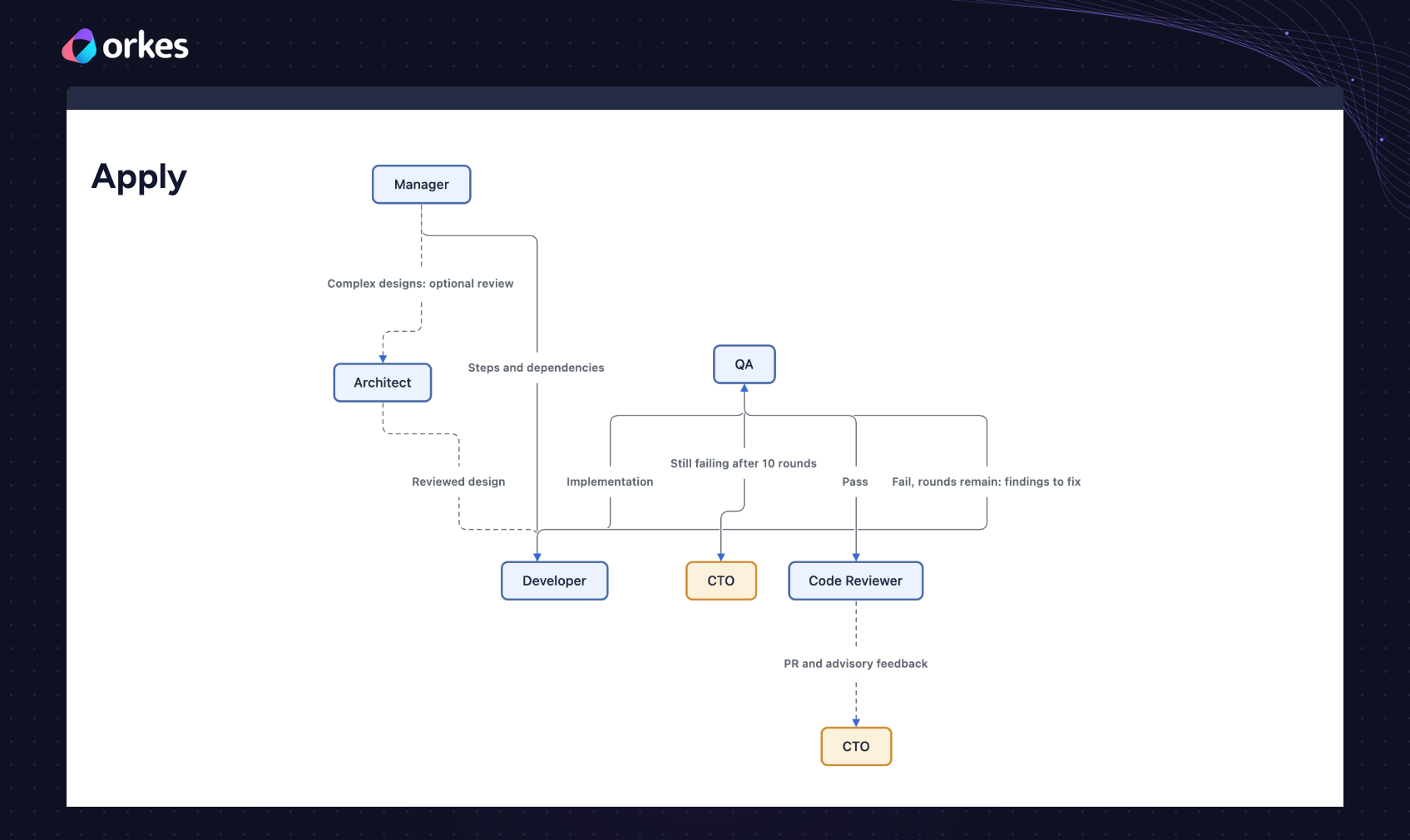
In one month, the team shipped 40 features. Yangchen stressed that this is the number that matters, not the 66,833 lines changed or the 111 pull requests, since AI makes lines and pull requests cheap. The setup is flexible, too. Teams can change the number of review rounds, add their own agents, or build their own dashboard on the same data. One manager turned his into a game where every feature is a boss to defeat.
Calvin then took on the last kind of babysitting: teaching every teammate, and every teammate’s agent, the same lessons over and over. His team keeps a shared knowledge graph of linked articles about systems, recurring gotchas and past decisions. Each project starts by reading from the graph and ends by proposing what it learned. A person reviews every update before it joins the graph, because, in Calvin’s words, the graph is “self-improving, not self-authorizing.” The graph has grown 78% since late June. His advice for getting started: don’t document everything; start with the thing your team explained twice this week.
The takeaway, in Calvin’s closing line: “Every project should leave the graph smarter than it found it.”
💜 Orkes: The realities of running agents in production
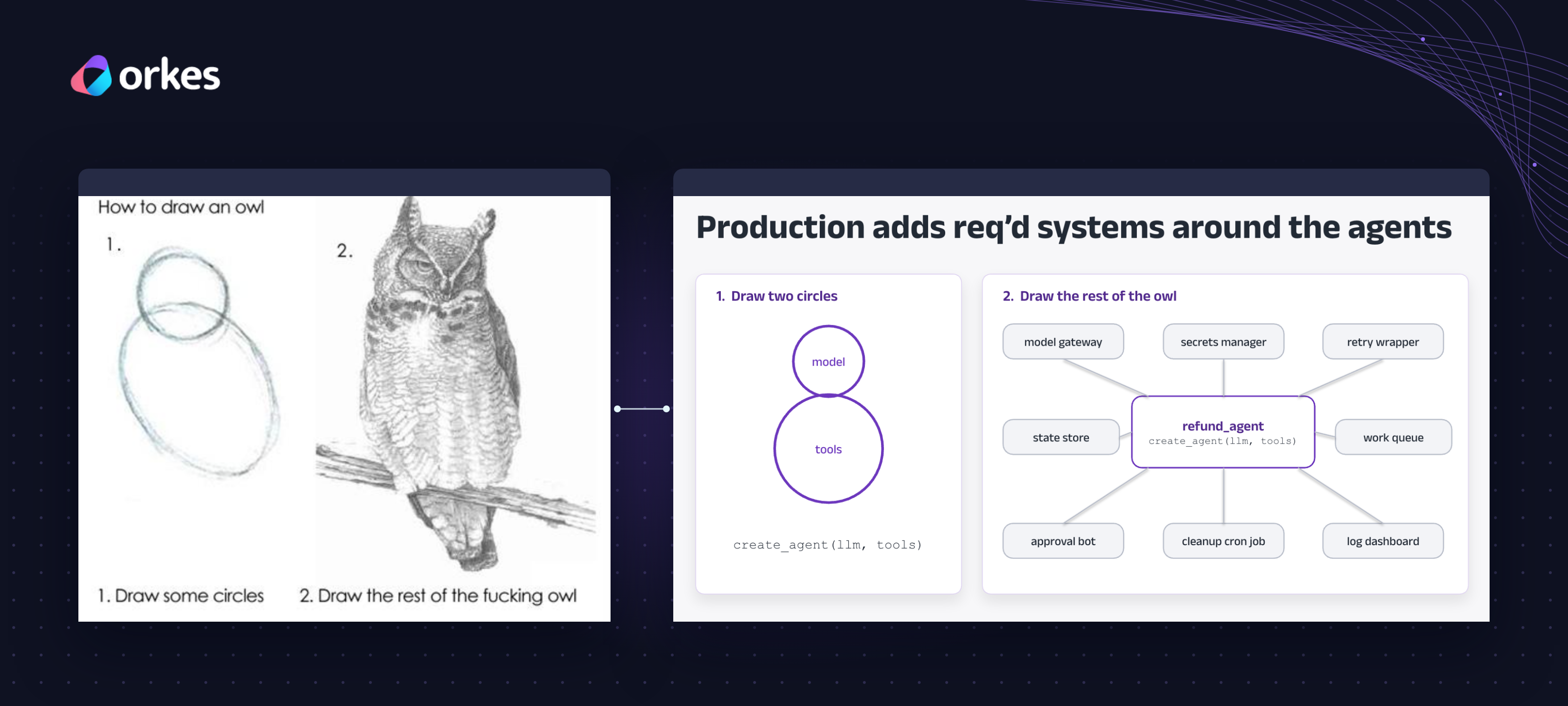
Nick Lotz of Orkes made a simple point: building an AI agent is easy now. Running one in production is the hard part.
He showed this with one example: an agent that handles refund requests. It looks up the order, checks the refund policy, and suggests what to do. A few lines of code get it working on a laptop. In production, though, you also need a way to retry failed steps, save progress, get a person’s approval, keep API keys safe, and see what happened when something goes wrong. Most teams end up building each of those pieces themselves.
Small failures add up fast. If each step works 99% of the time, a 100-step task finishes only about a third of the time. Retrying failed steps fixes most of that. But starting over after a crash creates new problems: the agent might suggest a different refund, ask the approver again, or pay the customer twice. The fix is to save each step as it finishes, so a crashed task picks up where it left off.
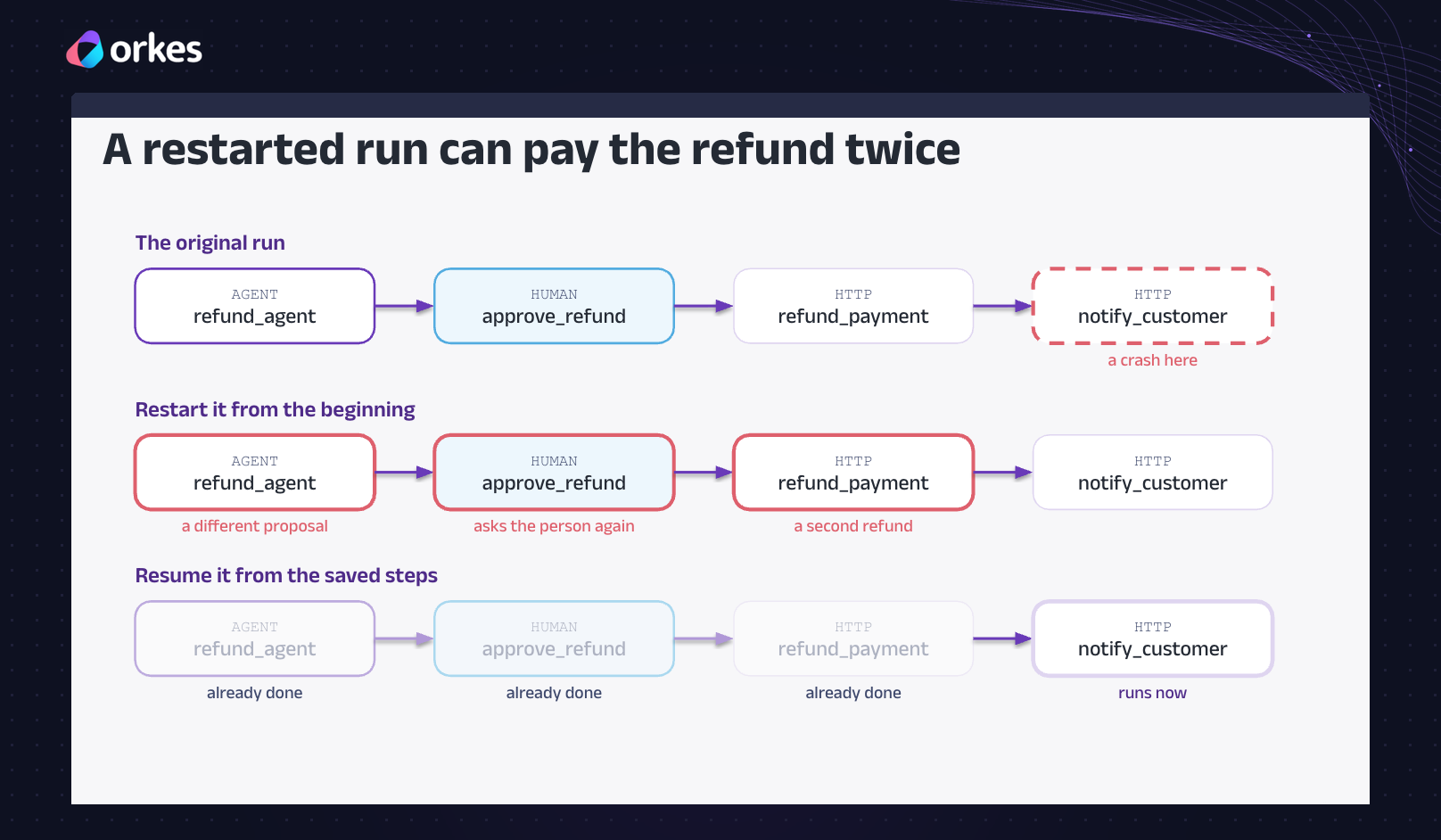
Orkes does that for you. Nick showed it live: he crashed part of the system in the middle of a task, and instead of failing, the task waited and then carried on once things were running again. The agent also fits into a bigger process. It suggests a refund, a person approves it, and the refund is issued automatically. Other AI tools, like Claude Code, can start that whole process too.
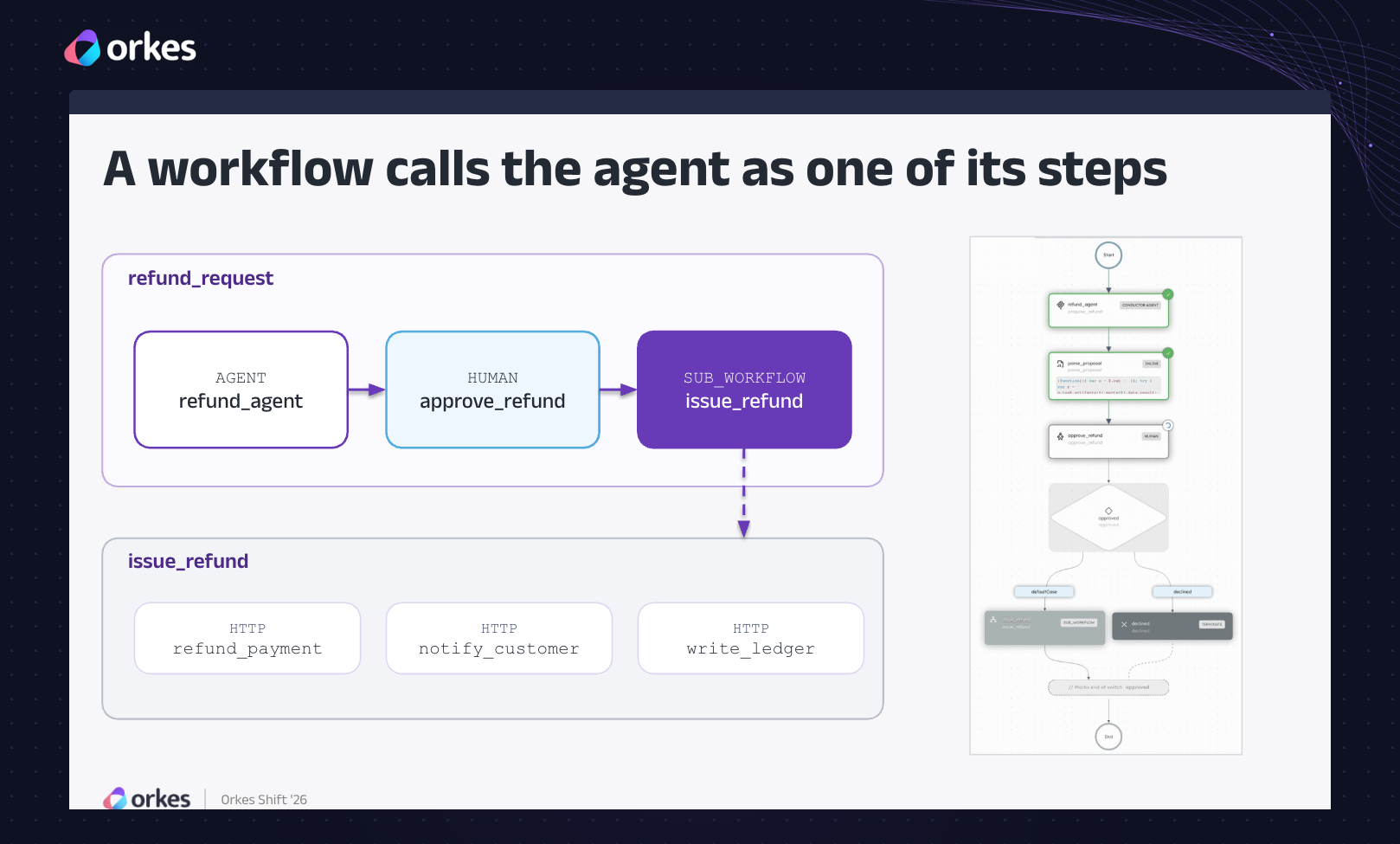
The takeaway: you don’t have to build all those extra pieces yourself. Retries, saved progress, approvals and safety checks are built into Orkes. To try it, head to www.developer.orkescloud.com.
What’s next for you and for Orkes Shift
- Session recordings: coming soon
- Keep the conversation going: join us on Slack and star Conductor OSS on GitHub.
Missed the day? Start building on the same engine the speakers use: try Orkes Developer Edition for free or book a demo to see agents and workflows running side by side.

Orkes Conductor Developer Edition
Your first agentic workflow is 5 minutes away. Everything you need is already there.

Lastly, thank you to our speakers for sharing honest stories from production, to our customers and partners, and to everyone who spent the day with us. And a special shoutout to the whole Orkes team for putting it all together.
As our CEO, Jeu George, put it after the event: “We’re entering an era where anyone can build an AI agent.” The real difference, in Jeu’s words, will come from the platforms that make those agents reliable, scalable, explainable and ready for production. That’s exactly what every conversation at Shift came back to.
And this is just the beginning. Orkes Shift is coming to a city near you. Stay tuned for dates.