Deep research tools have become a common way to get up to speed on an unfamiliar topic. We give one a question, and a model spends several minutes searching the web, reading what it finds and writing a long report with citations.
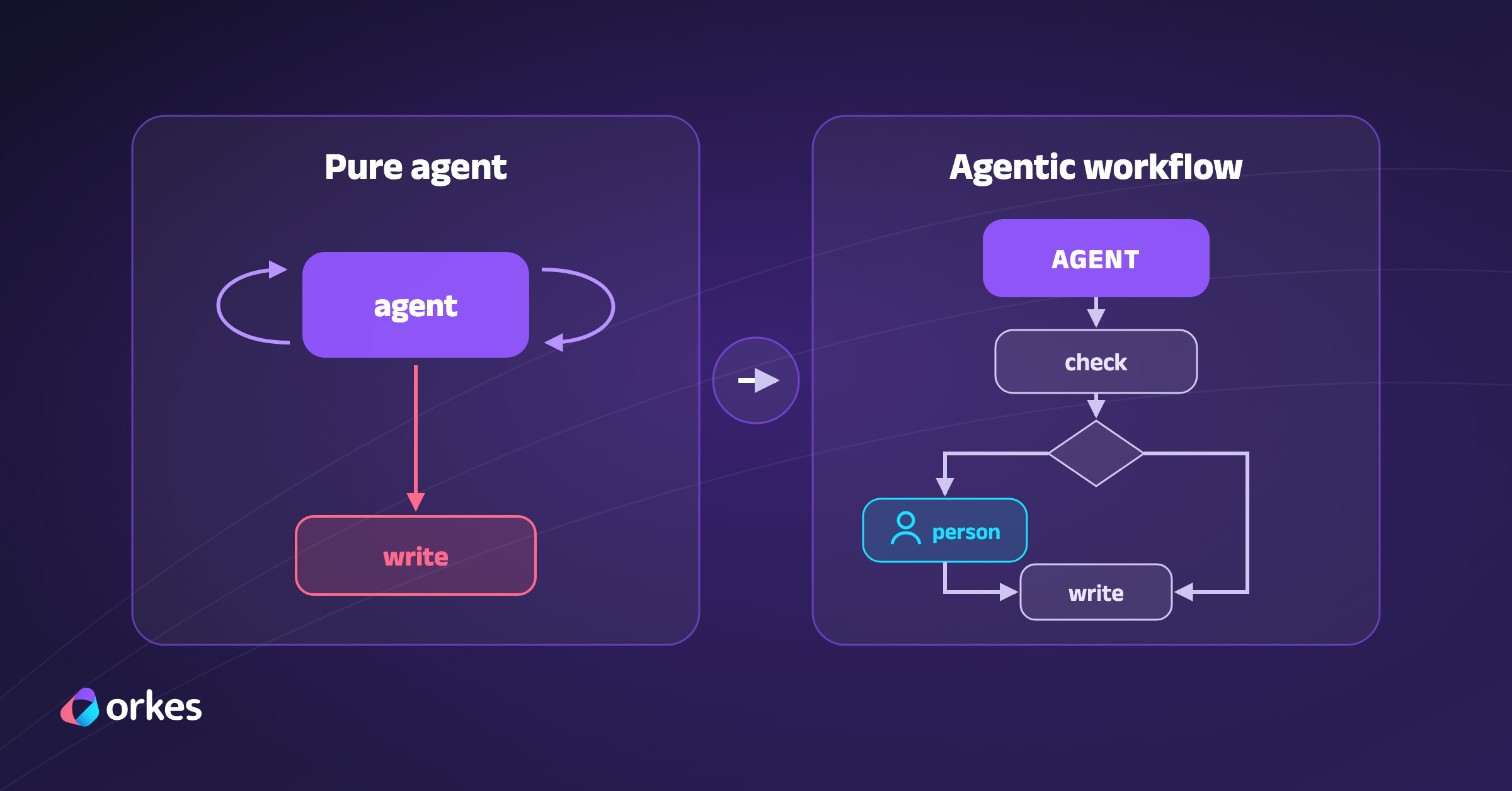
The catch is that a single model does all of that work. The same model that picks what to search for also decides which sources to trust and when it has found enough. Nothing checks its claims before they reach the report, so a wrong number reads exactly like a right one.
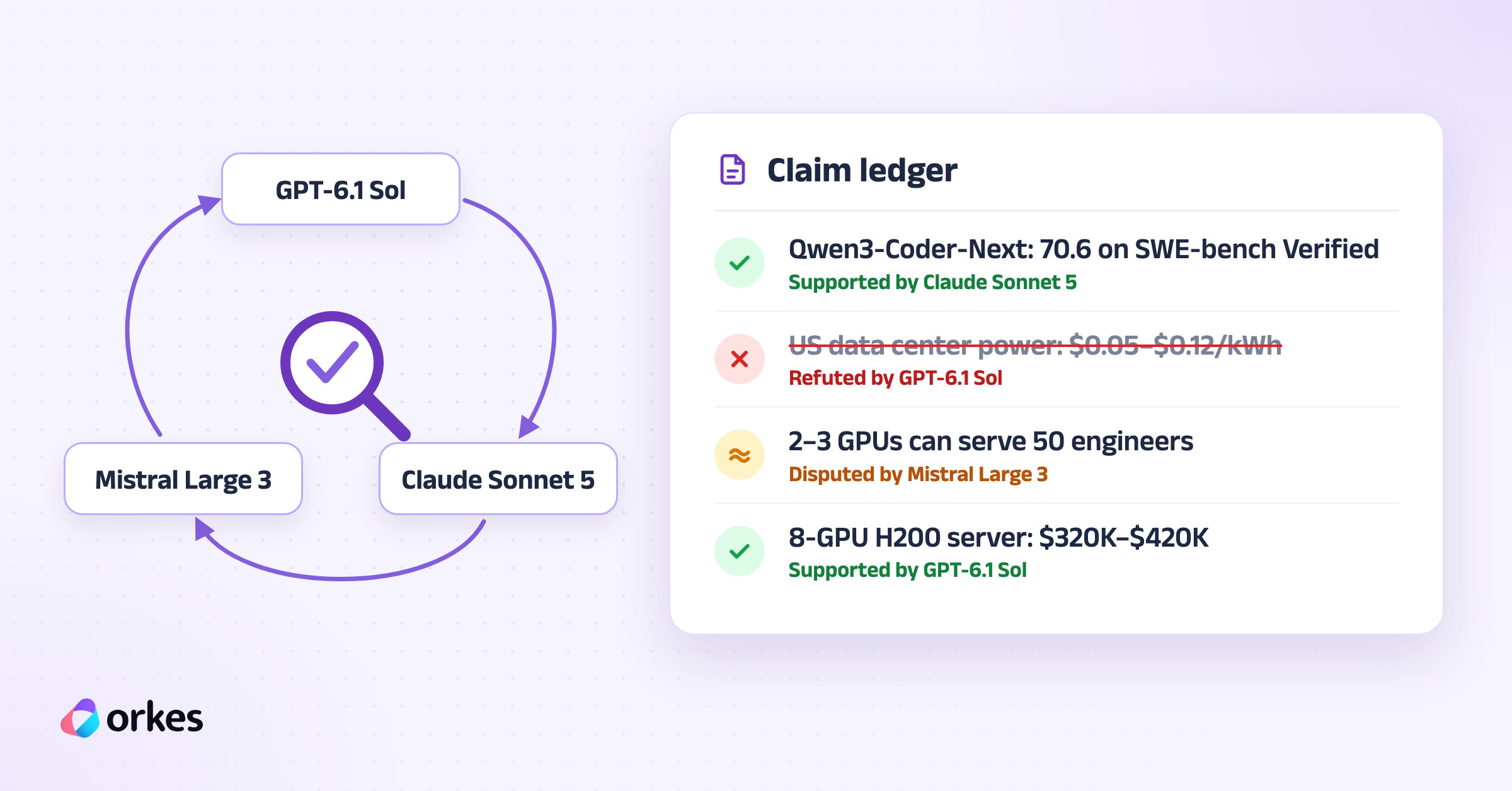
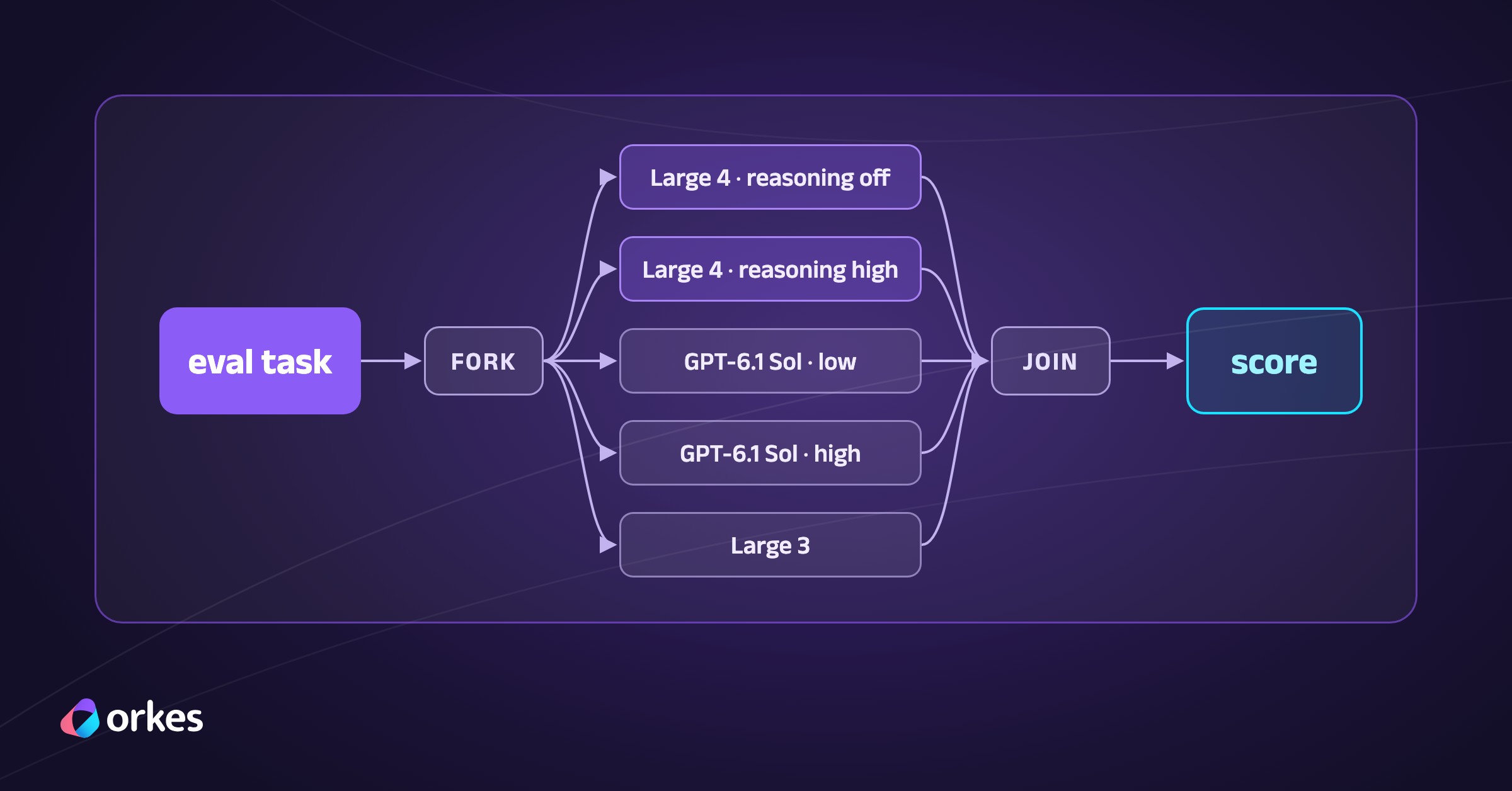
So we built a research team instead. A planner splits the question into separate research areas, and each area gets its own research agent, with all of them running in parallel. Each claim then goes to a reviewer on a model from another company, and that reviewer’s job is to find what’s wrong with it. Claims that don’t survive review get fixed or dropped before the report is written.
The team runs on Conductor and uses OpenAI’s GPT-6.1 Sol, Anthropic’s Claude Sonnet 5 and Mistral Large 3. The Conductor docs already include a single-model deep research recipe, and our build extends that recipe in four ways.
Each researcher runs as its own workflow.
A reviewer on another provider checks every claim.
The fan-out scales to tens of researchers.
A small React app starts runs and shows their progress.
TL;DR13 mins
What this covers
A deep research agent built from Conductor workflows. Researchers on three LLM providers search the web in parallel, a reviewer from a different provider tries to refute every claim, and an editor turns what survives into a PDF report.
What you'll build
Three workflows on Orkes Developer Edition (a planner with a fan-out, one workflow per researcher, and one per model call) plus a React app that starts runs, shows each researcher's progress and claims, and downloads the PDF.
Prerequisites
A free Orkes Developer Edition account and an access key for an application
API keys for at least two of OpenAI, Anthropic and Mistral
Node.js 20.6 or later
How the research team works
A run starts with a topic and a goal. The goal is the decision or question the report should answer, such as whether a 50-person engineering team should self-host an open-weight coding model.
The work moves through three stages.
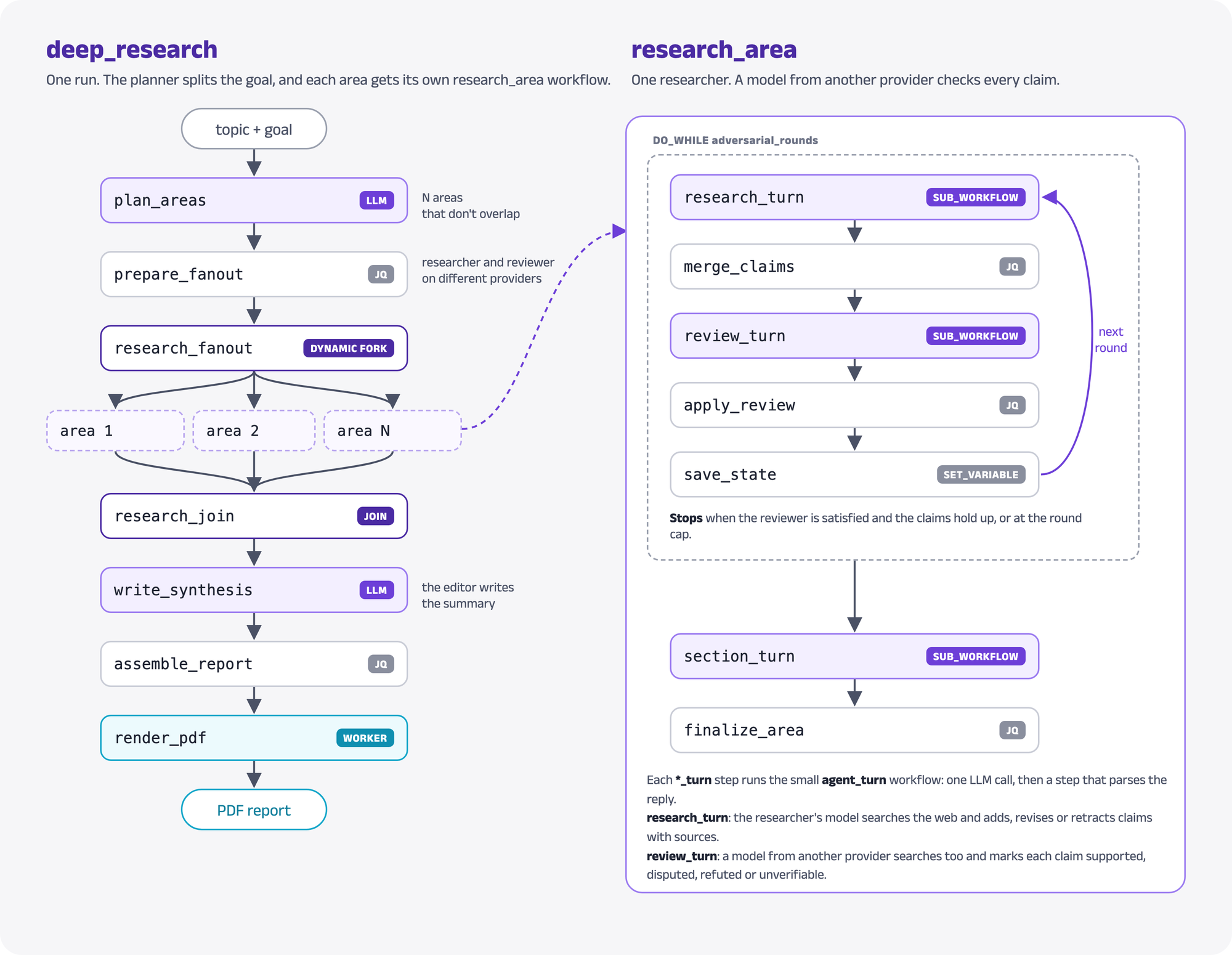
A planner model splits the goal into research areas that don’t overlap, one per researcher.
Each area gets its own research_area workflow with a researcher and a reviewer from different providers. In every round, the researcher searches the web and reports claims with sources. The reviewer searches too and tries to refute each claim.
When every area is done, an editor model writes the summary, and a worker renders the report as a PDF.
Each of these steps is a Conductor task. A task is one unit of work in a workflow, and Conductor records its input, output, timing and retries. That record means we can open any researcher’s run in the Conductor UI and read exactly what it was asked and what it answered.
What we asked Claude Code for
We built this with Claude Code, Anthropic’s coding agent, and conductor-skills, a package of instructions and reference files that teaches coding agents how to build on Conductor. Installing it for Claude Code is one command:
Terminal window
npx@conductor-oss/conductor-skills--agentclaude
Then we gave Claude Code this prompt:
Use conductor-skills to build a deep research agentic workflow that uses at least 3 different
models with web search. The input is a specific topic and goal that the agents collaborate on
and research. Each agent should focus on a different area, and a final summary agent should take
all the findings and put together a PDF with the details. Create a simple single-page UI in React
that lets me start research, monitor progress, list all these agentic workflows and download the
PDF. Each agent must run enough iterations to gather sufficient detail and use an adversarial
approach to validate each other's work. Make sure the agents run in parallel and can scale up to
tens of them if required.
The skill shaped the design in two ways that are worth knowing before reading the code.
First, it insists on Conductor’s built-in tasks. GPT and Claude calls are LLM_CHAT_COMPLETE tasks with webSearch: true, which turns on each provider’s own web search. The skill’s review checklist flags an HTTP task that calls a model provider’s API as critical.
Mistral is the exception the skill allows, because the built-in task doesn’t expose the feature we need. Its webSearch option covers OpenAI, Anthropic and Gemini, so our Mistral calls go to Mistral’s Conversations API through an HTTP task.
Second, the skill’s default for “build an agent” is the Conductor Agent SDK, but it allows a hand-built loop when each round uses several models. That’s our case, since every round pairs a researcher with a reviewer from another company.
We tested each piece on Orkes Developer Edition, the free hosted Conductor service from Orkes, before building on it. Two of those tests changed the design, and they come up in Step 4 and Step 5.
Prerequisites
Everything here runs on Orkes Developer Edition, so the first step is a free account there. In Developer Edition, create an application under Access Control > Applications, then create an access key for it.
Next, connect the model providers. The only rule is that a reviewer can’t share a provider with its researcher, so two providers are enough.
For OpenAI, add an OpenAI integration under Integrations > Connections and Resources with an OpenAI API key, and add the model to use under it.
For Claude, add an Anthropic Claude integration with an Anthropic API key and the endpoint https://api.anthropic.com/v1, and add a model.
For Mistral, add a secret named mistral_api_key under Definitions > Secrets that holds a Mistral API key.
Finally, give the application access to each model and to the secret.
{"kind": "mistral", "transport": "mistral_conversations", "model": "mistral-large-2512", "label": "Mistral Large 3"}
]
Notice that llmProvider is the integration’s name in Developer Edition, not the provider type. kind groups models by provider, which is how the fan-out makes sure a researcher is never paired with a reviewer of the same kind. The Mistral entry uses Mistral Large 3 because Mistral’s API rejects web search for Large 4. As of October 30, 2026, the error reads “Model mistral-large-4 currently does not support builtin connectors.”
Build it
Step 1: Register the workflows
The project has three workflows. deep_research plans the areas and collects the results, research_area is one researcher, and agent_turn is a single model call. Register them along with their task definitions:
The prompts and the JQ programs live in their own files under conductor/, and a build step inlines them into the definitions in conductor/dist/. JQ is a small language for reshaping JSON, and Conductor runs it with the built-in JSON_JQ_TRANSFORM task. Keeping the programs in separate files makes them much easier to read than escaped strings inside JSON.
Step 2: Split the goal into research areas
The planner is one LLM_CHAT_COMPLETE task. It returns a JSON object with exactly as many areas as the run asked for, each with a title, a scope and three to five questions:
{"role": "user", "message": "TOPIC: ${normalize_input.output.result.topic}\nGOAL: ${normalize_input.output.result.goal}\nAUDIENCE: ${normalize_input.output.result.audience}\nNUMBER OF AREAS: ${normalize_input.output.result.numAreas}\nReturn the JSON object now."}
]
}
}
Notice jsonOutput: true, which asks the provider for a JSON reply. OpenAI models also need the word JSON in a message, so the user message ends with “Return the JSON object now.”
Step 3: Fan out one researcher per area
Next, a JQ step pairs each area with a researcher and a reviewer. Models rotate through the list, and the reviewer is the next model of a different kind:
conductor/jq/prepare_fanout.jq
[ $areas | to_entries[] | .key as $i | .value as $a | $m[$i % $n] as $res
Notice that the number of branches comes from the data, so the same definition runs 4 researchers or 30. Setting optional on the fork means one failed researcher doesn’t fail the run. The report lists that area under “Areas that did not complete” instead.
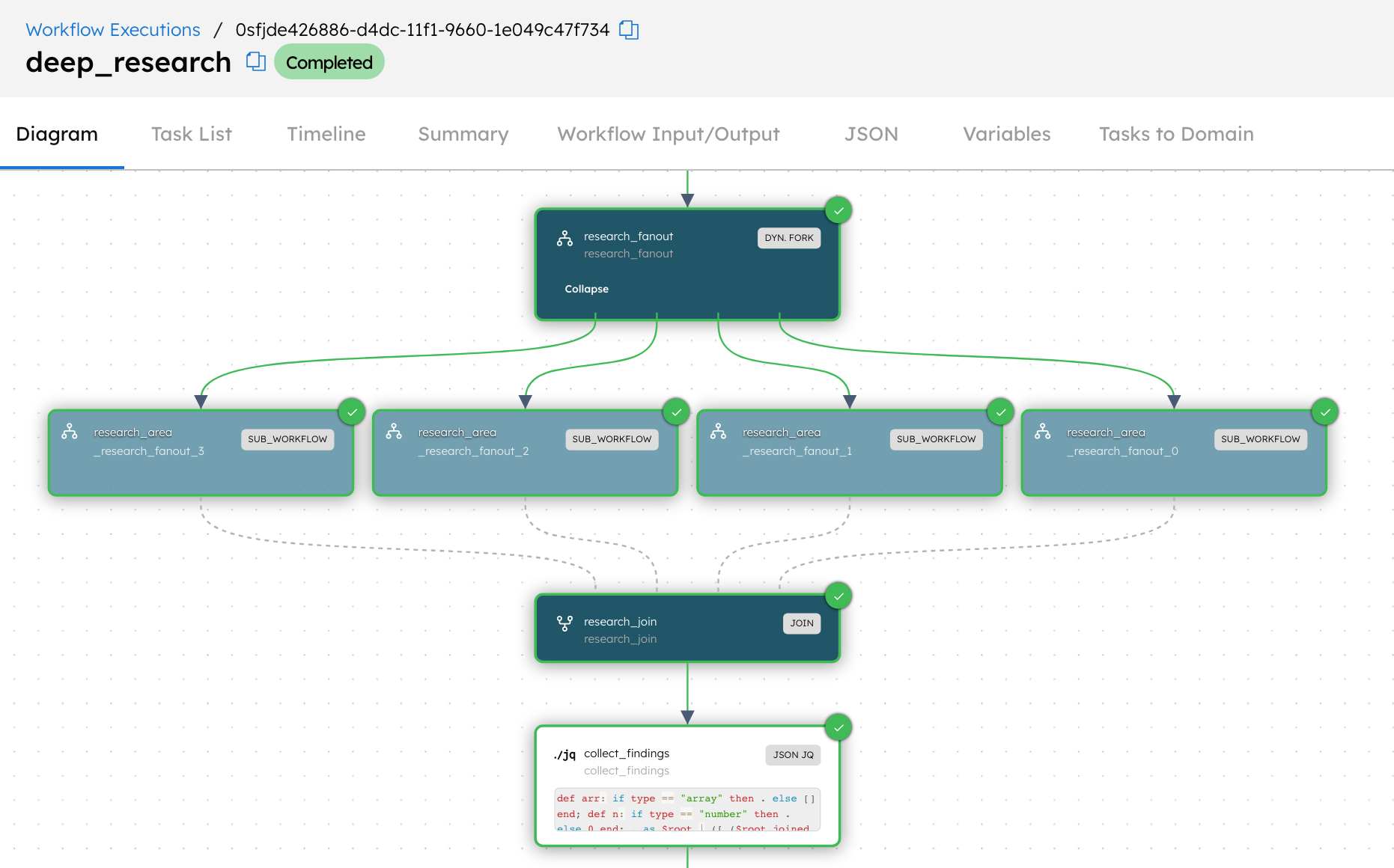
In the Conductor UI, the dynamic fork expands into one research_area workflow per area, and each one keeps its own status and history.
Step 4: Let the reviewer try to break every claim
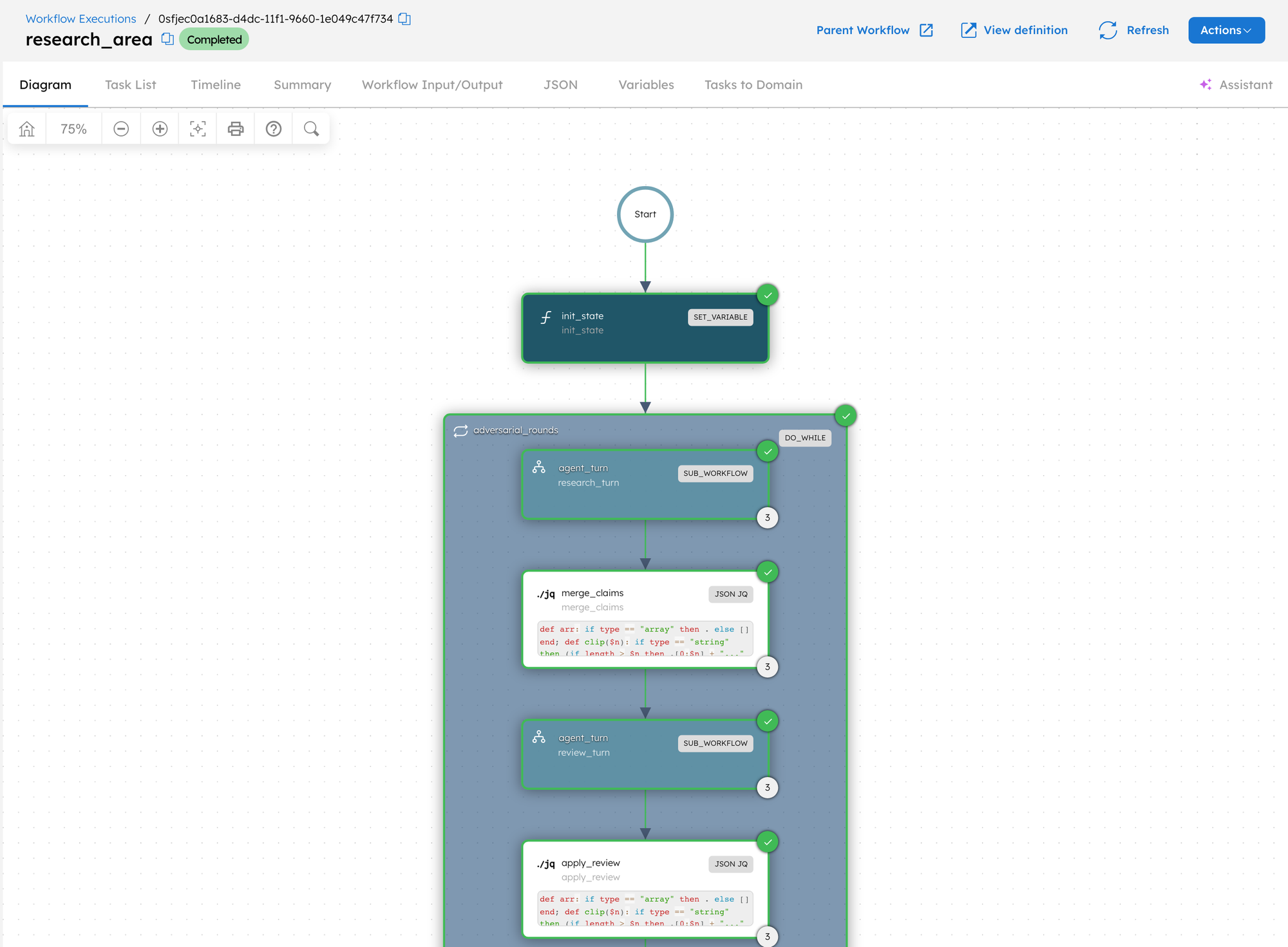
Each research_area workflow runs a DO_WHILE loop, which repeats a list of tasks until a condition says to stop. Every round has two model calls with a little bookkeeping around them.
research_turn asks the researcher’s model to search, then add, revise or retract claims. Every claim needs at least one source URL.
merge_claims updates the claim ledger, which is the list of claims with IDs, sources and the reviewer’s latest verdict on each.
review_turn sends every claim that isn’t settled to the reviewer, on a different provider. It also searches the web and gives each claim one verdict.
apply_review applies the verdicts, moves refuted claims out of the ledger and decides whether to stop.
save_state stores the ledger, the reviewer’s feedback and a progress record in workflow variables, which is also where the UI reads progress from.
The reviewer’s prompt defines the verdicts:
conductor/prompts/reviewer.md
Give each claim one verdict:
- "supported" when credible evidence confirms it as stated
- "disputed" when sources conflict, only partly support it, or it is out of date
- "refuted" when it is false or the cited source doesn't support it
- "unverifiable" when you couldn't confirm it, because missing evidence never counts as support
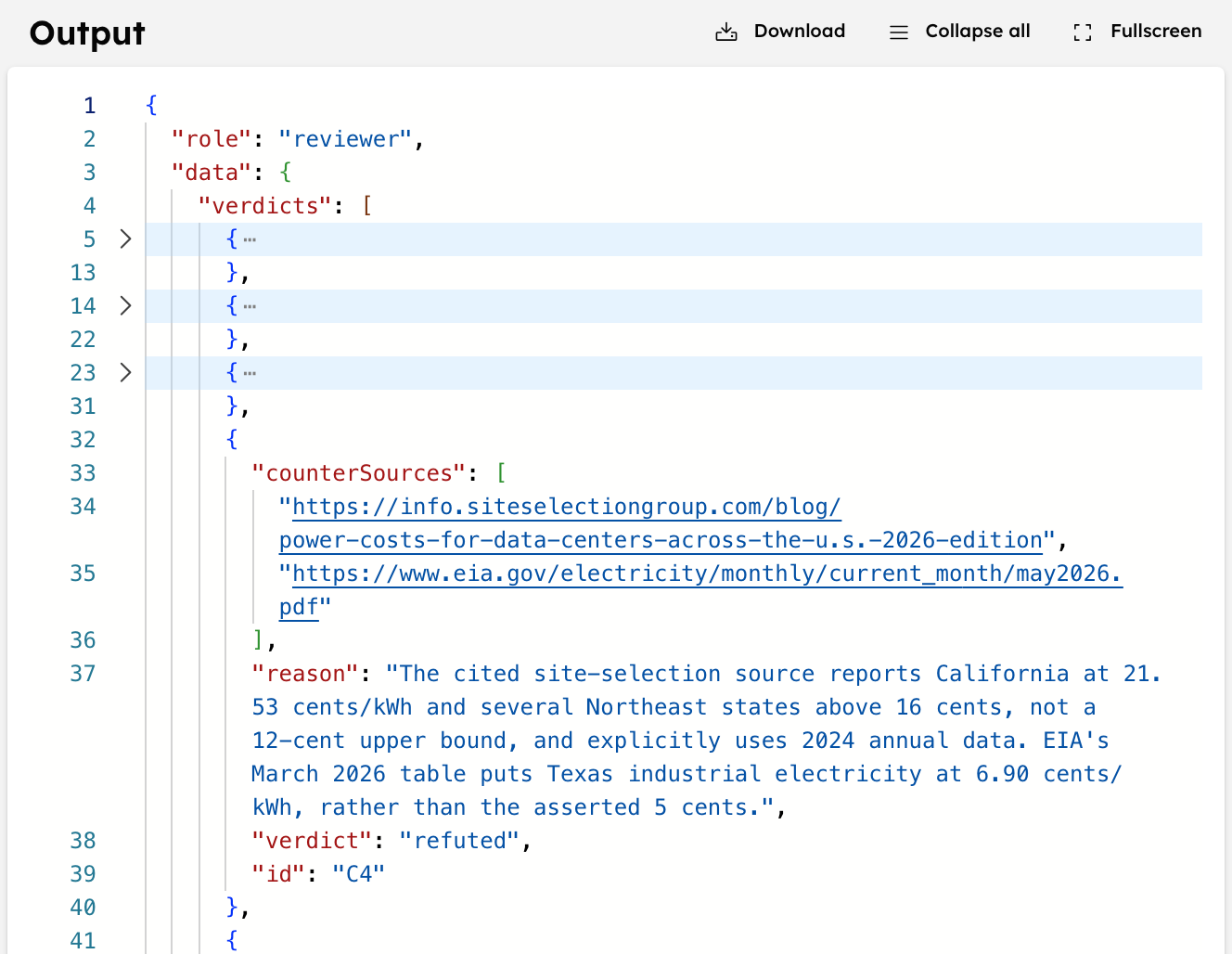
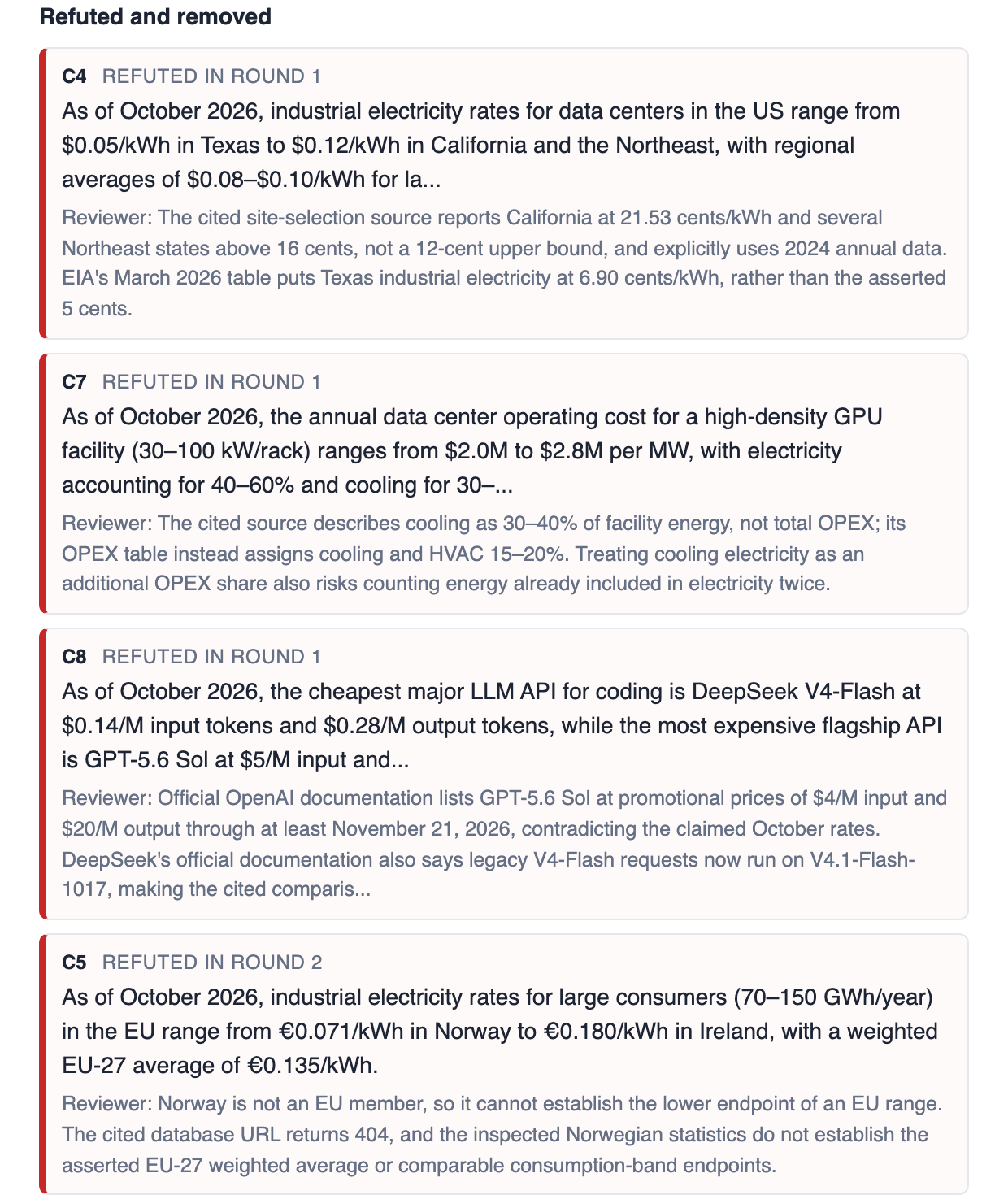
In our first full run, GPT-6.1 Sol reviewed Mistral Large 3’s cost research. Claim C4 put US data center electricity between $0.05/kWh in Texas and $0.12/kWh in California. The reviewer refuted it, because Mistral’s own source lists California at 21.53 cents and a US Energy Information Administration table puts Texas at 6.90 cents. Conductor keeps that verdict, with the reason and counter-sources, in the review turn’s output.
The loop stops when the reviewer says coverage is sufficient and the ledger holds up, or when it hits the round cap. That rule lives in apply_review:
conductor/jq/apply_review.jq
| ($round >= $min and $rok and $suff and $s >= 4 and ($d + $p) <= 3) as $gate
| ($fails >= 3) as $abort
In plain terms, a researcher can finish early once these conditions all hold.
It has done the minimum number of rounds.
The review succeeded and marked the area sufficient.
The area has at least four supported claims and at most three disputed or pending ones.
Three failed model calls end the area early, and the report marks it as degraded.
Here’s the first design change from testing. Inside a DO_WHILE, Conductor can add an LLM_CHAT_COMPLETE task’s replies from earlier iterations to its next call as chat history. We saw it on Developer Edition with GPT-6.1 Sol, where round two’s call carried round one’s reply after the new prompt. That’s handy for a chat agent, but here each call should only see the ledger and feedback it’s given.
So the model calls aren’t tasks inside the loop. research_turn and review_turn are SUB_WORKFLOW tasks that run the small agent_turn workflow. Inside it, a SWITCH sends GPT and Claude to the built-in task and Mistral to its Conversations API:
Notice that the Mistral key never appears in the workflow. ${workflow.secrets.mistral_api_key} reads it from the secrets stored in Developer Edition when the task runs. The Mistral branch also has a small JQ step after the call that pulls the text out of Mistral’s reply, which we left out above.
Notice too that jsonOutput is off even though the prompts ask for JSON. In our tests, Claude’s web search replies opened with a sentence like “I found three well-documented stories” and split the text around its citations. So a JQ step after the call strips anything outside the JSON object and parses what’s left. A reply that still won’t parse counts as a failed turn.
Step 5: Write the report and the PDF
After the join, the editor model reads a digest of every area’s section and writes the summary. It covers the takeaways, the places where areas disagree and the limits of the evidence, including any area that didn’t finish. A JQ step then assembles the full markdown report with a methodology table and a numbered list of sources.
Here’s the second design change. Conductor has a built-in GENERATE_PDF task, but on Developer Edition it saves the PDF on the Conductor server’s local disk, where our app can’t reach it. Saving it somewhere we could read would take an S3 or Google Cloud Storage bucket and a matching cloud integration.
So the last step is a SIMPLE task instead, which is a task that our own worker code executes. The worker runs inside the UI server, renders the markdown with headless Chrome and saves the PDF next to the UI:
server/pdf.ts
exportconstrenderPdfWorker= {
taskDefName: "deep_research_render_pdf",
execute: async ({ inputData }:Task) => {
const { workflowId, markdown } = inputData ?? {};
if (typeof workflowId !=="string"||!/^[\w-]+$/.test(workflowId) ||typeof markdown !=="string") {
return { status: "FAILED"asconst, reasonForIncompletion: "workflowId and markdown are required" };
Notice that the worker is just a task name and a function. The UI server starts it with the JavaScript SDK’s TaskManager, which polls Conductor for deep_research_render_pdf tasks.
Step 6: Start research from the UI
The React app talks only to a small Express server, and that server holds the Conductor access key. Starting a run is one call to the JavaScript SDK:
Notice that the server sends the model list with every run, so changing models doesn’t touch the workflow definitions. Now start the app:
Terminal window
npmrundev
Open http://localhost:5173, give it a topic and a goal, and choose how many researchers to run.
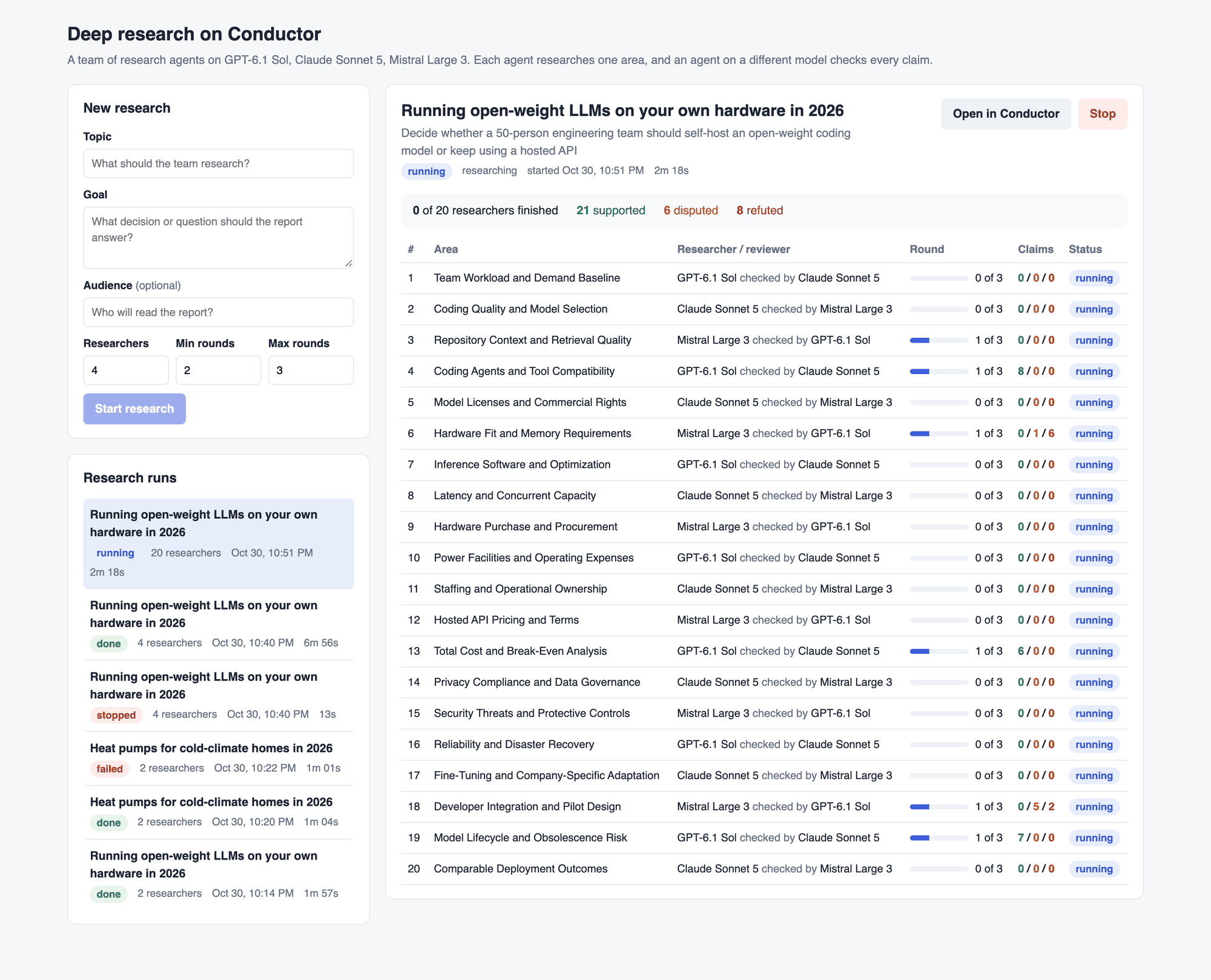
The run page lists every researcher with its pair of models, its current round and its claim counts. Clicking a row shows the claims themselves, each with its sources and the reviewer’s reasoning.
What a run looks like
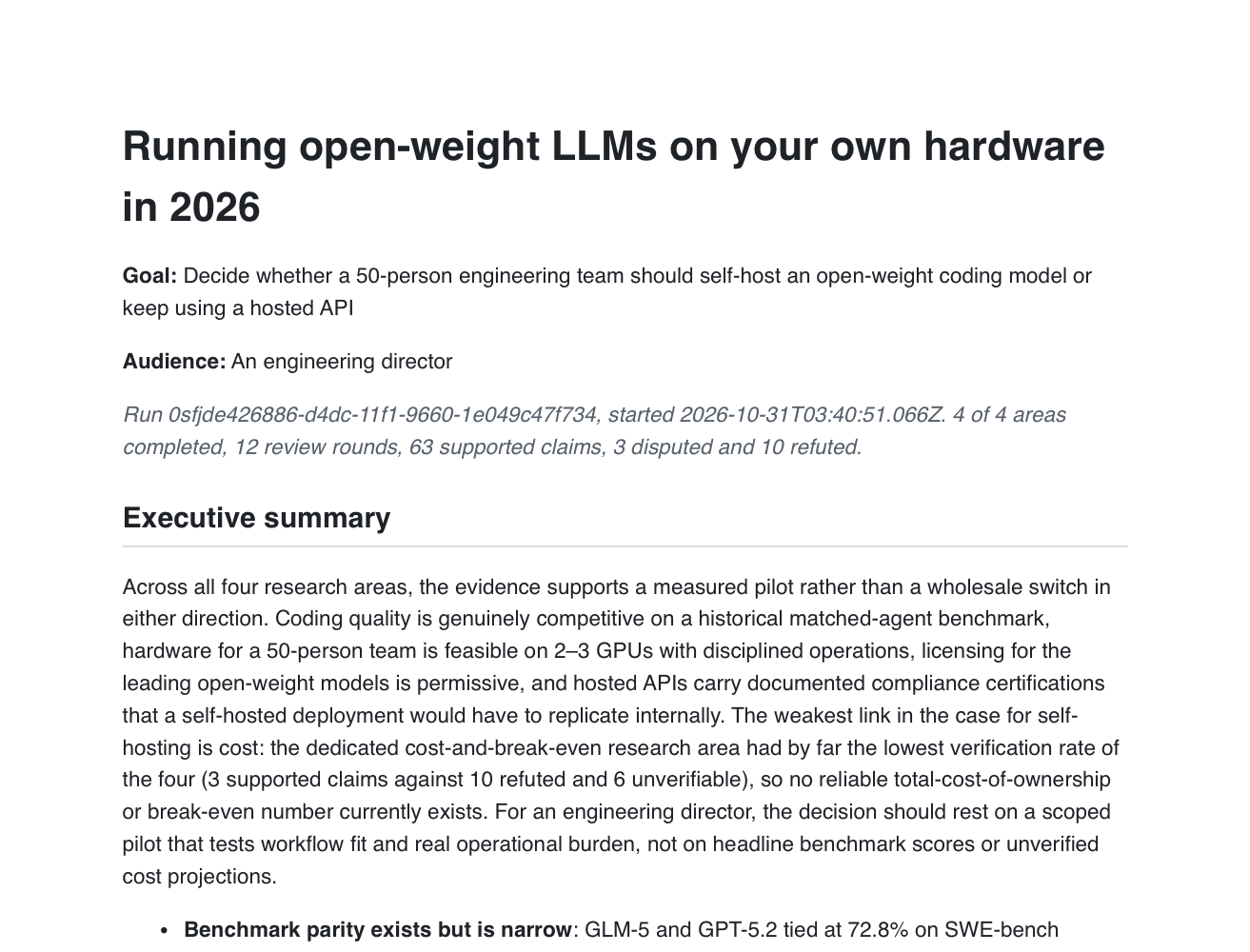
Our first full run used the topic “Running open-weight LLMs on your own hardware in 2026”, with the 50-person team decision as the goal. We ran 4 researchers with a minimum of two rounds and a maximum of three, and the run finished in 6 minutes 56 seconds.
The planner took 23 seconds.
The 4 researchers ran in parallel and took between 3.7 and 5.4 minutes each.
The editor took 67 seconds, and the PDF came out at 15 pages.
All 30 model calls succeeded. Together they used about 1.9 million input tokens, mostly web search results, and about 93,000 output tokens.
The researchers ended with 63 supported claims, 3 disputed and 10 refuted. None of the reviewers ever marked an area sufficient, so all four ran the full three rounds.
How hard a reviewer pushed depended on the pair. With GPT-6.1 Sol researching and Claude Sonnet 5 reviewing, Claude supported all 41 claims across two areas. With Mistral Large 3 researching the cost area and GPT-6.1 Sol reviewing, GPT-6.1 Sol refuted 10 claims.
The reasons are specific. Claim C7 counted cooling as a share of operating costs on top of electricity, which the reviewer said could count the same energy twice. Claim C5 started an EU price range with Norway, which isn’t in the EU, and its cited database URL returned a 404.
Disputes also led to better claims. Claude first claimed that two to three GPUs could serve all 50 engineers, and Mistral disputed it as optimistic for real concurrency and context lengths. After two revisions, Claude’s round-three version said the answer depends on the GPU and quantization, citing a self-hosting guide and a separate benchmark. Mistral marked that version supported.
The review results also reached the conclusion. The executive summary noted that the cost area had “3 supported claims against 10 refuted and 6 unverifiable,” so no reliable break-even number exists yet. It recommended a scoped pilot instead.
Every researcher is a workflow we can open in Conductor. The loop shows how many rounds ran, and each round’s research_turn and review_turn link to the agent_turn run that holds the exact prompt and reply.
Scaling to 20 researchers
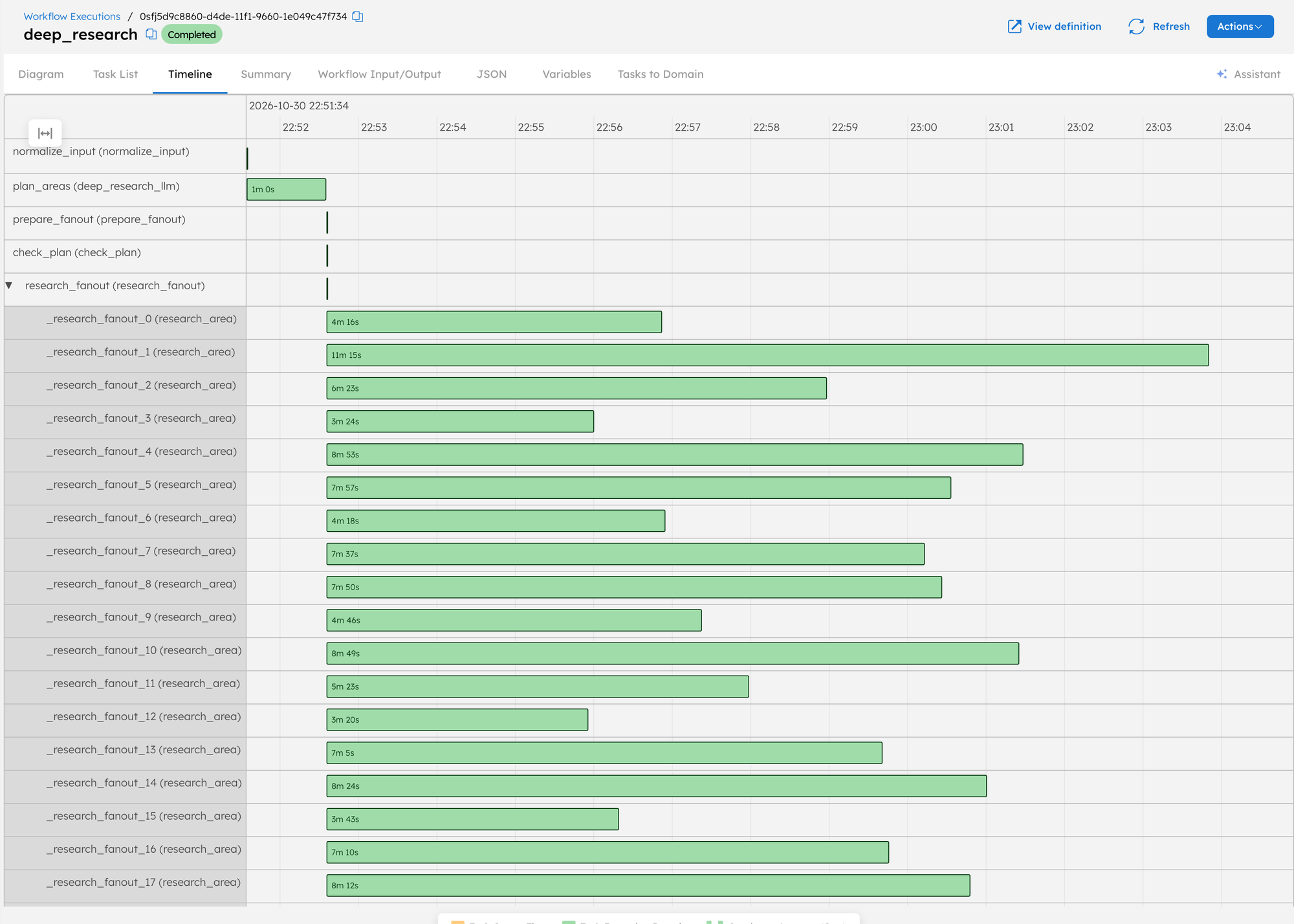
Next we ran the same topic and goal with 20 researchers. The planner split the goal into 20 areas, from licensing to staffing to disaster recovery. The run finished in 13 minutes 15 seconds, so five times the researchers took about 1.9 times as long.
The timeline in Conductor shows why. All 20 research_area workflows started within the same second, and each one took between 3 minutes 20 seconds and 11 minutes 15 seconds. The run lasts as long as its slowest researcher, and here the slowest pairs were Claude researching with Mistral reviewing.
The bigger run produced 258 supported claims, 51 disputed and 36 refuted. Two researchers met the stop rule and finished as verified, one of them after only two rounds.
It also surfaced the first limit we hit at this width, which is the providers’ rate limits. The retries in our task definitions absorbed most of them, since 26 Mistral calls hit a limit and then succeeded on a later attempt. Seven of the 138 agent_turn calls still failed.
Three Mistral calls ran out of retries, mostly on “Token rate limit reached” or “web_search rate limit reached”.
Four replies weren’t valid JSON, even after the cleanup step.
None of them stopped the run. Each one counted as a failed turn, and the next round carried on.
For runs of 20 or more researchers, there are a few ways to stay under the limits.
Raise the retry count in the task definitions under conductor/taskdefs/.
Ask the providers for higher limits.
Run fewer researchers at a time.
Break it on purpose
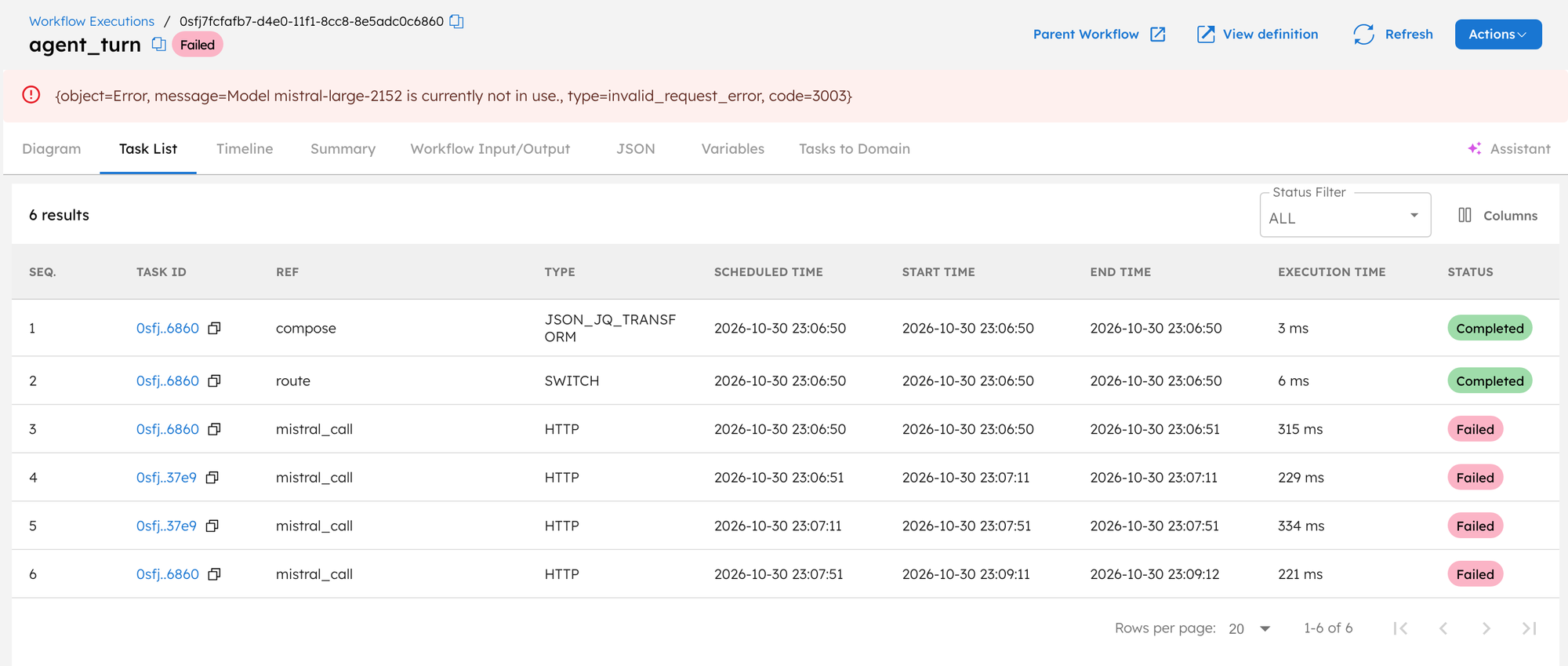
Now let’s break something. Change the Mistral model in models.json to a name that doesn’t exist, such as mistral-large-2152, then restart the app and start a run with three researchers and one round.
Two of the three areas use Mistral, one as the researcher and one as the reviewer, so their Mistral calls fail. Opening one of the failed agent_turn workflows in Conductor shows the HTTP call in the Task List, tried four times.
Notice the gaps between attempts, which come from the retry policy in conductor/taskdefs/deep_research_mistral.json. Retries can’t fix a typo, but they’re the same retries that rescued those 26 rate-limited calls in the 20-researcher run.
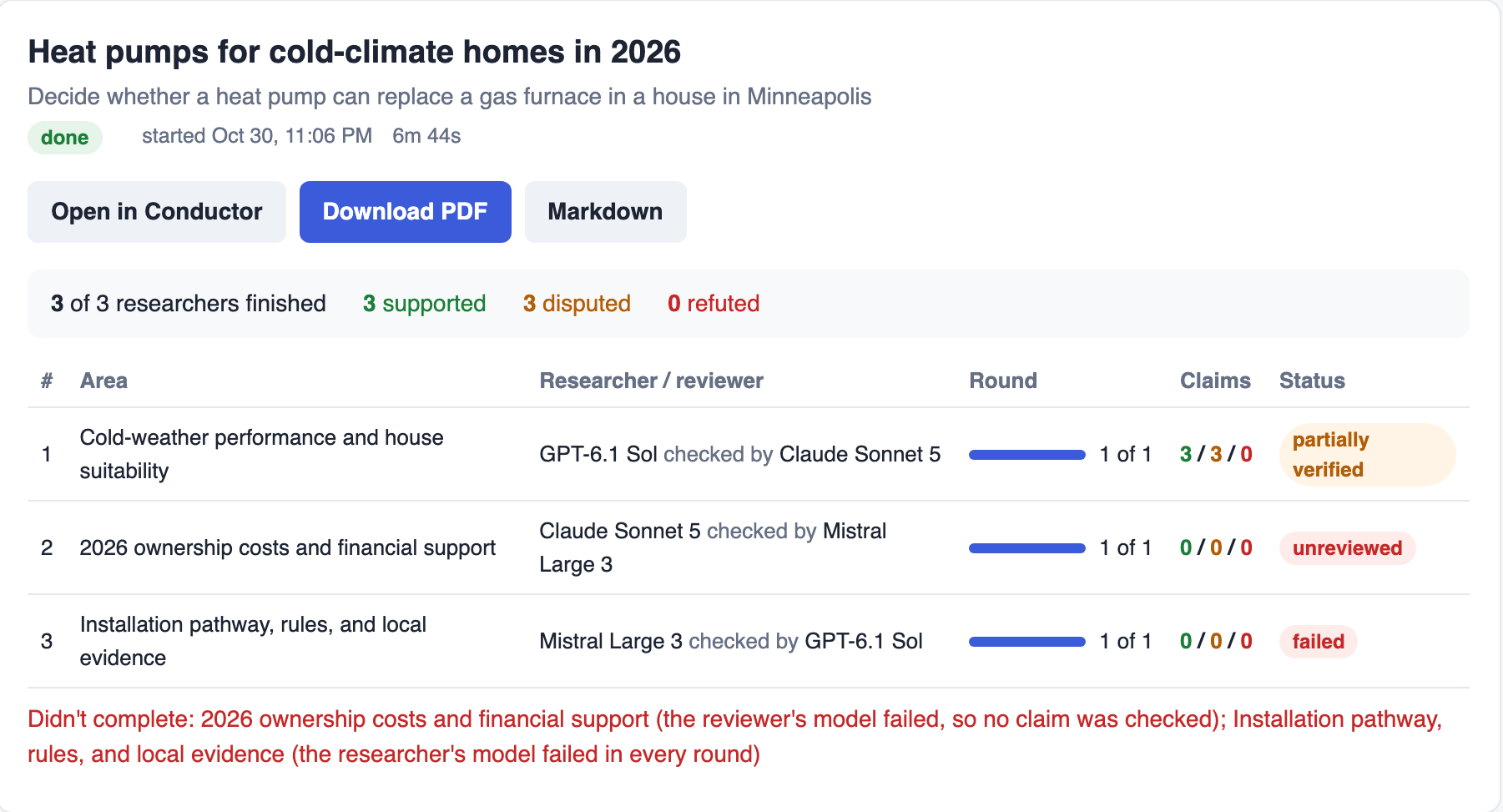
The run still finishes. The one area that didn’t need Mistral completes, and the app shows why the other two produced nothing usable.
The report carries the same list under “Areas that did not complete”, so anyone reading the PDF knows what’s missing. Fixing the model name and restarting the app gets everything back to normal.
Wrapping up
We built a deep research team from Conductor workflows.
A planner splits a goal into areas, and one research_area workflow per area runs in parallel.
In every round, a researcher on one provider searches the web and a reviewer on another provider tries to refute each claim.
Claims that fail review get fixed or dropped, and an editor writes a PDF report from what survives.
Every step is a task we can inspect and retry in the Conductor UI.