- AGENTIC
- ENGINEERING
How to Benchmark a New LLM on Your Own Tasks: Mistral Large 4 vs GPT-6.1 Sol on Conductor
Mistral released Large 4 on October 6, 2026 as a public preview. It is a mixture-of-experts model with about one trillion parameters, and only about 52 billion of them run for each token. Its context window holds one million tokens, and its reasoning mode can be switched on or off for each request.
Mistral’s launch post reports strong scores on coding and agentic benchmarks. Those scores come from public test sets, so they say little about how the model handles your own work. They also don’t tell you how long your users will wait for an answer or how many tokens a typical request uses.
The way to find out is to run your own tasks against the new model and against the model you already use. Every answer gets scored the same way, and each task runs several times so the results hold up.
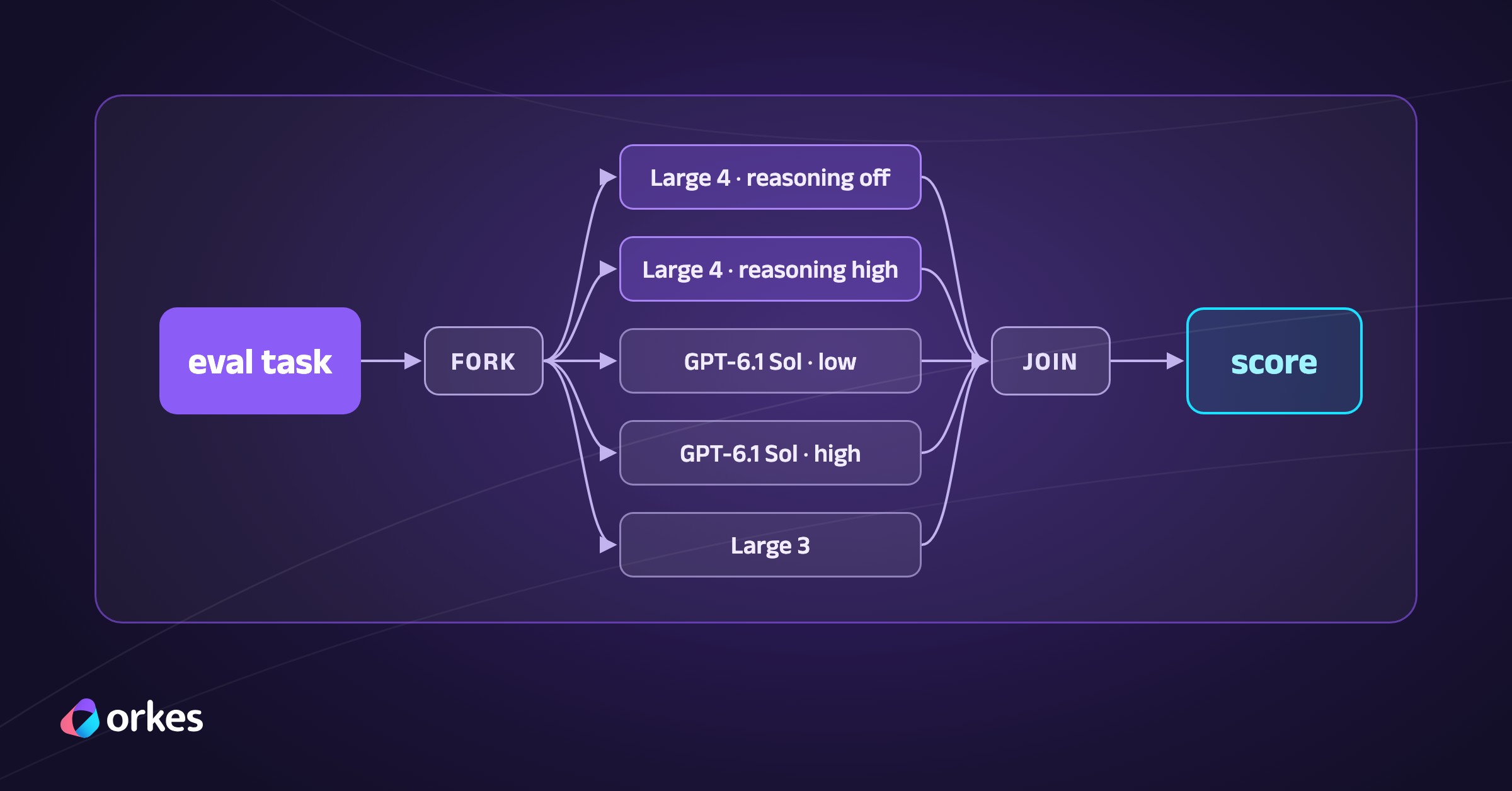
We built a benchmark like that as an eval harness in Conductor. The harness is a set of workflows that sends each task to every model, scores the answers and records every call. We ran it against Mistral Large 4, OpenAI’s GPT-6.1 Sol and Mistral Large 3, which was Mistral’s previous flagship model.
The benchmark has 76 tasks in five categories (reasoning, coding, agentic tool use, web-grounded questions and questions about a private document). The workflows, the tasks and every raw result are published on GitHub in orkes-io/conductor-mistral-large-4-benchmark.
What an eval harness needs from an orchestrator
A benchmark like this one runs a set of eval tasks against several model configs. An eval task is a problem with a known correct outcome, such as a puzzle with a verified answer or a function specification with hidden unit tests. A model config is a model plus its settings, so Large 4 with reasoning off and Large 4 with reasoning high count as two configs.
Answers are checked by code wherever possible, and the rest go to an LLM judge, which is a second model that grades each answer against a written rubric. A config’s pass rate is the share of its scored calls that passed.
Conductor started at Netflix in 2016, where it replaced services that coordinated through events (choreography) with a central workflow definition (orchestration). Each process became visible in one place, and failed steps could be retried. In November 2023, Orkes added LLM tasks, which call a model as a workflow step, and human tasks, which wait for a person. An agent runtime and the AGENT task, which runs a whole agent as one step, followed in August and September 2026.
An eval run has the same problems as the business processes Conductor was built to run. Each of the three full runs here covered 380 scored calls and took 21 to 34 minutes. Any call can time out, hit a rate limit or return a malformed reply, and the harness handles each of those cases.
- One prompt goes to several models in parallel, and the results are combined once every model has answered.
- Calls that fail or hit a rate limit are retried, so a temporary error doesn’t count against a model.
- API keys are stored as Conductor secrets instead of in the workflow definitions.
- Code written by a model runs in a sandbox with no network access.
- Answers that code can’t check go to the judge model.
- Every call is recorded, so any number in the results can be traced back to the calls behind it.
Shift ‘26, the Orkes user conference, took place in October 2026. In the opening keynote, Orkes CEO Jeu George made two points that also apply to choosing a model.
- Every run of an agent can be different, so you need to be able to explain why it did what it did on any given run.
- Teams increasingly use models from more than one provider. For example, a team might run on one cloud while preferring another provider’s model for agentic work.
The harness compares models from different providers on identical tasks. Each task runs several times and every call is recorded, so a pass rate always rests on runs you can open in the Conductor UI and explain.
The harness
The harness is four workflows, and each one runs the next as a sub-workflow.
ml4_bench_runloads the eval tasks and works through them in batches.ml4_bench_itemsends one task to every model config at once.ml4_eval_oneruns and scores one task against one config.ml4_call_modelmakes the API call to the model provider.
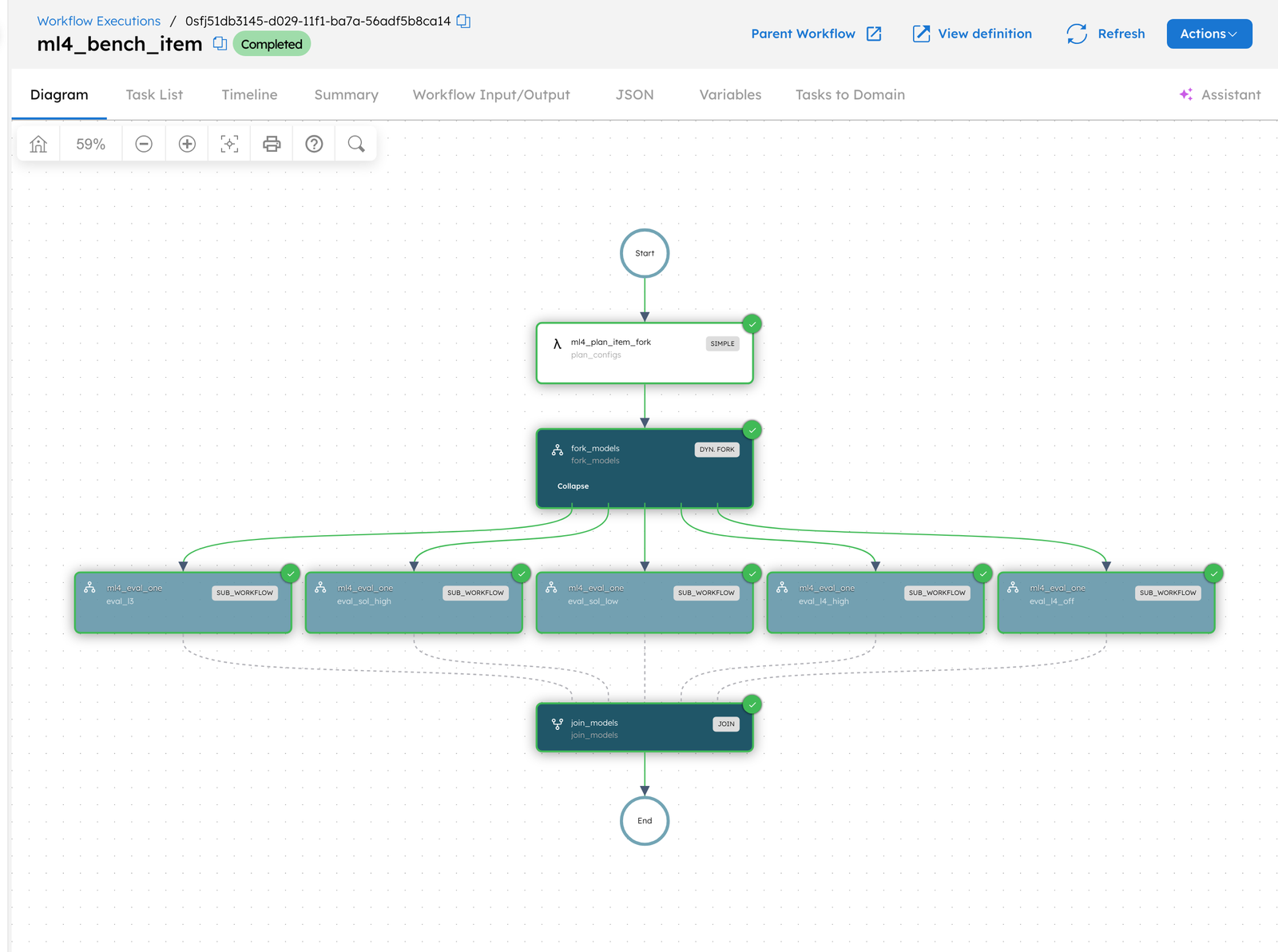
Sending one task to every model
ml4_bench_item uses a dynamic fork, which is a fork whose branches are decided when the workflow runs. A worker task, a step that runs your own code, builds the list of branches from the configs passed to the run. Adding a model to the comparison therefore only means changing the run’s input. A JOIN task after the fork waits for every branch to finish.
[ { "name": "ml4_plan_item_fork", "taskReferenceName": "plan_configs", "type": "SIMPLE", "inputParameters": { "item_id": "${workflow.input.item_id}", "repeat": "${workflow.input.repeat}", "configs": "${workflow.input.configs}", "dataset": "${workflow.input.dataset}", "run_id": "${workflow.input.run_id}", "judge": "${workflow.input.judge}" } }, { "name": "fork_models", "taskReferenceName": "fork_models", "type": "FORK_JOIN_DYNAMIC", "dynamicForkTasksParam": "dynamicTasks", "dynamicForkTasksInputParamName": "dynamicTasksInput", "inputParameters": { "dynamicTasks": "${plan_configs.output.tasks}", "dynamicTasksInput": "${plan_configs.output.inputs}" } }, { "name": "join_models", "taskReferenceName": "join_models", "type": "JOIN" }]Calling the models
Each model call is an HTTP task, a built-in task type that sends an HTTP request and records the response. The API key is stored as a Conductor secret, so it never appears in the workflow definition, and the UI shows it as Bearer *** in every execution.
{ "name": "ml4_http_mistral", "taskReferenceName": "http_mistral", "type": "HTTP", "optional": true, "inputParameters": { "http_request": { "uri": "${workflow.input.request.uri}", "method": "POST", "accept": "application/json", "contentType": "application/json", "headers": { "Authorization": "Bearer ${workflow.secrets.ml4_mistral_api_key}" }, "body": "${workflow.input.request.body}", "connectionTimeOut": 15000, "readTimeOut": 900000 } }}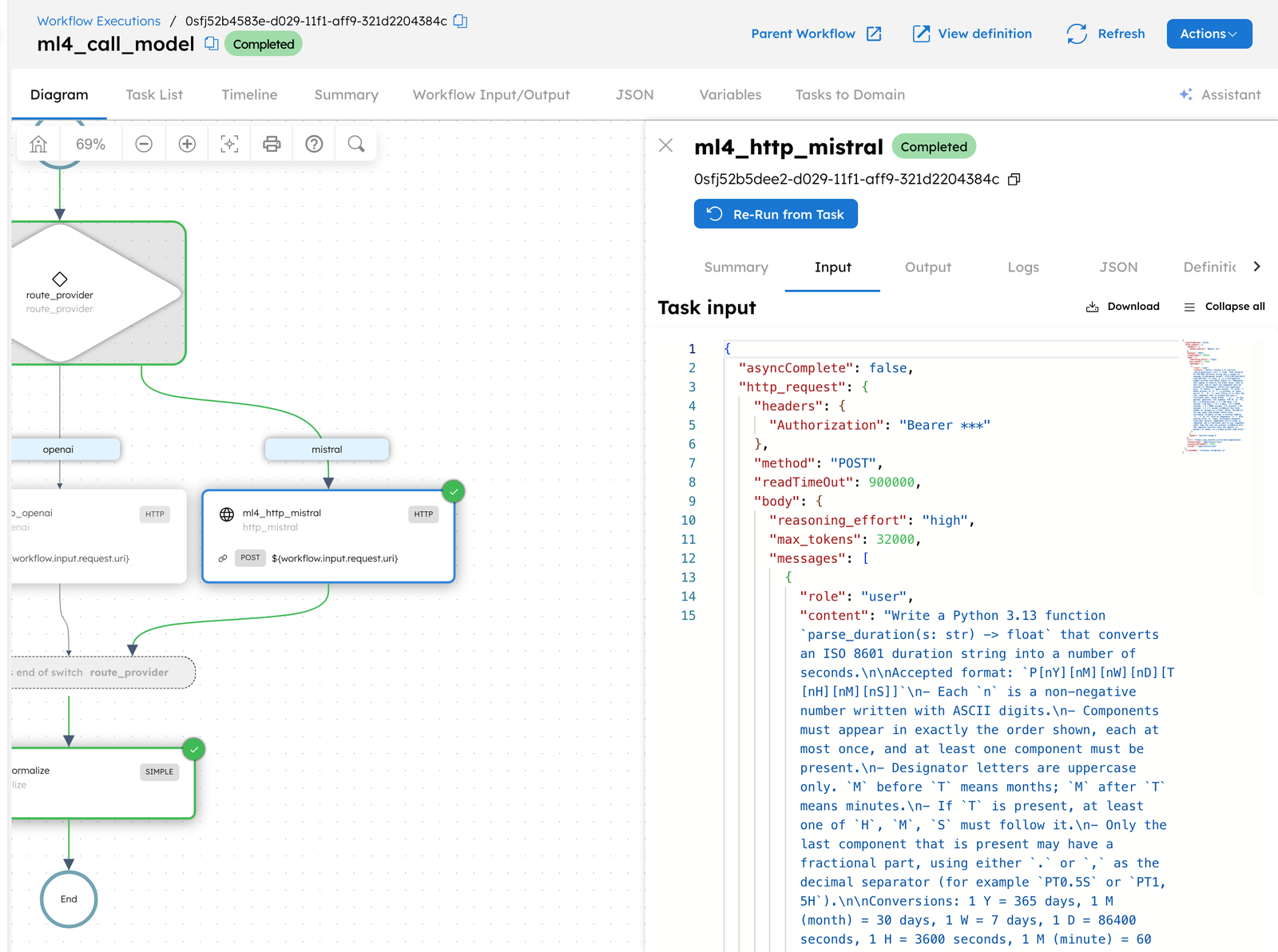
Latency figures are the HTTP task’s start-to-end times as Conductor recorded them, so each one traces back to a task you can open in the UI.
Scoring the answers
Code scores four of the five task categories, and only the questions about a private document go to the judge.
- Reasoning tasks have one verified answer, which the model has to state on a final line that starts with
ANSWER:. - For coding tasks, a worker runs the model’s Python function against 12 to 20 hidden unit tests inside a Docker container with no network access.
- Agentic tasks are scenarios, such as rolling back a bad deploy or booking travel under a company policy, with tools backed by a simulated environment. The check covers the model’s tool calls and its final summary. Taking an action the scenario forbids fails the run.
- Web-grounded questions ask about events from August to October 2026, after the models’ training data, so the models have to search the web. A correct answer must also cite a source.
- Private-document questions (“Your documents” in the charts) are about a fictional company handbook that no model has seen. GPT-6 Astra, an OpenAI model, grades them without knowing which model answered, alongside a key-facts check for the details each answer must include.
Looping over tool calls
An agentic task can take several tool calls before the model answers, so it runs inside a DO_WHILE loop. The loop ends when the model replies without asking for a tool. Each pass through the loop runs three tasks in order.
- The
ml4_call_modelsub-workflow calls the model. - A worker runs the tools the model asked for and adds the results to the conversation.
- A
SET_VARIABLEtask saves the conversation and the scenario’s state for the next pass.
{ "name": "agent_loop", "taskReferenceName": "agent_loop", "type": "DO_WHILE", "loopCondition": "if ($.agent_step['done'] == true) { false; } else { true; }", "evaluatorType": "graaljs", "inputParameters": {}, "loopOver": [ { "name": "ml4_call_model", "taskReferenceName": "agent_call", "type": "SUB_WORKFLOW", "subWorkflowParam": { "name": "ml4_call_model", "version": 1 }, "inputParameters": { "route": "${prepare.output.route}", "request": "${workflow.variables.request}" } }, { "name": "ml4_agent_step", "taskReferenceName": "agent_step", "type": "SIMPLE", "inputParameters": { "item_id": "${workflow.input.item_id}", "config": "${workflow.input.config}", "route": "${prepare.output.route}", "state": "${workflow.variables.state}", "result": "${agent_call.output.result}", "dataset": "${workflow.input.dataset}" } }, { "name": "save_agent_state", "taskReferenceName": "save_agent_state", "type": "SET_VARIABLE", "inputParameters": { "state": "${agent_step.output.state}", "request": "${agent_step.output.request}" } } ]}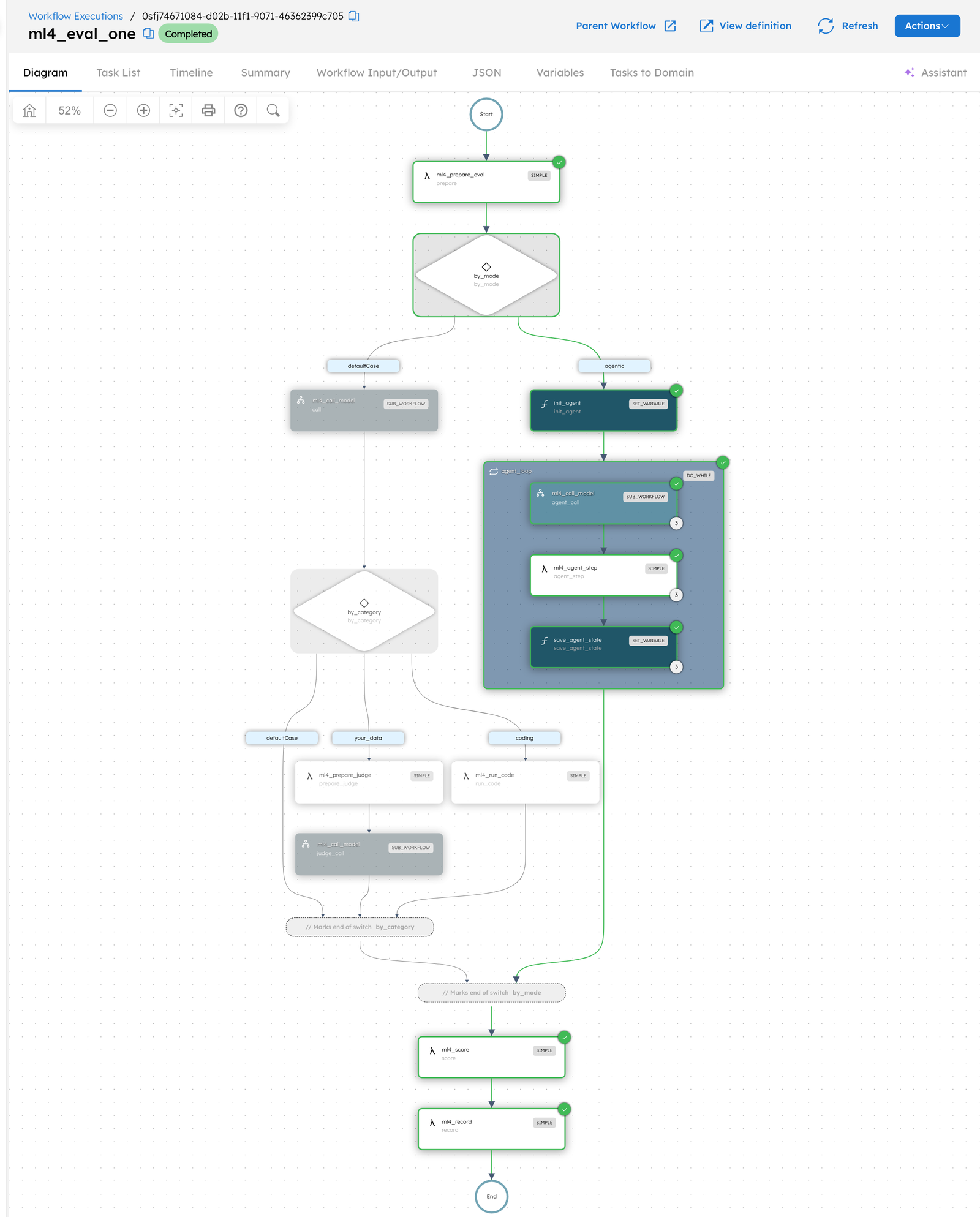
Testing your own tasks
The harness’s Python workers load eval tasks from a folder or URL that you pass to the run. To test your own tasks, you write them in the same JSONL format as the published ones and change that one input. Because the workers do the loading, private data stays on the machines where the workers run.
Results
Every task ran three times against each config, which gives 228 scored calls per config and 1,140 in total. All configs received identical prompts and a 32,000-token output cap, and each used its provider’s default sampling settings.
GPT-6.1 Sol is the OpenAI model closest to Large 4 in price and intended use. It costs $2 per million input tokens and $10 per million output tokens, against $1.36 and $4.18 for Large 4. Sol can’t turn reasoning off, so its lowest setting, low, is the counterpart to Large 4 with reasoning off.
| Config | Pass rate (95% CI) | Median time to answer | Avg output tokens |
|---|---|---|---|
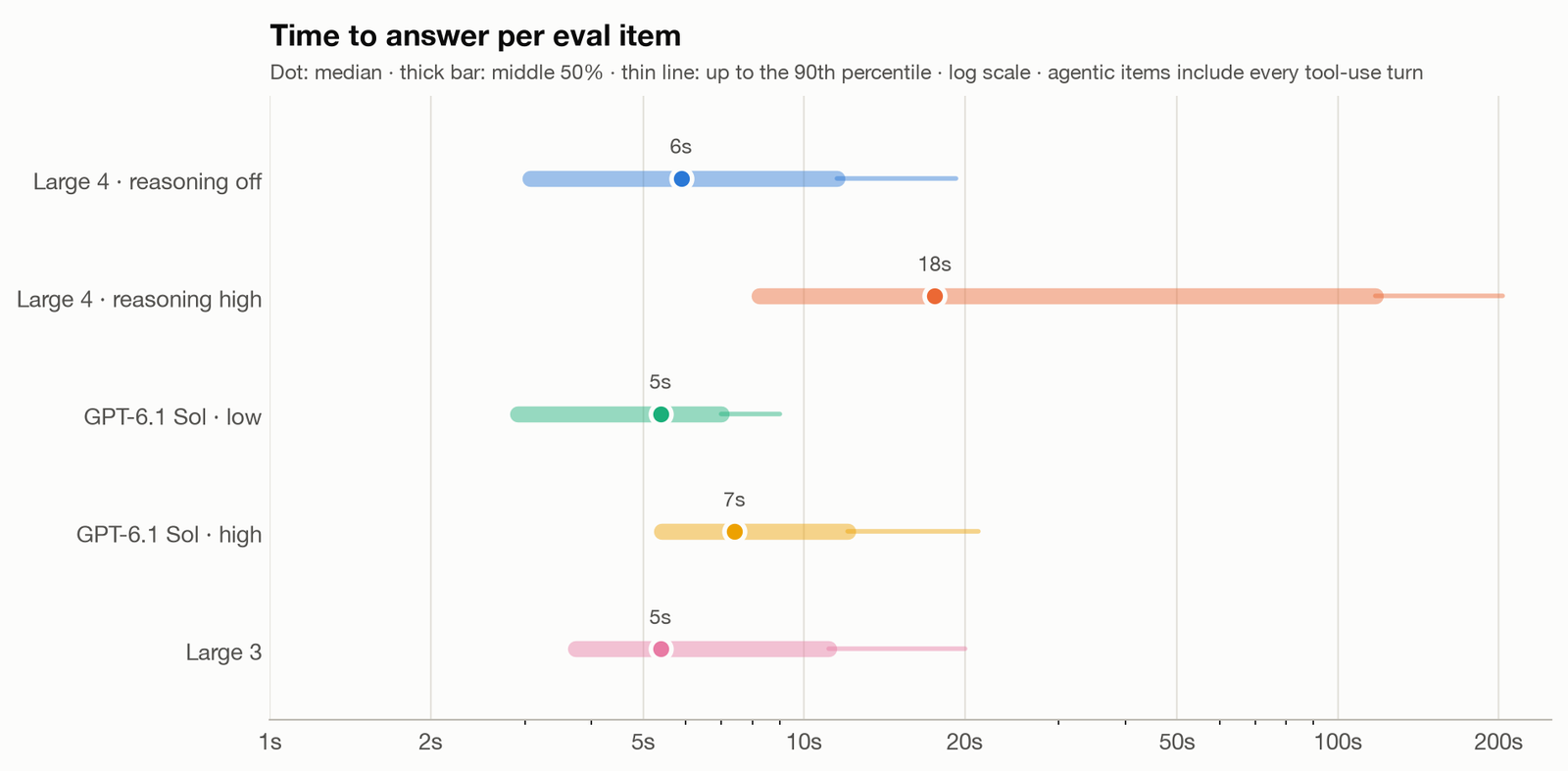
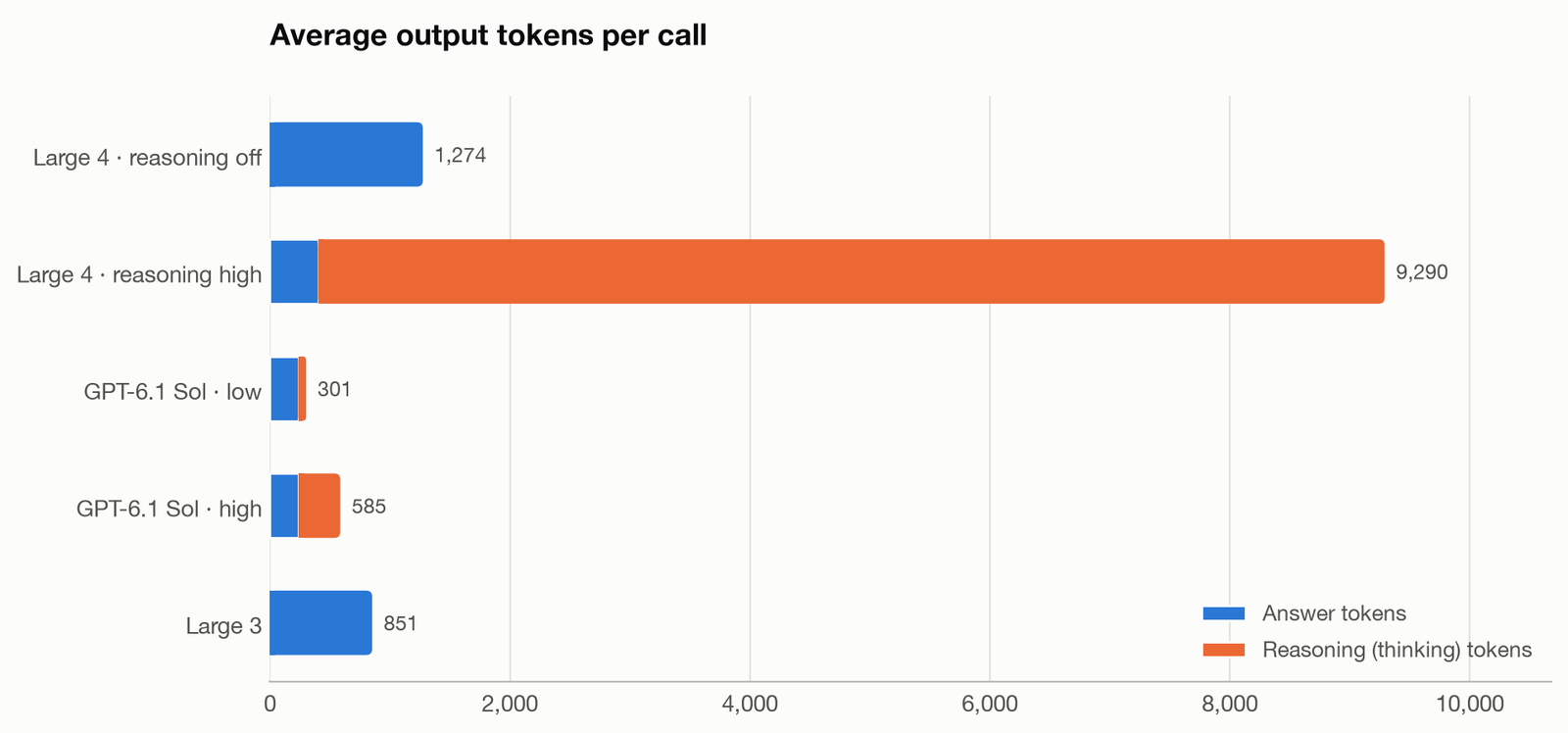
| Large 4, reasoning off | 92% (87–96%) | 5.9 s | 1,274 |
| Large 4, reasoning high | 82% (74–89%) | 17.6 s | 9,289 |
| GPT-6.1 Sol, low | 100% (99–100%) | 5.4 s | 301 |
| GPT-6.1 Sol, high | 100% (100–100%) | 7.4 s | 585 |
| Large 3 | 68% (58–77%) | 5.4 s | 851 |
The ranges in parentheses are 95% confidence intervals, bootstrapped over tasks.
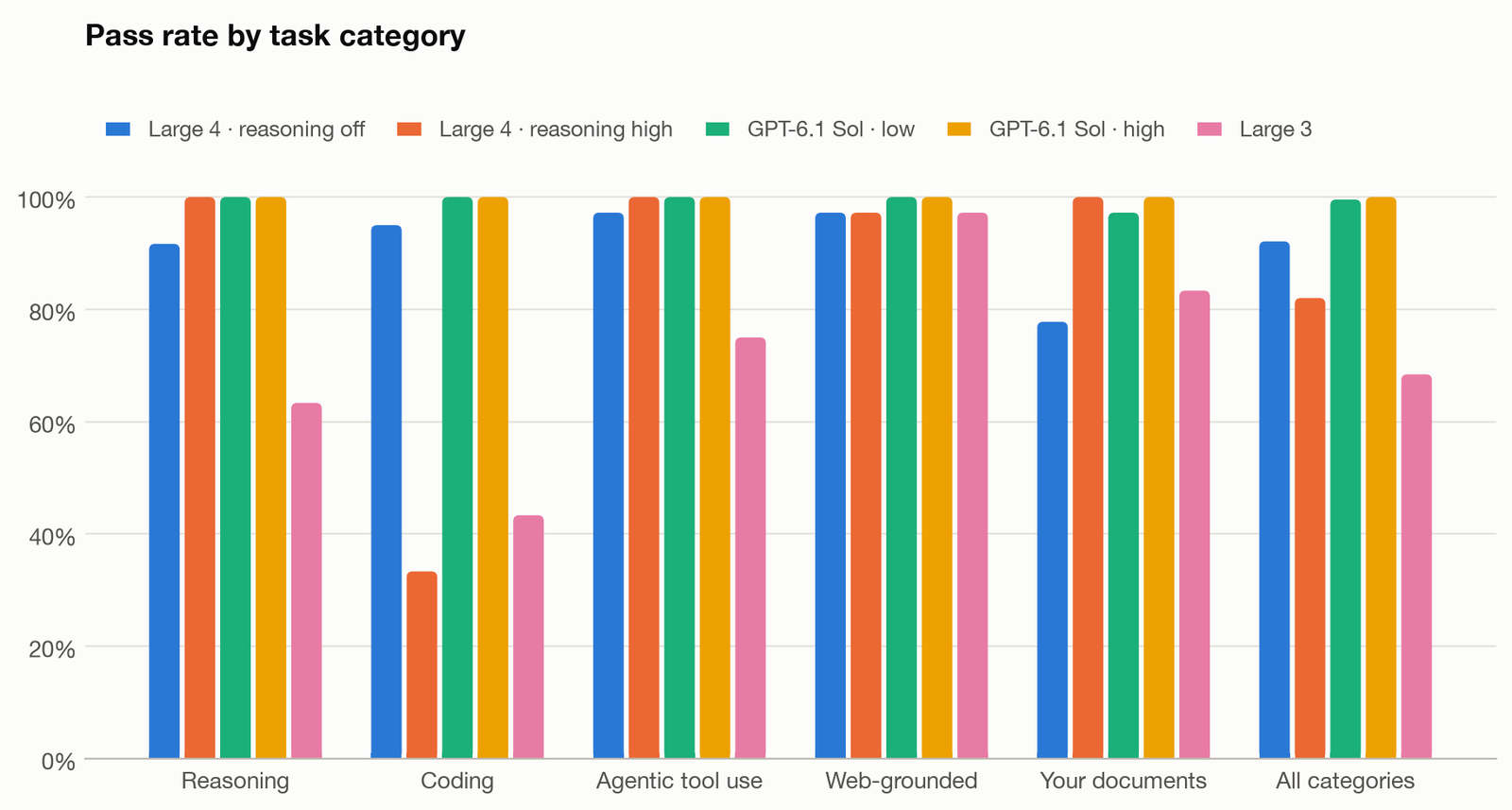
GPT-6.1 Sol passed 455 of its 456 calls. These tasks are too easy to tell Sol’s two settings apart or to find the limits of what it can do. They do show where Large 4 falls short, and each of its gaps traces back to a specific behavior.
Large 4 with reasoning off
With reasoning off, Large 4 passed 92% of calls at about the same speed as Sol.
- Compared with Large 3, it did better on 31 of the 76 tasks and worse on 4.
- Its code passed the hidden tests in 95% of coding calls, with a median time of 3.6 seconds.
- It completed 35 of 36 agentic runs. The one failure booked a flight that broke the scenario’s travel policy.
- Its weakest category was the private-document questions, at 78%, because the judge caught answers that contradicted themselves.
One handbook question asked whether a normal production deploy could start at 15:00 UTC on a Friday. The handbook says Friday changes must reach 100% of traffic before 16:00, and its standard rollout takes 90 minutes, so the answer is no. In all three runs, Large 4 opened by calling the deploy allowed and then worked out that it wasn’t. The key-facts check passed all three answers because the right numbers were present, which is why this category uses a judge.
Large 4 with reasoning high
With reasoning high, Large 4 passed every reasoning, agentic and private-document task. It passed only 33% of its coding calls, because it often ran out of output tokens while it was still thinking.
Web search
Every config answered almost all of the web-grounded questions correctly, but Large 4 searched far more often to get there.
- Large 4 with reasoning off ran an average of 6.5 web searches per question, against 1.2 for Sol at low reasoning.
- Its median time per question was 15 seconds, against 6 seconds for Sol.
When Large 4 thinks too long
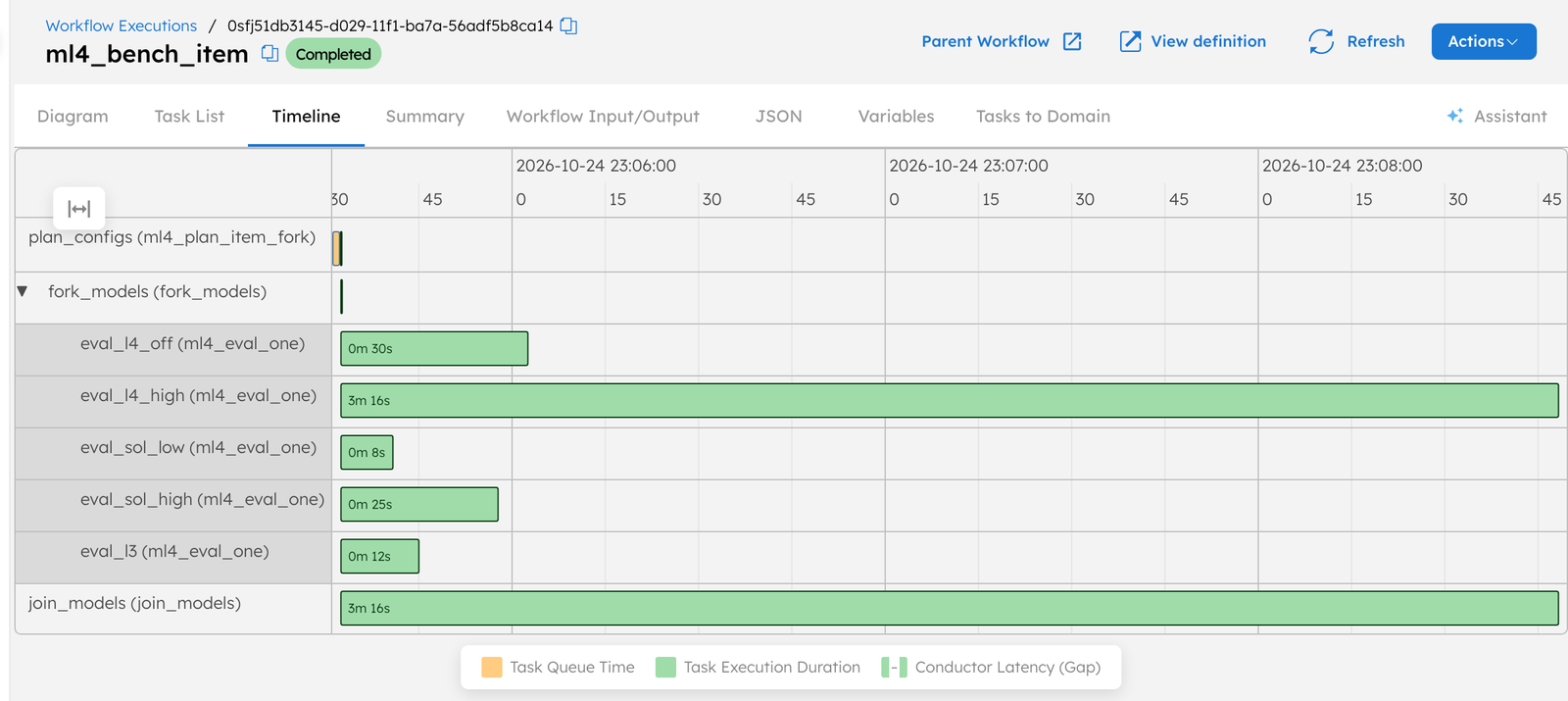
With reasoning high, Large 4 hit the 32,000-token output cap on 39 of its 60 coding calls. Those calls ran for a median of 199 seconds and spent every token on thinking. Each one ended with finish_reason: length, the API’s signal that the output limit was reached, before the model wrote any code.
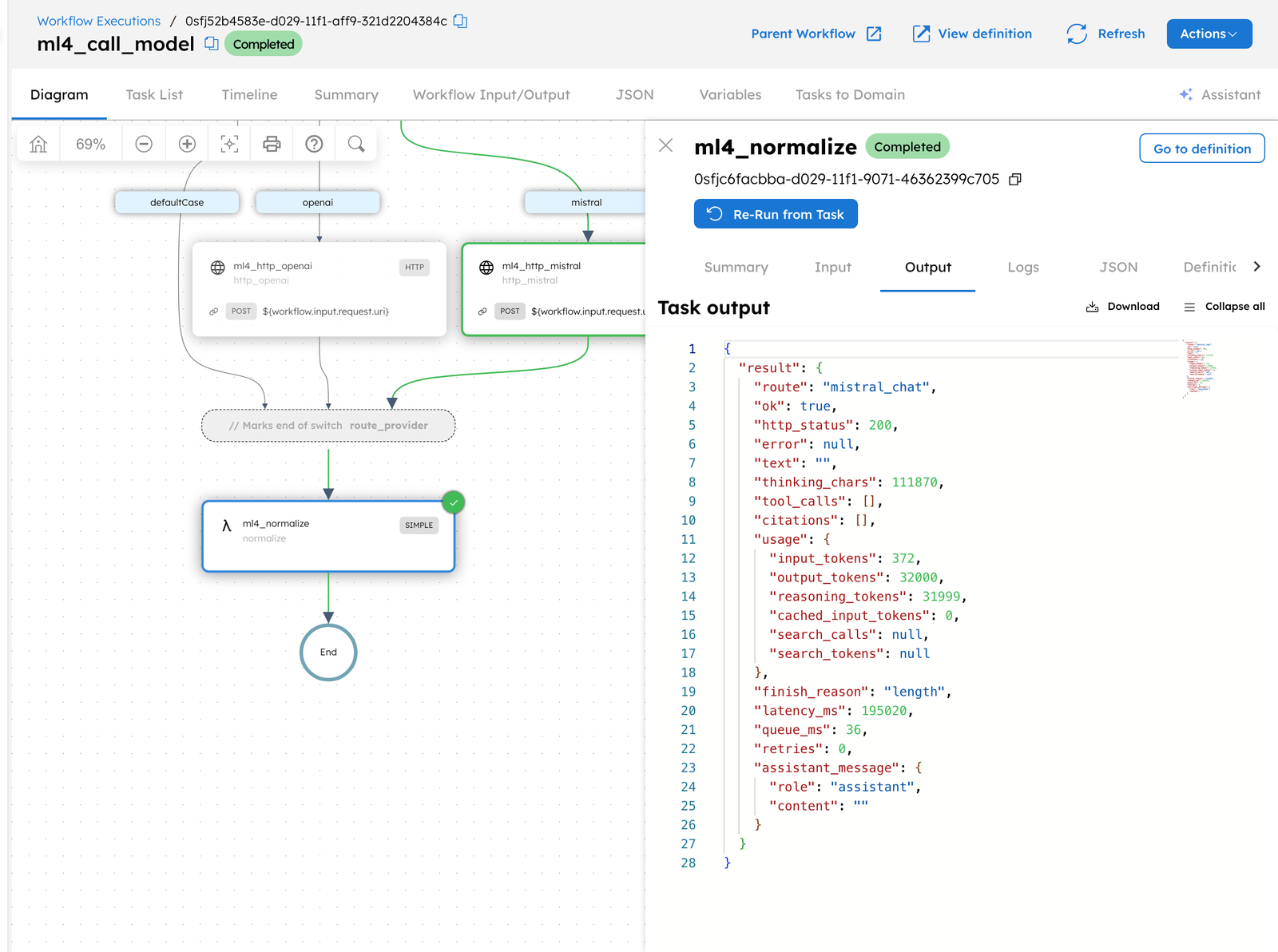
Because the JOIN task waits for every branch, one of these calls holds up the result for all five configs.
To test whether the cap was the only problem, we reran the nine coding tasks where Large 4 had hit it in the first run. This time it had a 128,000-token budget.
- Six passed, at a median of about 58,000 output tokens per answer.
- Two hit the larger cap as well.
- One ended with an error from the API (
finish_reason: error).
On the same nine tasks, Large 4 with reasoning off passed 25 of 27 runs with a median time of 7.9 seconds.
Which Large 4 setting to use
Large 4’s two reasoning settings suit different kinds of work.
- For code generation and other latency-sensitive work, use reasoning off. It passed 95% of coding calls with a median time of 3.6 seconds, and its median across all tasks was 5.9 seconds, close to Sol’s 5.4.
- Reasoning high fits multi-step reasoning and questions about your own documents, where it passed every call. Across all tasks it took a median of 17.6 seconds and averaged about 9,300 output tokens per call.
- If you need reasoning on for code, raise the output cap well above 32,000 tokens and allow several minutes per call. With a 128,000-token cap, Large 4 solved six of the nine coding tasks it had failed, at about 58,000 output tokens per answer.
- For questions that need web search, expect about five times as many searches as Sol and about 2.5 times the latency.
- Teams on Large 3 get a clear upgrade from Large 4 with reasoning off, which did better on 31 of the 76 tasks and worse on 4.
- Large 4 didn’t beat GPT-6.1 Sol on any task in this set, so run your own tasks through a harness like this one before you switch from Sol.
Running Large 4 inside Conductor today
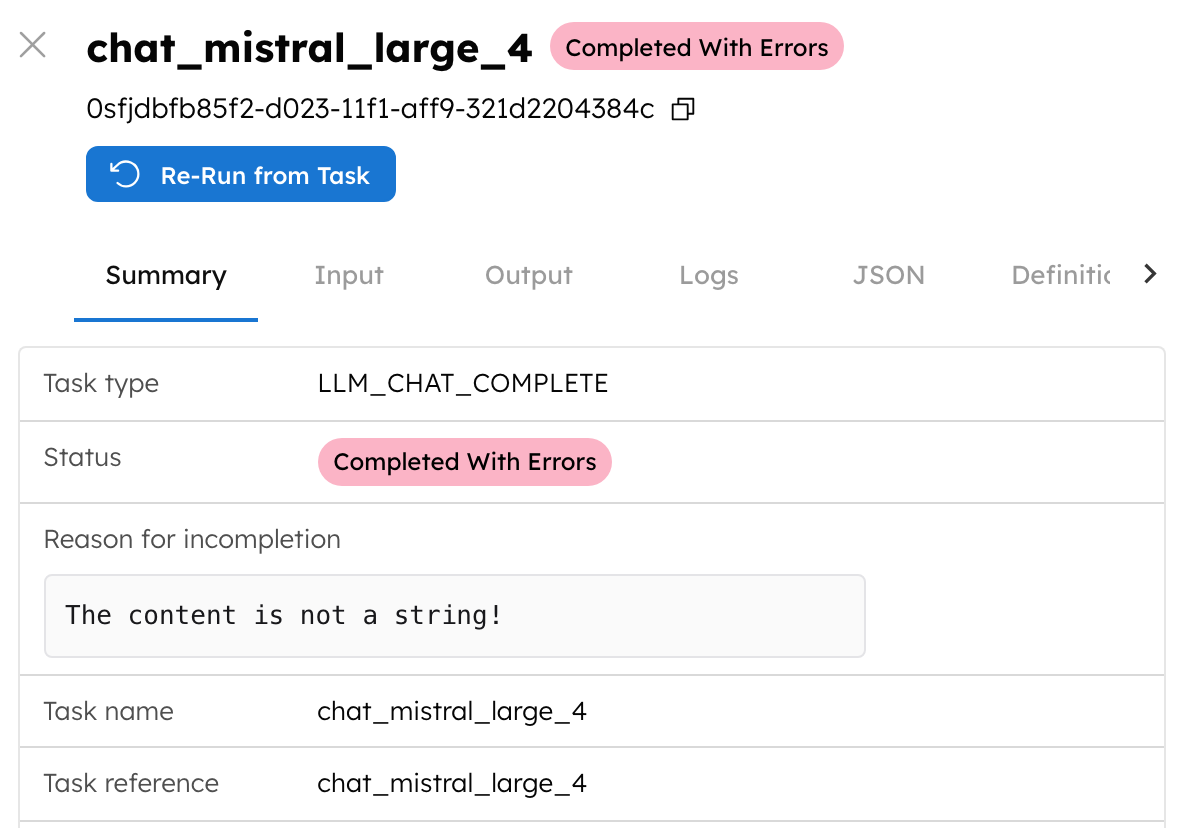
Conductor also has built-in LLM tasks that call a model through a configured integration. With those, the natural approach is to add a Mistral integration and point an LLM_CHAT_COMPLETE task at mistral-large-4. We tried that on October 24, 2026 on Orkes Developer Edition, a hosted Orkes Conductor environment for developers, and on Conductor OSS, the open-source release.
| Platform | Large 3 | Large 4 |
|---|---|---|
| Orkes Developer Edition 5.6.0-rc2 | works | fails: The content is not a string! |
| Conductor OSS 3.32.5 | fails (gzip) | fails (gzip) |
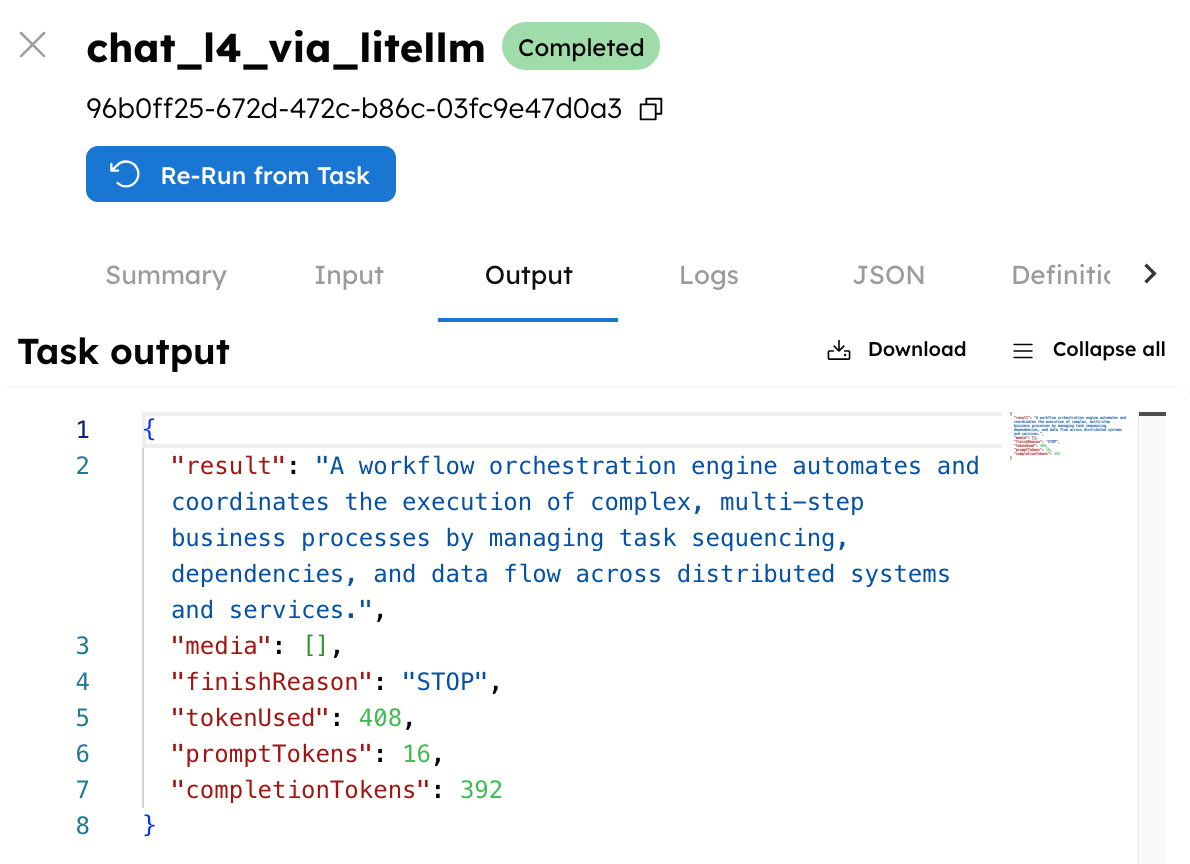
Conductor OSS 3.32.5 with the litellm provider | not tested | works |
The failures come from two separate problems.
- Large 4 reasons by default and returns its answer as a list of content chunks, a thinking chunk followed by the text. The Mistral client library that Conductor’s built-in integration uses only accepts a plain string, so it can’t read those replies.
- The open-source releases also fail on every Mistral model, because Mistral’s compressed (gzip) replies reach the JSON parser without being decompressed. Orkes fixed this in release 5.5.7, and a fix for the open-source project is approved and waiting to be merged.
Until the integration handles thinking replies, Large 4 can run from Conductor in two ways.
- Calling Mistral’s REST API from an HTTP task, as the harness does, works on every Conductor platform and lets you set Mistral’s
reasoning_effortparameter on each request. - On Conductor OSS, you can keep using the built-in LLM tasks by putting a LiteLLM proxy in front of Mistral. LiteLLM is an open-source proxy that gives many model providers an OpenAI-compatible API. You then select Conductor’s
litellmprovider, and LiteLLM separates the thinking text from the answer before Conductor sees the reply.
Next steps
- The orkes-io/conductor-mistral-large-4-benchmark repository on GitHub has the workflows, the workers, all 76 tasks and the raw results.
- You can run the harness on Orkes Developer Edition or on Conductor OSS.
- The Shift ‘26 opening keynote covers what’s coming next in the Orkes platform.

Orkes Conductor Developer Edition
Your first agentic workflow is 5 minutes away. Everything you need is already there.