- AGENTIC
- ENGINEERING
- SOLUTIONS
Testing With Live Agent Runtimes in Conductor
 Alex Devlin Content Engineer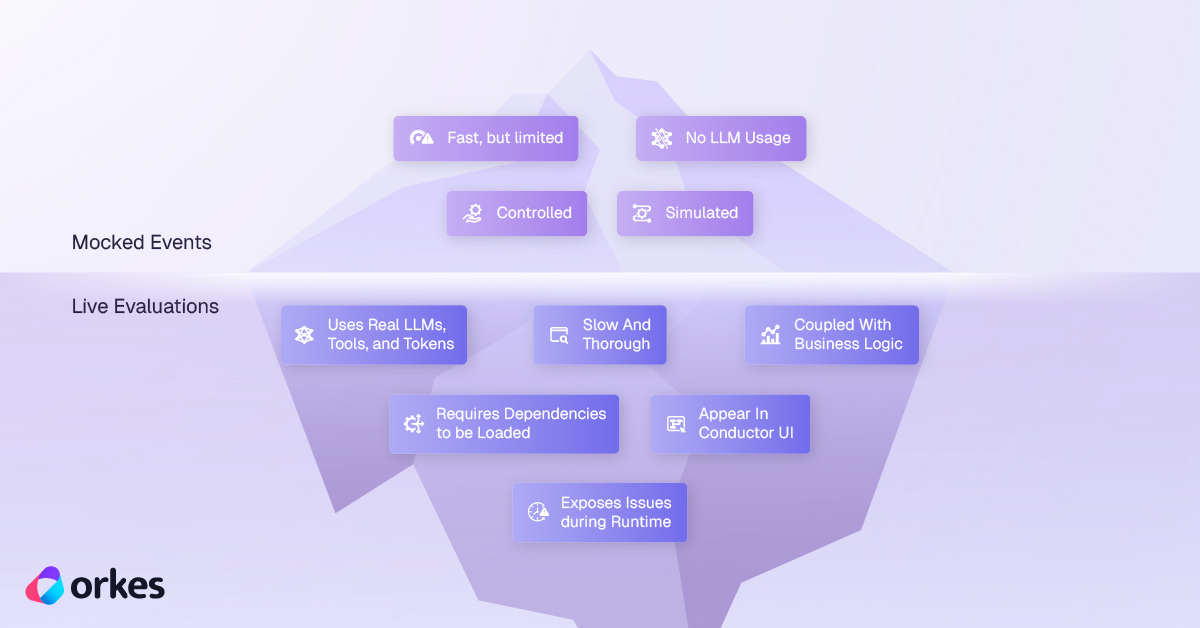
In part 1 of this article series, we used mock events to test agentic workflow routing with repeatable results. Those tests verify how the workflow handles the events we supply, but they do not run the real agents or their tools. In this article, we’ll run the same agents and pipeline in a live Conductor agent runtime. Conductor records each run, and we’ll use its evaluation tools to check each agent’s behavior and the handoffs between agents. These tests can reveal problems that scripted events cannot.
It is strongly recommended that you read part 1 and complete the code there before proceeding since this article expands on the concepts and code introduced there. At a minimum, be sure to complete these required prerequisite steps to ensure that your environment is configured correctly.
Introducing Agentic Evaluations
The Conductor SDK includes a set of building blocks for evaluating agents against a real runtime, including
EvalCase for describing a single test scenario and CorrectnessEval for running a full test suite. A full list can be found in the
Agent Evals documentation.
We’ll be using the same agents and pipeline we defined in part 1, but this time we’ll be running them through a live agent runtime instead of mocked events.
Setting Up the Pytest Runtime
Create a new file called test_content_pipeline_live_eval.py in the same directory you used
for part 1 of this blog series. Paste the following code into the new file:
import pytest
from conductor.ai.agents.runtime.config import AgentConfigfrom conductor.ai.agents.runtime.runtime import AgentRuntimefrom conductor.ai.agents.testing import CorrectnessEval, EvalCase
from agents import content_pipeline, editor_agent, search_agent, summary_agent

# Custom fixture for pytest so we don't have to create a new runtime for every test case.# The runtime is closed at the end of this module.@pytest.fixture(scope="module")def runtime():    config = AgentConfig.from_env()    # Polling mode is required for handoff events to be reported.    config.streaming_enabled = False    with AgentRuntime(settings=config) as rt:        yield rt
class StreamingRuntime:    """Runs agents through stream(), which reports handoff events; a plain run() does not."""
    def __init__(self, runtime):        self._runtime = runtime
    def run(self, agent, prompt):        return self._runtime.stream(agent, prompt).get_result()
This defines a pytest fixture that creates one Conductor Agent runtime for the test module. It
also adds a small wrapper around stream() so we can see handoff events (when one agent passes
control to another).
Don’t worry if your IDE complains about unused imports - they will be used in the test cases we define below.
Conductor records every agent and workflow run in its UI, including the details of each agent’s execution. Define a helper function that prints a link to each run so we can inspect it later:
def print_execution_links(results): """Prints a Conductor UI link for each case, so any run can be inspected after the test.""" AGENT_EXECUTIONS_URL = "https://developer.orkescloud.com/agentExecutions" for case in results.cases: if case.result is not None: print(f" {case.name}: {AGENT_EXECUTIONS_URL}/{case.result.execution_id}")Our First Test Case: Pipeline Handoff Validation
As in part 1, we’ll check that our agents run in order and that the final output includes the search topic. However, this time we’ll use a live runtime and verify the handoff events it reports.
Add the following code to test_content_pipeline_live_eval.py:
# A word from the pipeline prompt that must persist through every handoff into the final output.HANDOFF_MARKER = "cheesemaking"

def assert_pipeline_handoff(result):    """Agents ran in the intended order and the topic reached the final output."""    handoff_targets = [        event.target for event in result.events if event.type == "handoff"    ]    # validate_strategy only checks the run against the pipeline's own definition, so this    # literal order is what catches the pipeline being wired incorrectly.    assert handoff_targets == ["search", "summary", "editor"]    assert HANDOFF_MARKER in result.output["result"].lower()

# The full pipeline on one prompt: checks the agents ran in order and the topic survived# every handoff into the editor's output.PIPELINE_EVAL = EvalCase(    name="content pipeline preserves output through handoff",    agent=content_pipeline,    prompt=(        f"Search for information about the history of {HANDOFF_MARKER}, then "        "summarize and edit the findings for publication."    ),    expect_output_contains=[HANDOFF_MARKER],    custom_assertions=[assert_pipeline_handoff],)
We can now create a pytest target that runs this test case in the same file:
class TestSequentialAgents:    """Confirms sequential agents handle valid and invalid expectations."""
    def test_content_pipeline_preserves_output_through_handoff(self, runtime):        """The final editor output should retain information from the search request."""        # Only the pipeline needs StreamingRuntime, because only it has handoffs to check.        results = CorrectnessEval(StreamingRuntime(runtime)).run([PIPELINE_EVAL])        results.print_summary()        print_execution_links(results)        assert results.all_passed
Now run the test case with this CLI command:
pytest test_content_pipeline_live_eval.py -s -vOnce it completes successfully, you should see output in your terminal that includes the following:
============================================================ Agent Correctness Eval Results============================================================
  [PASS] content pipeline preserves output through handoff
────────────────────────────────────────────────────────────  1/1 passed, 0 failed============================================================
  content pipeline preserves output through handoff: https://developer.orkescloud.com/agentExecutions/r8ai8baa6aff-b39d-11f1-af49-12d7dfb86326PASSED
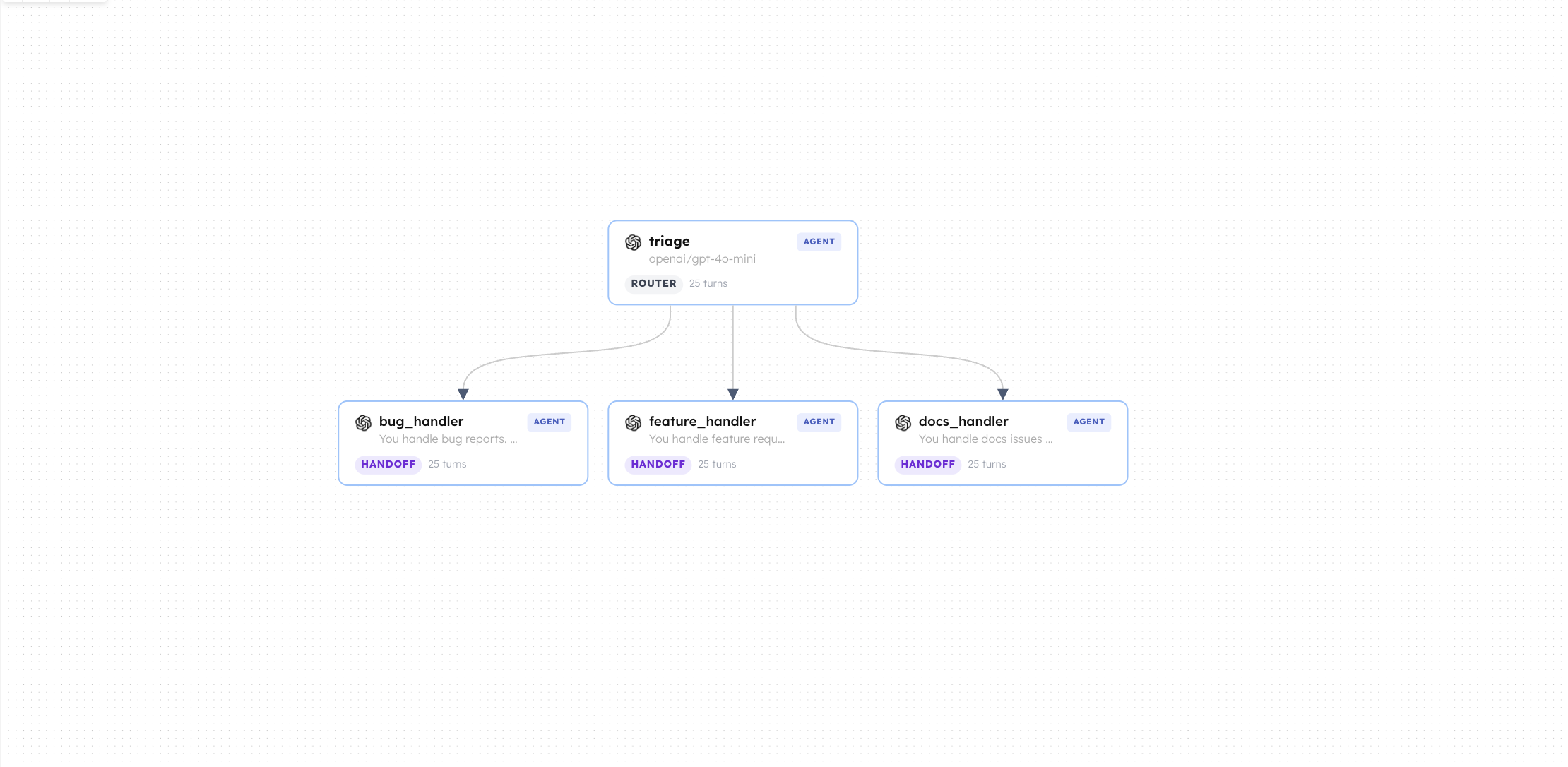
Click on the link in the CLI output to inspect the run in the Conductor UI (the links in your output will differ from the ones shown here). You should see a single execution with three handoff events, one for each agent in the pipeline, like so:
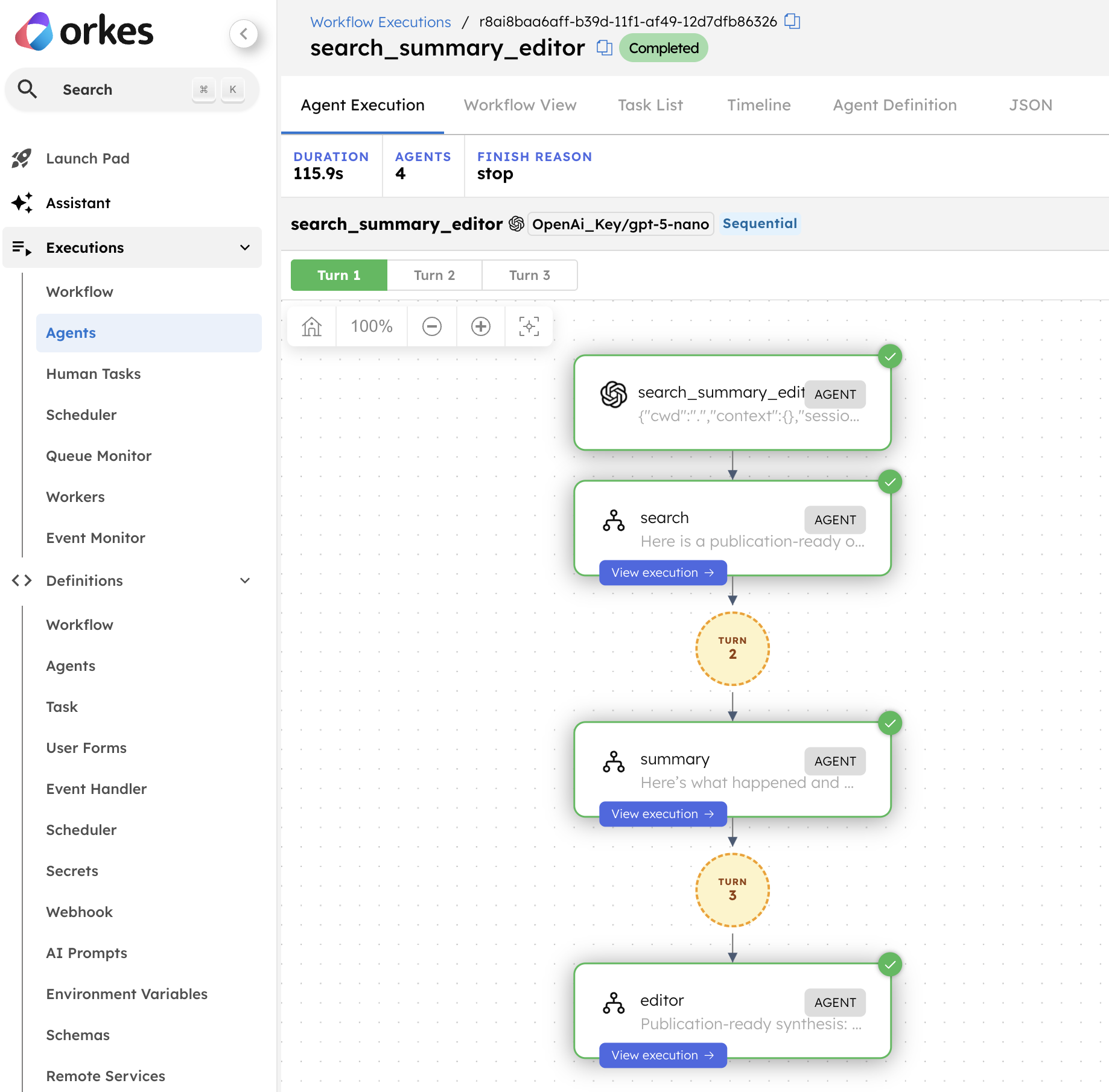
While you’re here, try clicking on each agent’s execution to see its input and output data.
Causing Our First Test Failure
As stated in part 1 of this blog series, it’s always crucial to ensure that our tests fail when they should.
Remove the summary_agent from the pipeline in agents.py to break the handoff order and confirm that our test case catches it.
# content_pipeline = search_agent >> summary_agent >> editor_agentcontent_pipeline = search_agent >> editor_agentNow re-run the test case with the same command as before:
pytest test_content_pipeline_live_eval.py -s -vYou should see a failure in the output because the summary agent is missing from the pipeline, which breaks the expected handoff order in our test case.
============================================================ Agent Correctness Eval Results============================================================
  [FAIL] content pipeline preserves output through handoff         x custom_0: assert ['search', 'editor'] == ['search', 's...ry', 'editor']
  At index 1 diff: 'editor' != 'summary'  Right contains one more item: 'editor'
  Full diff:    [        'search',...
  ...Full output truncated (3 lines hidden), use '-vv' to show
────────────────────────────────────────────────────────────  0/1 passed, 1 failed============================================================
  content pipeline preserves output through handoff: https://developer.orkescloud.com/agentExecutions/r8aief23b2cf-b3a2-11f1-9216-4224b94c0a5fFAILED
Notice that even though the test case failed, it still produced a valid agent execution in the Conductor UI.
Adding “Happy Path” Tests for Each Agent
In addition to overall pipeline verification, using a live agent runtime allows us to test each agent in isolation.
An EvalCase allows us to define a single test case for each agent, including the expected tools it should
(and should not) use, the expected output, and any custom assertions we want to run on the result. As in part 1, these are
“happy path” tests: when everything works as expected, none of them should fail.
First, we’ll define a custom assertion that catches agents making too many tool calls. Too many calls slow down the test suite and may indicate a problem with an agent’s prompt.
def assert_few_tool_calls(result): """A single question should not fan out into dozens of searches.""" assert ( len(result.tool_calls) <= 3 ), f"{len(result.tool_calls)} tool calls for one request"We can then define three evaluations, one per agent, that all run through the same runtime fixture.
# Happy path: one case per agent, each expected to use only its own tools and stay on topic.HAPPY_PATH_EVALS = [ EvalCase( name="search", agent=search_agent, prompt="Find information about how solar panels generate electricity.", expect_tools=["search_web"], expect_output_contains=["solar"], custom_assertions=[assert_few_tool_calls], ), EvalCase( name="summary", agent=summary_agent, prompt="Summarize these research notes: Solar panels convert sunlight into electricity.", expect_tools_not_used=["search_web"], expect_output_contains=["solar"], ), EvalCase( name="editor", agent=editor_agent, prompt="Edit this draft for publication: Solar panels convert sunlight into electricity.", expect_tools_not_used=["search_web"], expect_output_contains=["solar"], ),]Now we can define a single pytest target to execute all three EvalCase definitions for our happy path:
# Within the TestSequentialAgents class def test_each_agent_handles_a_valid_request(self, runtime): """Happy path: each agent handles a valid request using only its own tools.""" # Single agents make no handoffs, so a plain run records everything these checks need. results = CorrectnessEval(runtime).run(HAPPY_PATH_EVALS) results.print_summary() print_execution_links(results) assert results.all_passedRun the new test case with:
pytest test_content_pipeline_live_eval.py -s -v -k "test_each_agent_handles_a_valid_request"A successful run prints three separate agent execution links in your CLI output;
this is expected since we are performing three different EvalCase invocations. You should click through
each one and verify that the search agent made no more than three tool calls.
...
============================================================ Agent Correctness Eval Results============================================================
  [PASS] search
  [PASS] summary
  [PASS] editor
────────────────────────────────────────────────────────────  3/3 passed, 0 failed============================================================
  search: https://developer.orkescloud.com/agentExecutions/r8ai6129aa75-b3a9-11f1-af49-12d7dfb86326  summary: https://developer.orkescloud.com/agentExecutions/r8ai7146ef9d-b3a9-11f1-b02f-6295aa77ab9a  editor: https://developer.orkescloud.com/agentExecutions/r8ai79691836-b3a9-11f1-af49-12d7dfb86326PASSED
Before proceeding, make sure that you can cause failures in the test_each_agent_handles_a_valid_request test case
by modifying agents.py as a check of your understanding. There are a few possible ways you could do this including
(but not limited to):
- Make an agent use an unexpected tool, or stop using an expected one.
- Change a prompt so the agent never outputs the expected string.
- Change the logic of a tool that an agent relies on.
- Force the search agent to make more than three tool calls.
Restore any changes you made to agents.py and ensure your tests pass successfully before continuing.
Adding “Unhappy Path” Test Cases
As mentioned in part 1 of this series, it is generally good practice to write some test cases that ensure failures are reported when we expect them to be.
As with our happy path tests, we begin by defining a set of three EvalCase definitions - one for each agent in our pipeline.
For the sake of simplicity, each case expects a tool that its agent does not actually have, which we know
will always produce a failed check:
# Unhappy path: each case expects a tool its agent does not have, so every one must fail.INVALID_TOOL_EVALS = [ EvalCase( name="search", agent=search_agent, prompt="Find information about solar panel efficiency.", expect_tools=["calculate"], ), EvalCase( name="summary", agent=summary_agent, prompt="Summarize these notes about solar panel efficiency.", expect_tools=["search_web"], ), EvalCase( name="editor", agent=editor_agent, prompt="Edit these notes about solar panel efficiency for publication.", expect_tools=["search_web"], ),]For this test to pass, each EvalCase must fail for the expected reason. We’ll inspect results.cases
to confirm that each failure came from the missing tool:
# Within the TestSequentialAgents class def test_evaluator_reports_invalid_tool_expectations(self, runtime): """Each case expects a tool its agent does not have, so the evaluator must report a failed tool_used check for every one.""" results = CorrectnessEval(runtime).run(INVALID_TOOL_EVALS) results.print_summary() print_execution_links(results) # We expect that every case failed. assert results.fail_count == len(INVALID_TOOL_EVALS) # Retrieve detailed information about the failed checks for this case. for case, case_result in zip(INVALID_TOOL_EVALS, results.cases): # We expect to see messages about expect_tools not being used. unexpected_tool = case.expect_tools[0] failed_checks = [ch.check for ch in case_result.checks if not ch.passed] assert f"tool_used:{unexpected_tool}" in failed_checksNow run the new test case:
pytest test_content_pipeline_live_eval.py -s -v -k "test_evaluator_reports_invalid_tool_expectations"As with our happy path tests, you will see three separate agent execution links in your CLI output when the test passes:
============================================================ Agent Correctness Eval Results============================================================
  [FAIL] search         x tool_used:calculate: Expected tool 'calculate' to be used, but it was not.Tools used: ['search_web']
  [FAIL] summary         x tool_used:search_web: Expected tool 'search_web' to be used, but it was not.Tools used: []
  [FAIL] editor         x tool_used:search_web: Expected tool 'search_web' to be used, but it was not.Tools used: []
────────────────────────────────────────────────────────────  0/3 passed, 3 failed============================================================
  search: https://developer.orkescloud.com/agentExecutions/r8ai4cfd5801-b3c1-11f1-ac35-e6a2651dfb14  summary: https://developer.orkescloud.com/agentExecutions/r8ai5bc0ecf4-b3c1-11f1-b02f-6295aa77ab9a  editor: https://developer.orkescloud.com/agentExecutions/r8ai65d1d9f7-b3c1-11f1-ac35-e6a2651dfb14PASSED
As with our happy path tests, make sure that you can cause failures in the test_evaluator_reports_invalid_tool_expectations
case before proceeding. This is left as an exercise for the reader, but remember that this test asserts two things:
that every case fails, and that each one fails specifically because of a tool_used check. Breaking either assumption
will do. For example, you could change one EvalCase so that it expects a tool its agent actually uses. That case
will pass its tool_used check, so our test will no longer find the expected failure.
Restore any changes you made to agents.py or the EvalCase definitions, then ensure the full test suite
passes successfully before continuing.
Parallel Test Execution
When we run the tests in separate worker processes, each pytest target gets its own agent runtime. This helps keep the tests independent while they run in parallel.
To run the tests in parallel, we’ll add a pytest configuration file, install one plugin, and use one extra CLI flag.
Create a new file called pytest.ini and add the following contents:
[pytest]# Show captured output for passed tests too, so eval summaries and execution links# still appear when tests run in parallel workers (where -s has no effect).addopts = -rANext, install the pytest-xdist plugin into your Python environment:
pip install pytest-xdistThis allows us to distribute our tests across multiple worker processes and parallelize our test cases. Now we can run all our tests at the same time with the following CLI command:
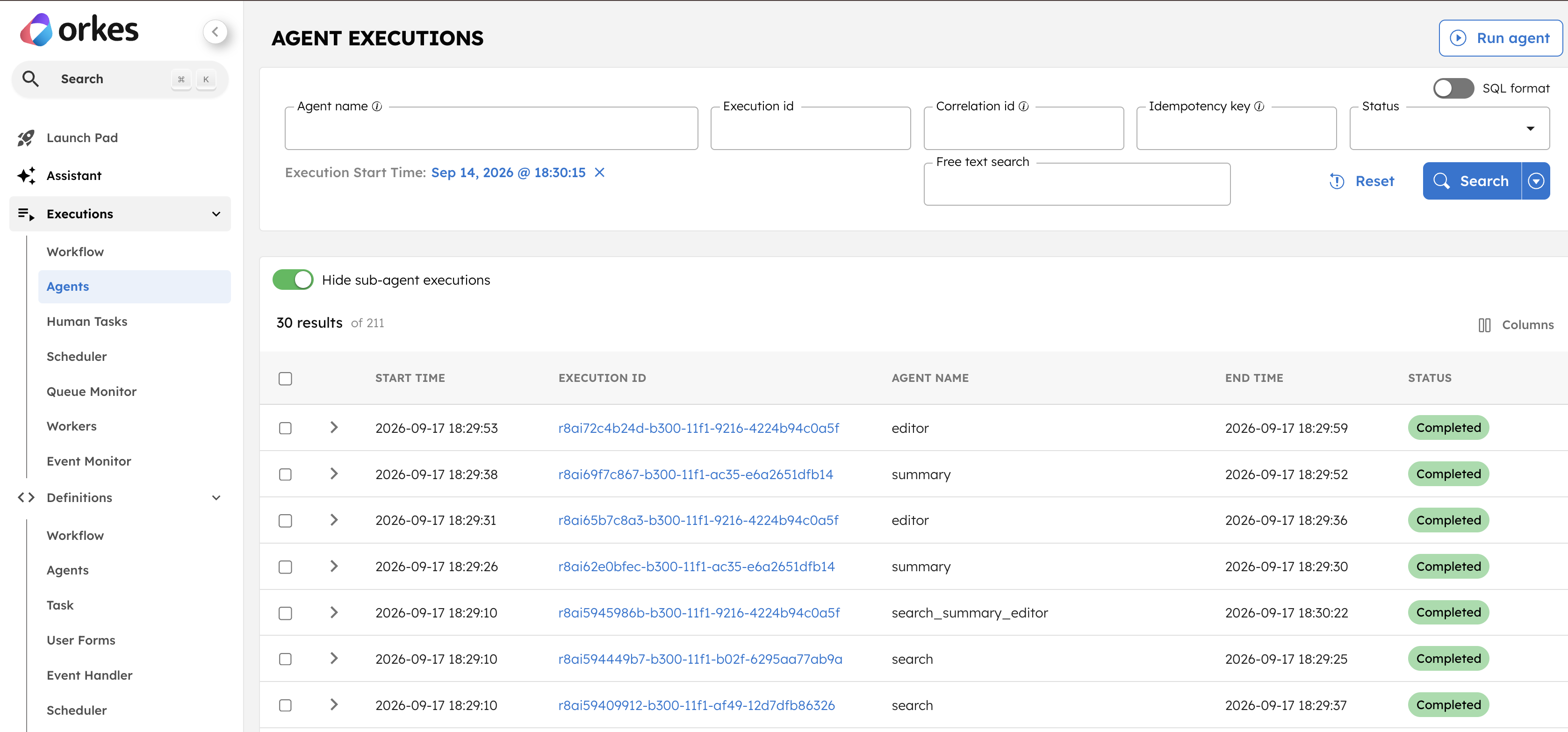
pytest test_content_pipeline_live_eval.py -v -n 3You can see how long the parallel test suite took by looking in the Conductor UI under Executions -> Agents.
Closing Remarks
Part 1 gave us fast, deterministic tests for workflow routing, but those tests used simulated events.
Here we ran the same content_pipeline and its three agents in a live agent runtime. We:
- Checked that the agents ran in the expected order and kept the search topic in the final output.
- Tested each agent’s tool use and output with “happy path” cases.
- Confirmed that the evaluator reports expected failures with an “unhappy path” test.
- Ran the whole test suite in parallel with
pytest-xdist.
Because these tests run the actual agents and tools, changes to agents.py affect the next test run without
requiring us to update mocked events. Conductor records each execution, and the links printed by our tests let
us inspect unexpected results.
Live evaluations take more time and use LLM tokens. Keep the mocked tests from part 1 for quick checks of workflow routing, and use live evaluations to check for unexpected changes in agent behavior before a release.
Until next time, happy testing and coding!
Further Reading
- Add a semantic judge deliberately to score output quality when correctness checks alone are insufficient.
- Record a regression trace from a live run once, then replay it deterministically in your unit tests.
- Test guardrails and side effects, together with the Agent Guardrails developer guide.
- The Production Agent Architecture and Failure Semantics entries in the AI Cookbook.
- Join the Conductor community.