Agent Guardrails
A guardrail is a check that runs as part of the agent's execution, at the point where something could go wrong. It can validate an incoming request, constrain what the model returns, block unsafe tool arguments, or hold a consequential write until a person approves it. Because each guardrail is a durable step in the run, its verdict is recorded alongside everything else the agent did.
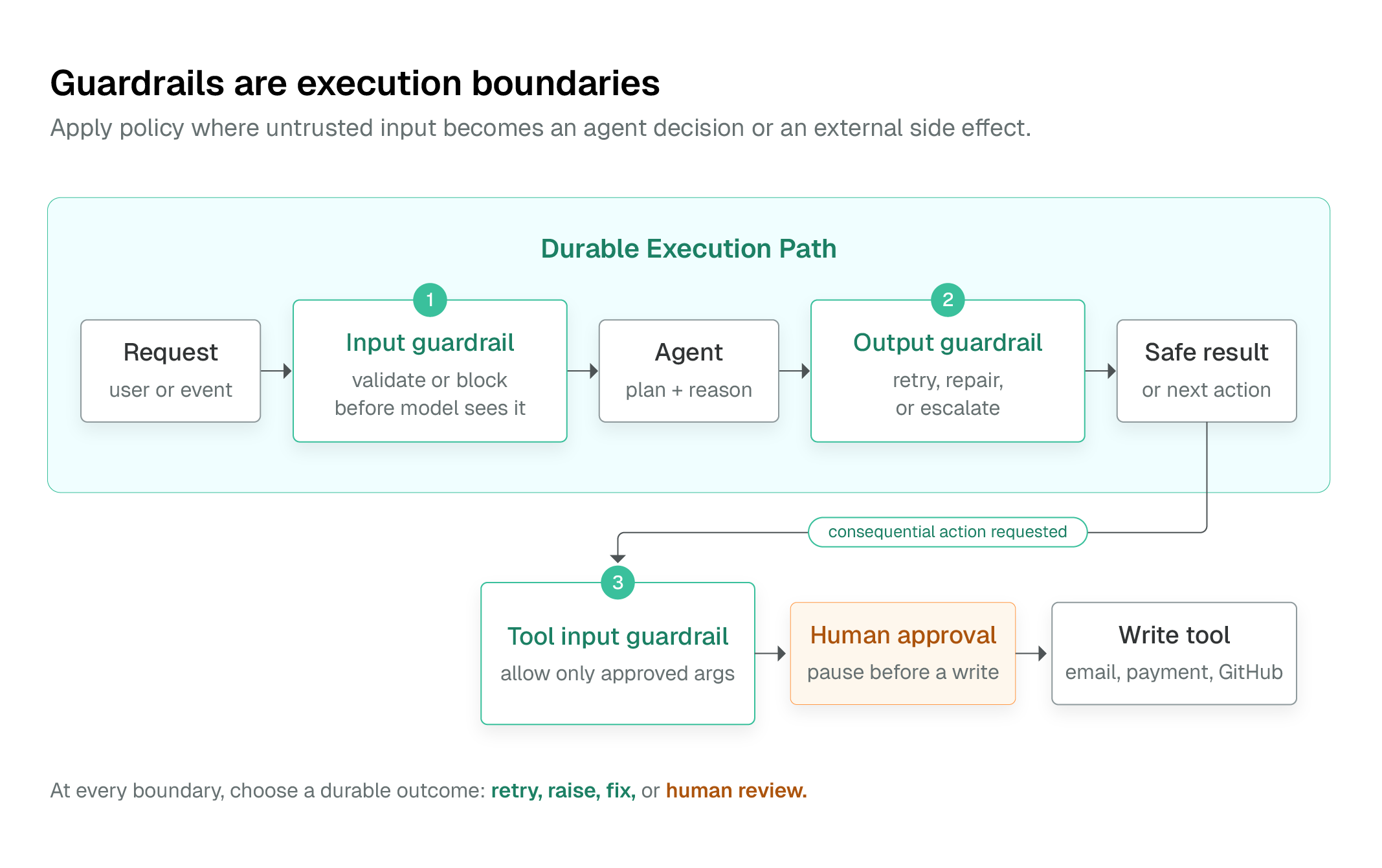
Use guardrails with Conductor Agents authored through the SDK. For a declarative workflow built directly from LLM_CHAT_COMPLETE, MCP, HUMAN, and control-flow tasks, compose the same policy explicitly with schemas, SWITCH, JSON_JQ_TRANSFORM, and HUMAN. See Durable Adaptive Graphs for that pattern.
Choose the closest enforcement point
| Need | Put the control here | Typical action |
|---|---|---|
| Reject unsafe user input before the model sees it | Agent input guardrail | Block or return a safe response |
| Keep a model response within policy | Agent output guardrail | Retry, terminate, repair, or ask a reviewer |
| Prevent a dangerous side effect | Tool input guardrail | Reject before the tool runs |
| Validate data returned by a tool | Tool output guardrail | Stop, repair, or escalate |
| Require review before a consequential action | Tool approval or a HUMAN task |
Pause until an operator decides |
Tool-input guardrails are the critical boundary for writes. Do not rely on prompt instructions alone to protect a database mutation, shell command, payment, email, or GitHub write.
Guardrail types
Conductor Agent definitions support four guardrail implementations:
| Type | Best for | Execution shape |
|---|---|---|
| Regex | PII patterns, formats, allowlists, known dangerous strings | Deterministic server-side check |
| LLM | Tone, groundedness, policy interpretation, semantic quality | A second model evaluates a policy at temperature zero |
| Custom | Domain policy that needs application state | A registered Conductor worker |
| External | A centrally managed policy service | An existing worker selected by name |
Regex guards run in block mode by default: a pattern match fails the check. Use allow mode when the content must match at least one allowed pattern, such as a constrained output format. Keep regexes narrow and deterministic; an allowlist for structured tool arguments is usually better expressed as a custom guardrail that parses the arguments by field.
An LLM guardrail receives the candidate content and a policy, then must produce a JSON pass/fail decision. Treat it as a semantic check, not a replacement for deterministic access control. Do not send credentials or raw sensitive records to an LLM judge; validate a redacted representation instead. (Note: using LLMGuardrail with the Python SDK requires the litellm package: pip install litellm).
Custom and external guards become SIMPLE tasks. Register their task definitions and run an idempotent worker before deploying the agent; otherwise the guardrail task cannot be completed.
Outcomes on failure
Every guardrail declares an onFail policy:
| Outcome | Behavior |
|---|---|
retry |
Add the failure feedback to the conversation and let the model produce another attempt, up to maxRetries. |
raise |
Terminate the agent execution as failed. Use for non-negotiable policy violations. |
fix |
Accept a corrected fixed_output from a custom guardrail. |
human |
Pause at a durable review step; the reviewer can approve, edit, or reject the output. |
Use retry only when another generation could plausibly satisfy the rule. Regex and LLM guards are validation checks, not rewriters; use a custom guardrail when a deterministic repair is required. A human outcome applies to output review, not input validation.
Example: protect a write-capable tool
This Python Agent SDK example blocks card-number-shaped text before an email tool can run. The same RegexGuardrail can be attached to a tool's output when a response must be checked before downstream use.
from conductor.ai.agents import OnFail, Position, RegexGuardrail, tool

no_card_data = RegexGuardrail(
    patterns=[r"\b(?:\d[ -]?){15}\d\b"],
    name="no_card_data_in_email",
    position=Position.INPUT,
    on_fail=OnFail.RAISE,
    message="Refusing to send payment-card data by email.",
)

@tool(guardrails=[no_card_data], approval_required=True)
def send_email(to: str, subject: str, body: str) -> dict:
    # Invoke the approved mail integration here.
    return {"status": "sent", "to": to}
This has two independent controls: the guardrail rejects unsafe arguments before the tool call, and approval_required=True creates a human decision point for an otherwise acceptable write. The tool should still be idempotent because retries and ambiguous network failures can occur around external side effects.
Bound what the agent can do
Guardrails are one layer of a larger policy boundary:
- Define tool input and output schemas so malformed arguments are rejected before execution.
- Set
maxCallsper tool,maxTurnsper agent, and task or agent timeouts to bound work and cost. - Use the plan-and-compile path's known-tool allowlist to reject plans that reference undeclared tools.
- Restrict multi-agent handoffs with
allowedTransitions, and require declared tools withrequiredToolswhere the process depends on a mandatory check. - For CLI/code execution, use a small command allowlist, disable shell execution unless necessary, and set a short timeout.
- Declare credentials on the agent or tool so they resolve at execution time. Do not pass secrets in prompts, workflow inputs, or ambient worker environment variables.
- Use
maskedFieldsto redact sensitive input or output fields from execution history and the UI.
For direct workflow definitions, make the same constraints visible in the graph: validate the model plan, branch only to allowlisted tasks, cap DO_WHILE and FORK_JOIN_DYNAMIC, and put a HUMAN task before an external write.
Verify the guardrail itself
Test both a passing and a failing case. A good release gate verifies that:
- Unsafe input never reaches the tool.
- A blocked output cannot reach a caller or a write task.
- The retry budget stops when exhausted.
- A human reviewer can approve, edit, and reject the durable pause.
- The expected guardrail event appears in the execution history.
Use Agent Evals to turn those checks into repeatable CI cases.
Next steps
- Production Agent Architecture — connect these controls to evaluation, deployment, recovery, and operations.
- Agent Evals — Test routing, tool use, guardrail behavior, and output quality before release.
- Human-in-the-Loop — Durable approval patterns for consequential actions.
- Durable Adaptive Graphs — Guard an adaptive workflow built directly from native tasks.
- Failure Semantics — Retry, cancellation, and idempotency behavior around side effects.