- AGENTIC
- ENGINEERING
- PRODUCT
Building a Better npm Dependency Auditor with Conductor
 Alex Devlin Content Engineer
This article talks about mixed API calls executed in parallel through a single Conductor workflow, with its read-only parts also exposed as MCP tools - all without needing to install any SDKs or additional dependencies!
The Issues with npm audit
The Node Package Manager (npm) runs the world’s largest software registry, and that popularity makes it a target. Security problems come up regularly, from typosquatted packages that steal CI/CD secrets to incidents involving widely used packages.
npm’s built-in safeguard, npm audit, is a useful but limited tool. It can only run on
packages that have already been installed, and its output is
notoriously noisy. Its warnings
about transitive dependencies often come with little context about whether they matter or
how to fix them.
A better audit would run before anything is installed, separate real risks from noise, and explain how to fix the ones that matter.
Building a Better Auditor
I built a custom Conductor workflow that utilizes multiple APIs to retrieve contextual information about any public npm package, including its dependencies and disclosed vulnerabilities, for a more holistic security audit of each requested package. It can be found on my personal GitHub repository here - it may be moved to the public Conductor OSS awesome-conductor-apps repo in the future.
The read-only child workflows are also exposed as Model Context Protocol (MCP) tools, so any agent or CI/CD pipeline can call them.
How They Compare
npm audit | conductor-npm-dependency-auditor | |
|---|---|---|
| When it runs | After a package has been downloaded, since it audits what’s in a defined project. | Before you download or adopt anything, without needing a defined project, since the workflow takes the package name and version as inputs. |
| What you get | A list of advisories. It fails a CI job on any vulnerability (or any above --audit-level), but every other judgment is up to the project maintainers. | A clear final decision that includes full reasoning, an AI summary, and a recommended version update where applicable. |
| Advisory data | The npm registry’s advisory feed, which only comes from the GitHub Advisory Database. | Multiple sources including OSV.dev, which combines several databases (such as GitHub’s and OpenSSF’s lists of malicious packages). |
| Transitive dependencies | Shows each vulnerable dependency’s path and severity. npm audit fix only updates within the version ranges its parents allow; anything else needs --force, which can install breaking changes. | Checks every dependency, then works out the lowest version that clears every advisory, for the package and each dependency. Flags fixes that need a new major version or don’t exist, and the AI suggests npm overrides. |
| Licenses | Not checked. | Checks every dependency’s license against an optional allowlist; unknown licenses are escalated for human review. |
| Deprecation | Not reported. npm install does print deprecation warnings, but they’re easy to miss in the install log. | Explicitly flags deprecated versions and deprecated packages. Wholly deprecated packages are rejected automatically, and any deprecation blocks automatic approval. |
| Project health signals | None considered. | OpenSSF Scorecard, GitHub stars, GitHub open issues, total downloads, release date, and DeepWiki’s maintenance notes. |
| Build provenance | Checked by a separate command, npm audit signatures. | Reads attestations from deps.dev, then flags an unverified build - or one built from a different repository - to the AI. |
| Community reports | Not checked. | Hacker News stories about the package’s security, marked as posted before or after the release. |
| Record of the decision | None by default. | Every decision is filed as a GitHub issue for historical tracking. |
How It Works
External Sources
- The npm registry has public APIs that allow the workflow to retrieve metadata about any public npm package, including its latest version and download counts.
- OSV.dev is an open vulnerability database that aggregates known vulnerabilities in npm packages (among other ecosystems) from a variety of sources.
- deps.dev is a Google-owned service that has dependency graphs for public npm packages.
- DeepWiki has AI-powered documentation for public GitHub repositories - including many that host npm packages.
The workflow also searches through stories on Hacker News
that connect the package in question to a security problem, for an added layer of human
context. This is particularly useful for tracking down past incidents, such as the 2021
hijack of ua-parser-js. As an added bonus, the HN search API does not need any
authentication, so we can use it without setting up any API keys or tokens.
Each source is reached through one of Conductor’s built-in tasks, so there’s no client code to write: gRPC tasks for deps.dev, HTTP tasks for npm, OSV.dev, and Hacker News, and a Call MCP Tool task for DeepWiki.
Workflow Hierarchy
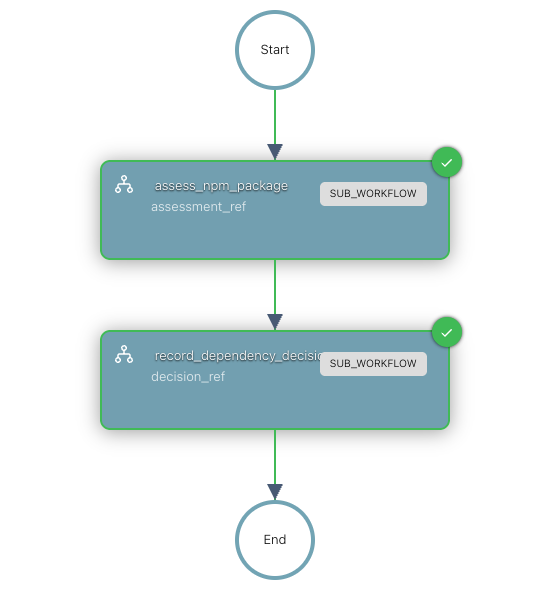
The auditor is made up of four nested workflows, structured so that each one can also be run on its own:
dependency_adoption_review├─ assess_npm_package│ └─ scan_npm_package└─ record_dependency_decisionDependency Adoption Review Workflow
The top-level workflow takes a package name and an exact version. It runs
assess_npm_package to reach a decision, then record_dependency_decision to act on it.
Assess npm Package Workflow
This is the primary heavy-lifting workflow, also exposed as the POST_assess MCP tool.
It gathers evidence in parallel from deps.dev, OSV.dev, npm, DeepWiki, and Hacker News,
then an LLM gives its verdict and fixed rules decide the outcome.
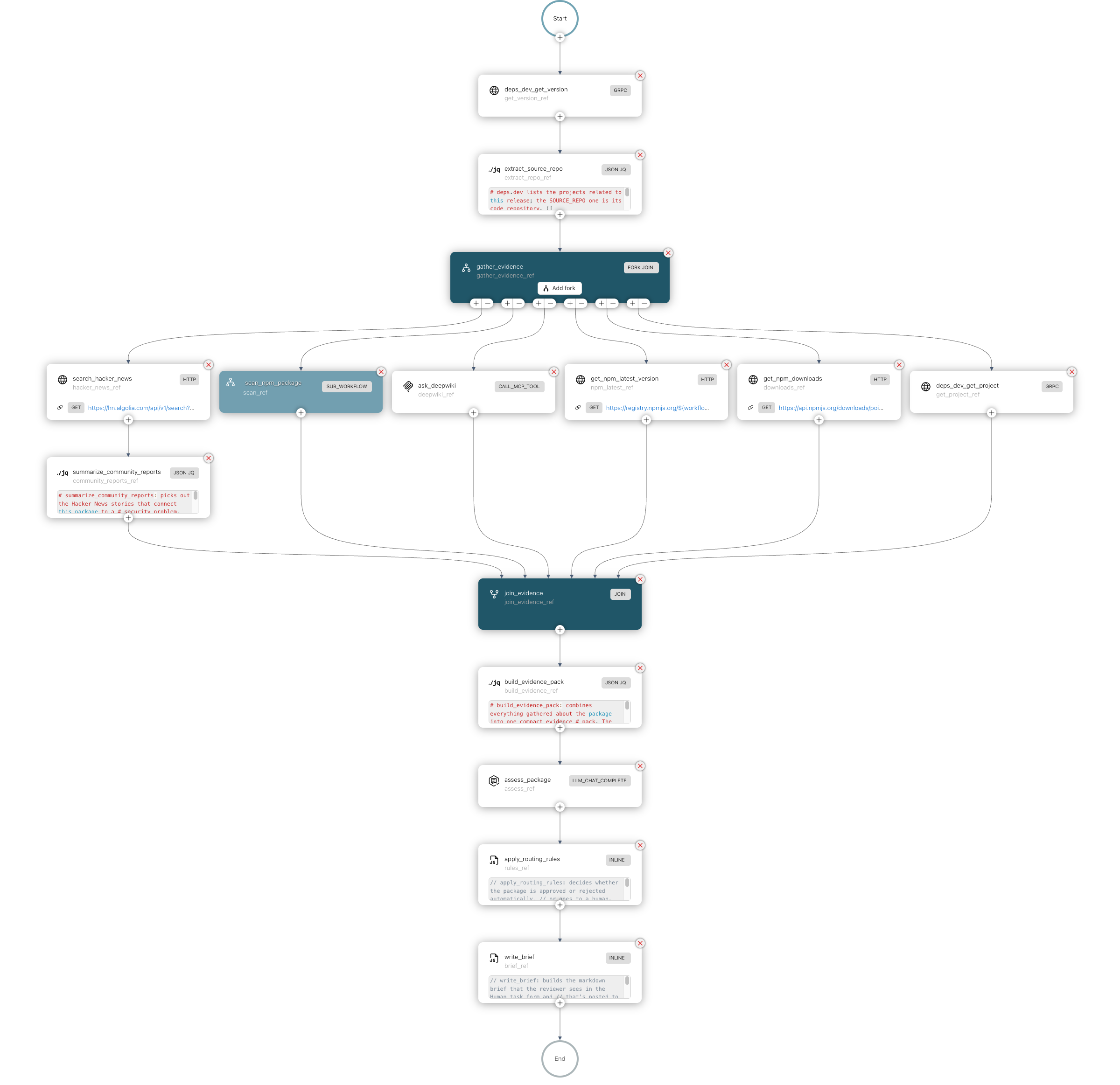 (opens the full-size image in a new tab)
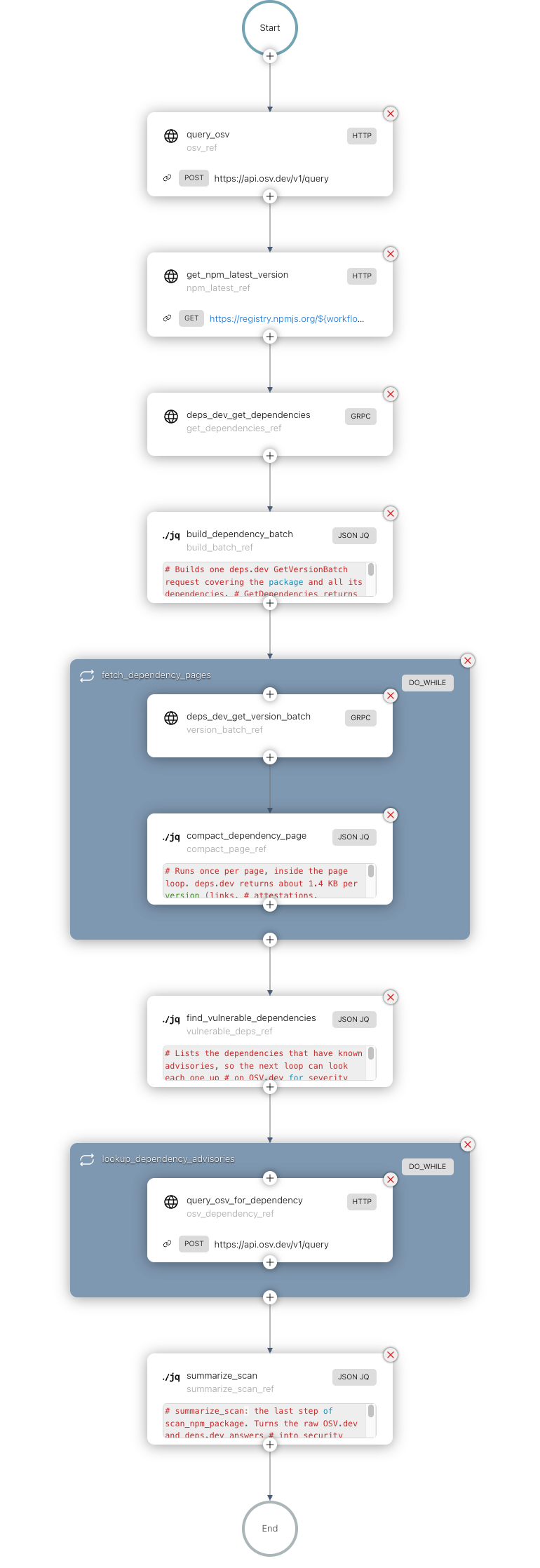
Scan npm Package Workflow
This child of assess_npm_package is the other workflow exposed as an MCP tool,
POST_scan. It collects security facts only, with no LLM: advisories, licenses, and
deprecation for the package and its whole dependency tree.
Record Dependency Decision Workflow
This workflow acts on the assessment’s decision. If there is any uncertainty, a human review is started; otherwise, the package is approved or rejected automatically. Every outcome is then filed as a GitHub issue.
 (opens the full-size image in a new tab)
MCP Tool Creation and Exposure
Both assess_npm_package and scan_npm_package are exposed as MCP tools through the
Orkes MCP Gateway so that they
can be easily integrated into any existing CI/CD pipeline or agentic workflow without
installing any SDKs or deploying any workers. They are read-only: an agent can use them
to check a package, but they never install anything or file an issue.
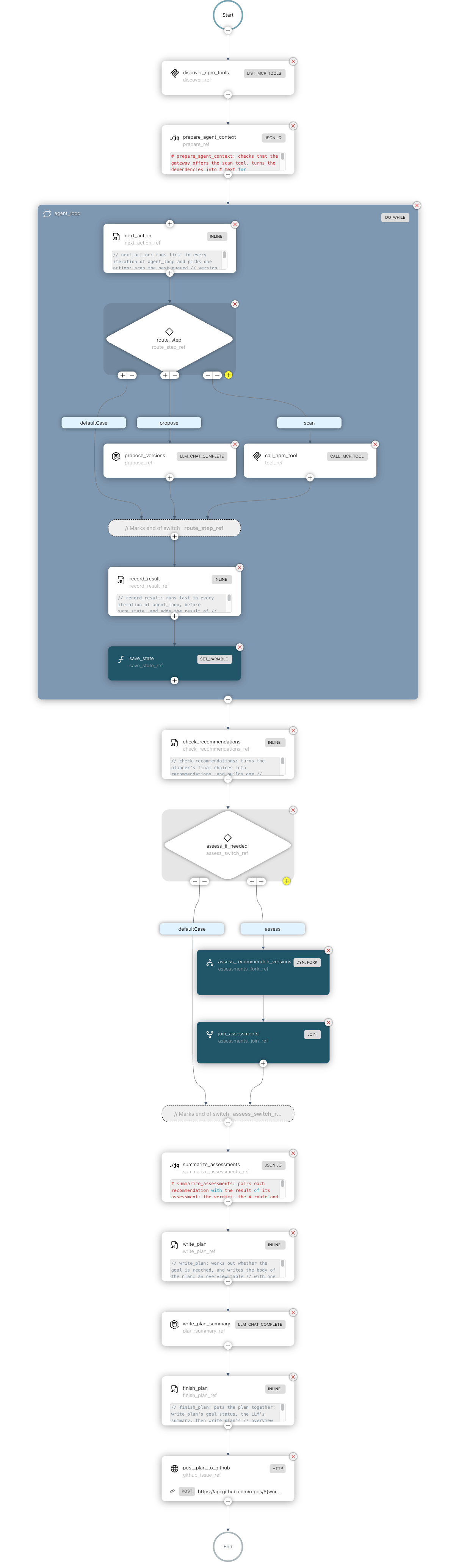
Pictured below is a sample workflow called npm_upgrade_planner_agent, which shows how to
use these workflows in a single agentic workflow: it calls scan_npm_package as an MCP
tool on each package version it considers, and runs assess_npm_package as a direct
sub-workflow integration for each version it recommends, all in parallel.
To run this workflow, follow the instructions in this README file to configure your own Orkes account and confirm that the MCP tools are available.
Why Scans Go Through MCP but Assessments Don’t
The npm_upgrade_planner_agent calls scan_npm_package through the read-only POST_scan
MCP tool because scans are fast: most finish in a few seconds, and even Strapi’s 1,321
dependencies took under 30 seconds in most of my test runs.
It doesn’t use POST_assess, because in Orkes Developer Edition, the MCP Gateway ends any
tool call after about 60 seconds with an HTTP 504, even if the route sets a longer
timeout. assess_npm_package can take close to or over 60 seconds, mostly while the LLM
reasons over the evidence. The assessment keeps running after the call fails, so a retry
starts a second assessment and pays for a second LLM call, which wastes compute and
tokens.
Instead, the agent runs assess_npm_package as a sub-workflow for each recommended
version, all in parallel through a dynamic fork. Sub-workflows have no gateway time limit,
so there is no risk of a timeout, even for a package with many dependencies like
Strapi. POST_assess is still available for MCP clients outside of
Conductor for those who want to use it on smaller packages or don’t mind the risk of a
timeout. You can try it by using a curl command, as shown in the README file of the
mcp/ directory:
curl -X POST --max-time 700 "<your_mcp_tool_remote_endpoint_here>" \ -H "Content-Type: application/json" \ -H "Authorization: Bearer <your_key_here>" \ -d '{"jsonrpc": "2.0", "id": 1, "method": "tools/call", "params": {"name": "POST_assess", "arguments": {"packageName": "@strapi/strapi", "packageVersion": "5.58.0"}}}'How Decisions Get Made
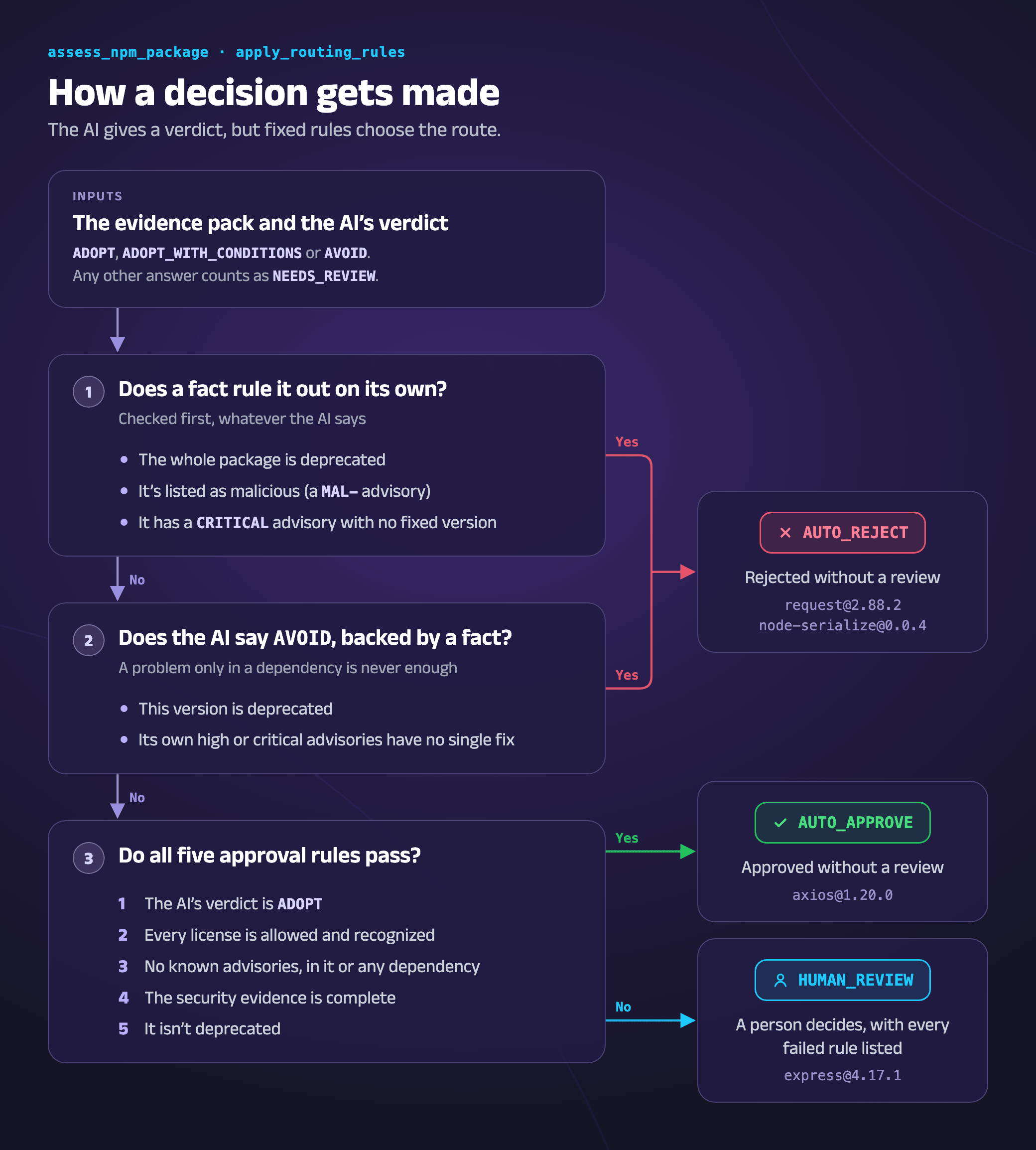
Every route comes from
apply_routing_rules,
an Inline task in assess_npm_package that runs right after the LLM gives its verdict.
The rules are fixed JavaScript, so the route never depends on how the LLM words its
answer.
Try It, Then Extend It
Before changing anything, run the auditor as-is. You’ll need an Orkes Conductor cluster
(the free Developer Edition works), an OpenAI API
key, and a GitHub account; the repo’s
setup steps cover
the rest. Then run dependency_adoption_review with the files in
sample-inputs/
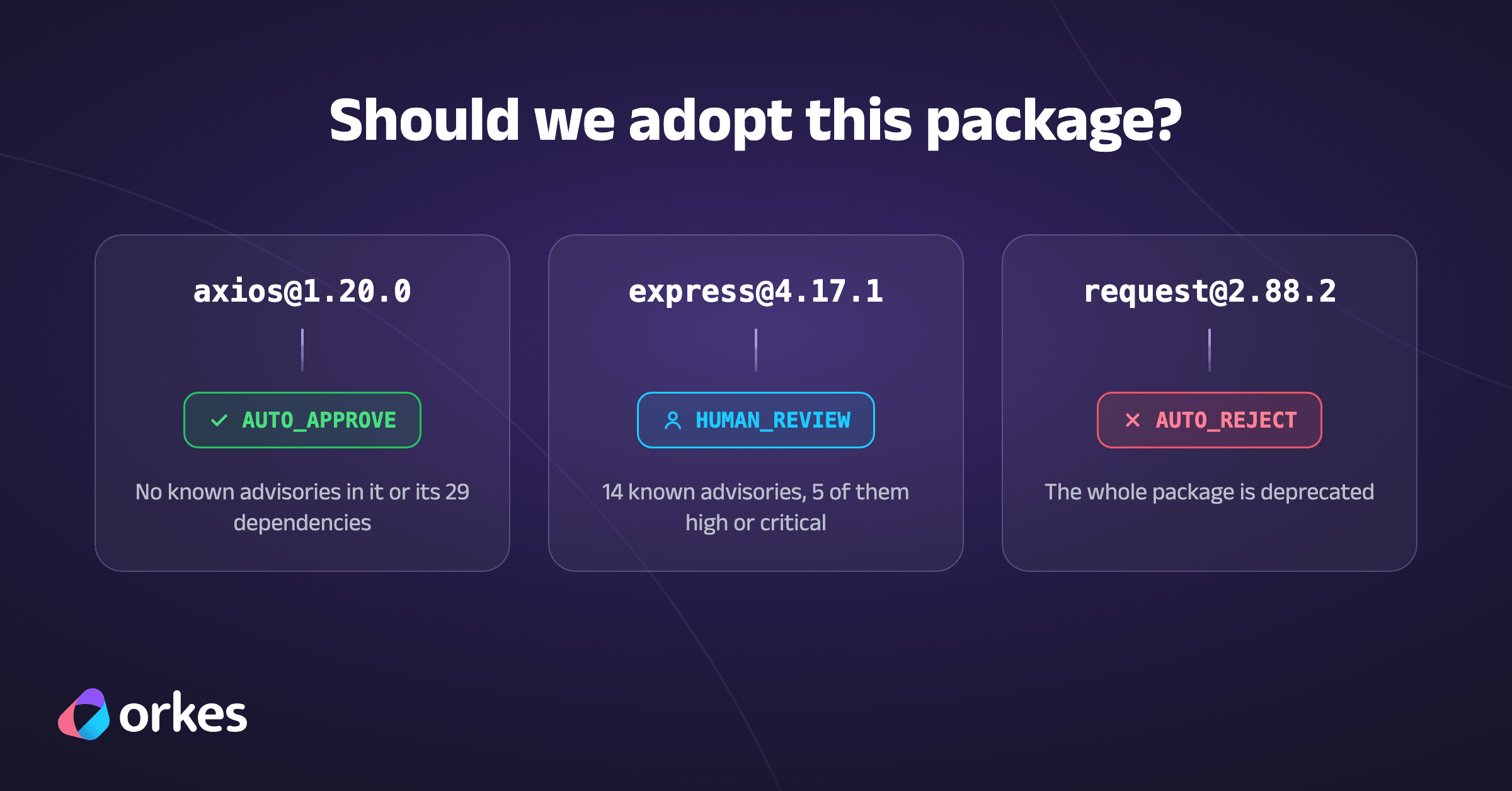
to see all three outcomes: axios@1.20.0 should be approved automatically,
express@4.17.1 waits for your review under Executions → Human Tasks, and
request@2.88.2 is rejected because the whole package is deprecated.

Orkes Conductor Developer Edition
Your first agentic workflow is 5 minutes away. Everything you need is already there.

Once you get the initial auditor working, here are some ideas for enhancements to make it even better:
- Add more community sources. Hacker News is the only social site checked today, and
not every problem gets reported there. Each new site - such as Reddit or Bluesky - can
be one more HTTP task in
the
gather_evidencefork. Note that most sites require an API key, which you’ll need to add to your Orkes Conductor cluster’s secrets. - Judge packages by how they’ll be used. npm’s
package.jsonalready separatesdependencies, which ship with your app, fromdevDependencies, such as test runners and bundlers, which only run on developer machines and in CI. A flaw that lets crafted input crash a server is serious in the first group, but often unreachable in the second. An optionalintendedUseinput could let the LLM and routing rules weigh that context. - Review a whole project at once. Accept a
package-lock.json, which pins the exact version of every dependency, and review each direct dependency in parallel with a dynamic fork, asnpm_upgrade_planner_agentdoes. Then file a single GitHub issue for the whole project containing all the decisions, so that human reviewers can easily follow them. - Expose the full review as an approval tool. Publish
dependency_adoption_reviewas a third MCP tool that answers “may I install this?”. The gateway’s Wait Until Tasks setting lets it reply once the assessment is done, and an idempotency key such as<package>@<version>stops retries from filing duplicate issues.
Closing Thoughts
Even as a first version, this auditor meets the goals set out at the start of this article. It checks a package before anything is installed, separates real risks from noise, and explains how to fix the ones that matter, down to the lowest version that clears every advisory.
Just as important, the AI advises, but code and people make the decision. The LLM’s
verdict is only one input to apply_routing_rules, and any case the rules can’t settle
goes to a human reviewer. That’s the main trust point: an LLM can take part in a security
decision, summarizing evidence that a person would otherwise have to dig up, without
becoming its point of failure.
Running on Conductor also makes the auditor dependable. If a step fails, the run can be retried from that step without gathering the evidence again. It also scales with the package: a single scan pages through all 1,321 of Strapi’s dependencies, and the agent assesses every version it recommends in parallel.
And it’s built once, but called many ways. assess_npm_package runs on its own, as a
sub-workflow of dependency_adoption_review or npm_upgrade_planner_agent, or as the
POST_assess MCP tool. However it’s called, it makes the same API calls, gathers the
same evidence, and applies the same rules, so a coding agent and a person reviewing a
package are held to the same standard.
Finally, the pattern goes well beyond npm. Gather evidence in parallel → summarize it with an LLM → let fixed rules decide → send unclear cases to a person → record the outcome: that flow fits almost any decision where a wrong “yes” is costly, such as vetting a new third-party vendor or approving a new marketing campaign.