PRODUCT
Implementing Easy-to-Build Workflows with Conductor’s System Tasks

Karl Goeltner
Software Engineer
Last updated: April 14, 2025
April 14, 2025
8 min read


Join thousands of developers building the future with Orkes.
This is Part 2 of the series on System Tasks. Check out Part 1, which discusses the pros and cons of using system tasks and alternative solutions.
Whether you’re orchestrating a simple API flow or building complex AI-powered applications, system tasks make it easy to plug functionality into your workflows. In this post, we’ll explore the most common system tasks in Orkes Conductor and demonstrate how you can leverage them to accelerate development and unlock the full potential of Orkes Conductor.
Orkes Conductor is a workflow orchestration platform packed with developer-first features.
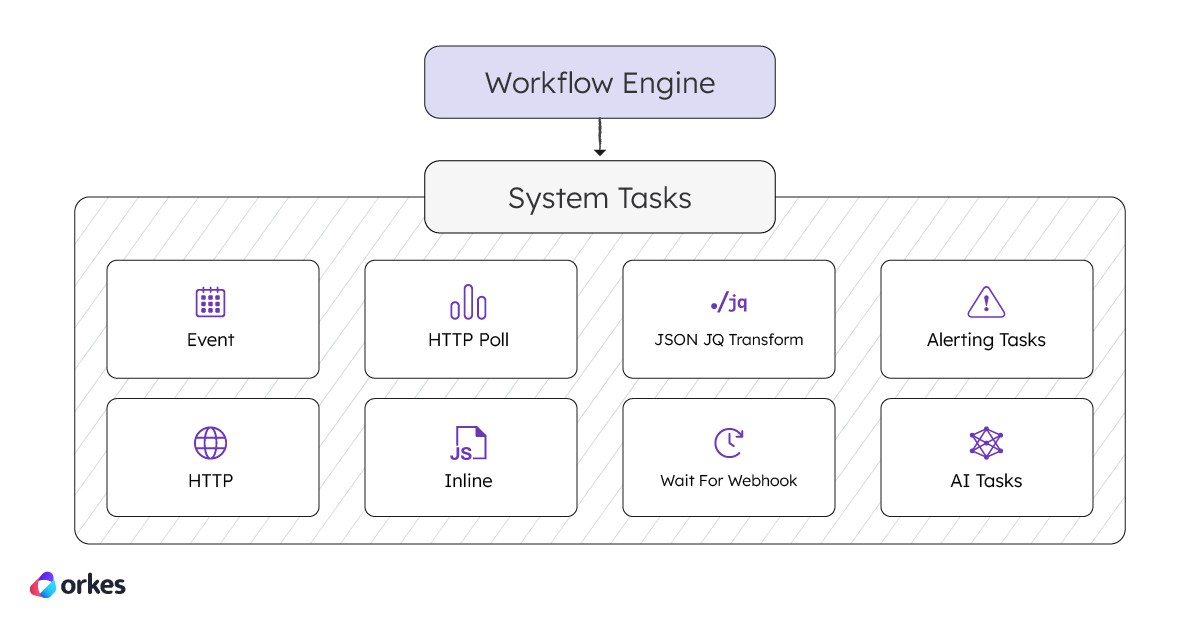
System tasks in Orkes Conductor represent reusable business logic components, like HTTP calls and database queries. These tasks run within the Conductor engine, allowing developers to quickly build complex and durable workflows without reinventing the wheel.
With over twenty system tasks and extensive SDK support, you can quickly build out and deploy powerful workflows. Let’s explore example workflows that make use of these most commonly-used tasks:
In distributed systems, async communication is key一and that’s where the Event task comes in. It allows your workflow to publish messages to an external event queue or topic, enabling decoupled communication between services. Whether you’re using Kafka, SQS, or another messaging system, Orkes Conductor integrates with many providers, making it easy to trigger downstream processes or notify external systems as part of your workflow.
Imagine a payment workflow that processes a transaction and needs to notify an inventory service once completed. The workflow first makes an HTTP call to a payment API to confirm the transaction. Once confirmed, instead of directly calling the inventory service, an Event task publishes a message to a Kafka topic. The inventory service listens to the Kafka topic, consumes the event, and asynchronously updates stock levels, decoupling the processes for scalability and flexibility.
Here’s the workflow visualized:
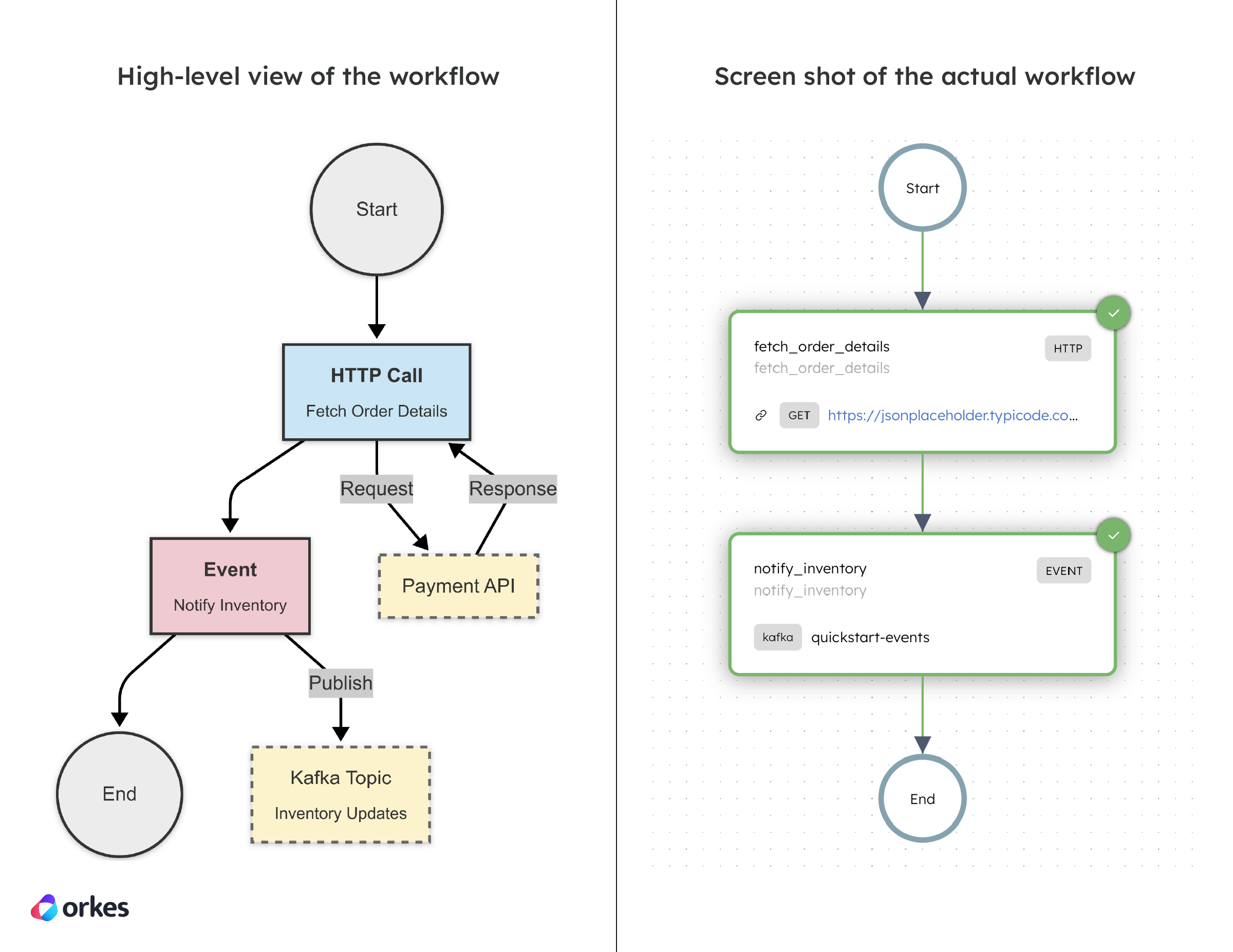
To create this workflow in Conductor, you must first integrate the required message broker, and then add the relevant system tasks. Here’s the code snippet for creating the workflow in code:
def register_workflow(workflow_executor: WorkflowExecutor) -> ConductorWorkflow:
  # 1) Define the HTTP task for calling the dummy JSONPlaceholder API
  http_task = HttpTask(
      task_ref_name="fetch_order_details",
      http_input={
          "uri": "https://jsonplaceholder.typicode.com/posts/${workflow.input.orderId}",
          "method": "GET",
          "headers": {
              "Content-Type": "application/json"
          }
      }
  )

  # 2) Define the Event task using EventTaskInterface
  event_task = EventTaskInterface(
      task_ref_name="notify_inventory",
      event_prefix="kafka",
      event_suffix="quickstart-events"
  )

  # Update input parameters for the event task using data from the HTTP task response
  event_task.input_parameters.update({
      "orderId": "${fetch_order_details.output.response.body.id}",
      "title": "${fetch_order_details.output.response.body.title}",
      "body": "${fetch_order_details.output.response.body.body}"
  })

  # Define the workflow and add the tasks
  workflow = ConductorWorkflow(
      name="inventory_management_workflow",
      executor=workflow_executor
  )
  workflow.version = 1
  workflow.add(http_task)
  workflow.add(event_task)

  # Register the workflow
  workflow.register(True)

  return workflow
Check out the full sample code for the Event Workflow.
The HTTP task is used to make calls to remote services exposed over HTTP/HTTPS, a fundamental part of most service-based applications. It provides a clean abstraction that makes it intuitive to declare API calls. This simplifies integration with external systems, eliminating the need for custom workers and manual integration..
In a payment processing system, you need to interact with an external API to charge a customer’s credit card. It sends a POST request via an HTTP task to the payment API with the order ID and amount, along with an authorization token.
The workflow ensures efficient handling of payment success or failure through conditional branching with the use of the Switch task.
Here’s the workflow visualized:
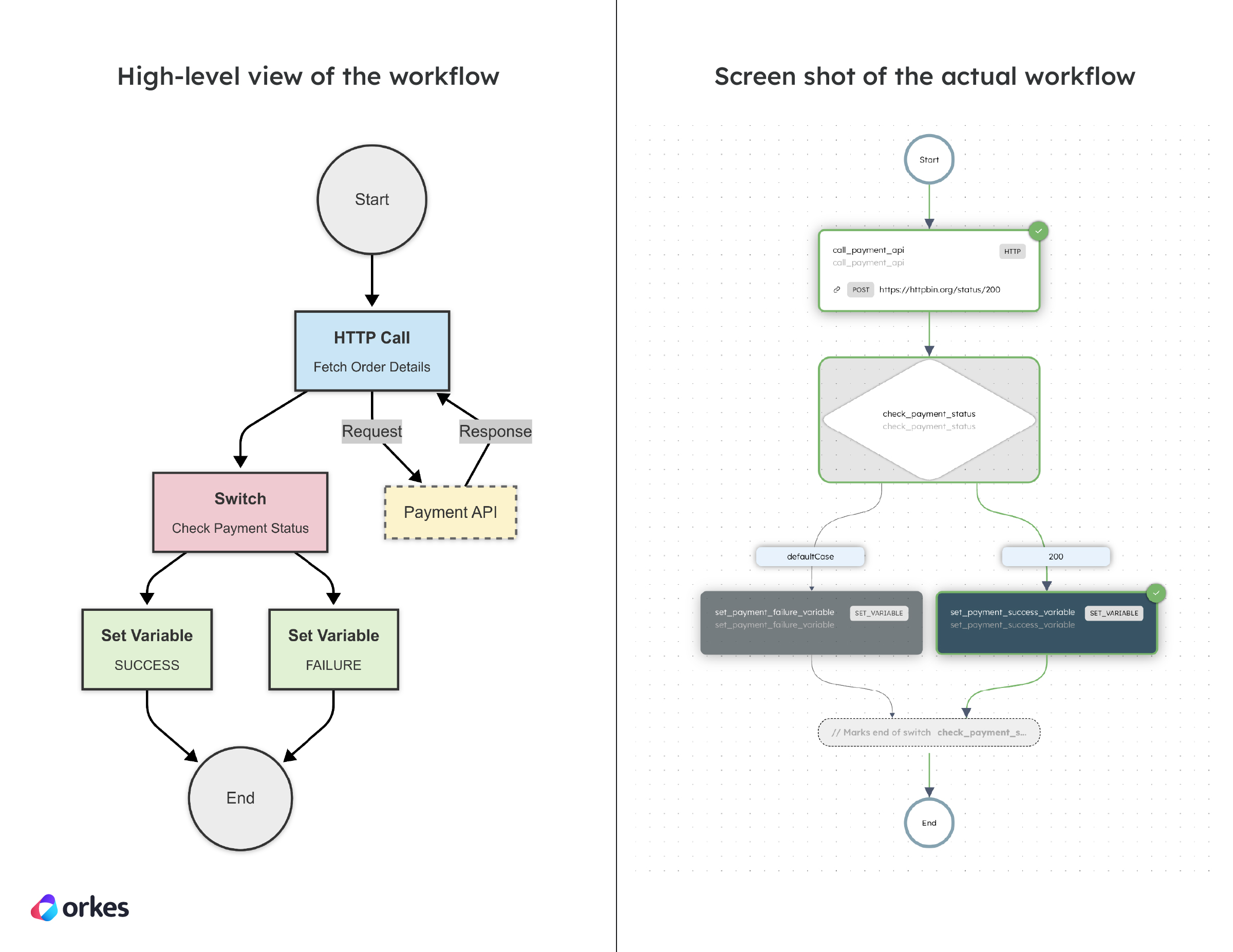
Here’s the code snippet for creating the workflow in code:
def register_workflow(workflow_executor: WorkflowExecutor) -> ConductorWorkflow:
  # 1) Define the HTTP task for calling the payment API
  http_task = HttpTask(
      task_ref_name="call_payment_api",
      http_input={
          "uri": "https://httpbin.org/status/200",
          "method": "POST",
          "headers": {
              "Content-Type": "application/json",
              "Authorization": "Bearer ${workflow.input.auth_token}"
          },
          "body": {
              "orderId": "${workflow.input.orderId}",
              "amount": "${workflow.input.amount}"
          }
      }
  )

  # 2) Define the SwitchTask with case expression
  switch_task = SwitchTask(
      task_ref_name="check_payment_status",
      case_expression="${call_payment_api.output.response.statusCode}",
      use_javascript=False
  )

  # 3) Define SetVariableTask for success case
  set_payment_success_variable = SetVariableTask(
      task_ref_name="set_payment_success_variable"
  )
  set_payment_success_variable.input_parameters.update({
      "payment_status": "SUCCESS"
  })

  # Define SetVariableTask for failure case
  set_payment_failure_variable = SetVariableTask(
      task_ref_name="set_payment_failure_variable"
  )
  set_payment_failure_variable.input_parameters.update({
      "payment_status": "FAILURE"
  })

  # Configure the decision logic for SwitchTask
  switch_task.switch_case("200", set_payment_success_variable)
  switch_task.default_case(set_payment_failure_variable)

  # Define the workflow and add the tasks
  workflow = ConductorWorkflow(
      name="payment_workflow",
      executor=workflow_executor
  )
  workflow.version = 1
  workflow.add(http_task)
  workflow.add(switch_task)

  # Register the workflow
  workflow.register(True)

  return workflow
Check out the full sample code for the HTTP Workflow.
The HTTP Poll task in Orkes Conductor enables workflows to send HTTP requests to a specified endpoint at regular intervals, continuing until a defined termination condition is met. This is particularly useful for monitoring the status of long-running operations or waiting for external processes to complete.
Consider a scenario where a workflow needs to monitor the status of a file processing job initiated by an external service. The workflow can use the HTTP Poll task to periodically check the status endpoint of the external service until the job is completed.
Here’s the workflow visualized:
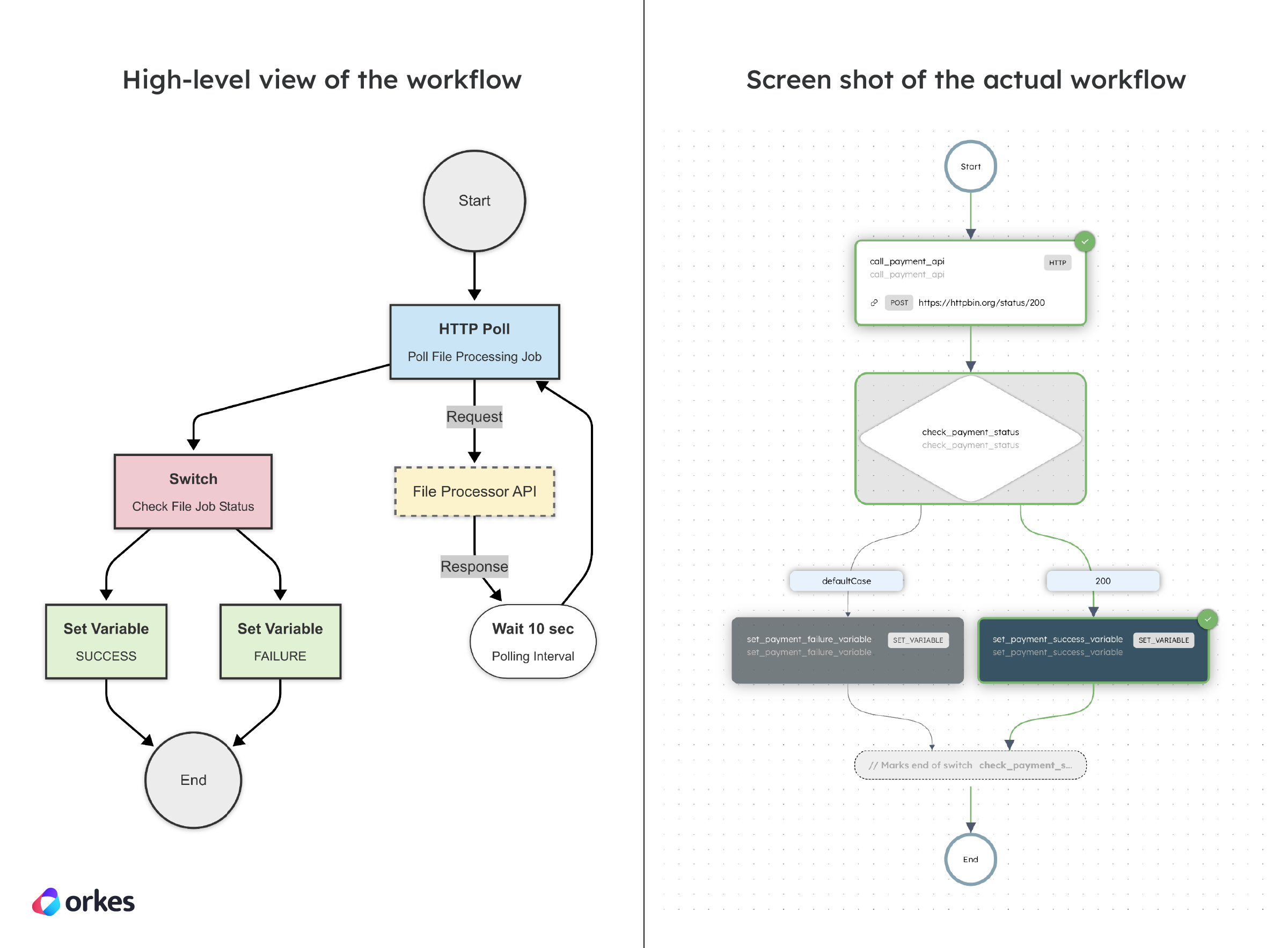
Here’s the code snippet for creating the workflow in code:
def register_workflow(workflow_executor: WorkflowExecutor) -> ConductorWorkflow:
  # 1) Define the HTTP Poll input
  http_poll_input = HttpPollInput(
      uri="https://httpbin.org/delay/10",
      method="GET",
      accept="application/json",
      termination_condition="$.output.response.statusCode == 200",
      polling_interval=10
  )

  # 2) Define the HTTP Poll task for checking the file processing status
  http_poll_task = HttpPollTask(
      task_ref_name="check_file_processing_status",
      http_input=http_poll_input
  )

  # 3) Define SetVariableTask for the success case
  set_processing_complete_variable = SetVariableTask(
      task_ref_name="set_processing_complete_variable"
  )
  set_processing_complete_variable.input_parameters.update({
      "processing_status": "COMPLETED"
  })

  # Define SetVariableTask for the failure case
  set_processing_failed_variable = SetVariableTask(
      task_ref_name="set_processing_failed_variable"
  )
  set_processing_failed_variable.input_parameters.update({
      "processing_status": "FAILED"
  })

  # 4) Define SwitchTask to handle success and failure cases
  switch_task = SwitchTask(
      task_ref_name="check_processing_status",
      case_expression="${check_file_processing_status.output.response.statusCode}",
      use_javascript=False
  )

  # Configure the decision cases for the SwitchTask
  switch_task.switch_case(200, set_processing_complete_variable)
  switch_task.default_case(set_processing_failed_variable)

  # Define the workflow and add the tasks
  workflow = ConductorWorkflow(
      name="file_processing_workflow",
      executor=workflow_executor
  )
  workflow.version = 1
  workflow.add(http_poll_task)
  workflow.add(switch_task)

  # Register the workflow
  workflow.register(True)

  return workflow
Check out the full sample code for the HTTP Poll Workflow.
The Inline task in Orkes Conductor allows workflows to execute custom JavaScript code during runtime, facilitating dynamic data processing and decision-making without the need for external workers. This task is particularly useful for implementing lightweight logic, such as data transformations, conditional checks, or calculations, directly within the workflow.
In an e-commerce platform, the Inline task can be used to dynamically calculate prices based on various factors like loyalty status and active promotions. Instead of relying on an external service, the task executes custom JavaScript within the workflow to calculate the final price.
Here’s the workflow visualized:
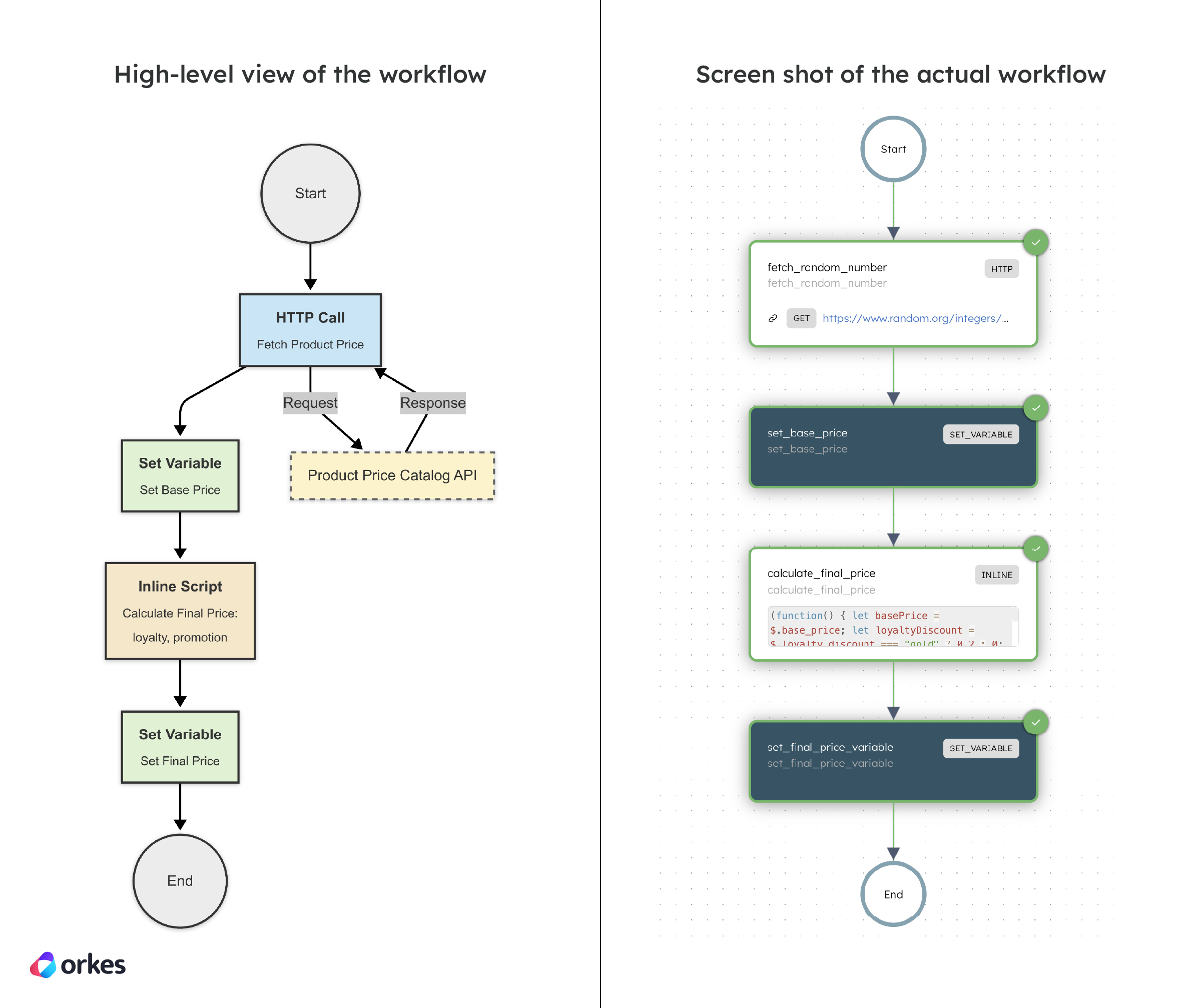
Here’s the code snippet for creating the workflow in code:
def register_workflow(workflow_executor: WorkflowExecutor) -> ConductorWorkflow:
  # 1) HTTP task to fetch a random number from random.org
  fetch_random_number_task = HttpTask(
      task_ref_name="fetch_random_number",
      http_input={
          "uri": "https://www.random.org/integers/?num=1&min=1&max=100&col=1&base=10&format=plain&rnd=new",
          "method": "GET",
          "headers": {
              "Content-Type": "application/json"
          }
      }
  )

  # 2) Set variable for base price using the random number
  set_base_price = SetVariableTask(
      task_ref_name="set_base_price"
  )
  set_base_price.input_parameters.update({
      "base_price": "${fetch_random_number.output.response.body}"
  })

  # 3) Inline task to calculate the final price with discounts
  calculate_price_task = InlineTask(
      task_ref_name="calculate_final_price",
      script="""
          (function() {
              let basePrice = $.base_price;
              let loyaltyDiscount = $.loyalty_discount === "gold" ? 0.2 : 0;
              let promotionDiscount = $.promotion_discount ? 0.1 : 0;
              return basePrice * (1 - loyaltyDiscount - promotionDiscount);
          })();
      """,
      bindings={
          "base_price": "${workflow.variables.base_price}",
          "loyalty_discount": "${workflow.input.loyalty_status}",
          "promotion_discount": "${workflow.input.is_promotion_active}"
      }
  )

  # 4) Set the final calculated price in a workflow variable
  set_price_variable = SetVariableTask(
      task_ref_name="set_final_price_variable"
  )
  set_price_variable.input_parameters.update({
      "final_price": "${calculate_final_price.output.result}"
  })

  # Define the workflow and add all tasks
  workflow = ConductorWorkflow(
      name="dynamic_pricing_workflow",
      executor=workflow_executor
  )
  workflow.version = 1
  workflow.add(fetch_random_number_task)
  workflow.add(set_base_price)
  workflow.add(calculate_price_task)
  workflow.add(set_price_variable)

  # Register the workflow
  workflow.register(overwrite=True)

  return workflow
Check out the full sample code for the Inline Workflow.
The JSON JQ Transform task in Orkes Conductor enables workflows to process and transform JSON data using JQ, a powerful command-line tool for querying and manipulating JSON. This task allows you to apply JQ expressions to input JSON, facilitating operations like filtering, mapping, and restructuring data directly within your workflow.
Consider a scenario where a workflow retrieves a list of user data from an external API, but only a subset of fields is required for subsequent processing. The JSON JQ Transform task can be employed to filter and format the API response efficiently.
Here’s the workflow visualized:

Here’s the code snippet for creating the workflow in code:
def register_workflow(workflow_executor: WorkflowExecutor) -> ConductorWorkflow:
  # JQ script to transform user data
  jq_script = """
    .users | map({
      username: .login,
      profile_url: .html_url,
      avatar: .avatar_url
    })
  """

  # 1) Create the JSON JQ task to transform incoming user data
  jq_task = JsonJQTask(
      task_ref_name="transform_user_data",
      script=jq_script
  )
  jq_task.input_parameters.update({
      "users": "${workflow.input.users}"
  })

  # 2) Create a SetVariableTask to store the transformed result
  set_variable_task = SetVariableTask(
      task_ref_name="store_filtered_users"
  )
  set_variable_task.input_parameters.update({
      "filtered_users": "${transform_user_data.output.result}"
  })

  # Define and register the workflow
  workflow = ConductorWorkflow(
      name="simple_user_data_transform",
      executor=workflow_executor
  )
  workflow.version = 1
  workflow.input_parameters = ["users"]
  workflow.add(jq_task)
  workflow.add(set_variable_task)

  # Register the workflow
  workflow.register(overwrite=True)

  return workflow
Check out the full sample code for the JSON JQ Transform Workflow.
The Wait for Webhook task in Orkes Conductor is designed to pause a workflow’s execution until a specific external event is received via a webhook. This integration enables workflows to respond dynamically to real-time events from various platforms, including GitHub, Slack, Stripe, Microsoft Teams, and SendGrid. This is best when the external system can push events out.
A workflow waits for a webhook event indicating that a specific comment has been posted on a GitHub issue. Using a Wait for Webhook task, the workflow pauses until it receives the event with a comment from a specific author, such as “user123”. Once triggered, the workflow stores the comment content in a mock database, allowing subsequent tasks to process the comment, such as analyzing its content or triggering automated responses.
Here’s the workflow visualized:
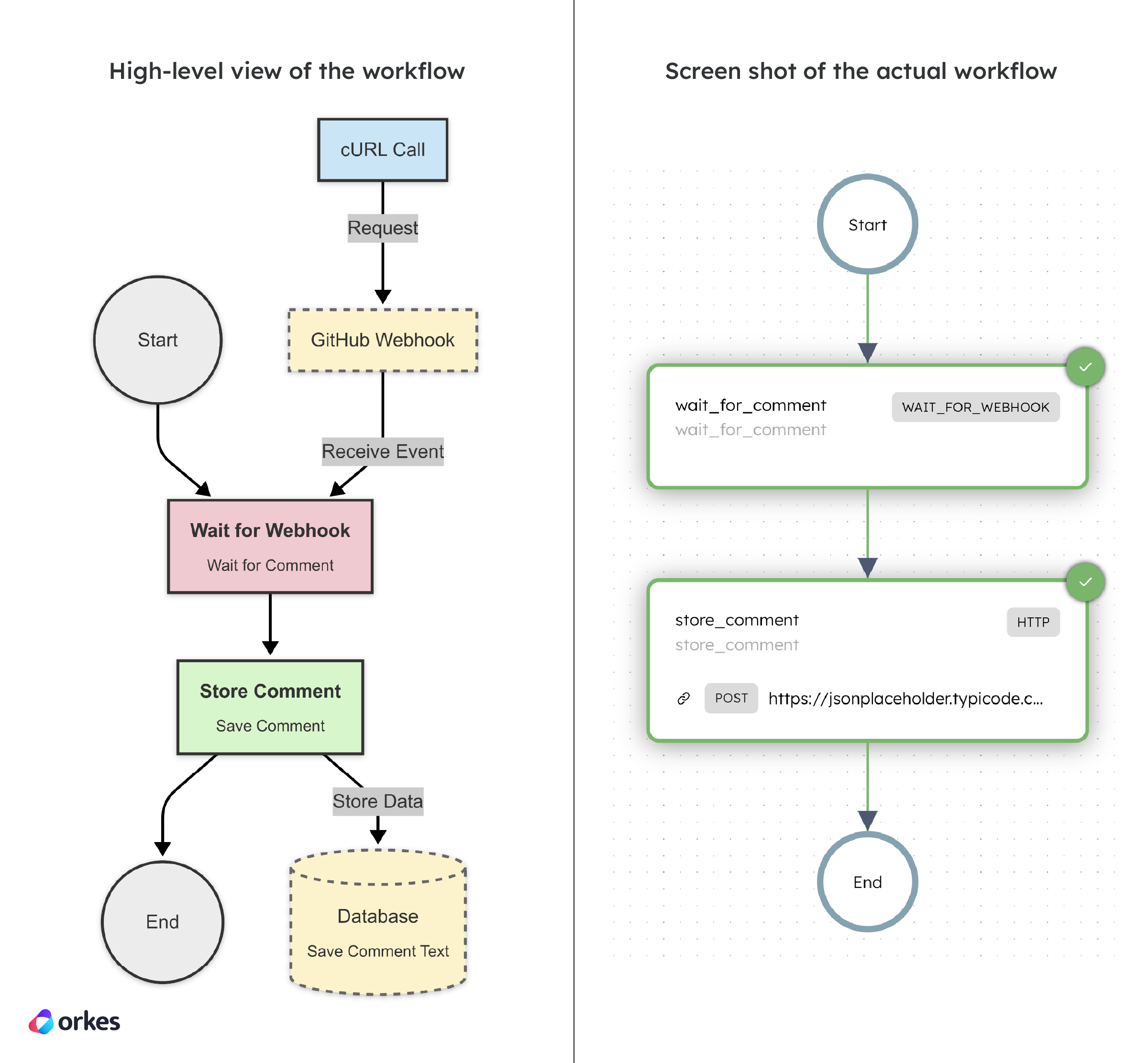
Here’s the code snippet for creating the workflow in code:
def register_workflow(workflow_executor: WorkflowExecutor) -> ConductorWorkflow:
  # 1) Define the WaitForWebhookTask to pause until a specific comment is received
  wait_for_comment_task = WaitForWebHookTask(
      task_ref_name="wait_for_comment",
      matches={
          "$['comment']['author']": "user123"
      }
  )

  # 2) Define an HTTP task to store the received comment in a mock database
  store_comment_task = HttpTask(
      task_ref_name="store_comment",
      http_input={
          "uri": "https://jsonplaceholder.typicode.com/posts",
          "method": "POST",
          "headers": {
              "Content-Type": "application/json"
          },
          "body": {
              "comment_body": "${wait_for_comment.output.comment.body}",
              "author": "user123"
          }
      }
  )

  # Define and register the workflow
  workflow = ConductorWorkflow(
      name="comment_trigger_workflow",
      executor=workflow_executor
  )
  workflow.version = 1
  workflow.add(wait_for_comment_task)
  workflow.add(store_comment_task)

  # Register the workflow
  workflow.register(overwrite=True)

  return workflow
Check out the full sample code for the Wait for Webhook Workflow.
Before running the workflow you must set up a webhook in Conductor for the workflow comment_trigger_workflow and GitHub.
After running the workflow, call this curl command to complete the workflow:
curl -H "Content-Type:application/json" -H "Accept:application/json" -H 'key: value' -X POST '[INSERT_WEBHOOK_URL]' -d '{"comment": {"body": "This is my comment.", "author": "user123"}}'Alerting tasks are specialized system tasks designed to monitor workflows and trigger alerts based on specific conditions. These tasks enhance observability and enable proactive incident management within your workflows, helping teams stay informed and act quickly when systems deviate from expected behavior. Explore how to use Alerting tasks with our suite of tutorials.
Orkes Conductor offers a suite of AI tasks that facilitate seamless integration of Large Language Models (LLMs) and vector databases into workflows. These tasks enable functionalities such as text generation, embedding creation, document indexing, and retrieval, allowing developers to build both AI-driven applications and agentic workflows.
By incorporating these AI tasks, users can effectively orchestrate complex AI processes within their workflows, enhancing automation and intelligence in their applications. Explore how to use AI tasks with our suite of tutorials.
Using system tasks in Conductor speeds up development cycles, bringing processes and products from paper to reality in no time at all. In this post, we’ve demonstrated building workflows using system tasks through Python. As a developer-first platform, Orkes Conductor is built for creating workflows in any programming language (Java, Python, JavaScript, C#, Go, Clojure), or even using a visual diagram editor. Learn more about how exactly system tasks make developing workflows so much faster in Part 1.
Orkes Conductor is an enterprise-grade orchestration platform for process automation, API and microservices orchestration, agentic workflows, and more. Check out the full set of features, or try it yourself using our free Developer Edition.