PRODUCT
Control the Flow: Building Dynamic Workflows with Orkes Operators

Karl Goeltner
Software Engineer
Last updated: April 28, 2025
April 28, 2025
5 min read


Join thousands of developers building the future with Orkes.
Orchestration is a powerful design framework for coordinating distributed services and systems into automated processes. Using a workflow engine, such as Orkes Conductor, provides a myriad of benefits like durable executions, state tracking, and developer productivity.
A key part of this orchestration model is operators, which are control flow primitives that resemble programming constructs. By using operators, developers can model dynamic, intelligent workflows without writing imperative control logic, making it easier to scale, maintain, and evolve complex systems.
In Conductor, operators define the control flow, structure, and decision-making within a workflow. Operators are one of the three core task types used in workflows, alongside system tasks and worker tasks. While system and worker tasks focus on performing actions (like sending HTTP requests or processing data), operator tasks define the control flow.
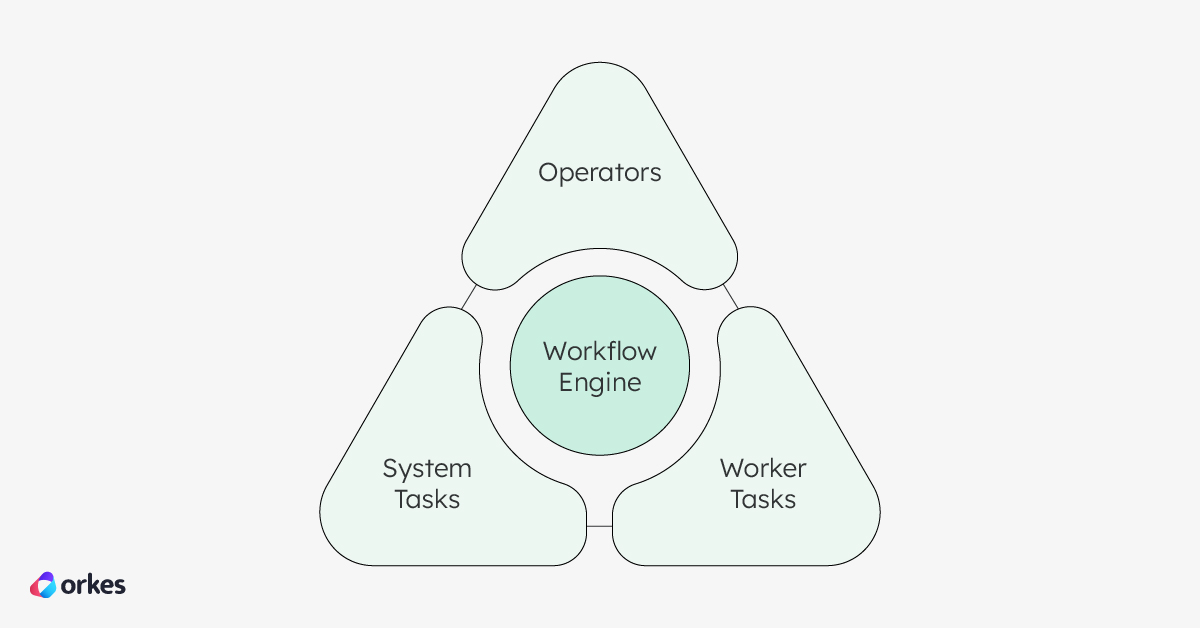
Operators act as declarative control structures, similar to constructs in traditional programming languages. For example, a Switch operator mimics a switch-case statement, a Fork allows for parallel task execution, and a Do While enables looping logic. These constructs make it possible to express complex workflow logic (branching, looping, and conditional execution) all without writing procedural code.
Operators are essential for orchestrating agentic workflows, where conditional or parallel logic provides a mapped space for the agent to act autonomously within bounds. Similarly, using operators, human-in-the-loop flows can be dynamically controlled based on the manual input received mid-flow.
Like system tasks, operator tasks are fully managed by Conductor and do not require any external workers to run. They are evaluated and executed internally by the engine, making them lightweight and efficient building blocks for composing complex workflows.
Using operators in your workflows offers a range of benefits, especially when compared to managing control flow directly in code:
By leveraging operators, you can design robust, readable, and adaptable workflows without getting bogged down by control-flow code scattered across services.
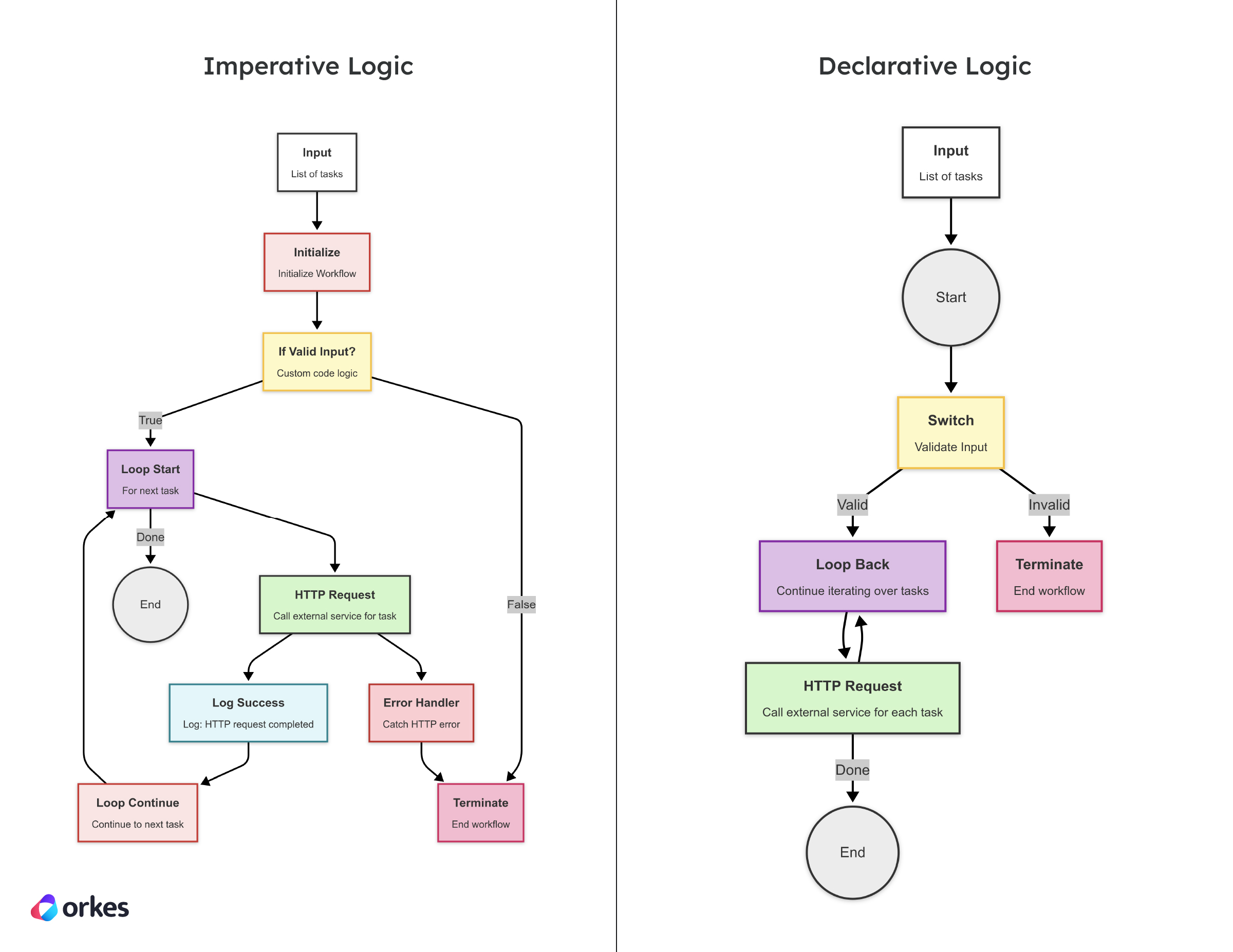
Declarative logic is all about describing what should happen, not how to make it happen. In traditional code, developers must spell out the exact sequence of steps and control flow — managing state, writing loops, handling conditionals, and coordinating service calls. This imperative approach can quickly become brittle and hard to maintain as workflows grow in complexity.
By contrast, declarative logic lets you define the intent of the workflow and offload the execution details to the orchestration engine. This not only simplifies development but also makes workflows easier to read, reason about, and debug.
Operators in Orkes Conductor are a perfect example of this approach. They serve as control flow declarations: you define that a workflow should loop, branch, or fork — and Conductor takes care of executing that logic under the hood. Want to repeat a task until a condition is met? Just add a Do While with the right condition. Need to split work across multiple paths and rejoin later? Use Fork and Join. There’s no need to write a single line of plumbing code.
This declarative style brings huge benefits:
Sub Workflow or Start Workflow as high-level building blocks.In this example, we demonstrate how both imperative and declarative workflows handle iterating over a list of tasks and making HTTP requests for each. The imperative workflow explicitly defines the loop, including custom error handling for each HTTP request, while the declarative workflow uses Orkes Conductor's built-in Do While operator to manage iteration, with automatic error handling provided by the engine. This showcases the difference in complexity and control between the two approaches.
Declarative orchestration is especially valuable when building agentic workflows, human-in-the-loop workflows, event-driven systems, or other dynamic execution paths. Operators let you adapt to changing inputs or user actions without embedding decision logic inside services.
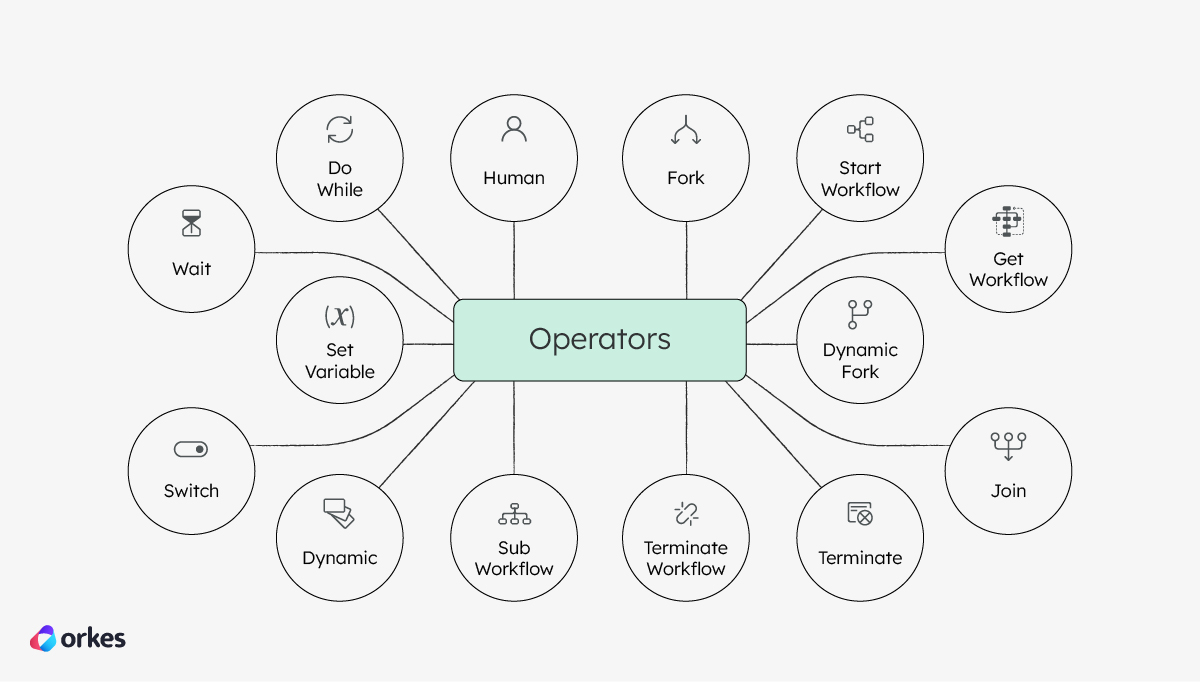
With over a dozen operators and extensive SDK support, you can quickly build out and deploy powerful workflows. Let’s explore example workflows that make use of these most commonly used tasks:
| Operator | Description |
|---|---|
| Switch | Branches the workflow based on conditions, similar to a switch-case construct. Learn more: Branching and Conditionals |
| Dynamic | Dynamically evaluates conditions at runtime to determine what to do. Learn more: Branching and Conditionals |
| Set Variable | Sets variables within the workflow, allowing for dynamic control during execution. Learn more: Branching and Conditionals |
| Terminate | Ends the workflow execution early, often used for terminating workflows under conditions. Learn more: [Branching and Conditionals](https://orkes.io/blog/operators-branching-and-conditionals) |
| Do While | Loops through tasks until a condition is no longer true, used for repeated actions. Learn more: Loops, Waits, and Human-in-the-Loop |
| Wait | Pauses execution for a set time or until a condition is met. Learn more: Loops, Waits, and Human-in-the-Loop |
| Human | Pauses execution until manual input is received, useful for human-in-the-loop scenarios. Learn more: Loops, Waits, and Human-in-the-Loop |
| Fork | Executes multiple tasks in parallel, enabling concurrent processing. Learn more: Parallelism and Reusability |
| Join | Merges the results from parallel tasks, allowing the workflow to proceed together. Learn more: Parallelism and Reusability |
| Dynamic Fork | Dynamically creates parallel tasks at runtime based on conditions or data. Learn more: Parallelism and Reusability |
| Sub Workflow | Triggers another workflow within the current workflow for modularity and reusability. Learn more: Parallelism and Reusability |
| Start Workflow | Starts another workflow asynchronously in parallel with the current workflow. Learn more: Parallelism and Reusability |
Orkes Conductor simplifies workflow orchestration by using declarative operators to manage complex logic. With tasks like Switch, Do While, and Fork/Join, you can build flexible, scalable workflows without writing imperative code. This approach accelerates development, reduces maintenance overhead, and enables collaboration across teams. Whether through the visual diagram editor or Conductor SDKs in Java, Python, or other languages, Conductor empowers developers to easily design, manage, and scale workflows.
Mastering control flow with Conductor
With operators, you design the flow, and Conductor handles the execution logic, freeing you to focus on building the features that matter.
Check out how to use Conductor’s operators with these articles:
Orkes Conductor is an enterprise-grade orchestration platform for process automation, API and microservices orchestration, agentic workflows, and more. Check out the full set of features, or try it yourself using our free Developer Edition.