PRODUCT
Orkes Operators: Branching and Conditionals

Karl Goeltner
Software Engineer
Last updated: April 28, 2025
April 28, 2025
6 min read


Join thousands of developers building the future with Orkes.
Smart workflows don’t just follow a straight line—they make decisions.
Orkes Conductor provides a set of declarative operators that let your workflows respond to input, handle conditions, and dynamically route execution without hardcoding logic into your services.
In this article, we’ll walk through four core decision-making operators:
With these operators, you can model flexible, maintainable decision paths that react to real-world complexity—all without writing imperative glue code.
The Switch task is a control flow operator that enables conditional branching within a workflow, similar to a switch-case or if-else statement in code. It evaluates an expression at runtime and routes execution to a matching case, with support for a default path if no match is found. This makes it ideal for directing workflow logic based on dynamic values such as user input, AI-powered decisions, or status flags.
Let’s say you're building an order processing workflow that needs to handle different shipping methods. Based on the shippingType selected by the user (standard, express, or overnight), the workflow should branch into a different fulfillment path. A Switch task can evaluate the shippingType and route the workflow accordingly.
Here’s the workflow visualized:
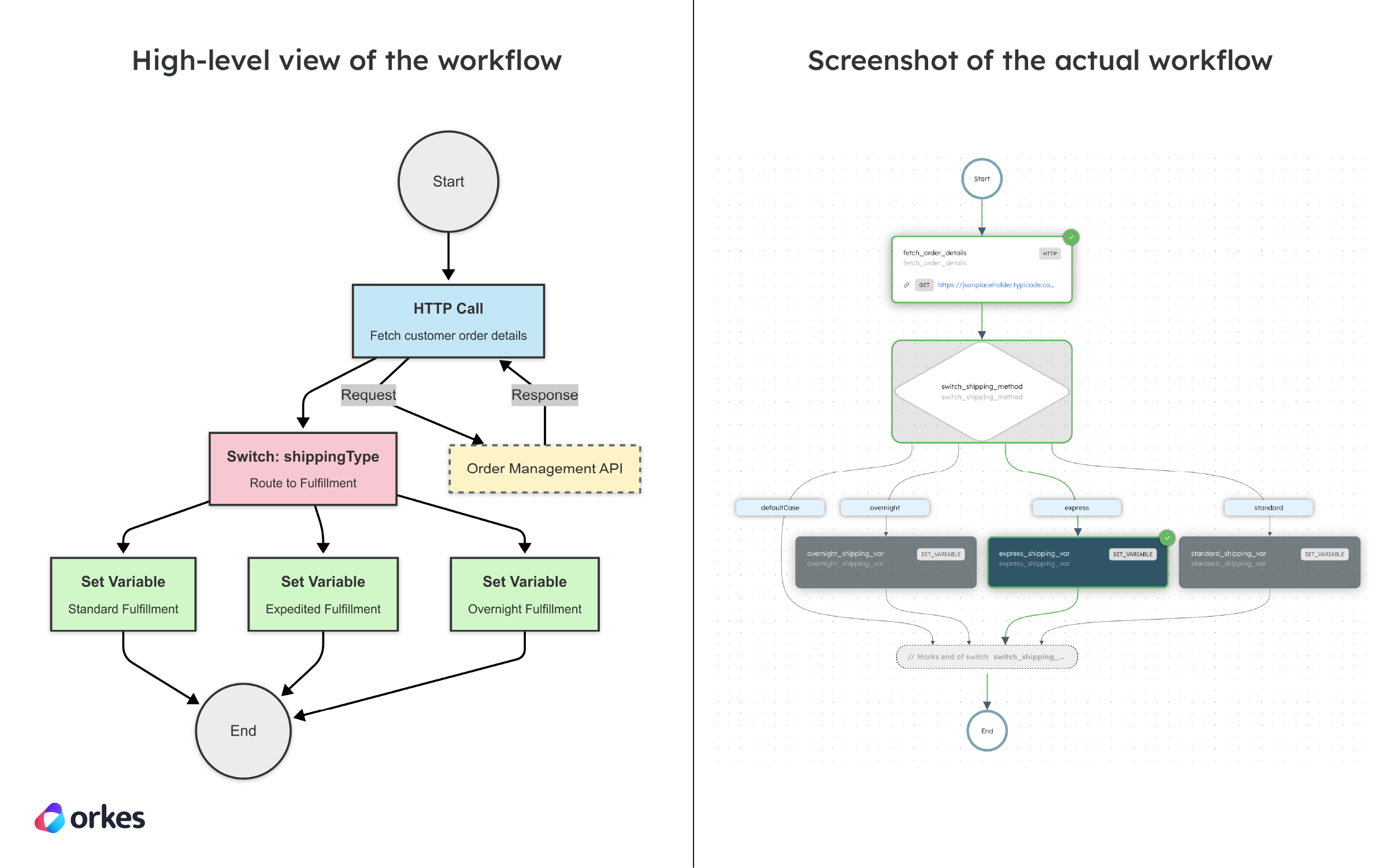
Here’s the code snippet for creating the workflow in code:
def register_workflow(workflow_executor: WorkflowExecutor) -> ConductorWorkflow:
    # 1) Task to fetch order details
    fetch_order_details = HttpTask(
        task_ref_name="fetch_order_details",
        http_input={
            "uri": "https://jsonplaceholder.typicode.com/posts/${workflow.input.orderId}",
            "method": "GET",
            "headers": {
                "Content-Type": "application/json"
            }
        }
    )

    # 2) SetVariable tasks for each shipping method
    standard_shipping = SetVariableTask(task_ref_name="standard_shipping_var")
    standard_shipping.input_parameters.update({
        "selected_shipping_method": "standard"
    })

    express_shipping = SetVariableTask(task_ref_name="express_shipping_var")
    express_shipping.input_parameters.update({
        "selected_shipping_method": "express"
    })

    overnight_shipping = SetVariableTask(task_ref_name="overnight_shipping_var")
    overnight_shipping.input_parameters.update({
        "selected_shipping_method": "overnight"
    })

    # 3) Define the Switch task to route based on shippingType
    switch_shipping = SwitchTask(
        task_ref_name="switch_shipping_method",
        case_expression="${workflow.input.shippingType}"
    )
    switch_shipping \
        .switch_case("standard", [standard_shipping]) \
        .switch_case("express", [express_shipping]) \
        .switch_case("overnight", [overnight_shipping]) \
        .default_case([])

    workflow = ConductorWorkflow(
        name="order_processing_workflow",
        executor=workflow_executor
    )
    workflow.version = 1
    workflow.add(fetch_order_details)
    workflow.add(switch_shipping)

    workflow.register(True)

    return workflow
Check out the full sample code for the Switch Workflow.
The Dynamic task in Orkes Conductor enables workflows to determine and execute tasks at runtime based on input data, rather than defining them statically in the workflow definition. This is especially useful for cases where the number or type of tasks isn’t known in advance—such as processing a variable-length list of items or executing a dynamic sequence of operations. The task determines a llist of task(s) to be executed, allowing workflows to adapt their structure on the fly while remaining fully managed and observable within Conductor.
In a shipping workflow, the courier used to fulfill an order—such as FedEx or UPS—depends on the destination address, which isn’t known until runtime. A Dynamic task allows the workflow to decide which shipping task to execute on the fly, based on the result of a previous task that determines the best courier. For instance, if the shipping_info task outputs "ship_via_fedex", the dynamic task will execute the ship_via_fedex task; if it returns "ship_via_ups", the workflow dynamically routes to ship_via_ups. This eliminates hardcoded branching and makes the workflow adaptable to real-time decision-making.
Here’s the workflow visualized:
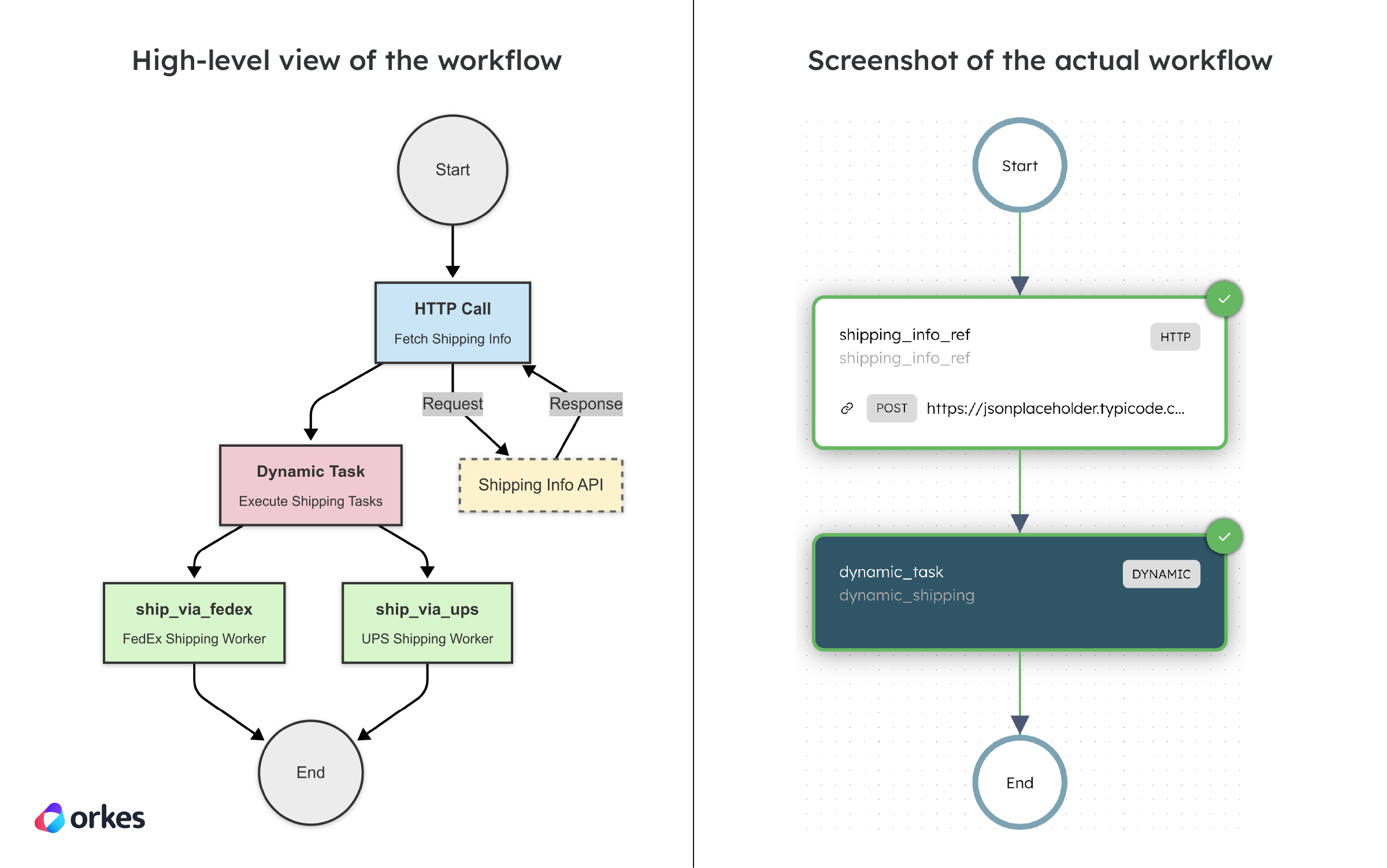
Here’s the code snippet for creating the workflow in code:
def register_workflow(workflow_executor: WorkflowExecutor) -> ConductorWorkflow:
    # 1) Task to simulate courier selection
    shipping_info = HttpTask(
        task_ref_name="shipping_info_ref",
        http_input={
            "uri": "https://jsonplaceholder.typicode.com/posts",
            "method": "POST",
            "headers": {
                "Content-Type": "application/json"
            },
            "body": {
                "order_id": "${workflow.input.order_id}",
                "destination": "${workflow.input.address}"
            }
        }
    )

    # 2) Dynamic task that picks the shipping method based on workflow input
    dynamic_shipping = DynamicTask(
        dynamic_task="${workflow.input.shipping_service}",
        task_reference_name="dynamic_shipping"
    )

    workflow = ConductorWorkflow(
        name="Shipping_Flow",
        executor=workflow_executor
    )
    workflow.version = 1
    workflow.add(shipping_info)
    workflow.add(dynamic_shipping)
    workflow.register(overwrite=True)

    return workflow


# Worker for FedEx
@worker_task(task_definition_name="ship_via_fedex")
def ship_via_fedex() -> dict:
    print("📦 Shipping via FedEx")
    return {"status": "FedEx shipment created"}


# Worker for UPS
@worker_task(task_definition_name="ship_via_ups")
def ship_via_ups() -> dict:
    print("📦 Shipping via UPS")
    return {"status": "UPS shipment created"}
Check out the full sample code for the Dynamic Workflow.
The Set Variable task in Orkes Conductor is used to define or update variables within the scope of a workflow execution. It allows you to store values—such as computed results, flags, or counters—that can be referenced later by other tasks. This task is especially useful for tracking workflow state, managing intermediate data, or preparing inputs for conditional logic or dynamic tasks. Variables set using this task are stored in the workflow’s context and persist throughout its execution.
In an e-commerce order processing workflow, the Set Variable task is used to store intermediate values like the subtotal, discount, and tax during price calculation. For instance, after the calculate_subtotal task, a Set Variable task updates the subtotal variable, which is then modified by the apply_discount task and used in the final price calculation. These variables are passed to subsequent tasks like process_payment, ensuring the correct amount is charged.
Here’s the workflow visualized:
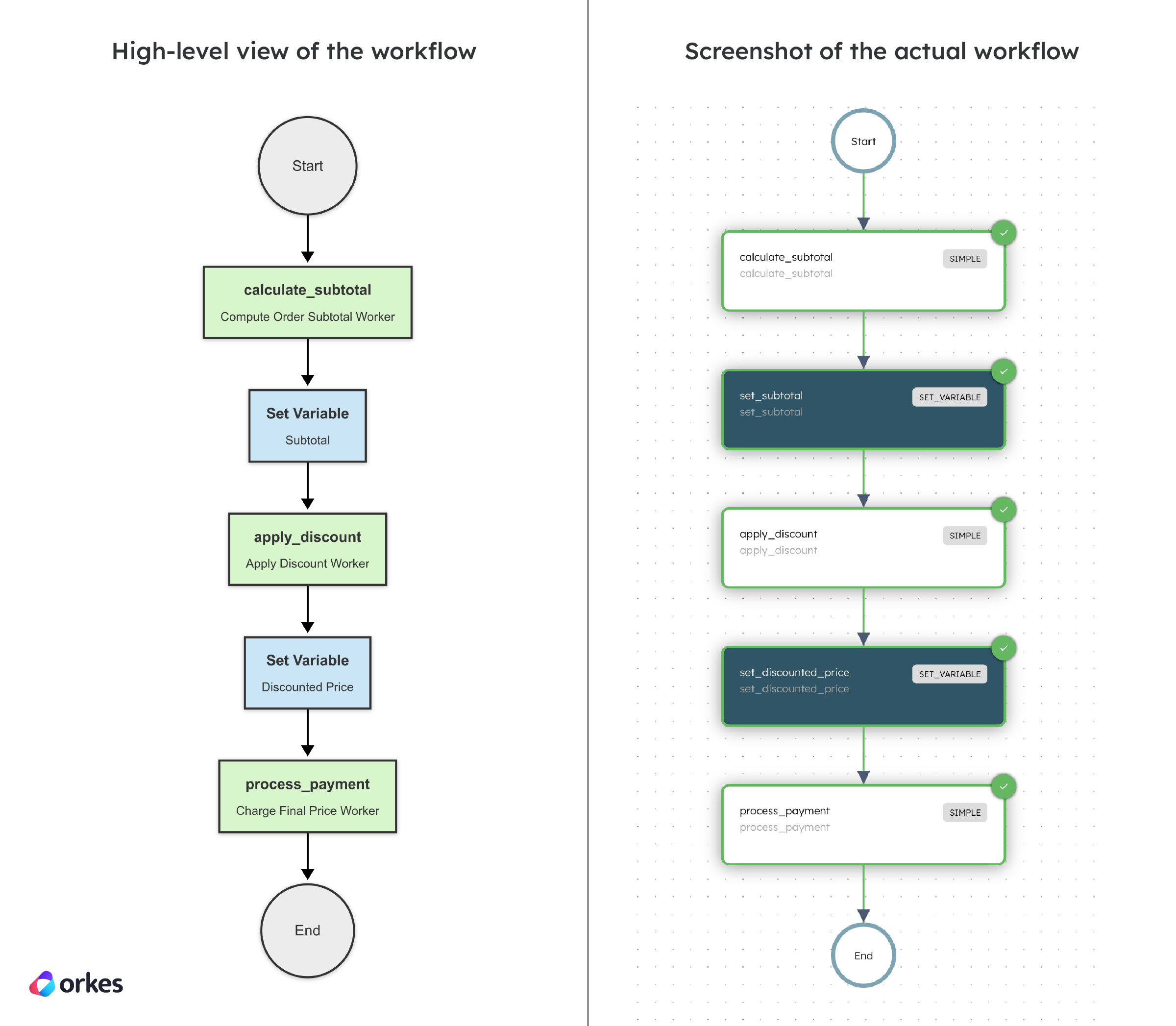
Here’s the code snippet for creating the workflow in code:
def register_workflow(workflow_executor: WorkflowExecutor) -> ConductorWorkflow:
    # 1) Calculate subtotal
    calc_subtotal = SimpleTask(
        task_def_name="calculate_subtotal",
        task_reference_name="calculate_subtotal"
    )

    # 2) Store subtotal
    set_subtotal = SetVariableTask(task_ref_name="set_subtotal")
    set_subtotal.input_parameters.update({
        "subtotal": "${calculate_subtotal.output.subtotal}"
    })

    # 3) Apply discount
    apply_discount = SimpleTask(
        task_def_name="apply_discount",
        task_reference_name="apply_discount"
    )

    # 4) Store discounted price
    set_discounted_price = SetVariableTask(task_ref_name="set_discounted_price")
    set_discounted_price.input_parameters.update({
        "discounted_price": "${apply_discount.output.discounted_total}"
    })

    # 5) Process payment
    process_payment = SimpleTask(
        task_def_name="process_payment",
        task_reference_name="process_payment",
        input_parameters={
            "amount": "${workflow.variables.discounted_price}"
        }
    )

    workflow = ConductorWorkflow(
        name="ecommerce_order_processing",
        executor=workflow_executor
    )
    workflow.version = 1
    workflow.add(calc_subtotal)
    workflow.add(set_subtotal)
    workflow.add(apply_discount)
    workflow.add(set_discounted_price)
    workflow.add(process_payment)
    workflow.register(overwrite=True)

    return workflow


@worker_task(task_definition_name="calculate_subtotal")
def calculate_subtotal() -> dict:
    print("🧮 Calculating subtotal...")
    return {"subtotal": 200.0}


@worker_task(task_definition_name="apply_discount")
def apply_discount() -> dict:
    print("🏷️ Applying discount...")
    return {"discounted_total": 180.0}


@worker_task(task_definition_name="process_payment")
def process_payment(amount) -> dict:
    print(f"💰 Charging customer: {amount.input_data['amount']}")
    return {"status": "Payment successful"}
Check out the full sample code for the Set Variable Workflow.
The Terminate task in Orkes Conductor allows you to immediately end a workflow, either successfully or with a failure, before all tasks are completed. This is useful for scenarios where certain conditions are met, such as an error or a manual intervention, that require halting the workflow early. The task can be configured with an optional message, like a termination reason, providing context. This helps ensure that workflows end gracefully, preventing unnecessary tasks from being executed when they are no longer needed.
In a shipping workflow, the Terminate task ends the workflow if an invalid shipping provider is provided. During the workflow, a decision is made to ship with a specific provider based on user input. If the input does not match the available options (e.g., FedEx or UPS), the workflow enters the default case of a Switch task and triggers a Terminate task, halting the workflow with a "FAILED" status and a relevant reason.
Here’s the workflow visualized:
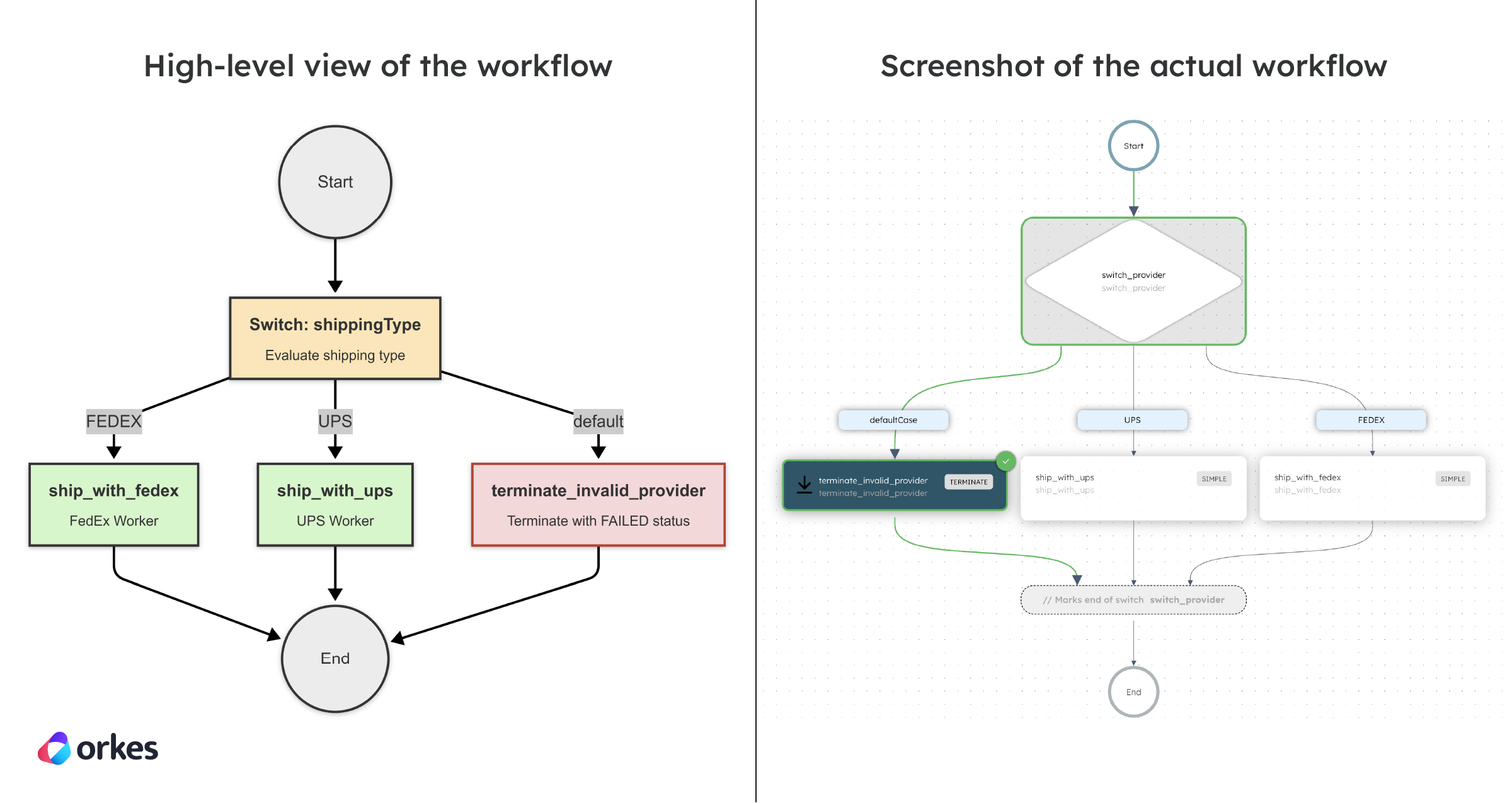
Here’s the code snippet for creating the workflow in code:
def register_shipping_workflow(workflow_executor: WorkflowExecutor) -> ConductorWorkflow:
    # 1) Decide based on shipping provider
    switch_provider = SwitchTask(
        task_ref_name="switch_provider",
        case_expression="${workflow.input.shipping_provider}"
    )

    # 2a) FedEx path
    fedex_task = SimpleTask(
        task_def_name="ship_with_fedex",
        task_reference_name="ship_with_fedex"
    )

    # 2b) UPS path
    ups_task = SimpleTask(
        task_def_name="ship_with_ups",
        task_reference_name="ship_with_ups"
    )

    # 3) Default path — Terminate the workflow if the provider is invalid
    terminate_task = TerminateTask(
        task_ref_name="terminate_invalid_provider",
        status=WorkflowStatus.FAILED,
        termination_reason="${workflow.input.termination_reason}"
    )

    # 4) Configure Switch task cases
    switch_provider.switch_case("FEDEX", [fedex_task])
    switch_provider.switch_case("UPS", [ups_task])
    switch_provider.default_case([terminate_task])

    workflow = ConductorWorkflow(
        name="shipping_workflow_with_validation",
        executor=workflow_executor
    )
    workflow.version = 1
    workflow.add(switch_provider)
    workflow.register(overwrite=True)

    return workflow


@worker_task(task_definition_name="ship_with_fedex")
def ship_with_fedex() -> dict:
    print("📦 Shipping with FedEx...")
    return {"status": "Shipped via FedEx"}


@worker_task(task_definition_name="ship_with_ups")
def ship_with_ups() -> dict:
    print("📦 Shipping with UPS...")
    return {"status": "Shipped via UPS"}
Check out the full sample code for the Terminate Workflow.
Branching and conditionals bring workflows to life, allowing them to adapt in real time based on input, state, or external data. With tasks like Switch, Dynamic, SetVariable, and Terminate, Conductor makes decision logic clear, declarative, and maintainable. No tangled logic, no hidden conditionals—just clean, visible control flow.
Next up:
—
Orkes Conductor is an enterprise-grade orchestration platform for process automation, API and microservices orchestration, agentic workflows, and more. Check out the full set of features, or try it yourself using our free Developer Edition.