Expedite Tesla Powerwall Payback Period with Automated Solar Production Curtailment During Negative Feed-In Pricing with Australia’s Amber Electric and Orkes
 Jonathan Cochran Principal Solutions Engineer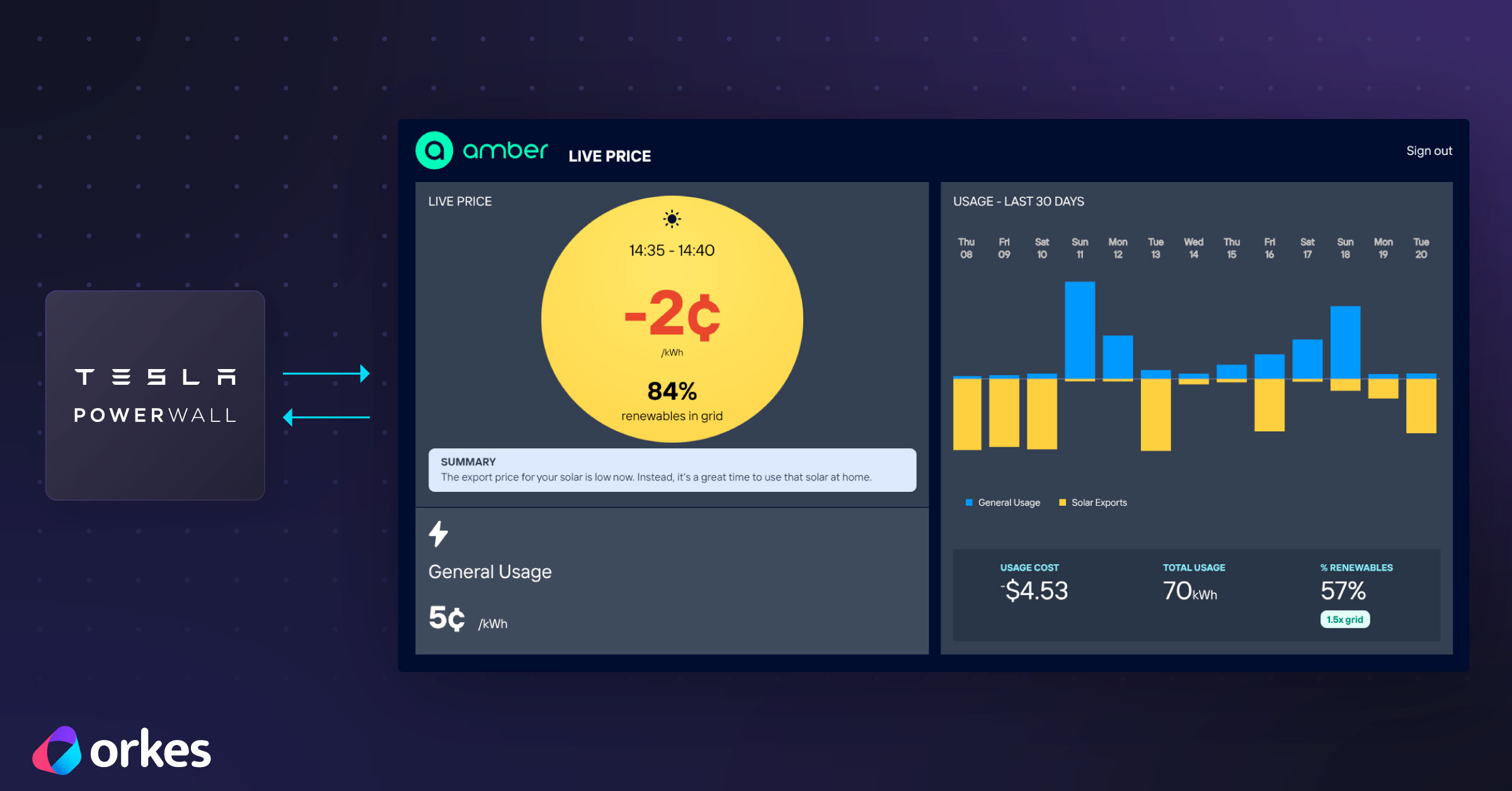
Section 1: Use Case
This Orkes workflow optimises Tesla Powerwall energy export behavior when connected to Australia’s grid with Amber Electric’s wholesale pricing energy plan.
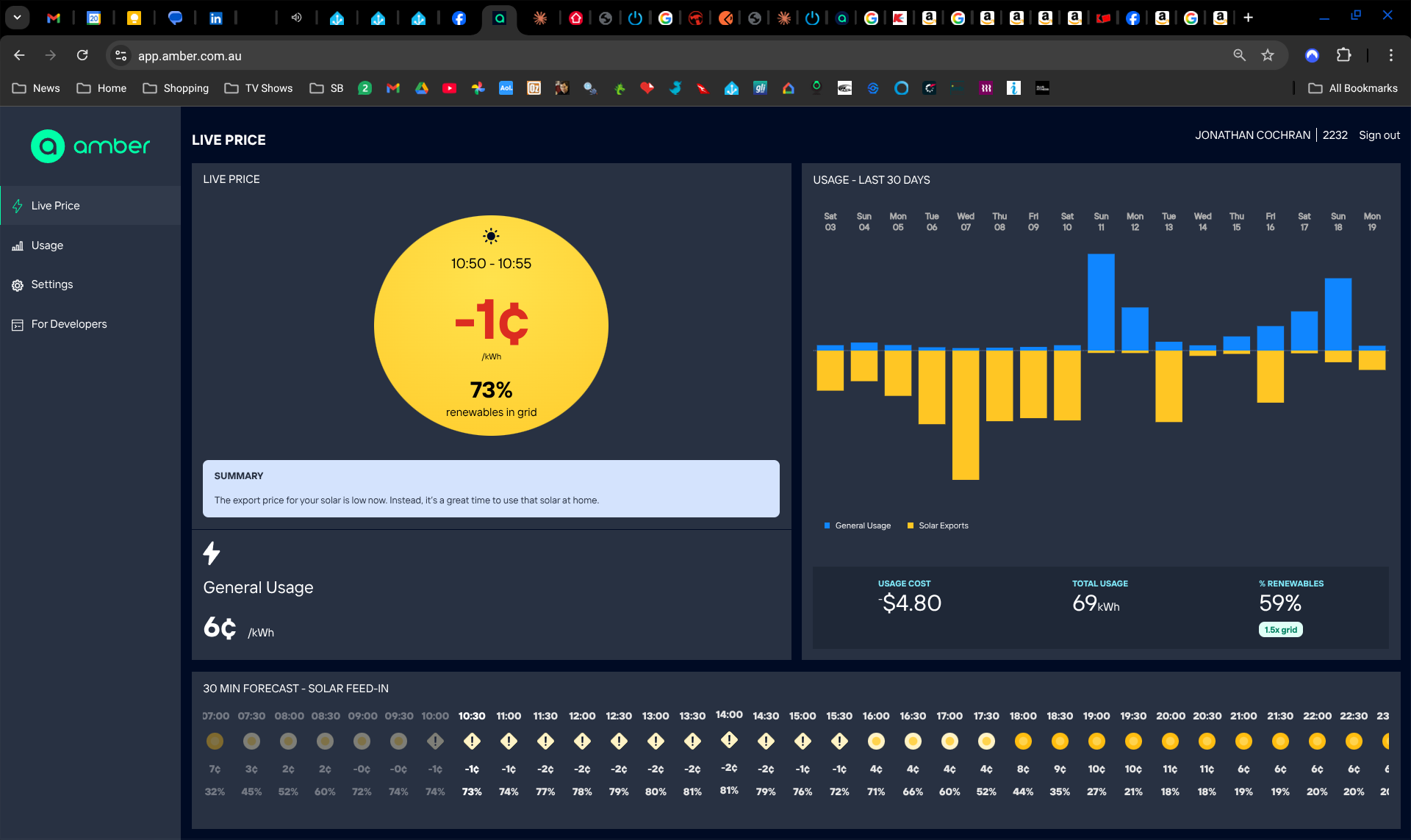
When feed-in rates drop below 0 cents per kWh, you’re actually paying to export excess solar energy to the grid; reducing overall savings and ultimately delaying your system’s payback period. Monitoring price changes and manually updating battery export settings is not practical, given frequent fluctuations.
Orkes Conductor solves this by orchestrating API calls, evaluating real-time conditions, and applying configuration changes to your system - only when needed. The workflow continuously aligns battery export behavior with current pricing, without manual intervention or unnecessary updates.
In this tutorial, you will build a workflow that:
- Retrieves the current Tesla Powerwall battery export setting (via NetZero’s API proxy)
- Retrieves the current feed-in price from Amber Electric
- Evaluates whether exporting energy should be enabled or disabled based on pricing
- Updates your Powerwall’s export configuration only when a change is required
Section 2: Deploy the Tesla Powerwall Curtailment Workflow
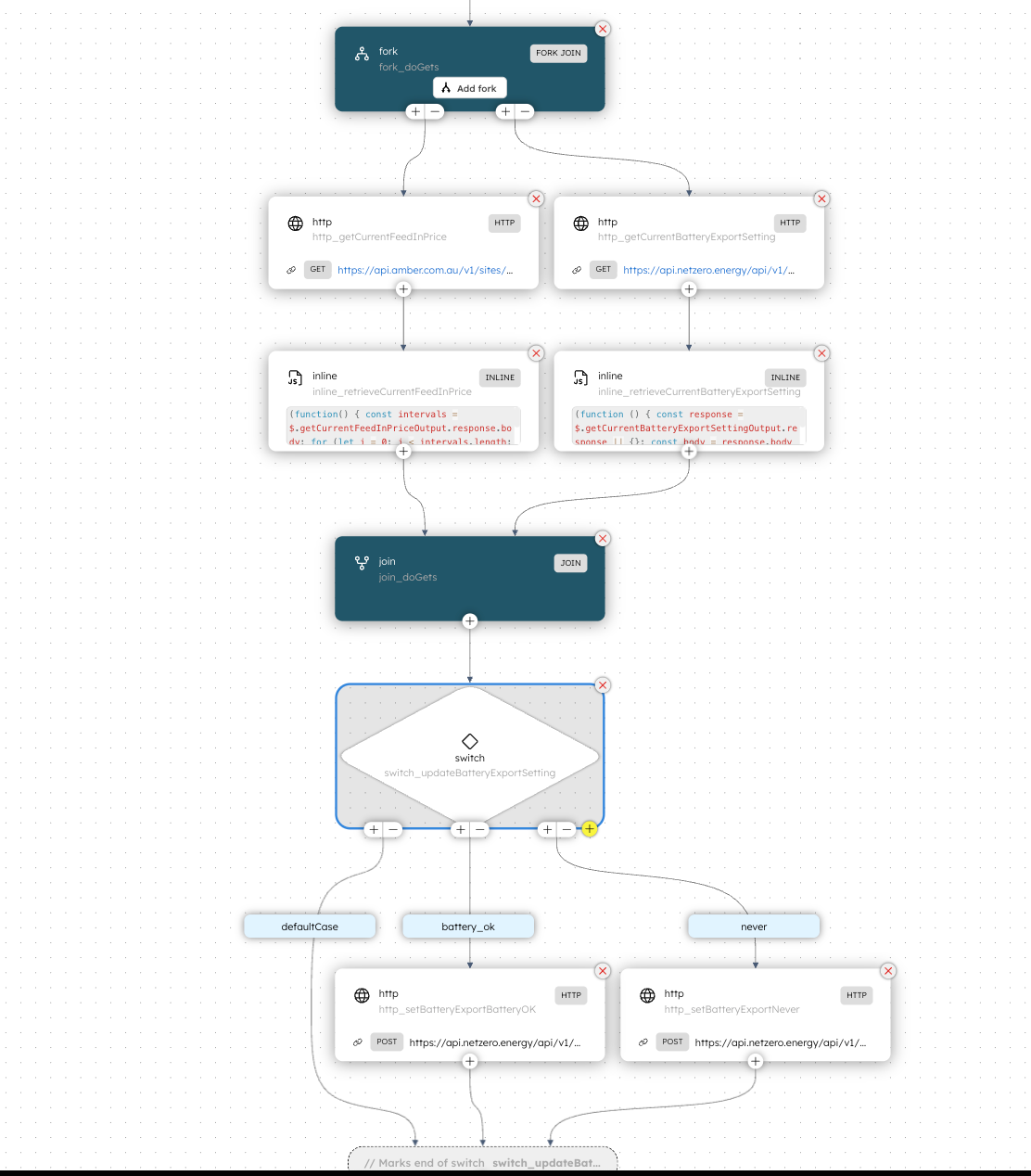
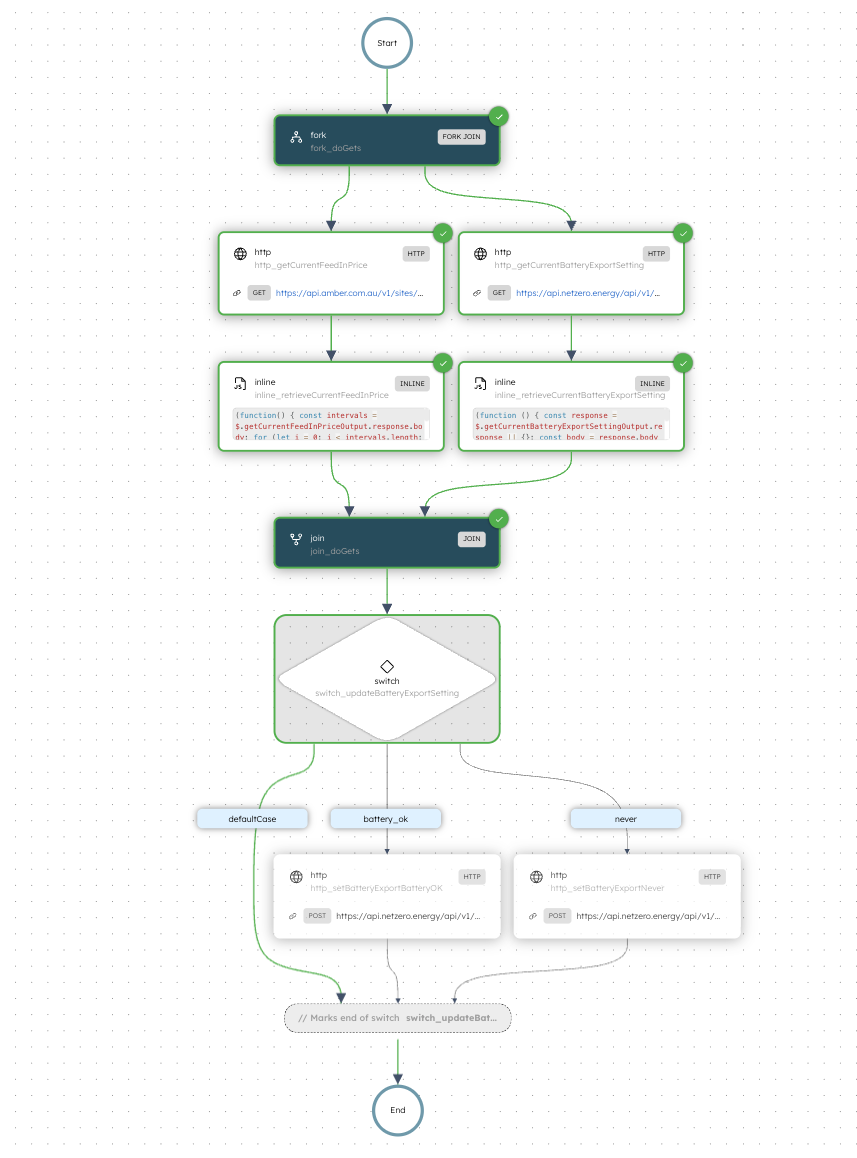
Here’s the workflow you’ll build:
Workflow Overview
- The workflow begins with a Fork/Join which executes two HTTP tasks in parallel:
- One retrieves the Powerwall’s current export configuration via NetZero API gateway
- The other retrieves the current feed-in price per kWh from Amber’s pricing API
- Each branch uses an Inline task to validate and extract the required values from the HTTP responses
- A Join task waits for both forks and combines their outputs
- A Switch task uses a simple JavaScript (GraalJS) expression to decide whether a battery export setting update is required
- When an update is required, the workflow sends a POST request to the NetZero API using an HTTP task
Prerequisites
Before you begin, ensure you have access to the following:
- A free Orkes Developer Edition account
- A free account on NetZero (must provide existing Tesla credentials to sign in)
- An existing Amber Electric energy account
Step 1: Get Amber Credentials and Store as Secrets in Orkes
Amber provides dynamic power prices that fluctuate based on the real-time wholesale energy market. In this workflow, we use the Amber energy pricing API to get the current feed-in price.
To authenticate API requests, you need an Amber API token and your associated site ID. These values are stored as secrets in Orkes Conductor to prevent sensitive data from being exposed in the workflow definition.
Get the Amber API Token
- Open a browser window, navigate to app.amber.com.au and sign in to your Amber account.
- On the left hand menu, select For Developers
- Toggle the DEVELOPER MODE switch to the on position
- Select Generate a new Token, provide an application name such as Orkes, then hit Generate
- Copy the resulting token (including the psk_) noting that the token will only be shown this one time before it is permanently hidden
- Navigate back to your Orkes Developer Edition account and select Definitions > Secrets on the left hand menu
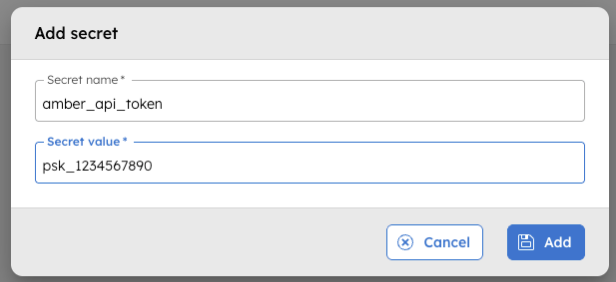
- Select Add secret, enter the secret name precisely as amber_api_token then paste the API token as the Secret value. Hit Add
Get the Amber site ID
The site ID identifies the location for which pricing data is retrieved. It can be retrieved by making an API call using tools like Postman or cURL.
To get the Site ID:
- Open an API client such as Postman or cURL
- Send a GET request to https://api.amber.com.au/v1/sites
- Add the Authorization header and set the value to:
Bearer <YOUR-AMBER-API-TOKEN>and send the request - Copy the SiteID from the API response
- Now repeat the steps detailed above and create another secret with
- Secret name exactly as amber_site_id
- Secret value as the Amber site ID
The workflow definition created later in this tutorial will reference these secrets.
Step 2: Get API token and Energy System ID from NetZero
NetZero is an intelligent home energy management system. It enables programmatic control of your Tesla Powerwall with simplified API calls. In the following steps, you will fetch a NetZero API token and Energy System ID and create corresponding secrets in Orkes.
Get the NetZero API Token and Energy system ID (Site ID)
To get the API token and Energy system ID:
- Open a browser and navigate to app.netzero.energy
- Hit Sign in with Tesla, then sign in with your Tesla account credentials on the resulting sign in page
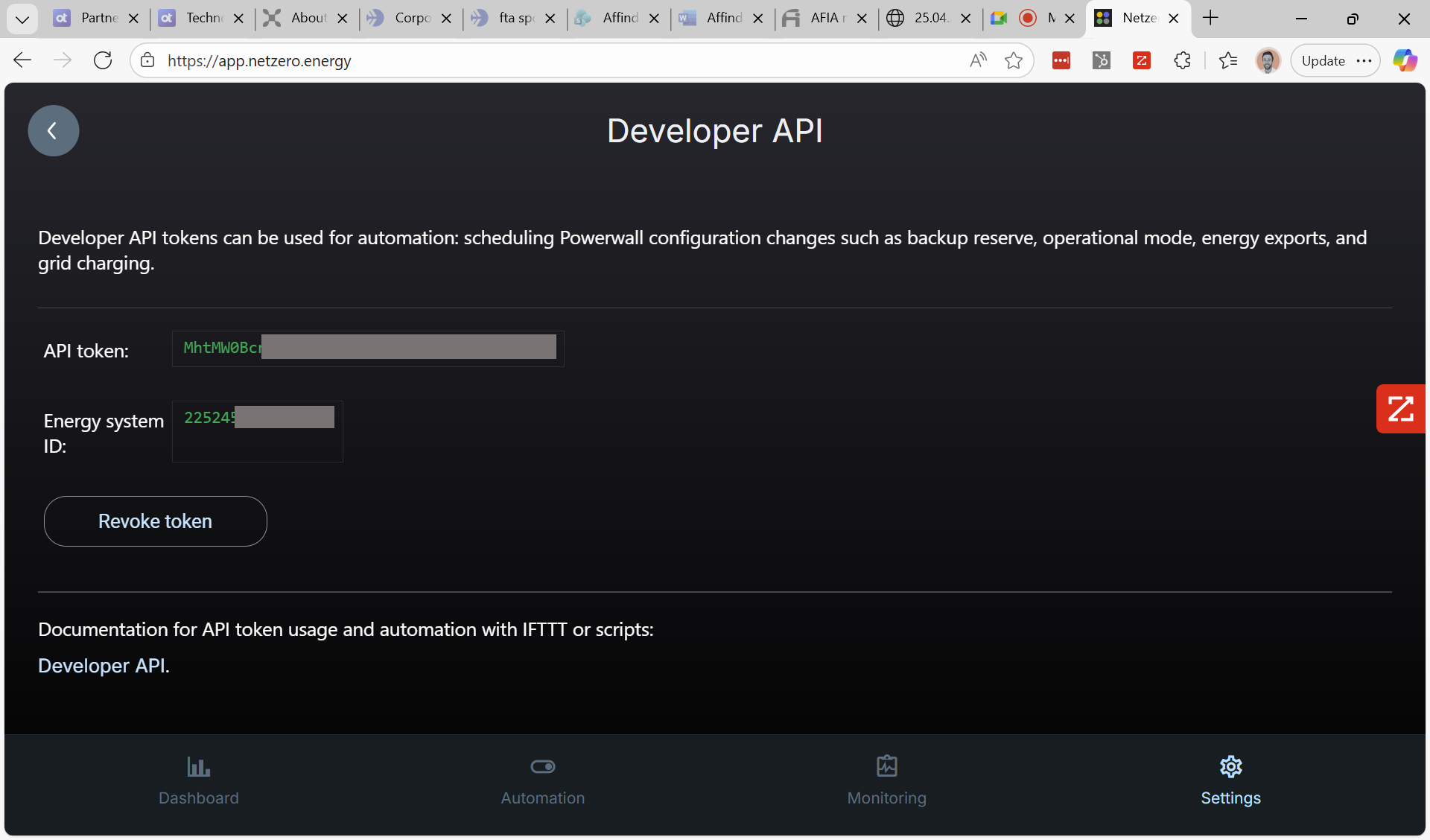
- Once logged into the NetZero interface, navigate to Settings on the bottom menu and then Developer API
- Copy the API token and create a corresponding Secret in Orkes:
- Secret name exactly as netzero_api_token
- Secret value your NetZero API token
- Copy the Energy system ID and create a corresponding Secret in Orkes:
- Secret name exactly as netzero_site_id
- Secret value your NetZero Energy system ID
Step 3: Create Workflow in Orkes Conductor
Conductor workflows can be created in different ways such as writing workflows as code, APIs, importing from BPMNs, and using Conductor UI. In this tutorial, we will use the Orkes Conductor UI to build the workflow.
To create a workflow:
- Go to Definitions > Workflow from the left navigation menu on your Conductor cluster.
- Select + Define workflow
- In the Code tab, paste the following code;
{ "name": "TeslaPowerwallSolarCurtailment", "description": "Prevents export to grid during times of negative feed-in rates when paired with Amber Electric's wholesale energy plan", "version": 1, "tasks": [ { "name": "fork", "taskReferenceName": "fork_doGets", "inputParameters": {}, "type": "FORK_JOIN", "decisionCases": {}, "defaultCase": [], "forkTasks": [ [ { "name": "http", "taskReferenceName": "http_getCurrentBatteryExportSetting", "inputParameters": { "uri": "https://api.netzero.energy/api/v1/${workflow.secrets.netzero_site_id}/config", "method": "GET", "accept": "application/json", "contentType": "application/json", "encode": true, "hedgingConfig": { "maxAttempts": 3 }, "headers": { "Authorization": "Bearer ${workflow.secrets.netzero_api_token}" } }, "type": "HTTP", "decisionCases": {}, "defaultCase": [], "forkTasks": [], "startDelay": 0, "joinOn": [], "optional": false, "taskDefinition": { "createTime": 0, "updateTime": 0, "retryCount": 3, "timeoutSeconds": 0, "inputKeys": [], "outputKeys": [], "timeoutPolicy": "TIME_OUT_WF", "retryLogic": "FIXED", "retryDelaySeconds": 60, "responseTimeoutSeconds": 3600, "inputTemplate": {}, "rateLimitPerFrequency": 0, "rateLimitFrequencyInSeconds": 1, "backoffScaleFactor": 1, "totalTimeoutSeconds": 0, "outputSchema": { "createTime": 0, "updateTime": 0, "name": "", "version": 1, "type": "JSON" }, "enforceSchema": false }, "defaultExclusiveJoinTask": [], "asyncComplete": false, "loopOver": [], "onStateChange": {}, "permissive": false }, { "name": "inline", "taskReferenceName": "inline_retrieveCurrentBatteryExportSetting", "inputParameters": { "expression": "(function () {\n const response = $.getCurrentBatteryExportSettingOutput.response || {};\n const body = response.body || {};\n\n if (body.energy_exports || body.energy_exports === null)\n return body.energy_exports;\n\n throw \"unable to retrieve current battery export setting\";\n})();", "evaluatorType": "graaljs", "getCurrentBatteryExportSettingOutput": "${http_getCurrentBatteryExportSetting.output}" }, "type": "INLINE", "decisionCases": {}, "defaultCase": [], "forkTasks": [], "startDelay": 0, "joinOn": [], "optional": false, "defaultExclusiveJoinTask": [], "asyncComplete": false, "loopOver": [], "onStateChange": {}, "permissive": false } ], [ { "name": "http", "taskReferenceName": "http_getCurrentFeedInPrice", "inputParameters": { "uri": "https://api.amber.com.au/v1/sites/${workflow.secrets.amber_site_id}/prices/current", "method": "GET", "accept": "application/json", "contentType": "application/json", "encode": true, "hedgingConfig": { "maxAttempts": 3 }, "headers": { "Authorization": "Bearer ${workflow.secrets.amber_api_token}" } }, "type": "HTTP", "decisionCases": {}, "defaultCase": [], "forkTasks": [], "startDelay": 0, "joinOn": [], "optional": false, "taskDefinition": { "createTime": 0, "updateTime": 0, "retryCount": 3, "timeoutSeconds": 0, "inputKeys": [], "outputKeys": [], "timeoutPolicy": "TIME_OUT_WF", "retryLogic": "FIXED", "retryDelaySeconds": 60, "responseTimeoutSeconds": 3600, "inputTemplate": {}, "rateLimitPerFrequency": 0, "rateLimitFrequencyInSeconds": 1, "backoffScaleFactor": 1, "totalTimeoutSeconds": 0, "outputSchema": { "createTime": 0, "updateTime": 0, "name": "", "version": 1, "type": "JSON" }, "enforceSchema": false }, "defaultExclusiveJoinTask": [], "asyncComplete": false, "loopOver": [], "onStateChange": {}, "permissive": false }, { "name": "inline", "taskReferenceName": "inline_retrieveCurrentFeedInPrice", "inputParameters": { "expression": "(function() {\n const intervals = $.getCurrentFeedInPriceOutput.response.body;\n\n for (let i = 0; i < intervals.length; i++) {\n let interval = intervals[i];\n\n if (interval.channelType === \"feedIn\")\n return interval.perKwh;\n }\n\n throw \"unable to retrieve feed-in price per Kwh\";\n})();", "evaluatorType": "graaljs", "getCurrentFeedInPriceOutput": "${http_getCurrentFeedInPrice.output}" }, "type": "INLINE", "decisionCases": {}, "defaultCase": [], "forkTasks": [], "startDelay": 0, "joinOn": [], "optional": false, "defaultExclusiveJoinTask": [], "asyncComplete": false, "loopOver": [], "onStateChange": {}, "permissive": false } ] ], "startDelay": 0, "joinOn": [], "optional": false, "defaultExclusiveJoinTask": [], "asyncComplete": false, "loopOver": [], "onStateChange": {}, "permissive": false }, { "name": "join", "taskReferenceName": "join_doGets", "inputParameters": {}, "type": "JOIN", "decisionCases": {}, "defaultCase": [], "forkTasks": [], "startDelay": 0, "joinOn": [ "inline_retrieveCurrentBatteryExportSetting", "inline_retrieveCurrentFeedInPrice" ], "optional": false, "defaultExclusiveJoinTask": [], "asyncComplete": false, "loopOver": [], "onStateChange": {}, "permissive": false }, { "name": "switch", "taskReferenceName": "switch_updateBatteryExportSetting", "inputParameters": { "currentBatteryExportSetting": "${join_doGets.output.inline_retrieveCurrentBatteryExportSetting.result}", "currentFeedInPrice": "${join_doGets.output.inline_retrieveCurrentFeedInPrice.result}" }, "type": "SWITCH", "decisionCases": { "never": [ { "name": "http", "taskReferenceName": "http_setBatteryExportNever", "inputParameters": { "uri": "https://api.netzero.energy/api/v1/${workflow.secrets.netzero_site_id}/config", "method": "POST", "accept": "application/json", "contentType": "application/json", "encode": true, "body": { "energy_exports": "never" }, "hedgingConfig": { "maxAttempts": 3 }, "headers": { "Authorization": "Bearer ${workflow.secrets.netzero_api_token}" } }, "type": "HTTP", "decisionCases": {}, "defaultCase": [], "forkTasks": [], "startDelay": 0, "joinOn": [], "optional": false, "defaultExclusiveJoinTask": [], "asyncComplete": false, "loopOver": [], "onStateChange": {}, "permissive": false } ], "battery_ok": [ { "name": "http", "taskReferenceName": "http_setBatteryExportBatteryOK", "inputParameters": { "uri": "https://api.netzero.energy/api/v1/${workflow.secrets.netzero_site_id}/config", "method": "POST", "accept": "application/json", "contentType": "application/json", "encode": true, "body": { "energy_exports": "battery_ok" }, "hedgingConfig": { "maxAttempts": 3 }, "headers": { "Authorization": "Bearer ${workflow.secrets.netzero_api_token}" } }, "type": "HTTP", "decisionCases": {}, "defaultCase": [], "forkTasks": [], "startDelay": 0, "joinOn": [], "optional": false, "defaultExclusiveJoinTask": [], "asyncComplete": false, "loopOver": [], "onStateChange": {}, "permissive": false } ] }, "defaultCase": [], "forkTasks": [], "startDelay": 0, "joinOn": [], "optional": false, "defaultExclusiveJoinTask": [], "asyncComplete": false, "loopOver": [], "evaluatorType": "graaljs", "expression": "(function() {\n // priceKwh feed in > 0 represents negative feed in to grid - exporting should be stopped\n if ($.currentFeedInPrice > 0 && $.currentBatteryExportSetting !== \"never\")\n return \"never\";\n else if ($.currentFeedInPrice <= 0 && $.currentBatteryExportSetting !== \"battery_ok\")\n return \"battery_ok\";\n else\n return false;\n})();\n", "onStateChange": {}, "permissive": false } ], "inputParameters": [ "netzero_api_token", "netzero_site_id", "amber_api_token", "amber_site_id" ], "outputParameters": {}, "failureWorkflow": "", "schemaVersion": 2, "restartable": true, "workflowStatusListenerEnabled": false, "ownerEmail": "your.email@gmail.com", "timeoutPolicy": "ALERT_ONLY", "timeoutSeconds": 0, "variables": {}, "inputTemplate": {}, "rateLimitConfig": { "rateLimitKey": "max", "concurrentExecLimit": 1 }, "enforceSchema": true, "metadata": {}, "maskedFields": []}- Select Save > Confirm.
This saves the workflow with references to the configured API tokens and site IDs. You only need to modify the workflow if you have saved the secrets using names different from those specified in the tutorial.
Step 4: Run Workflow
To test the workflow for the first time, wait for the feed-in price to fall to a negative value and then run the workflow, by selecting the Execute button.
After the execution completes, open the Tesla Powerwall app and verify that the system is not exporting surplus energy to the grid.
Step 5: Automate using Workflow Scheduler
In the last step, you ran the workflow manually. To automate this process, schedule the workflow to run every five minutes using Conductor’s Workflow Scheduler.
To create a Scheduler:
- Go to Definitions > Scheduler from the left navigation menu on your Conductor cluster.
- Select + Define schedule
- Create a schedule for every 5 minutes using this Cron expression
0 0/5 * ? * *- For Workflow name, select the TeslaPowerwallSolarCurtailment workflow created earlier and Latest version
- For the Input params section, simply enter an empty JSON object
{} - Save the schedule, ensuring that the Start schedule paused? toggle is not active
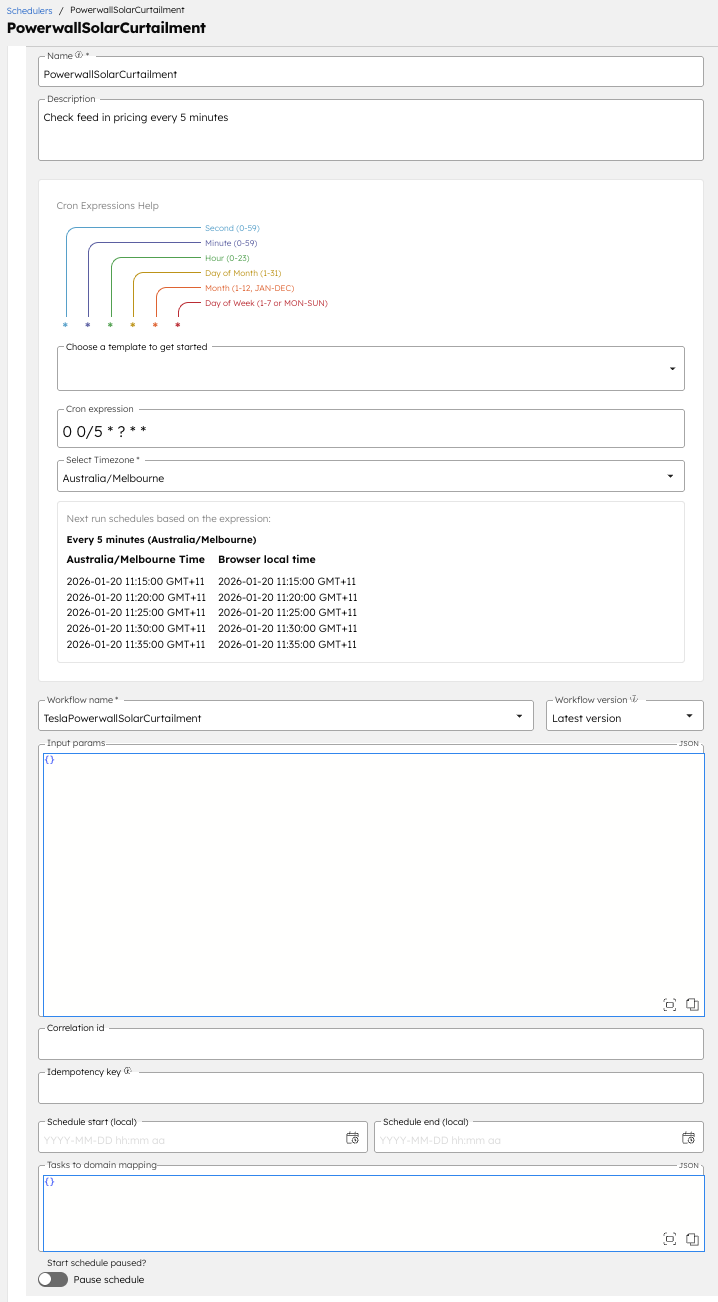
This ensures the workflow runs every five minutes and continuously evaluates whether energy export should be enabled or disabled based on current pricing.
And that’s it! Your Tesla Powerwall is now optimised to prevent exporting to the grid when feed-in prices are negative, saving you money and expediting the payback period of your equipment.
FAQs
Q. Does this workflow impact or replace Amber SmartShift?
No, this is a complimentary service that will not impact SmartShift’s ability to optimise other aspects of your system.
Q. How much does it cost to keep this workflow running?
Nothing! Orkes Developer Edition and NetZero’s Basic tier are free to use.
Q. How can I introspect previous workflow executions to see what the outcomes were?
Sure! Head to Executions > Workflow on the left hand menu in Orkes.
Any further questions? Reach out to me at jon.cochran@orkes.io