- ENGINEERING
- PRODUCT
What Are Workers in Orkes Conductor? How Your Own Code Fits Into a Workflow
 Maria Shimkovska Content Engineer
 What workers are, how they get work from Conductor, and when you need one. When you’re ready to build one, part two walks through it step by step.
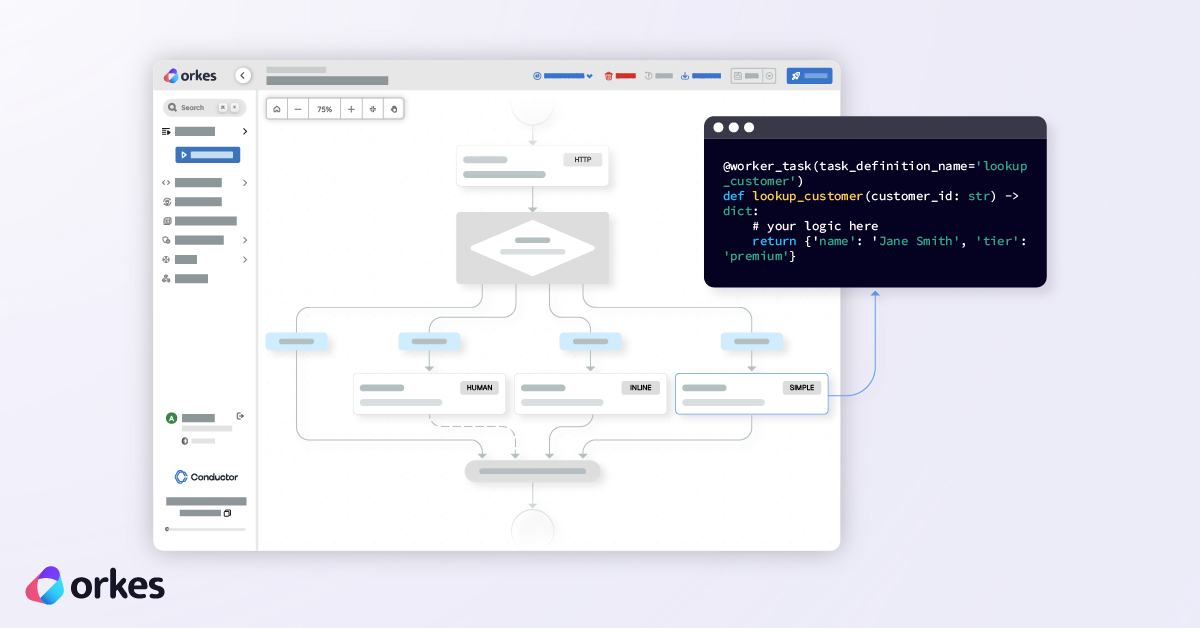
Often you need to add your own code to a workflow. You can easily do this in Conductor through workers. Then Conductor takes care of everything around it that you need for production, like retrying when something fails, timing out when something hangs, and keeping a record of every run so you can go back and see what happened.
What Is a Worker in Orkes Conductor?
A worker is your own code on your own machines, that runs as a single step inside a workflow.
It’s a separate program that runs on your side, not inside Conductor. Say you already have a function that looks up a customer in your database, and you want a workflow to call it as one of its steps in a whole process. That’s what we build workers for.
When a workflow reaches a step that none of the built-in task types are designed to handle, Conductor hands it off to a worker you wrote. The worker does the job, sends the result back, and the workflow keeps going.
@worker_task(task_definition_name='lookup_customer')def lookup_customer(customer_id: str) -> dict: # your logic here return {'name': 'Jane Smith', 'tier': 'premium'}The @worker_task decorator tells Conductor which task this function handles. Conductor hands the worker some input, the worker returns some output, and the workflow moves on.
3 properties every worker has
- They don’t remember anything. A worker has no idea which workflow it belongs to, what happened in the step before it, or what comes next. Every task starts fresh with just the input it was handed. Conductor keeps track of the rest. The official word for this is stateless.
- Running them twice should be safe. Conductor sometimes sends the same task more than once, like when an earlier attempt timed out. So your worker needs to give the same result the second time without doing damage, like charging a customer twice or sending the same email again. The official word for this one is idempotent.
- You can write them in any language. Conductor talks to workers over HTTP, so it doesn’t care what’s on the other end. There are SDKs for Python, JavaScript and TypeScript, Java, Go, C#, Ruby, and Rust, and you can happily mix them. One team writes their worker in Go, another in JavaScript, and Conductor never knows the difference. So the worker does the actual work, and Conductor decides when it happens and cleans up when things go wrong.
How a worker connects to a workflow
The full walkthrough is in part two, but the shape of it is three steps:
1. Register a task definition. This is how you tell Conductor “hey, a task called lookup_customer is going to exist,” along with settings like how many times to retry it. Skip this and your workflow will just sit there forever, waiting on a task Conductor has never heard of.
2. Start the worker. Your worker is just a script on your machine, and it does nothing until you run it. When you start it, it connects to the Conductor server and starts checking for work over and over in a loop.
3. Reference the task in a workflow by name, using a SIMPLE task. Every other task type is something Conductor runs itself. SIMPLE is the one that says “hand this off to a worker.” This task was built so you can add any service or code you want as a singular step in your workflows.
The task name shows up in all three places, and it has to match exactly.
Do You Need a Worker, or Will a Built-In Task Do?
Before you write a worker, check whether Conductor already has a built-in task for what you need:
| What you want to do | Use this built-in task instead |
|---|---|
| Call a REST API | HTTP |
| Call an LLM (OpenAI, Anthropic, etc.) | LLM_CHAT_COMPLETE |
| Transform or reshape JSON | JSON_JQ_TRANSFORM |
| Wait for a duration or a signal | WAIT |
| Pause for human approval | HUMAN |
| Run a sub-workflow | SUB_WORKFLOW |
Write a worker when you need to:
- Talk to one of your own internal systems.
- Do heavy lifting like image processing, machine learning, or generating PDFs.
- Run logic that’s too big or too important to squeeze into a workflow definition as inline JavaScript.
- Use an SDK, like AWS S3, a database driver, or a payment processor.
How Polling Works
When you deal with workers in Conductor you will read the word “polling”, because workers poll Conductor for work. So I wanted to explain what polling is if you’re not familiar.
So Conductor never reaches out to your workers. Instead, the workers come to Conductor.
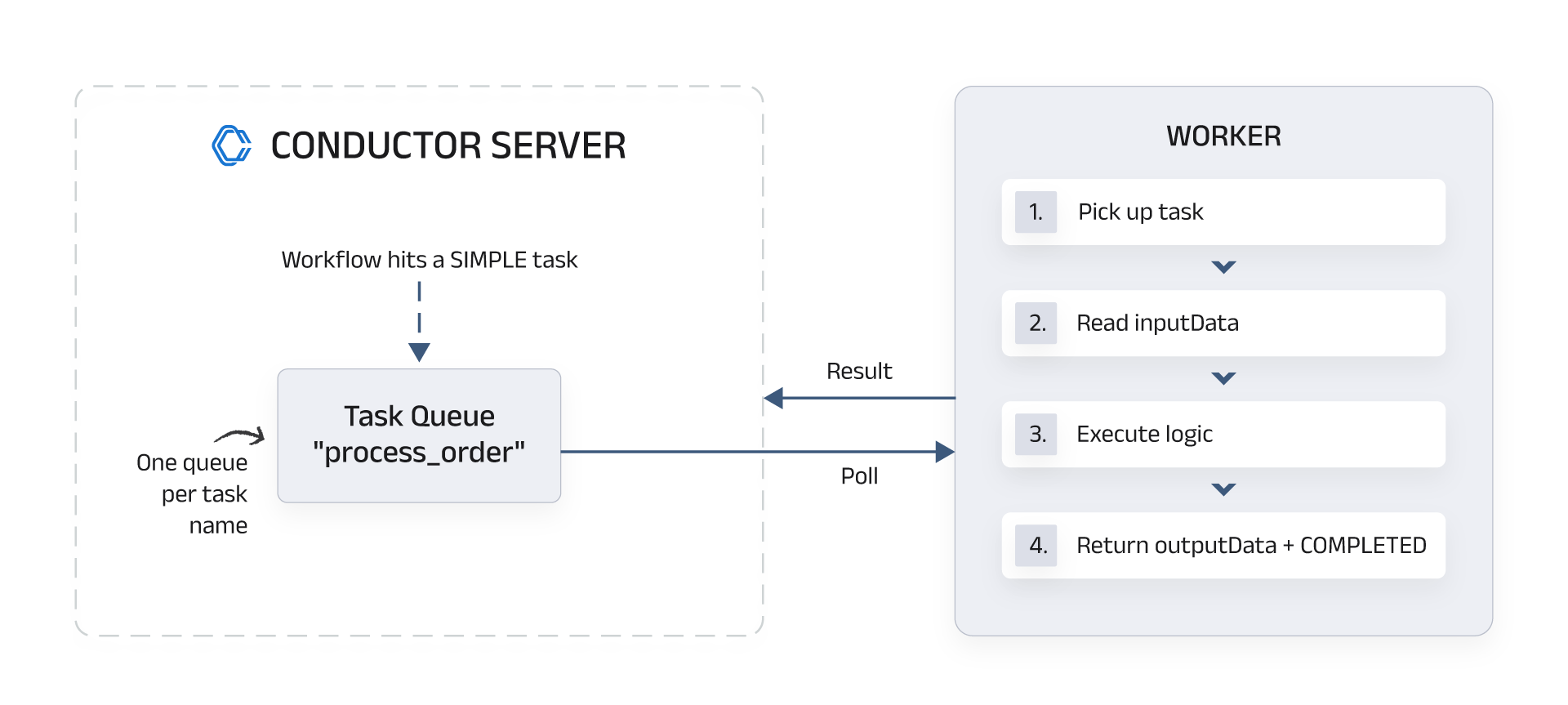
A worker asks the server if there’s any work for it. If there is, it takes the task, does the work, and reports back. If there isn’t, it waits a moment and asks again (you can set how often). This is called polling.
It works a bit like checking your own mailbox rather than having mail delivered to your door. The worker walks to the mailbox, which is the Conductor server, checks for work, and comes back when it is done.
You get three nice things out of this:
- Conductor doesn’t need to know where your workers are or what they do.
- Your workers can be written in anything, run anywhere, and scale on their own.
- If a worker dies you don’t need to worry. The task sits in the queue until another worker takes over.
The task lifecycle
1. Your workflow reaches a SIMPLE task. Conductor knows this isn’t something it handles internally.
2. The task goes into a queue, keyed by task name. Every SIMPLE task type gets its own queue, so process_order tasks go to one queue and send_email tasks go to another. The task waits there with its inputData attached.
3. A worker polls that queue and claims the task. The Conductore SDK handles the loop. All you need to write is the function that does the work, so this would be something you already have and want as part of your workflow.
4. The worker runs your code. The task comes with an inputData object holding whatever the workflow mapped into inputParameters. Your own personal function gets that data, does its thing, and produces a result.
5. The worker reports back with a status and outputData.
Three things can happen:
| Status | What Conductor does |
|---|---|
COMPLETED | Stores outputData and moves on |
FAILED | Checks retryCount and may redeliver the task |
FAILED_WITH_TERMINAL_ERROR | Fails immediately, no retries |
6. The workflow moves on. Later tasks can grab the result with ${taskRefName.output.fieldName}.
Common Questions I Get About Conductor Workers
Can I write a worker in JavaScript?
Yes. There are SDKs for JavaScript and TypeScript, Java, Go, C#, Ruby, and Rust, along with Python. Everything in this guide works the same way in all of them. Only the syntax changes.
Do I need a worker to call my own API?
Usually not. If your service already has an HTTP endpoint, use the built-in HTTP task and skip the worker entirely. Write a worker when you need to reach something that isn’t a plain HTTP call, like an SDK, or code that lives inside an existing project.
Where does a worker run?
Wherever you want, essentially. Could be your laptop, a container, a VM, or a server inside your own network. Nothing ever connects to your worker, so there are no ports to open and no public URL to set up. It just needs to be able to reach the Conductor server.
How many workers should I run?
As many as you want/need. Workers don’t hold any state, so you can run five copies of the same one and Conductor will spread tasks across whichever ones are polling.
Ready to Build One?
That’s the whole mental model: your function, Conductor’s queue, a polling loop between them. The best way to make it stick in your mind is to build one, and that’s what part two does. You’ll build a real image-processing worker, connect it into a workflow with branching, and run the whole thing on our free Developer Edition server.