PRODUCT ENGINEERING
Build an Agentic Workflow: Automate a Technical Ticket Triage

Maria Shimkovska
Content Engineer
December 10, 2025
5 min read


Nov 6, 2025
Nov 5, 2025
Oct 31, 2025
Join thousands of developers building the future with Orkes.
Company X employees are frustrated juggling support tickets. Learn how an agentic workflow can auto-triage issues so engineers get back to building.
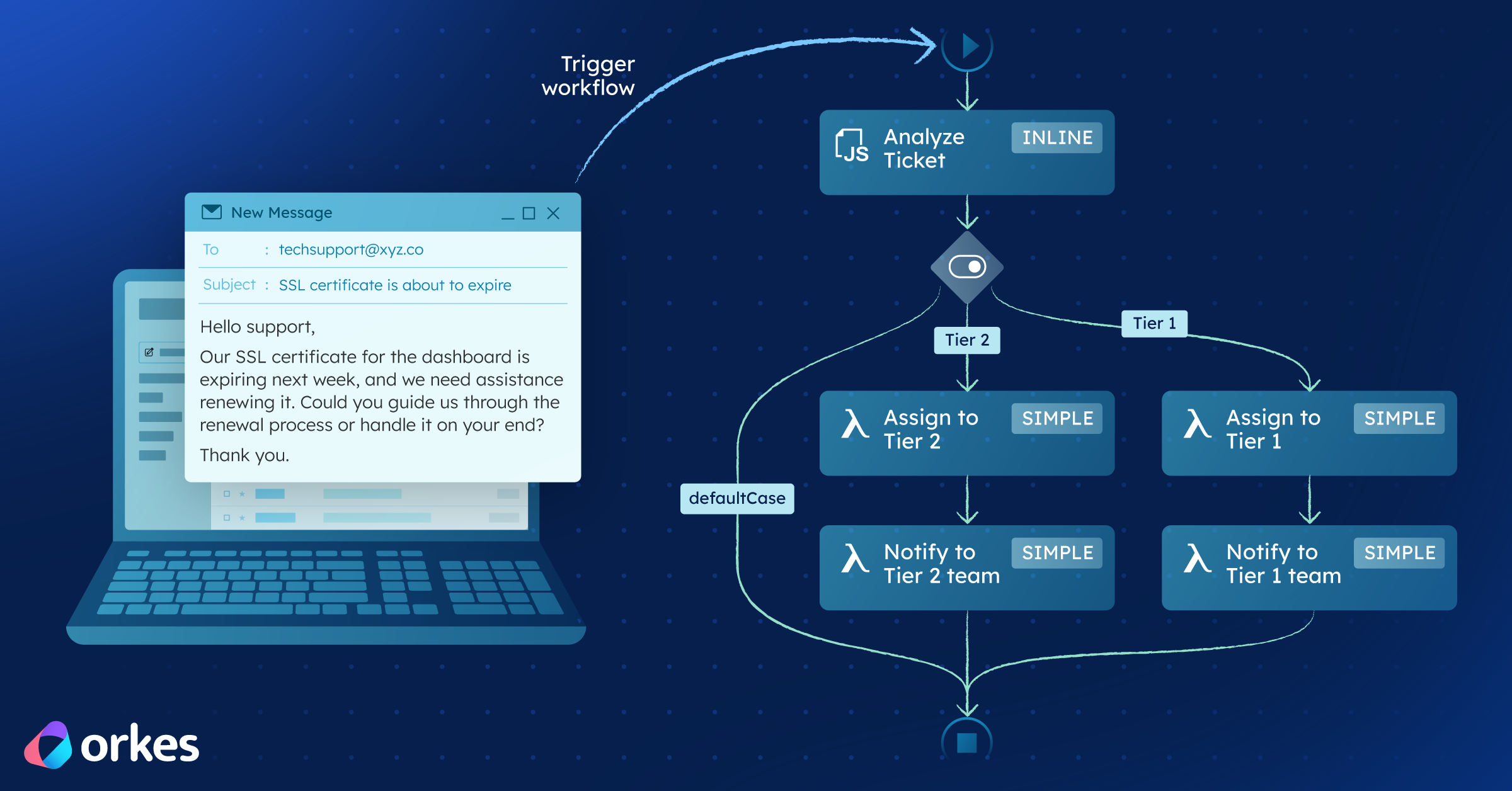
We have Company X. Company X sells software that helps customers create shipping labels. Sometimes the software runs into problems, like expired certificates, incorrect setup in an environment, confusing error messages, or urgent “we’re blocked” issues right before a deadline, or issues with logging in.
Their support team is skilled and knows how to troubleshoot. The issue is how the customer requests come in. Customers send unstructured emails, and an engineer has to manually turn each one into a proper support ticket.
That usually means reading long email threads with logs, screenshots, and forwarded messages, pulling out the important details (customer/account, environment, exact error, how urgent it is), rewriting it into the company’s ticket format, and sending it to the right queue. This repetitive admin work slows down the first response and uses up engineer focus before anyone even starts fixing the customer’s actual problem.
| The current routing rules | The outcome Company X wants |
|---|---|
| Company X routes tickets with two simple internal teams: Team 1: Certificate Support (existing customers only) Handles expired certificates, but only for existing customers. Team 2: General Technical Support Handles everything else—new user questions, product bugs, and non-certificate issues. The challenge is that the inbox doesn’t arrive labeled. Emails are unstructured, but the support process requires structure. | When an email arrives, Company X wants the system to automatically: - Classify the request (certificate issue vs everything else) - Extract the details engineers always need (customer/account, environment, errors, urgency, relevant context) - Route it to the correct team with a clean summary |
To fix this, they decide to implement an agentic workflow to handle triage automatically and they turn to Conductor.
Next, in Section 2, I’ll show exactly how Conductor solves this problem.
To get rid of manual sorting, Company X builds an agentic workflow in Orkes Conductor that turns unstructured emails into structured, auto-routed tickets. The entire workflow follows this simple pattern:
Even though LLMs are involved, this agentic workflow is deterministic because Conductor handles all orchestration logic. Only one step in the workflow "thinks". Everything else is explicit and repeatable. So if you are worried about the AI going off the rails, you can use the the rest of the features we have built to reign it in.
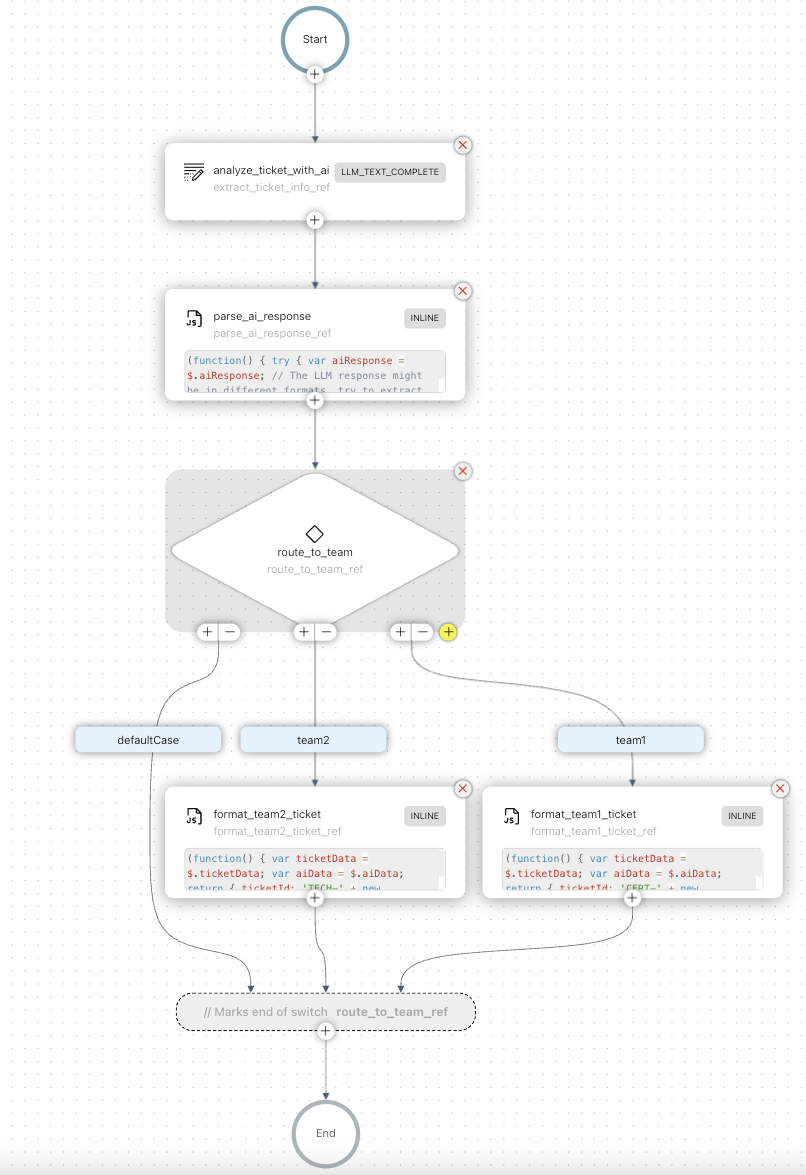
If you are a type to want to dive into the weeds more, I broke down the steps of how this workflow works, step-by-step.
Conductor task: analyze_ticket_with_ai (LLM_TEXT_COMPLETE)
The workflow starts by sending three inputs to the LLM task:
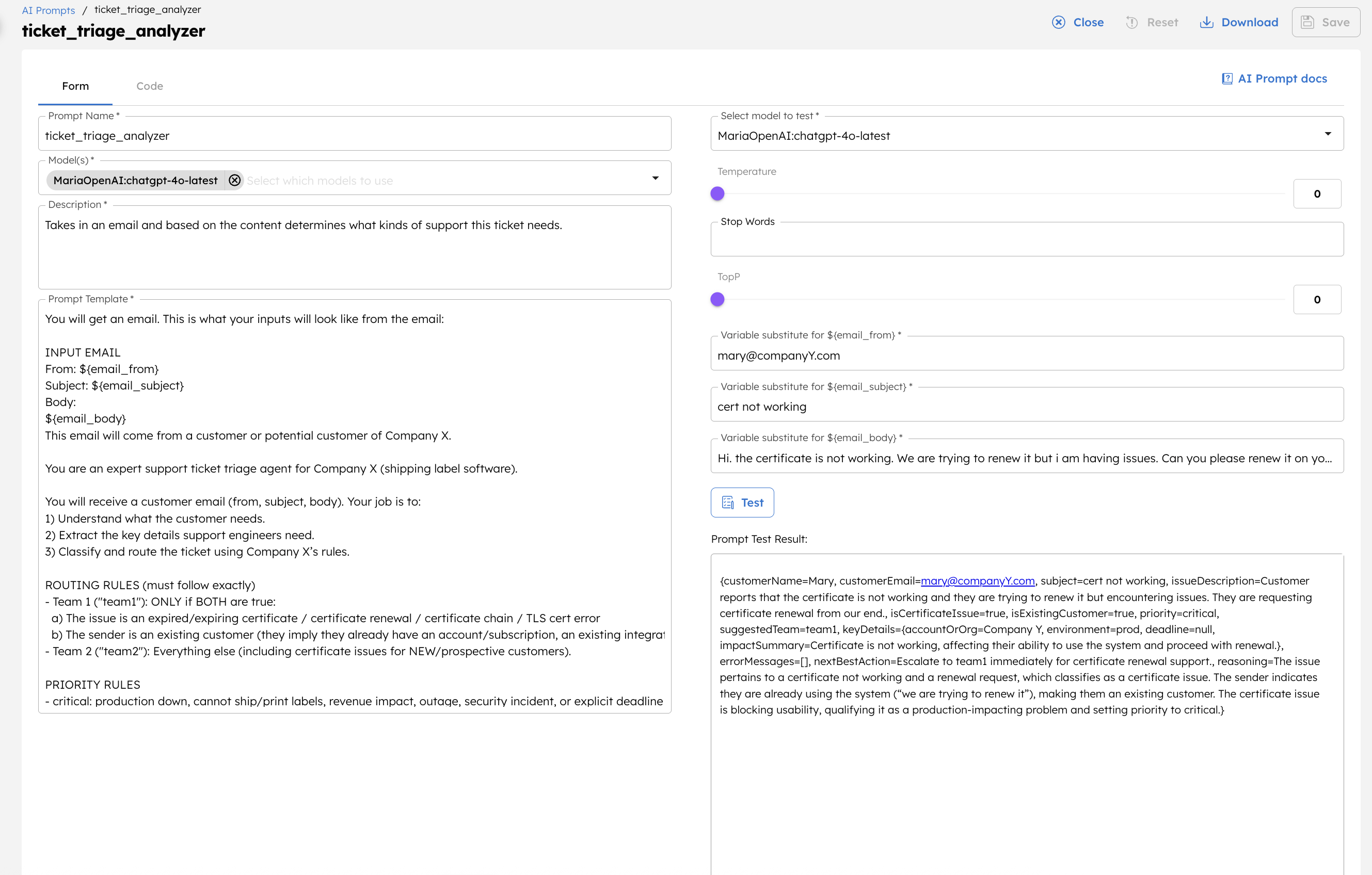
${workflow.input.emailFrom}${workflow.input.emailSubject}${workflow.input.emailBody}In Conductor's Prompt Studio, you can define a prompt (ticket_triage_analyzer) that teaches the model Company X's routing rules and asks it to return strict JSON, not long prose.
Here is what a trimmed version of the required schema looks like this:
{
  "customerName": "string|null",
  "customerEmail": "string|null",
  "subject": "string|null",
  "issueDescription": "string",
  "isCertificateIssue": true,
  "isExistingCustomer": true,
  "priority": "low|medium|high|critical",
  "sentiment": "positive|neutral|negative|frustrated",
  "suggestedTeam": "team1|team2",
  "reasoning": "string"
}
The most important field is suggestedTeam, which includes the routing rules:
Prompt Studio lets you build and test this very quickly, ensuring the model consistently outputs valid JSON Conductor can use.
Conductor task: parse_ai_response (INLINE)
LLMs outputs sometimes wrap JSON in code fences or include extra text. To keep the workflow reliable, a lightweight INLINE task cleans and parses the output. The script looks for JSON inside the models response, removes any sjon fences in they are present, attempts a safe JSON.parse, and returns a normalized object like:
{
  "success": true,
  "data": { ...structured fields from the model... },
  "extractedAt": "2025-12-10T15:23:41Z"
}
If parsing ever fails, the workflow can flag the ticket for human review instead of silently breaking.
This single guardrail step makes the rest of the workflow deterministic and dependable in production.
Conductor task: route_to_team (SWITCH)
With reliable fields from the AI step, routing is simply:
switch on:  suggestedTeam
cases:
  - team1 → format Team 1 ticket
  - team2 → format Team 2 ticket
Each branch has an INLINE task that assembles the final ticket payload.
Here’s the Team 1 version (Team 2 is nearly identical with different labels):
(function() {
  var ai = $.aiData;
  var meta = $.ticketData;

  return {
    ticketId: 'CERT-' + new Date().getTime(),
    team: 'Team 1 - Certificate Renewals',
    priority: ai.priority || 'medium',
    customerName: ai.customerName,
    customerEmail: ai.customerEmail,
    subject: ai.subject,
    category: 'Expired Certificate - Existing Customer',
    description: ai.issueDescription,
    sentiment: ai.sentiment,
    aiReasoning: ai.reasoning,
    assignedTo: 'cert-renewal-team@companyx.com',
    createdAt: meta.extractedAt,
    metadata: {
      customerType: 'Existing',
      issueType: 'Certificate',
      autoTriaged: true
    }
  };
})();
Team 2 uses a different ID prefix (TECH-…), team label, and category, but pulls from the same normalized AI output.
The formatted ticket object is now ready to be created in Jira, Zendesk, Freshdesk, or any internal system. This can be done with a simple Conductor HTTP task or whatever integration Company X prefers.
Company X engineers can use this workflow to automatically have their tickets sorted. Manual triage disappears, engineers get clean and consistent tickets, and customers get faster replies. It's a win-win-win situation. 🥳