Orkes logo image
Product
Platform
Orkes Platform thumbnail
Orkes Platform
Orkes Agentic Workflows
Orkes Conductor Vs Conductor OSS thumbnail
Orkes vs. Conductor OSS
Orkes Cloud
How Orkes Powers Boat Thumbnail
How Orkes Powers BOAT
Try enterprise Orkes Cloud for free
Enjoy a free 14-day trial with all enterprise features
Start for free
Capabilities
Microservices Workflow Orchestration icon
Microservices Workflow Orchestration
Enable faster development cycles, easier maintenance, and improved user experiences.
Realtime API Orchestration icon
Realtime API Orchestration
Enable faster development cycles, easier maintenance, and improved user experiences.
Event Driven Architecture icon
Event Driven Architecture
Create durable workflows that promote modularity, flexibility, and responsiveness.
Human Workflow Orchestration icon
Human Workflow Orchestration
Seamlessly insert humans in the loop of complex workflows.
Process orchestration icon
Process Orchestration
Visualize end-to-end business processes, connect people, processes and systems, and monitor performance to resolve issues in real-time
Use Cases
By Industry
Financial Services icon
Financial Services
Secure and comprehensive workflow orchestration for financial services
Media and Entertainment icon
Media and Entertainment
Enterprise grade workflow orchestration for your media pipelines
Telecommunications icon
Telecommunications
Future proof your workflow management with workflow orchestration
Healthcare icon
Healthcare
Revolutionize and expedite patient care with workflow orchestration for healthcare
Shipping and logistics icon
Shipping and Logistics
Reinforce your inventory management with durable execution and long running workflows
Software icon
Software
Lorem ipsum dolor sit amet, consectetur adipiscing elit. Aenean leo mauris, laoreet interdum sodales a, mollis nec enim.
Docs
Developers
Learn
Blog
Explore our blog for insights into the latest trends in workflow orchestration, real-world use cases, and updates on how our solutions are transforming industries.
Read blogs
Check out our latest blog:
Conductor CLI Guide: Register, Run, Retry, and Recover Durable Workflows Without Leaving Your Terminal đź’»
Customers
Discover how leading companies are using Orkes to accelerate development, streamline operations, and achieve remarkable results.
Read case studies
Our latest case study:
Twilio Case Study Thumbnail
Orkes Academy New!
Master workflow orchestration with hands-on labs, structured learning paths, and certification. Build production-ready workflows from fundamentals to Agentic AI.
Explore courses
Featured course:
Orkes Academy Thumbnail
Events icon
Events
Videos icons
Videos
In the news icon
In the News
Whitepapers icon
Whitepapers
About us icon
About Us
Pricing
Get a demo
Signup
Slack FaviconDiscourse Logo icon
Get a demo
Signup
Slack FaviconDiscourse Logo icon
Orkes logo image

Company

Platform
Careers
HIRING!
Partners
About Us
Legal Hub
Security

Product

Cloud
Platform
Support

Community

Docs
Blogs
Events

Use Cases

Microservices Workflow Orchestration
Realtime API Orchestration
Event Driven Architecture
Agentic Workflows
Human Workflow Orchestration
Process Orchestration

Compare

Orkes vs Camunda
Orkes vs BPMN
Orkes vs LangChain
Orkes vs Temporal
Twitter or X Socials linkLinkedIn Socials linkYouTube Socials linkSlack Socials linkGithub Socials linkFacebook iconInstagram iconTik Tok icon
© 2026 Orkes. All Rights Reserved.
Back to Blogs

Table of Contents

Share on:Share on LinkedInShare on FacebookShare on Twitter
Worker Code Illustration

Get Started for Free with Dev Edition

Signup
Back to Blogs
PRODUCT ENGINEERING

The Difference Between LLM Text Complete and LLM Chat Complete in Orkes Conductor

Maria Shimkovska
Maria Shimkovska
Content Engineer
Last updated: September 22, 2025
September 22, 2025
5 min read

Related Blogs

How to Connect Supabase to Orkes Conductor | Build the Integration Yourself

Nov 6, 2025

How to Connect Supabase to Orkes Conductor | Build the Integration Yourself

Connect Supabase and Orkes Conductor in a Couple of Minutes | No Code Needed

Nov 5, 2025

Connect Supabase and Orkes Conductor in a Couple of Minutes | No Code Needed

Discover how easy it is to build your own personalized AI agent! This hands-on guide walks you through the basics; then shows you how to create a fun, tool-using ghost chatbot to make it your own.

Oct 31, 2025

Discover how easy it is to build your own personalized AI agent! This hands-on guide walks you through the basics; then shows you how to create a fun, tool-using ghost chatbot to make it your own.

Ready to Build Something Amazing?

Join thousands of developers building the future with Orkes.
Start for free

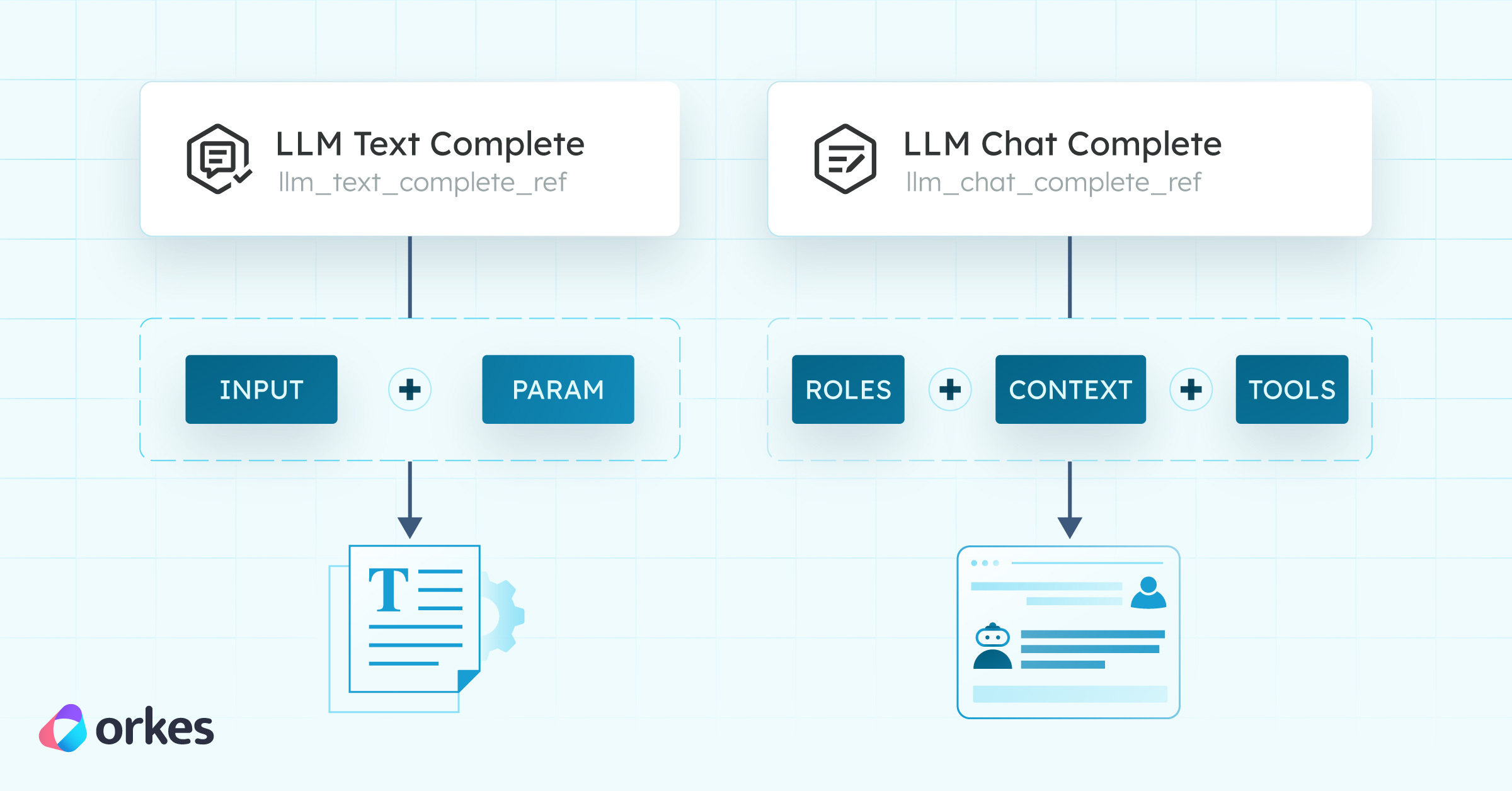
Article cover illustration showing the difference between Orkes Conductor LLM Text Complete and LLM Chat Complete

You are building your agentic workflow and are in the middle of picking your star LLM task for the brain of the operation. But which one should you pick? LLM Text Complete or LLM Chat Complete? Decisions, decisions.

Let's make this easy.

TL;DR
  • Use LLM Text Complete for one-shot helpers (summaries, rewrites, structured outputs).
  • Use LLM Chat Complete for agent-like tasks (multi-turn, tool use, reasoning, context retention).

The difference between text and chat completion simplified

Text completion is a raw “continue this text” interface. You send a single prompt string; the model predicts the next tokens.

Chat completion wraps the same next-token predictor in a message schema (system, user, assistant turns + optional tool calls). It preserves conversation context and role instructions.

Use LLM Text Complete when...

You just want the model to generate a single output from a prompt. Think of this as a utility function. So no need for ongoing conversation, memory, or back-and-forth. This is a simple task where you just want to integrate an LLM into your workflow and get going.

It's perfect for:

  • Summarizing text
  • Sentiment from reviews
  • Email subject lines
  • Blog meta descriptions
  • Translations
  • Rewriting code comments
  • And more...

Example in Orkes Conductor:

You might have a task in your workflow that takes a customer complaint and generates a concise summary. Drop in an LLM Text Complete task, connect it to an AI prompt, and there you go, you have your answer.

summarize-complaint.json
1{
2 "taskType": "LLM_TEXT_COMPLETE",
3 "inputParameters": {
4 "llmProvider": "MariaOpenAI",
5 "model": "gpt-4o-mini",
6 "prompt": "summarizer-prompt"
7 }
8}

It's simple, predictable, and fast.

Use LLM Chat Complete when…

You’re building something more agent-like, where the model needs to reason, respond, and interact over time.

You can think of Chat Complete as building a mini-assistant that can ask clarifying questions, use external tools, hold multi-step conversations, remember context, and adapt its behavior based on how you interact with it.

It's great for:

  • AI travel agents that ask for your preferences before planning a trip
  • Customer service bots that troubleshoot based on your answers
  • Agents that take actions based on your inputs (e.g., book, order, update)
  • Debugging assistants that help fix code with follow-up questions
  • Educational tutors that teach based on your answers

Messages and Roles in LLM Chat Complete

One of the key differences between Text Complete and Chat Complete in Orkes Conductor is the concept of messages.

In Text Complete, you send the model a single prompt and it gives you back a single completion. Simple.

But in Chat Complete, you build a conversationhistory using messages. Each message has two fields: roles (tells the model who is speaking) and message (the actual content of what's being said).

Supported Roles

  • System: Sets the rules, tone, and context of the entire conversation. This is how the AI should behave. For example, "You are a helpful travel agent who always asks clarifying questions."
  • User (or human): Represents the end-user's input. For example, "Plan me a trip to Europe in October."
  • Assistant: Represents the model's responses back to the user. For example, "Sure! Do you prefer warm weather or cooler destinations?"

This structure lets you simulate an ongoing conversation instead of just throwing isolated prompts at the model.

travel-agent-llm-chat-complete.json
1"messages": [
2{
3 "role": "system",
4 "message": "You are a travel planning assistant."
5},
6{
7 "role": "user",
8 "message": "Plan me a trip to Europe in October."
9},
10{
11 "role": "assistant",
12 "message": "Sure! Do you prefer warm weather or cooler destinations?"
13}
14]
15

Each new message you add gives the model more context to work with, so it can respond in a way that feels conversational and stateful.

Where the AI prompt fits in

In Text Complete, the AI prompt goes in the prompt field. In LLM Chat Complete, it goes in the instructions field. The difference is just how much extra context you can layer in.

In LLM Text Complete, you rely only on the prompt (with optional promptVariables and tunings like temperature and topP).

While in LLM Chat Complete, you still put the prompt in instructions, but you can also add messages to simulate a conversation history, so that you can actually build an agent that "remembers" previous results.

Example in Orkes Conductor:

Let’s say you're building a vacation planner AI agent that interacts with a weather API, asks for your travel dates, then recommends destinations.

Your workflow might include a Chat Complete task like this:

travel-agent-workflow.json
1{
2"taskType": "LLM_CHAT_COMPLETE",
3"inputParameters": {
4 "llmProvider": "MariaOpenAI",
5 "model": "gpt-4o-mini",
6 "instructions": "travel-agent-prompt",
7 "messages": [
8 { "role": "system", "content": "You are a helpful travel assistant." },
9 { "role": "user", "content": "Where should I go in December?" }
10 ],
11}
12}
13

So now you're thinking in agents and not just one-off responses.

In short: Pick the right tool for the job

It’s tempting to just default to Chat Complete because it feels more powerful, but if you need something simpler, Text Complete can do the job.

  • Use Text Complete when you're building a helper that gives you a result from a prompt.
  • Use Chat Complete when you’re designing an agent that thinks, talks, and acts.
Good to Note:

You can totally combine both in the same Orkes Conductor workflow. That is part of a well-designed agentic workflow, and this modularity is what makes agentic workflows in Conductor so awesome.

Best way is to try it yourself

The best way to understand the difference between LLM Text Complete and LLM Chat Complete is to build with them. As with anything else really.

You can head over to Orkes Conductor Developer Edition to explore prebuilt examples or create your own workflow using both task types. You can experiment, tweak, and see how each one behaves in real time.

It's a great way to get a feel for which one fits your use case best.

There are also other AI tasks you can explore, like LLM Store Embeddings for vector storing, LLM Index Document for converting documents into embeddings, and LLM Search Index for retrieving relevant chunks in RAG-style workflows. These tasks layer naturally with Text Complete and Chat Complete to form full agentic pipelines.