- AGENTIC
- ENGINEERING
Why Agentic Workflows Beat Pure Agents in Production
 Nick Lotz Content Engineer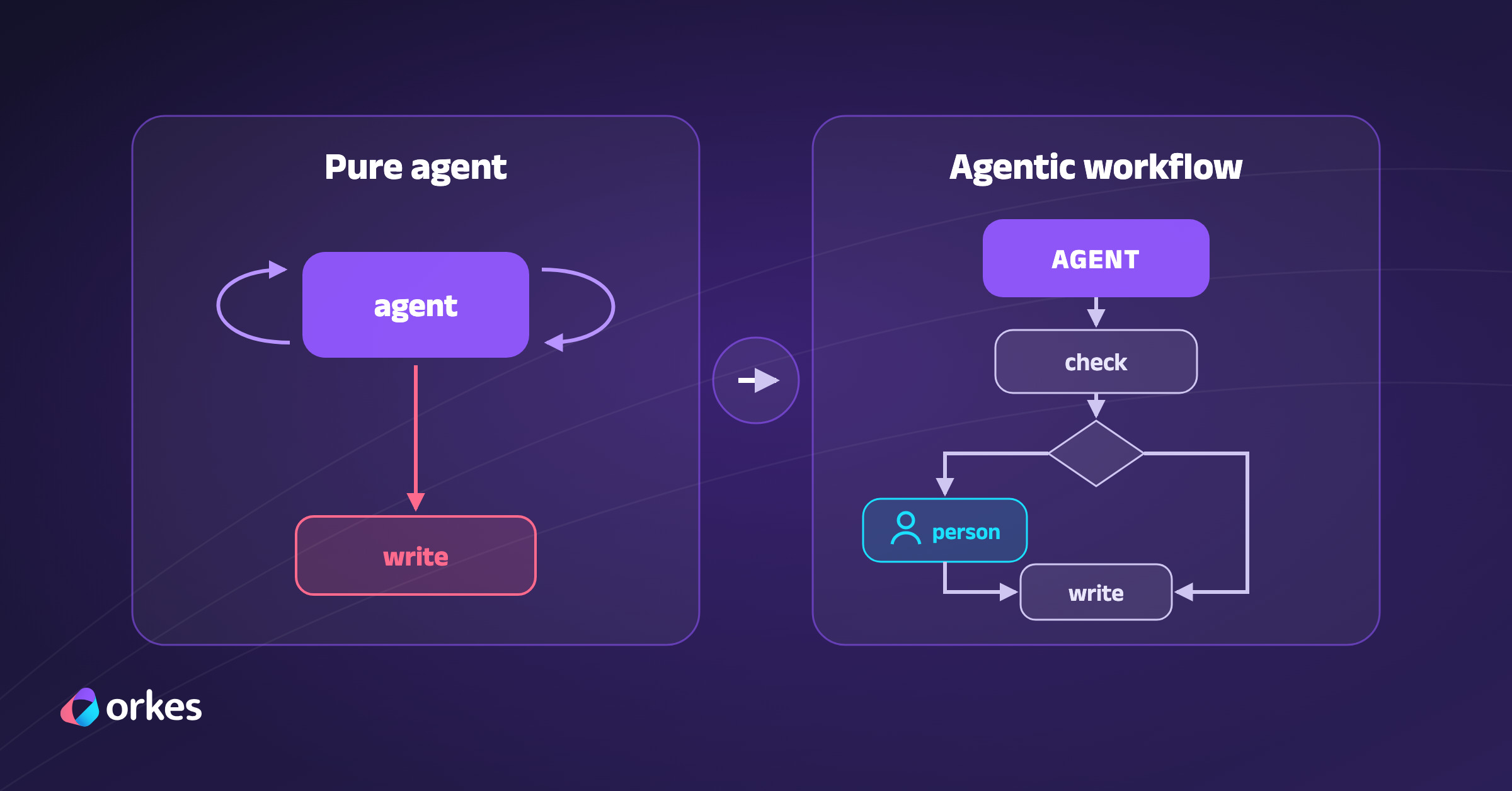
Building an agent is easy now. Connect a model and a loop over a few tools and you can get a working prototype in an afternoon. Running one in production is harder, and at Shift ‘26, the teams that have done it described the same pattern. Rather than simply hand their business processes over to agents, companies like Bumble and LinkedIn added AI as steps inside the workflows they already trust.
A pure agent is a model in a loop that picks each next step of a process and calls tools until it judges the work done, so the process exists only as that sequence of choices. But automation should really be thought of as a spectrum from fixed workflows to fully reasoning agents, including hybrids where workflows include AI as steps. That hybrid is an agentic workflow, and in Conductor the AGENT task is how a whole agent becomes a workflow step.
How Conductor got here
Netflix built Conductor to orchestrate its microservices and open-sourced it in December 2016. Before Conductor, those processes were coordinated ad hoc, with services publishing events and calling each other directly, so each process lived implicitly between them. Netflix’s announcement said process flows were “embedded” in the code of many applications, with “almost no way to systematically answer” how far along one was.
With Conductor, the process is written down in one place, as a workflow definition that lists the steps and how they connect. Workers are ordinary services that poll Conductor for tasks and run the business logic for one step at a time. Conductor saves the state of each run as its steps finish, which is what lets it retry a failed step and show where every run stands.
Bumble told a similar story at Shift. In its old trust and safety system nobody owned the process, and adding one status meant touching 13 places in the code across three teams.
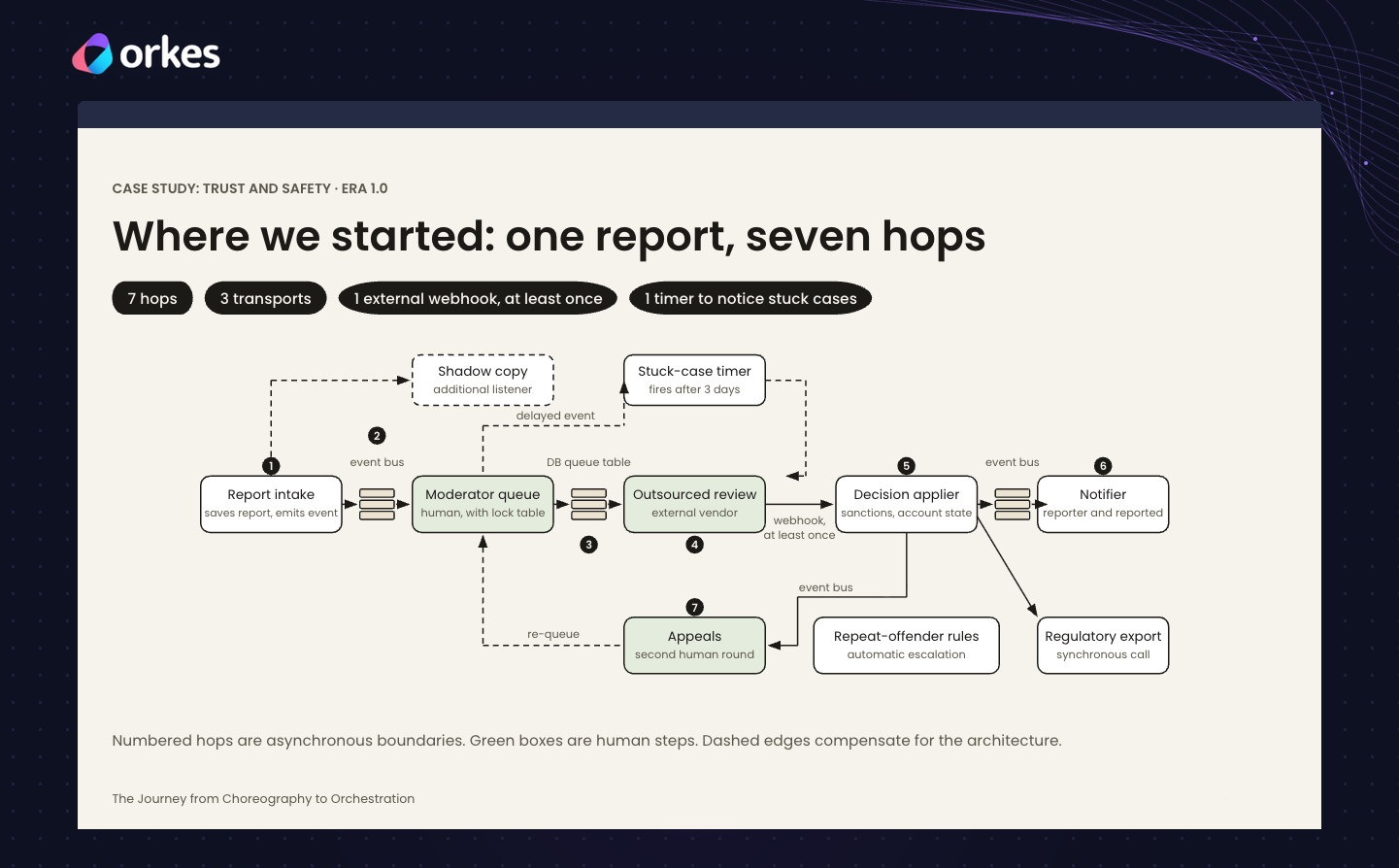
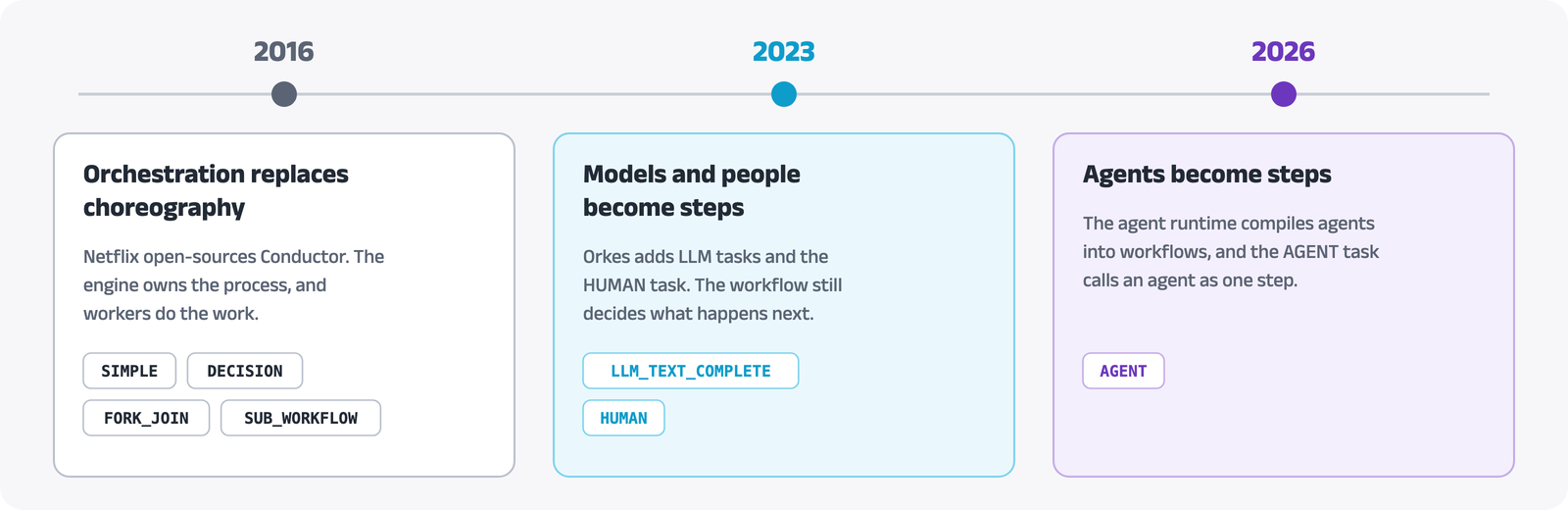
Bumble’s fix was the one Netflix made in 2016, writing the process down as a workflow. Conductor itself has grown the same way, by turning each new kind of work into a new kind of step, such as the HTTP task for calling an API or a FORK for parallel work. In November 2023, Orkes added LLM tasks and the HUMAN task, so a model call and a person’s decision became steps too, and the workflow still decided what happened next.
Agents changed that, because in an agent the model decides what happens next, and a pure agent hides the process inside one running program again. So in 2026 Conductor added an agent runtime, which compiles agents written with a Conductor SDK or a framework such as LangGraph into durable workflows, and the AGENT task, which calls an agent as one step.
What the AGENT task does
From the workflow’s side, an agent behind an AGENT task is one more step. You declare it in the workflow definition the way you declare an HTTP or HUMAN task, and its input parameters tell Conductor which agent to run and what to send it. The definition below is a minimal one for an agent deployed on Conductor, with a deadline added, and the table after it explains each field.
{ "name": "agent_step", "taskReferenceName": "agent_step", "type": "AGENT", "optional": true, "inputParameters": { "agentType": "conductor", "name": "my_agent", "prompt": "${workflow.input.request}", "maxDurationSeconds": 900 }}| Field | What it does |
|---|---|
type | AGENT makes this a system task. The Conductor server runs it, so no worker of yours polls for it. |
inputParameters.agentType | conductor runs an agent deployed on your Conductor cluster. The default, a2a, calls a remote agent at an agentUrl instead. |
inputParameters.name | The name the agent was deployed under. Each time the step runs, Conductor starts a run of that agent, which is a workflow execution of its own. |
inputParameters.prompt | The message the agent receives. Conductor fills in ${workflow.input.request} from the workflow’s input when the step starts. |
inputParameters.maxDurationSeconds | How long the workflow waits for the agent, 15 minutes here. The default is 24 hours. |
optional | When true, the workflow moves on to the next step even if this task fails. |
taskReferenceName | The name later steps use to read this task’s output, as in ${agent_step.output.state}. |
To show what this looks like in a run, we deployed a small LangGraph agent called my_agent to Orkes Developer Edition. It reviews change requests for customer accounts with two read-only tools, and we placed it in a workflow called change_request. For a request to raise an account’s API rate limit from 100 to 500 requests per minute, the agent read the account record and the policy, which caps owner-approved increases at three times the current limit, and proposed 300.
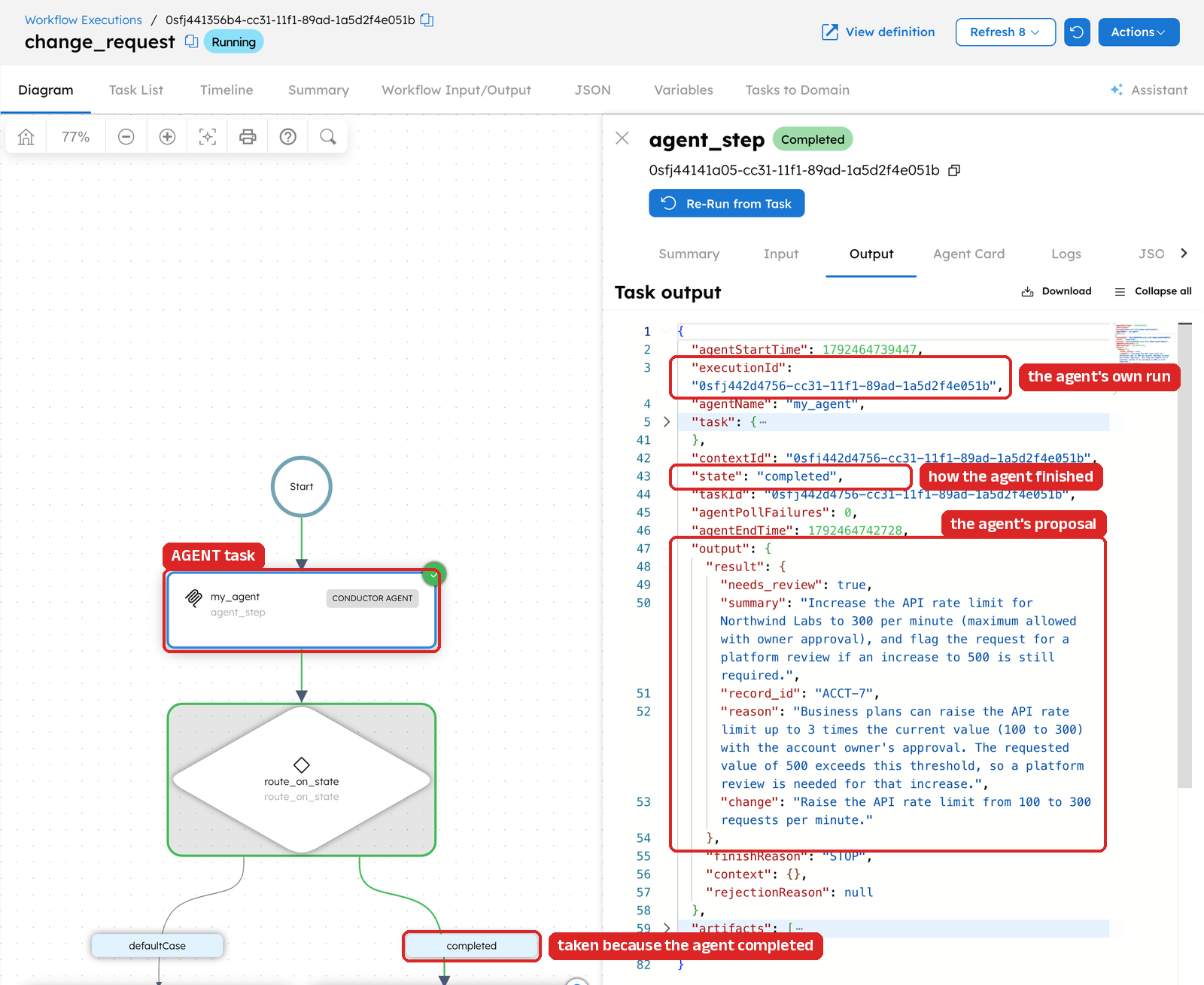
While the agent works, the task checks on it every five seconds by default, so a long run doesn’t hold a thread while it waits. When the agent reaches a final state, the task completes and records that state in its output, along with the agent’s result. The output also links to the agent’s own run, where every model call and tool call is recorded.
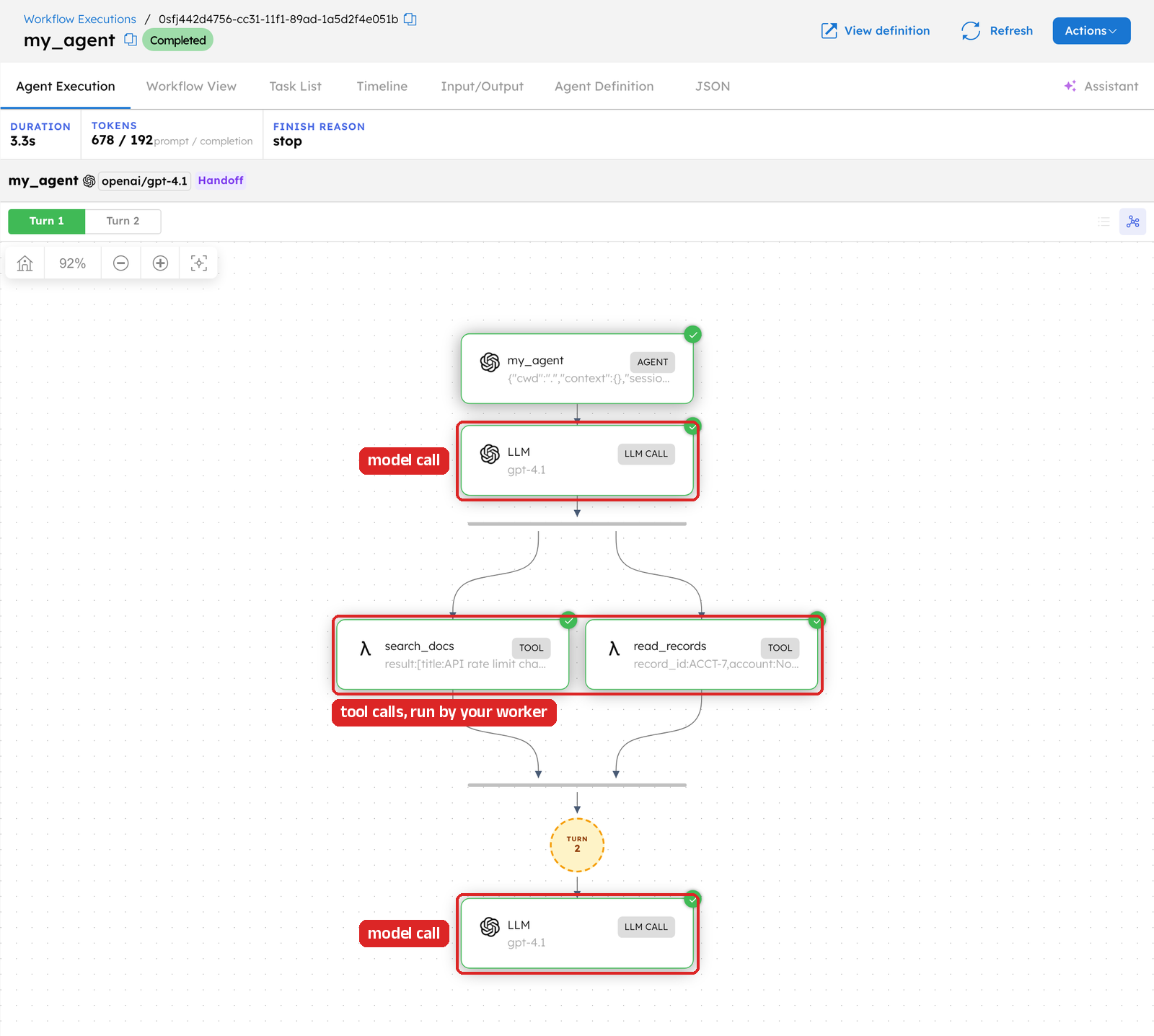
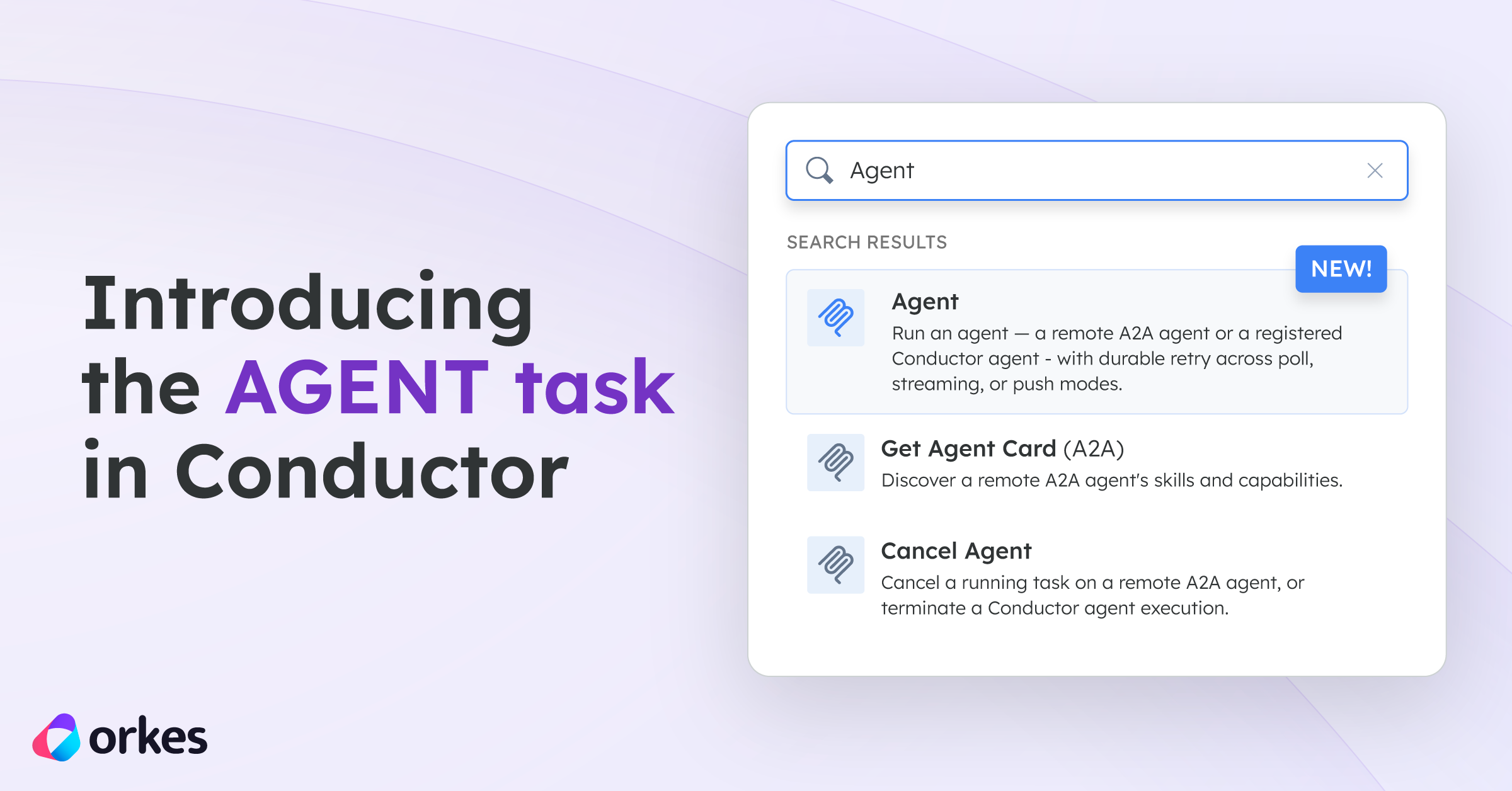
Those few fields are all you need to run an agent as a step, and the article Introducing the AGENT task and the reference docs list the other options. Once the step works, most of the design work is in the rest of the workflow, in what it does with the agent’s answer and when it brings in a person.
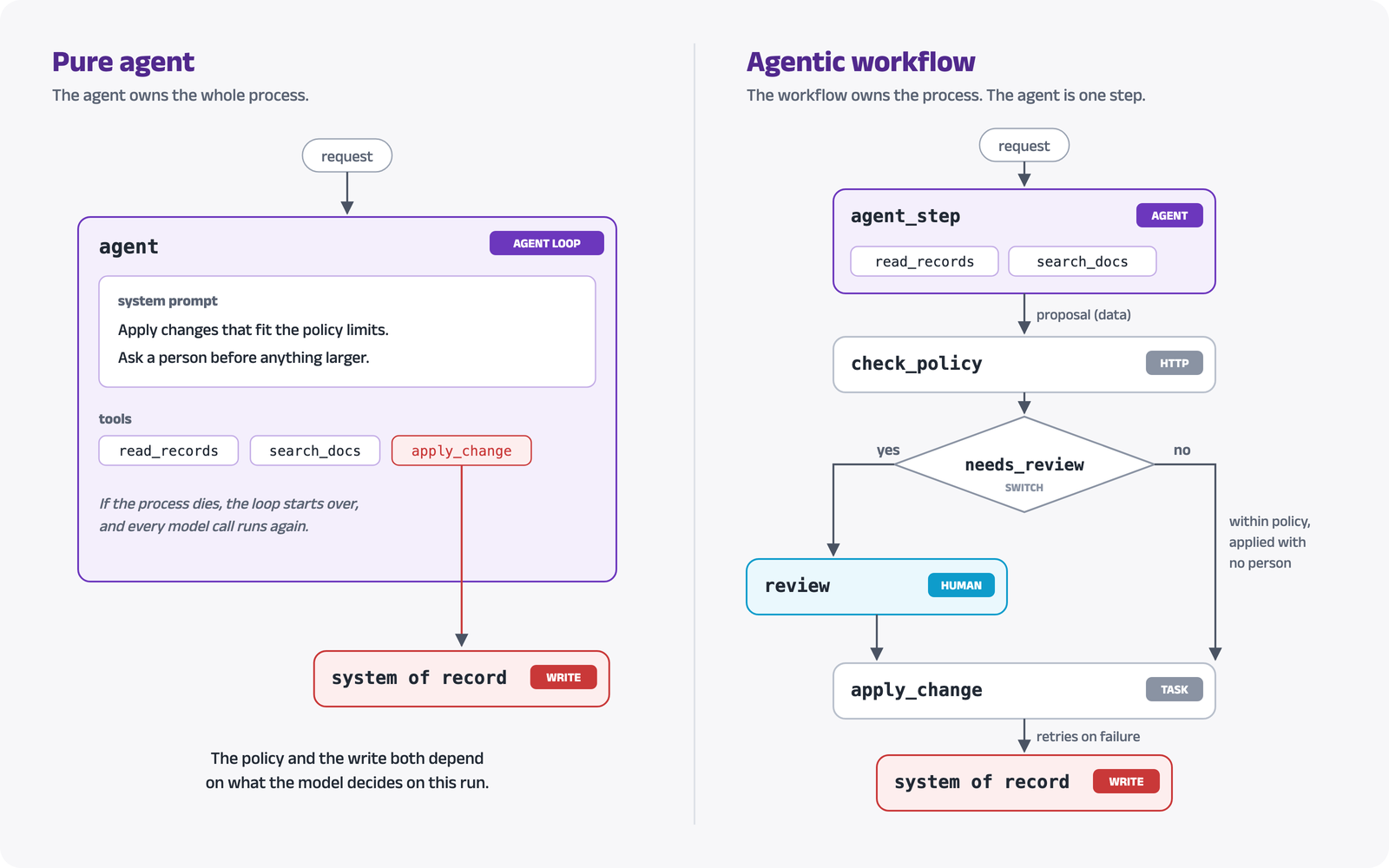
We can see the two designs compared below. In the pure agent on the left, the business rules live in the system prompt, and the agent writes to the system of record itself. On the right, the same agent is one step of a workflow, and the workflow owns everything after the agent’s answer, from the policy check to the write.
Treat the agent’s answer as a proposal
In a pure agent, the model’s tool call is the action itself, so if the model calls the tool that changes an account, the account changes. In an agentic workflow, the agent’s answer is data, and the workflow decides whether it becomes an action. Saltzer and Schroeder wrote in 1975 that “every program and every user of the system should operate using the least set of privileges necessary to complete the job.” The agent in our example can read records and docs, and nothing in its tool list can change an account.
The proposal is available to every later step at ${agent_step.output.output.result}. A step that checks it against the system of record can catch a number the model got wrong, and a person who has to approve it can start from the agent’s work.
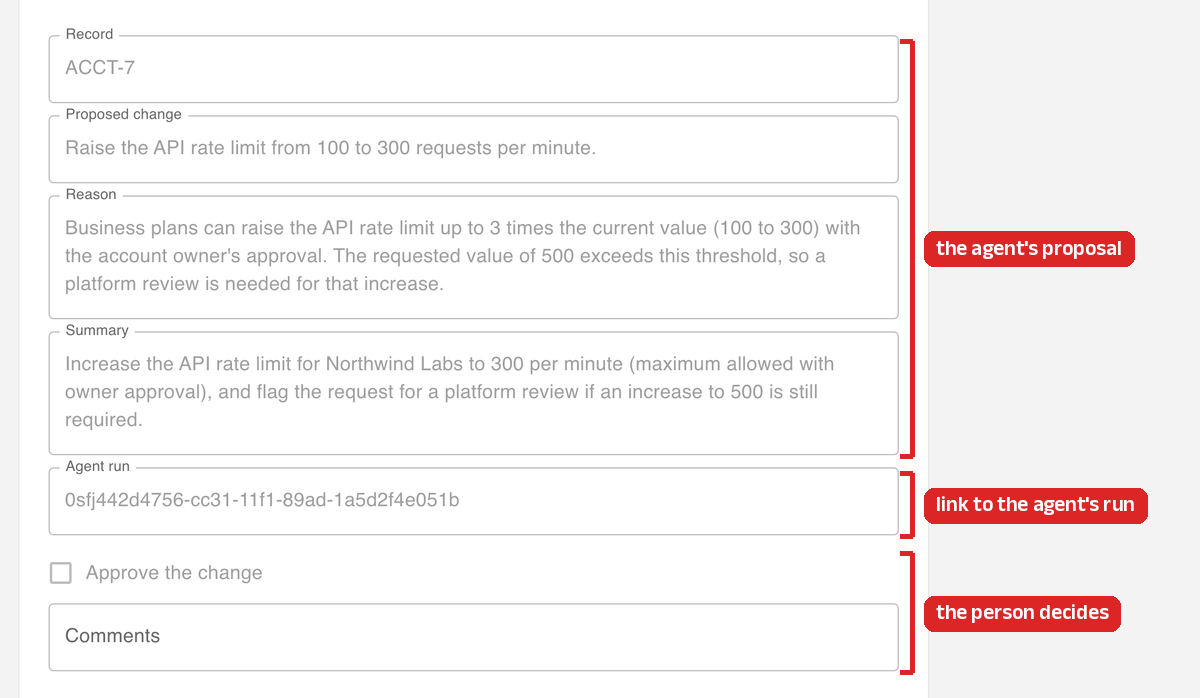
{ "name": "review", "taskReferenceName": "review", "type": "HUMAN", "inputParameters": { "proposal": "${agent_step.output.output.result}", "agent_run": "${agent_step.output.executionId}" }}This is the review task from change_request, with its form settings left out. In Orkes, a HUMAN task appears in the assignee’s Human Tasks inbox as a form, and the form for this one reads proposal and agent_run from the task’s input. The reviewer starts from the agent’s proposed change and reasoning, and can follow the run ID to check the agent’s steps before ticking Approve or leaving a comment. Bumble described the same goal at Shift, where AI gathers a case’s history and context first so the reviewer opens a briefed case.
Branch on how the agent finished
When an AGENT task completes, it tells you the agent has stopped, and the state in its output tells you how it stopped. The reference docs list four final states, and each one calls for a different next step.
| State | What it means | What the workflow can do next |
|---|---|---|
completed | The agent finished and returned a result. | Check the result and act on it. |
input-required | The agent paused because it needs more information. | Get the answer, often from a person, and resume the same run by passing its executionId to another AGENT task. |
failed | The agent hit an error it could not get past. | Retry the step or hand the case to a person. |
canceled | The run was stopped before it finished. | Hand the case to a person. |
Deadlines end up in this table too, because if the agent is still running when its deadline passes, Conductor cancels its run and the state that reaches the workflow is something other than completed. So the step after the agent should check the state before it uses the result. In the example workflow, a SWITCH sends a completed run to the review above and anything else to an escalation.
{ "name": "route_on_state", "taskReferenceName": "route_on_state", "type": "SWITCH", "evaluatorType": "value-param", "expression": "state", "inputParameters": { "state": "${agent_step.output.state}" }, "decisionCases": { "completed": [ { "name": "review", "taskReferenceName": "review", "type": "HUMAN" }, { "name": "apply_change", "taskReferenceName": "apply_change", "type": "SIMPLE" } ] }, "defaultCase": [{ "name": "escalate", "taskReferenceName": "escalate", "type": "HUMAN" }]}The review task here is the one from the previous section, shortened. The optional flag on the agent step matters for the same reason, because it keeps the workflow moving to this SWITCH even if the AGENT task fails outright.
Promote the agent one step at a time
With a pure agent, the choice is to let the agent run the whole process or keep it out entirely. An agentic workflow can hand AI one step at a time. Bumble hands steps to AI in order, starting with research and moving toward decisions. Each AI step runs alongside a person first and takes over only if its quality holds up.
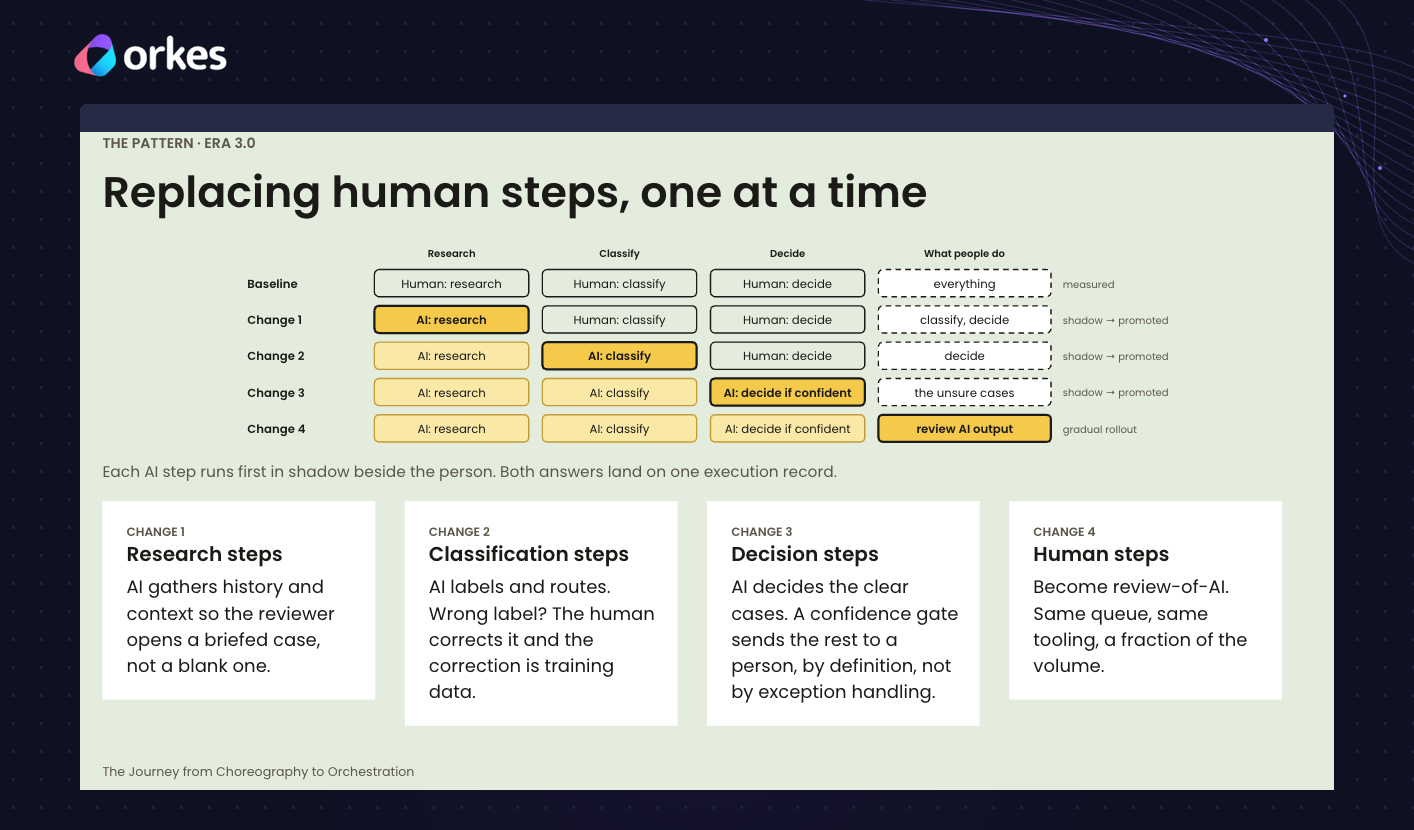
In Conductor, each stage of that rollout can be a new version of the workflow. In the first version, the agent works each case alongside the person, and the workflow records both answers but only acts on the person’s. Once the agent’s answers hold up, a later version lets it handle the clear cases on its own. Cases already underway finish on the version they started with, which is also how Twilio Segment runs old and new versions of a workflow at the same time.
Keep the agent’s work durable and on the record
At 99% success per step, a 100-step run completes about 37% of the time, a number I walked through in my own Shift talk. A pure agent recovers by running its loop again, which repeats model calls and their side effects.
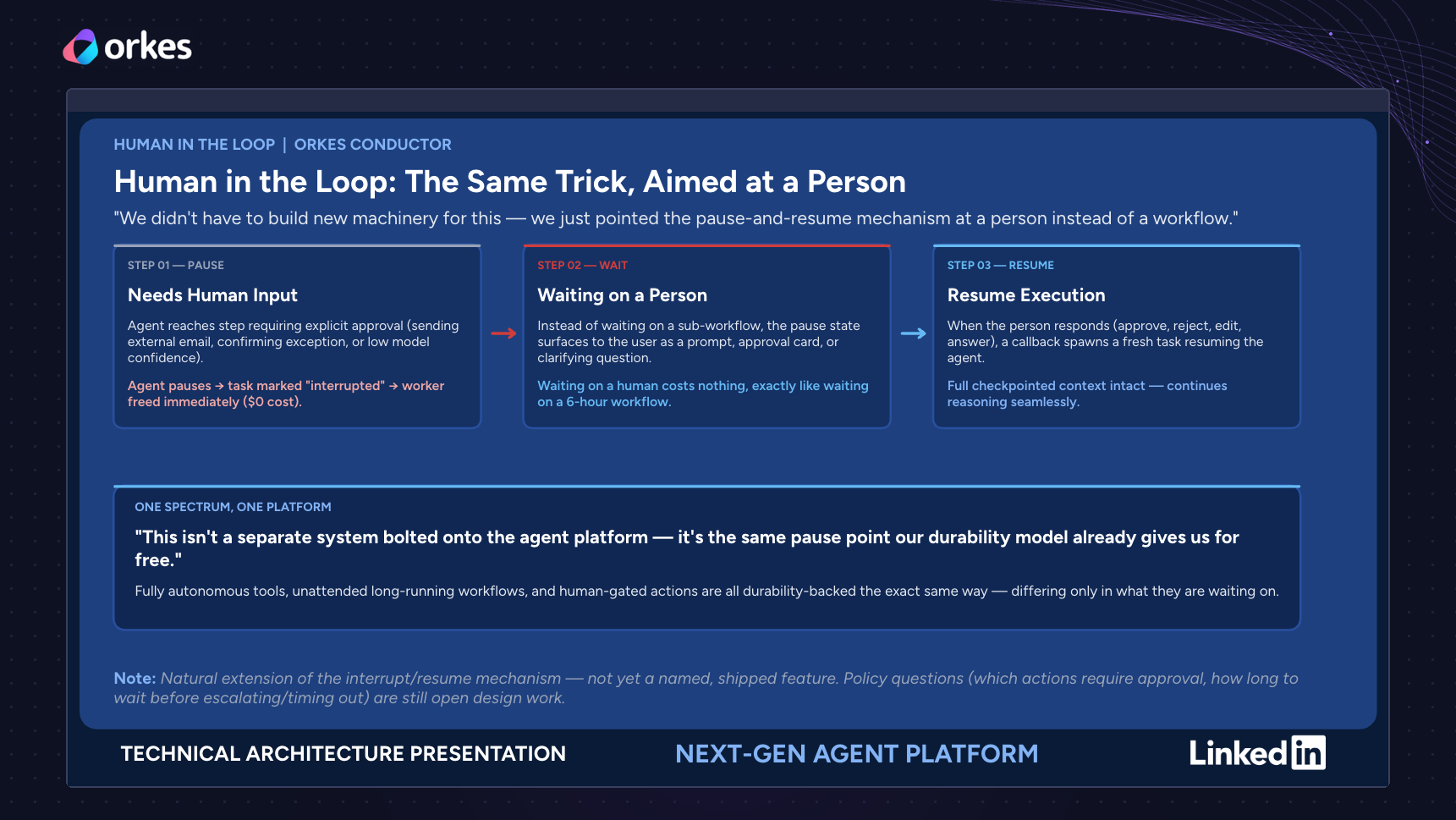
A Conductor agent behind an AGENT task runs as a workflow, so each model call and tool call is persisted as it finishes. LinkedIn’s agent platform relies on the same property. Each pause saves the agent’s progress, so after a server crash the agent picks up where it left off on another server, and an approval uses the same pause to wait for a person at no cost.
After the run ends, the parent execution still holds the agent’s input and output along with the ID of the agent’s run, and the agent’s run holds every prompt and response. Bumble pointed to the same trail for regulators and appeals, because every decision in its process is recorded.
Conclusion
Agents are good at the parts of a process that need judgment, like reading an unstructured request and working out what should happen next. The rules a business has to follow on every run belong somewhere more predictable. A pure agent keeps both inside one loop, which makes the process hard to see and risky to change, the same problem Conductor was built to solve for services in 2016.
An agentic workflow gives each part its own place. The agent’s judgment lives inside one AGENT task, and the workflow around it decides what happens to the agent’s answer, including when a person signs off. Every step on both sides is recorded, so the process stays visible even when an agent is doing the thinking. Bumble and LinkedIn described running AI this way at Shift, and you can start with one AGENT task in a workflow you already run.
To go deeper, Introducing the AGENT task walks through every option, and Agents on Conductor: Architecture for Production AI covers the architecture underneath.

Orkes Conductor Developer Edition
Your first agentic workflow is 5 minutes away. Everything you need is already there.