Python SDK
The Conductor Python SDK lets you write workers, define workflows as code, and manage workflow executions from your Python application.
- GitHub: https://github.com/conductor-oss/python-sdk
- PyPI: https://pypi.org/project/conductor-python/
- Python 3.9 or above
- A Conductor server to connect to. For quick testing, sign up for free Orkes Developer Edition.
Install the SDK
It is good practice to set up a virtual environment before installing:
python3 -m venv conductor
source conductor/bin/activate
Then install the SDK:
pip install conductor-python
Connect to Conductor
In Orkes Conductor, an application represents your SDK client and controls what it can access on the cluster. Each application has access keys (a key ID and secret) that the SDK uses to authenticate your requests.
To create an application:
- Go to Access Control > Applications from the left menu on your Conductor cluster.
- Select + Create application.
- Enter the application name.
- Select Save.
To retrieve the access key:
- Open the application.
- In Application roles, enable the Worker role.
- In the Access Keys section, select + Create access key to generate a unique Key ID, Key Secret, and Server URL.
The Key Secret is shown only once. So ensure to copy and store it securely.
Set environment variables
The SDK reads your server URL and credentials from environment variables. To make them available in every terminal session, add them to your shell profile (~/.zshrc or ~/.bash_profile):
export CONDUCTOR_SERVER_URL=https://SERVER_URL/api
export CONDUCTOR_AUTH_KEY=your-key-id
export CONDUCTOR_AUTH_SECRET=your-key-secret
Reload your shell profile after adding:
source ~/.zshrc
- If you set environment variables using
exportin a terminal, they only persist for that session. Any new terminal will require you to export them again, which is a common source of connection errors when running workers and workflows in separate terminals. - The
CONDUCTOR_SERVER_URLmust already include/api; the SDK uses it as-is. If you pass a URL programmatically viaConfiguration(base_url='...'), do not include/api, as the SDK appends it automatically.
# env var — must include /api
export CONDUCTOR_SERVER_URL=https://SERVER_URL/api

# programmatic — must NOT include /api (SDK appends it)
config = Configuration(base_url='https://SERVER_URL')
Initialize the SDK clients
Every application that uses the Conductor Python SDK starts with the same two lines:
from conductor.client.configuration.configuration import Configuration
from conductor.client.orkes_clients import OrkesClients

config = Configuration()
clients = OrkesClients(configuration=config)
Configuration() reads your environment variables automatically; no arguments needed. OrkesClients is the single entry point for all SDK clients:
workflow_executor = clients.get_workflow_executor()  # run and trigger workflows
workflow_client = clients.get_workflow_client()       # pause, resume, terminate, restart
task_client = clients.get_task_client()               # signal WAIT tasks
metadata_client = clients.get_metadata_client()       # register task and workflow definitions
Quickstart
This tutorial walks you through creating a workflow with a single worker task and running it end-to-end.
Open your terminal and create a new folder for your project:
mkdir conductor-app
cd conductor-app
Create a new file called quickstart.py inside that folder and paste the following code:
from conductor.client.automator.task_handler import TaskHandler
from conductor.client.configuration.configuration import Configuration
from conductor.client.orkes_clients import OrkesClients
from conductor.client.workflow.conductor_workflow import ConductorWorkflow
from conductor.client.worker.worker_task import worker_task


@worker_task(task_definition_name='greet', register_task_def=True)
def greet(name: str) -> str:
    return f'Hello {name}'


def main():
    config = Configuration()
    clients = OrkesClients(configuration=config)
    executor = clients.get_workflow_executor()

    workflow = ConductorWorkflow(name='greetings', version=1, executor=executor)
    greet_task = greet(task_ref_name='greet_ref', name=workflow.input('name'))
    workflow >> greet_task
    workflow.output_parameters({'result': greet_task.output('result')})
    workflow.register(overwrite=True)

    with TaskHandler(configuration=config, scan_for_annotated_workers=True) as task_handler:
        task_handler.start_processes()
        run = executor.execute(name='greetings', version=1, workflow_input={'name': 'Conductor'})
        print(f'Result: {run.output["result"]}')
        print(f'Execution: {config.ui_host}/execution/{run.workflow_id}')


if __name__ == '__main__':
    main()
What this does:
- Define a worker: Registers a
greetfunction as the handler for thegreettask type.register_task_def=Trueregisters the task definition on the server when the worker starts. - Initialize the SDK: Reads your environment variables and creates the SDK clients.
- Define and register the workflow: Builds a workflow with one task and registers the workflow definition on the Conductor server.
- Start the worker: Begins polling for tasks.
- Run the workflow: Triggers an execution and waits for the result.
Run it:
python quickstart.py
Expected output:
Result: Hello Conductor
Execution: https://developer.orkescloud.com/execution/<workflow-id>
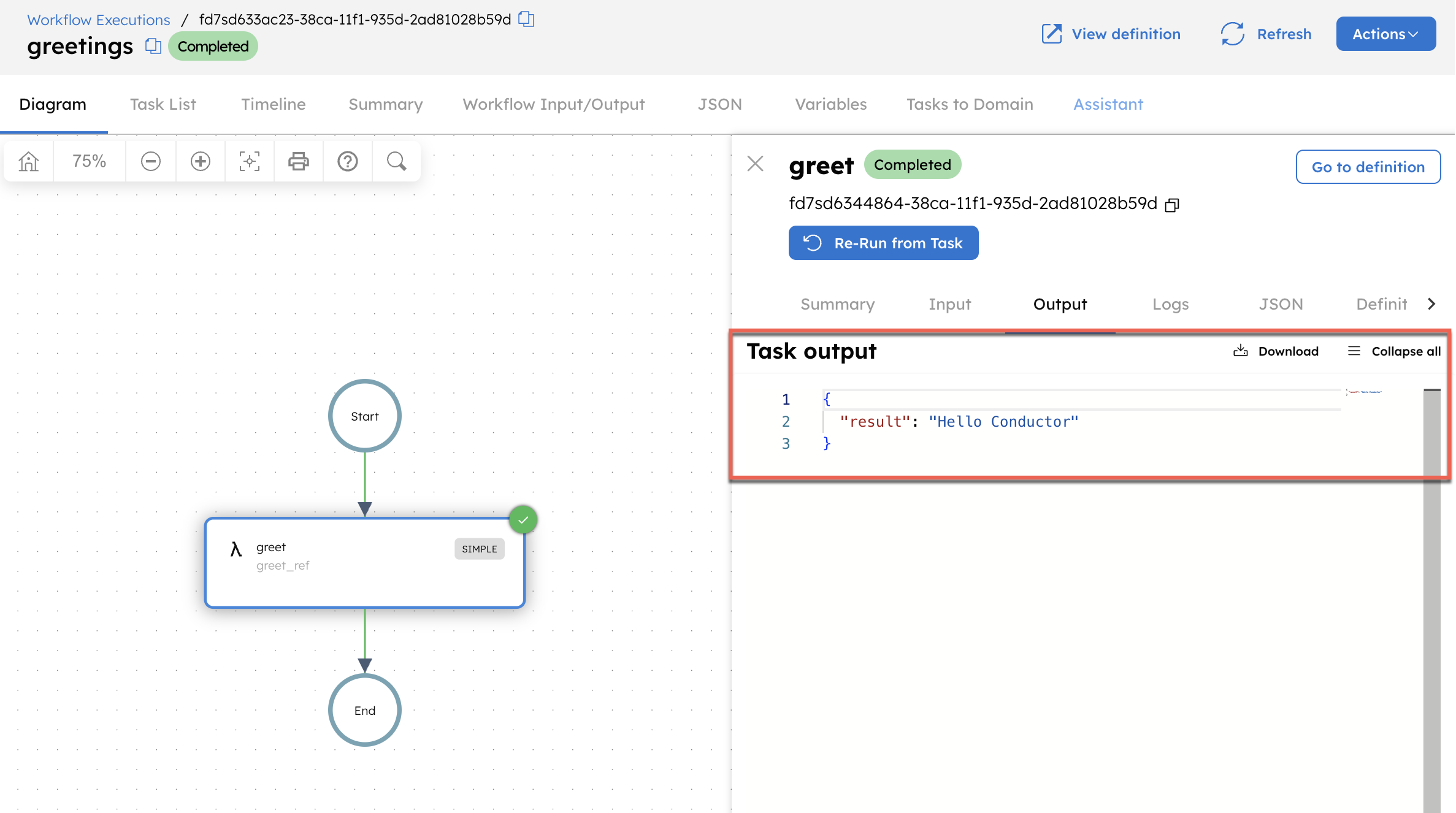
Open the execution URL to view the workflow run in the Conductor UI. Select the task, then go to the Output tab to confirm that the output is displayed.
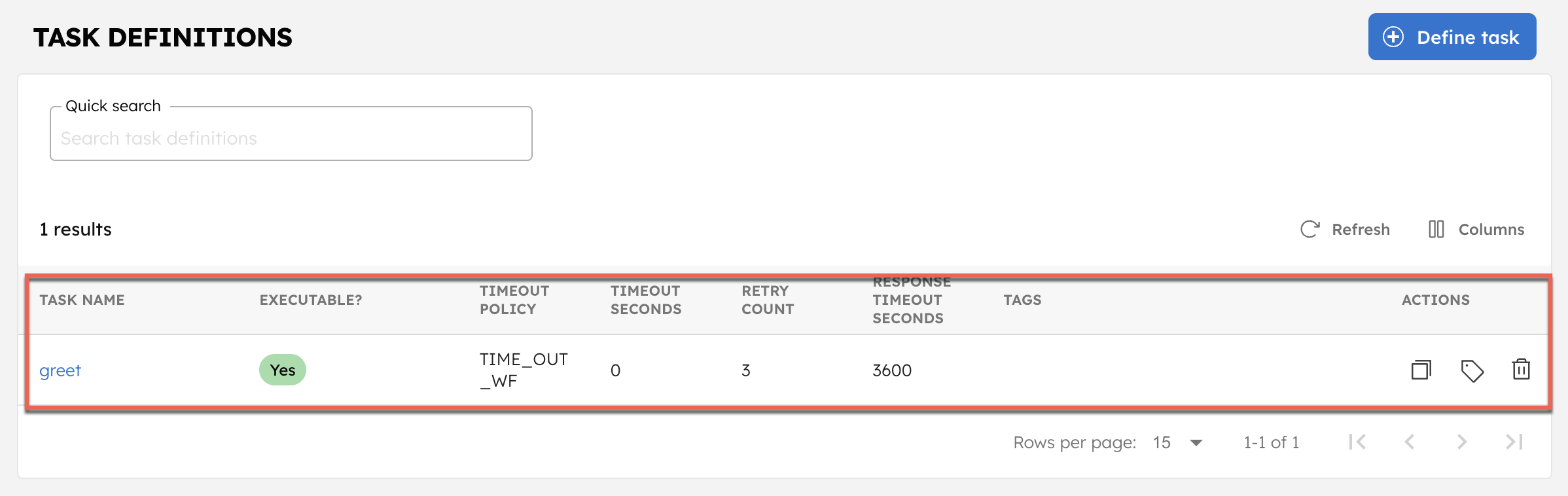
This also registers the task and workflow definitions on your Conductor cluster. To verify, go to Definitions > Task, and confirm that the greet task is created.
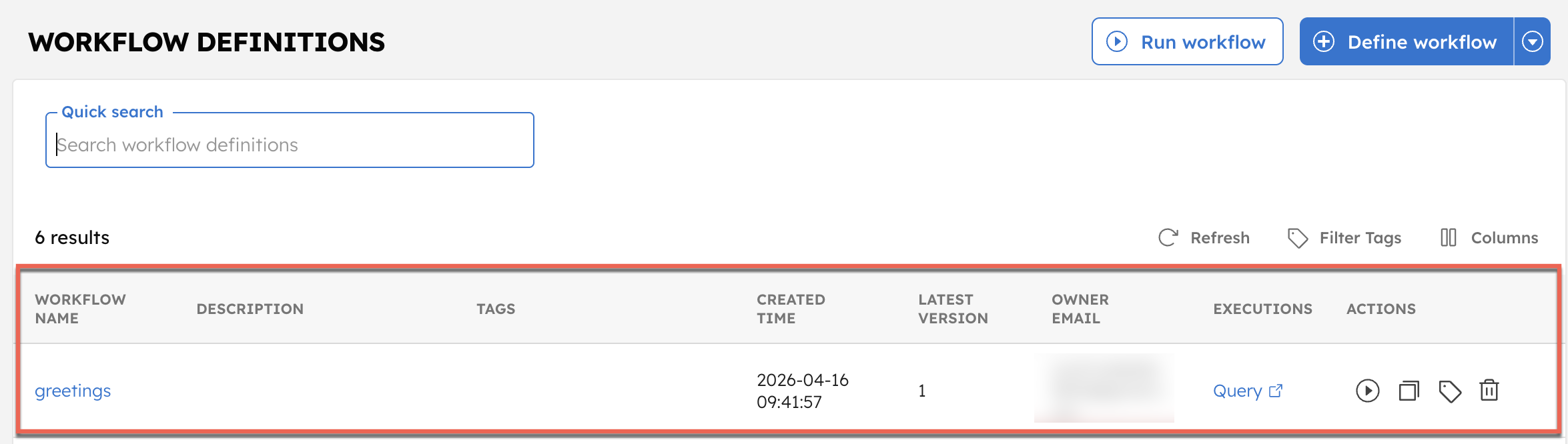
Similarly, the greetings workflow is available under Definitions > Workflow.
That’s it. You have successfully run a simple workflow. Next, explore the core concepts to understand how to build your own workflows.
The following sections cover each concept from the quickstart in detail, including workers, workflows, and execution management.
Workers
A worker is a piece of code responsible for executing a task. In Conductor, workers can be implemented in any language and deployed anywhere.
Implement a worker
In Python, a worker is a Python function annotated with @worker_task. The annotation registers the function as the handler for a task type.
from conductor.client.worker.worker_task import worker_task


@worker_task(task_definition_name='greet')
def greet(name: str) -> str:
    return f'Hello, {name}'
Register the task definition automatically
Pass register_task_def=True to have the SDK register the task definition on the server when the worker starts:
@worker_task(task_definition_name='greet', register_task_def=True)
def greet(name: str) -> str:
    return f'Hello, {name}'
This is convenient during development. In production, manage task definitions separately using metadata_client.register_task_def() so that retry settings, timeouts, and rate limits are controlled independently of your worker code.
The task definition and the worker are intentionally decoupled. The definition tells the server what task types exist and how they should behave such as retry count, timeout, rate limits. The worker provides the code that executes when the server assigns a task. This means you can update retry behavior without touching worker code, and deploy workers without changing server configuration. The task definition can be registered through the UI or in code using register_task_def(); either way, it remains independent of your worker.
Workers can accept primitive types (str, int, float, bool) or data classes:
from conductor.client.worker.worker_task import worker_task
from dataclasses import dataclass


@dataclass
class OrderInfo:
    order_id: int
    sku: str
    quantity: int
    sku_price: float


@worker_task(task_definition_name='process_order')
def process_order(order_info: OrderInfo) -> str:
    return f'order: {order_info.order_id}'
Task context
Use get_task_context() inside a worker to access server-side execution metadata:
from conductor.client.context.task_context import get_task_context


@worker_task(task_definition_name='charge_payment')
def charge_payment(amount: float, account_id: str) -> dict:
    ctx = get_task_context()
    attempt = ctx.get_retry_count()
    ctx.add_log(f'Charge attempt {attempt} for account {account_id}')
get_retry_count() returns the current attempt number, which is 0 on first execution, 1 on first retry, and so on. add_log() writes a log line visible in the Conductor UI under the task's execution timeline, with no extra instrumentation needed.
Terminal errors
A regular Exception triggers the retry policy. NonRetryableException tells Conductor to fail the task immediately regardless of how many retries are configured:
from conductor.client.worker.exception import NonRetryableException


@worker_task(task_definition_name='validate_order')
def validate_order(order_id: str, amount: float, customer_id: str) -> dict:
    if not customer_id:
        raise NonRetryableException('Missing customer ID')
Use it when retrying would never help: invalid input, missing records, unauthorized requests. The task status in the UI will show Failed_with_terminal_error.
Async workers
For I/O-bound tasks (API calls, database queries), use async def. The SDK automatically routes async workers to AsyncTaskRunner, which handles many concurrent tasks on a single event loop with far less overhead than threads.
@worker_task(task_definition_name='fetch_data', thread_count=50)
async def fetch_data(url: str) -> dict:
    import httpx
    async with httpx.AsyncClient() as client:
        resp = await client.get(url)
    return resp.json()
- Use
async deffor I/O-bound work (HTTP, database, queues). - Use regular
deffor CPU-bound or blocking work.
The SDK detects which runner to use automatically based on your function signature.
Concurrency with thread_count
The worker_task decorator accepts a thread_count parameter (default: 1) that controls how many tasks the worker executes concurrently. Leaving it at 1 is a common scaling bottleneck.
@worker_task(task_definition_name='process_order', thread_count=5)
def process_order(order_info: OrderInfo) -> str:
    return f'order: {order_info.order_id}'
Recommended values:
- CPU-bound tasks: 1–4 (matches core count)
- I/O-bound sync tasks: 10–50 (threads spend most time waiting)
- Async tasks (
async def): Set to the desired concurrency level; the event loop handles it efficiently
Long-running tasks
Tasks that run longer than ~30 seconds must set lease_extend_enabled=True on the decorator. Without it, the Conductor server considers the task timed out and reschedules it, causing duplicate execution.
@worker_task(
    task_definition_name='long_running_job',
    lease_extend_enabled=True  # required for tasks that take more than ~30 seconds
)
def long_running_job(batch_id: str) -> dict:
    # ... processing that takes minutes ...
    return {'status': 'done'}
Start and stop workers
Workers use a long-poll mechanism to check for tasks. The TaskHandler class manages worker startup and shutdown:
from conductor.client.automator.task_handler import TaskHandler
from conductor.client.configuration.configuration import Configuration


config = Configuration()

task_handler = TaskHandler(
    configuration=config,
    scan_for_annotated_workers=True,
    import_modules=['greetings_worker']  # module containing your @worker_task functions
)

task_handler.start_processes()

# ... application runs ...

task_handler.stop_processes()
scan_for_annotated_workers=True only discovers @worker_task functions that are already imported into the Python process, and it does not scan the filesystem. Always list your worker modules in import_modules, or import them manually before creating TaskHandler.
Worker design principles
- Workers are stateless and contain no workflow-specific logic.
- Each worker executes one task and produces a defined output for a given input.
- Workers should be idempotent, a task may be rescheduled if it times out.
- Retry and timeout logic is handled by the Conductor server, not the worker.
Workflows
A workflow is the blueprint that connects tasks into a sequence. It defines which tasks run, in what order, and how outputs from one task become inputs to the next. Workflows handle branching, parallelism, retries, and timeouts; all configured in the workflow definition, not in your worker code.
You can define workflows in the Conductor UI, via the API, or in code using the SDK.
Define a workflow as code
Use ConductorWorkflow to define workflows in Python. The >> operator sets task execution order:
from conductor.client.configuration.configuration import Configuration
from conductor.client.orkes_clients import OrkesClients
from conductor.client.worker.worker_task import worker_task
from conductor.client.workflow.conductor_workflow import ConductorWorkflow


@worker_task(task_definition_name='get_user_email')
def get_user_email(userid: str) -> str:
    return f'{userid}@example.com'


@worker_task(task_definition_name='send_email')
def send_email(email: str, subject: str, body: str):
    print(f'Sending email to {email}')


config = Configuration()
clients = OrkesClients(configuration=config)
workflow_executor = clients.get_workflow_executor()

workflow = ConductorWorkflow(name='email_workflow', version=1, executor=workflow_executor)

get_email = get_user_email(task_ref_name='get_user_email_ref', userid=workflow.input('userid'))
send = send_email(
    task_ref_name='send_email_ref',
    email=get_email.output('result'),
    subject='Hello from Orkes',
    body='Welcome!'
)

workflow >> get_email >> send

workflow.output_parameters(output_parameters={'email': get_email.output('result')})
workflow.register(overwrite=True)
Use system tasks
System tasks are pre-built tasks available in Conductor without writing a worker.
Wait task: Pauses the workflow until a certain timestamp, duration, or an external signal is received.
from conductor.client.workflow.task.wait_task import WaitTask

# Wait for a fixed duration
wait_two_sec = WaitTask(task_ref_name='wait_2_sec', wait_for_seconds=2)

# Wait until a specific time
wait_till_date = WaitTask(task_ref_name='wait_till_date', wait_until='2030-01-31 00:00 UTC')

# Wait for an external signal
wait_for_signal = WaitTask(task_ref_name='wait_for_signal')
HTTP task: The HTTP task is used to make calls to remote services exposed over HTTP/HTTPS.
from conductor.client.workflow.task.http_task import HttpTask

http_call = HttpTask(task_ref_name='call_api', http_input={
    'uri': 'https://orkes-api-tester.orkesconductor.com/api',
    'method': 'GET'
})
Inline task: Runs ECMA-compliant JavaScript inline.
from conductor.client.workflow.task.javascript_task import JavascriptTask

script = """
function greetings() {
    return { "text": "hello " + $.name }
}
greetings();
"""

js = JavascriptTask(
    task_ref_name='hello_script',
    script=script,
    bindings={'name': '${workflow.input.name}'}
)
JSON JQ Transform task: Transforms JSON using jq expressions.
from conductor.client.workflow.task.json_jq_task import JsonJQTask

jq = JsonJQTask(
    task_ref_name='jq_process',
    script='{ key3: (.key1.value1 + .key2.value2) }'
)
Learn more about other task types.
Execute a workflow
Asynchronously: Use when workflows are long-running.
from conductor.client.http.models import StartWorkflowRequest

request = StartWorkflowRequest()
request.name = 'greetings'
request.version = 1
request.input = {'name': 'Orkes'}

workflow_id = workflow_client.start_workflow(request)
Synchronously: Use when workflows complete quickly. Pass wait_for_seconds explicitly; the default differs depending on which client you use (10 for workflow_executor.execute(), 30 for workflow_client.execute_workflow()).
from conductor.client.http.models import StartWorkflowRequest

request = StartWorkflowRequest()
request.name = 'greetings'
request.version = 1
request.input = {'name': 'Orkes'}

workflow_run = workflow_client.execute_workflow(
    start_workflow_request=request,
    wait_for_seconds=10  # set explicitly to avoid surprises
)
Manage workflow executions
Get workflow_client from OrkesClients:
config = Configuration()
clients = OrkesClients(configuration=config)
workflow_client = clients.get_workflow_client()
Get execution status
Retrieves the status of the workflow execution.
workflow = workflow_client.get_workflow(workflow_id=workflow_id, include_tasks=True)
When include_tasks is True, the response includes all completed and in-progress tasks.
Pause and resume
A paused workflow lets currently running tasks complete but does not schedule new tasks until resumed.
workflow_client.pause_workflow(workflow_id=workflow_id)
workflow_client.resume_workflow(workflow_id=workflow_id)
Terminate
Stops the workflow immediately and moves it to TERMINATED state.
workflow_client.terminate_workflow(
    workflow_id=workflow_id,
    reason='Cancelled by user',
    trigger_failure_workflow=False
)
Retry a failed workflow
Resumes the workflow from the failed task without restarting from the beginning.
workflow_client.retry_workflow(
    workflow_id=workflow_id,
    resume_subworkflow_tasks=False  # set True to resume sub-workflows from the failed task
)
Restart a workflow
Restarts a workflow in a terminal state (COMPLETED, TERMINATED, FAILED) from the beginning.
workflow_client.restart_workflow(
    workflow_id=workflow_id,
    use_latest_def=False  # set True to use the latest workflow definition
)
Rerun from a specific task
Resumes the workflow from a specific task, re-executing it and all subsequent tasks.
from conductor.client.http.models import RerunWorkflowRequest

workflow_client.rerun_workflow(
    workflow_id=workflow_id,
    rerun_workflow_request=RerunWorkflowRequest(
        re_run_from_task_id='task_id_to_rerun_from'
    )
)
Search executions
Queries workflow executions by status, type, or other fields.
results = workflow_client.search(
    start=0,
    size=10,
    query='workflowType="greetings" AND status="FAILED"',
    free_text='Orkes'
)
Supported query fields: status, correlationId, workflowType, version, startTime.
Test workflows
The Conductor server provides a test endpoint (POST /api/workflow/test) that lets you run a workflow with mocked task outputs, no workers required.
from conductor.client.http.models.workflow_test_request import WorkflowTestRequest

task_ref_to_mock_output = {
    'greet_ref': [
        {
            'status': 'COMPLETED',
            'output': {'result': 'Hello, Orkes'}
        }
    ]
}

test_request = WorkflowTestRequest(
    name=workflow.name,
    version=workflow.version,
    task_ref_to_mock_output=task_ref_to_mock_output,
    workflow_def=workflow.to_workflow_def()
)

run = workflow_client.test_workflow(test_request=test_request)
assert run.status == 'COMPLETED'
Worker functions are regular Python functions and can be tested independently with any testing framework.
For a full working example, see test_workflows.py.
Next steps
- Examples: Browse the full examples directory on GitHub.