Generate PDF
Task parameters
Configure these parameters for the Generate PDF task.
| Parameter | Description | Required/ Optional |
|---|---|---|
| inputParameters.markdown | The Markdown content to convert to a PDF. Supports tables, strikethrough, task lists, footnotes, and images. | Required. |
| inputParameters.pageSize | Page size of the generated PDF. Supported values: A4, A3, A5, LETTER, LEGAL. Default is A4. |
Optional. |
| inputParameters.theme | Rendering theme. Supported values: default, compact. Default is default. |
Optional. |
| inputParameters.baseFontSize | Base font size, in points. Default is 11. | Optional. |
| inputParameters.marginTop | Top margin, in points. Default is 72 (1 inch). | Optional. |
| inputParameters.marginRight | Right margin, in points. Default is 72 (1 inch). | Optional. |
| inputParameters.marginBottom | Bottom margin, in points. Default is 72 (1 inch). | Optional. |
| inputParameters.marginLeft | Left margin, in points. Default is 72 (1 inch). | Optional. |
| inputParameters.pdfMetadata | Document metadata to embed in the PDF. Supported keys: title, author, subject, keywords. |
Optional. |
| inputParameters.outputLocation | The storage location where the generated PDF is saved. For example:
Note: Cloud storage output requires a corresponding integration with write permissions. Use the integrationName parameter to add the required integration. |
Optional. |
| inputParameters.integrationName | The integration name of the Cloud Providers integrated with your Conductor cluster, used when outputLocation is a cloud storage location. |
Optional. |
| inputParameters.imageBaseUrl | Base URL used to resolve relative image paths referenced in the Markdown. | Optional. |
The following are generic configuration parameters that can be applied to the task and are not specific to the Generate PDF task.
Caching parameters
You can cache the task outputs using the following parameters. Refer to Caching Task Outputs for a full guide.
| Parameter | Description | Required/ Optional |
|---|---|---|
| cacheConfig.ttlInSecond | The time to live in seconds, which is the duration for the output to be cached. | Required if using cacheConfig. |
| cacheConfig.key | The cache key is a unique identifier for the cached output and must be constructed exclusively from the task’s input parameters. It can be a string concatenation that contains the task’s input keys, such as ${uri}-${method} or re_${uri}_${method}. |
Required if using cacheConfig. |
Other generic parameters
Here are other parameters for configuring the task behavior.
| Parameter | Description | Required/ Optional |
|---|---|---|
| optional | Whether the task is optional. If set to true, any task failure is ignored, and the workflow continues with the task status updated to COMPLETED_WITH_ERRORS. However, the task must reach a terminal state. If the task remains incomplete, the workflow waits until it reaches a terminal state before proceeding. |
Optional. |
Task configuration
This is the task configuration for a Generate PDF task.
{
  "name": "generate_pdf",
  "taskReferenceName": "generate_pdf_ref",
  "inputParameters": {
    "markdown": "<YOUR-MARKDOWN-HERE>",
    "pageSize": "A4"
  },
  "type": "GENERATE_PDF"
}
Task output
The Generate PDF task will return the following parameters.
| Parameter | Description |
|---|---|
| media | Array containing the generated PDF. Contains a location (the path where the generated PDF is stored), tagged mimeType: application/pdf. |
| result.location | Location of the stored PDF. |
| result.sizeBytes | Size of the generated PDF, in bytes. |
| finishReason | Indicates the result of the generation. Returns COMPLETED when the PDF is generated. |
Examples
Here are some examples for using the Generate PDF task.
Generate a PDF and save it to an AWS S3 bucket
In this example, we will:
- Create an AWS integration in Orkes Conductor.
- Create a workflow that uses the Generate PDF task.
- Run the workflow and verify the output.
Step 1: Create an AWS integration in Orkes Conductor
Create an AWS integration with the connection type as Access Key/Secret. Ensure that the access key has write access to the S3 bucket where the PDF is to be saved.
Step 2: Create a workflow in Orkes Conductor
To create a workflow definition using Conductor UI:
- Go to Definitions > Workflow, from the left navigation menu on your Conductor cluster.
- Select + Define workflow.
- In the Code tab, paste the following code:
Workflow definition:
{
  "name": "generate_pdf_s3",
  "description": "Workflow to generate a PDF and save it to an AWS S3 bucket.",
  "version": 1,
  "tasks": [
    {
      "name": "generate_pdf",
      "taskReferenceName": "generate_pdf_ref",
      "inputParameters": {
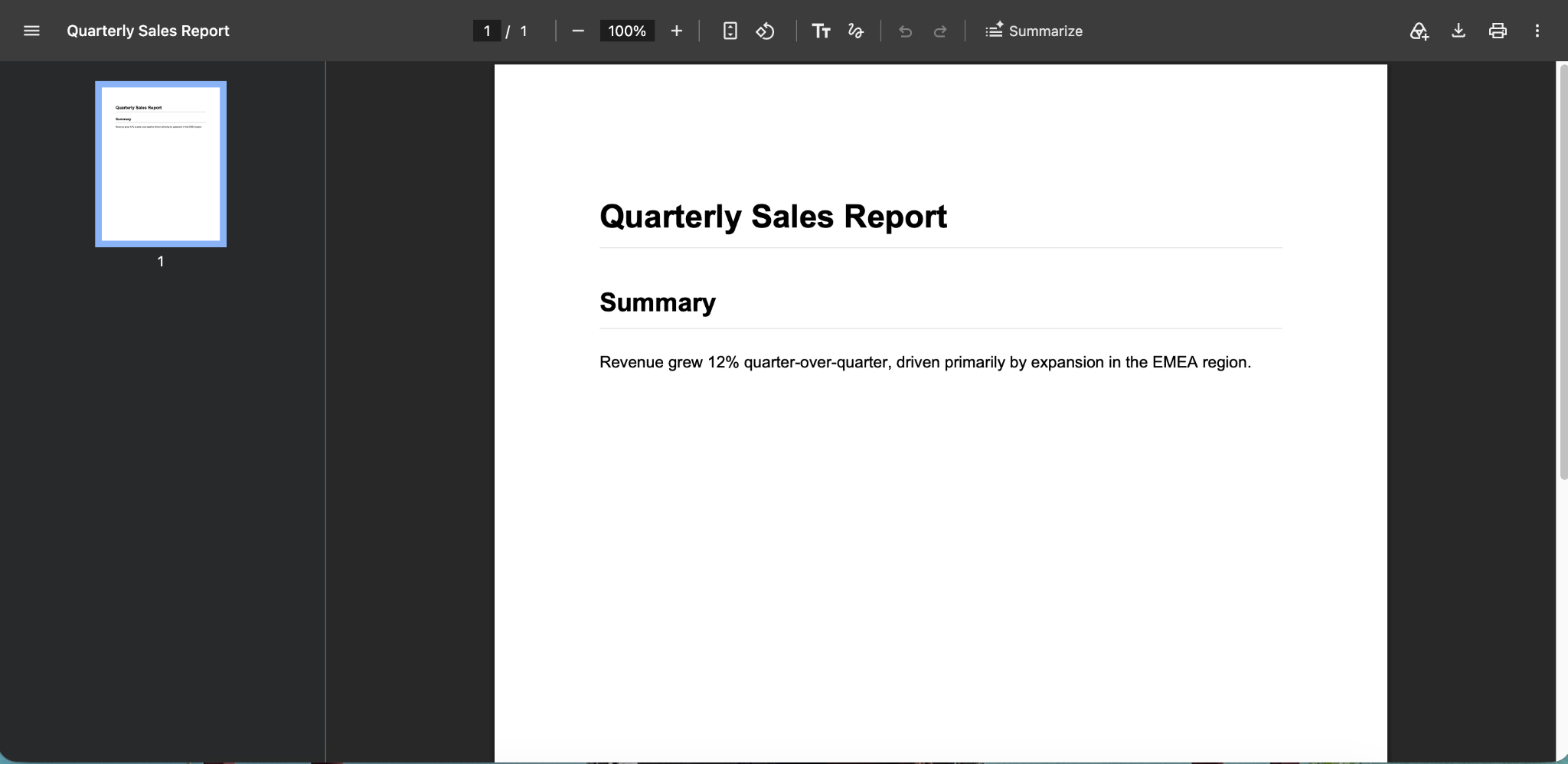
        "markdown": "# Quarterly Sales Report\n\n## Summary\n\nRevenue grew 12% quarter-over-quarter, driven primarily by expansion in the EMEA region.",
        "pageSize": "LETTER",
        "pdfMetadata": {
          "title": "Quarterly Sales Report",
          "author": "Sales Analytics"
        },
        "outputLocation": "s3://<YOUR-BUCKET-NAME>/<FOLDER-NAME>/sales-report.pdf",
        "integrationName": "<YOUR-AWS-INTEGRATION-NAME>"
      },
      "type": "GENERATE_PDF"
    }
  ],
  "schemaVersion": 2
}
- Replace
<YOUR-BUCKET-NAME>and<FOLDER-NAME>with the S3 bucket and folder where the PDF is to be saved, and<YOUR-AWS-INTEGRATION-NAME>with the integration name created in Step 1. - Select Save > Confirm.
Step 3: Run the workflow and verify the output
Select the Execute button from the workflow definition page. Once the workflow is completed, the task output contains the S3 path of the PDF and its size:
{
  "result": {
    "location": "s3://<YOUR-BUCKET-NAME>/<FOLDER-NAME>/sales-report.pdf",
    "sizeBytes": 1266
  },
  "media": [
    {
      "location": "s3://<YOUR-BUCKET-NAME>/<FOLDER-NAME>/sales-report.pdf",
      "mimeType": "application/pdf"
    }
  ],
  "finishReason": "COMPLETED"
}
The generated PDF contains the Markdown rendered as a formatted document, with the heading and summary text from the input.